
UGREEN USB C to Ethernet Adapter
4.7Editor score
Up to 1000Mbps speeds
Driver-free on major systems
Works with compatible USB-C iPhones
Explore 10 Ethernet iPhone adapters for Lightning and USB-C models, comparing charging support, speed, compatibility, and ease of setup in 2026.
An Ethernet iPhone adapter can provide a more stable and consistent connection than crowded Wi-Fi, especially in hotels, offices, conference rooms, and homes where wireless service is unreliable. The right adapter should match your iPhone connector, support the network speed you need, and offer convenient charging when your workflow requires it.
This guide compares ten Lightning and USB-C Ethernet adapters using their stated specifications, compatibility, customer ratings, design features, and supported operating systems. It covers dedicated iPhone models, multi-device options, adapters with charging ports, and USB-C choices that can work with compatible newer iPhones.
Each review identifies the product’s main strengths, limitations, and best use case so you can choose with confidence. Ratings reflect the supplied customer feedback, while practical details such as connector type, charging support, and maximum Ethernet speed can change with device and network configuration, so verify current information before buying.
4.7Editor score

5.0Editor score

4.4Editor score
The table below compares all ten adapters by connector, Ethernet speed, charging capability, and stated device support, making it easier to identify the option that fits your particular iPhone and network needs.






This Apple MFi Certified Lightning to Ethernet adapter is the strongest all-around choice for iPhones that use the Lightning connector. It holds a 5.0 customer rating, the highest among the ten products in this guide, and its stated 10/100Mbps support should be sufficient for everyday browsing, video calls, streaming, and online work on a standard home or office network.
We may earn a commission when you buy through this link, at no additional cost to you.
Its main appeal is straightforward operation. After connecting the adapter to a router with an Ethernet cable, the instructions call for turning off Wi-Fi and cellular data, then locating the Ethernet setting in iOS. No application, driver, or complex configuration is required. Compatibility is listed across numerous iPhone, iPad, and iPod models, and the 1.6-foot cable gives you enough flexibility to place the device comfortably on a desk.
The principal limitation is that this is a network-only adapter. It cannot charge the connected iPhone while Ethernet is active, which makes it less convenient for long work sessions or travel where battery life matters. It also tops out at 100Mbps rather than gigabit Ethernet, although the actual result will also depend on the phone, network, cable, router, and internet service.
Choose this model if you want a straightforward, certified adapter for a Lightning iPhone and value reliability and simple setup over simultaneous charging. It is especially well suited to offices, hotel rooms, classrooms, and travel situations where Wi-Fi congestion makes a wired connection more dependable. For newer USB-C iPhones, verify connector compatibility or consider a USB-C alternative.
A wired connection removes much of the variability associated with crowded wireless networks. That can lead to steadier browsing, clearer calls, and fewer interruptions when video streaming or large file transfers depend on a stable connection.
Apple MFi certification is a notable advantage for a Lightning accessory. It indicates that the product has been produced to Apple’s accessory requirements, which is particularly useful for buyers who prioritize straightforward iOS recognition.
We may earn a commission when you buy through this link, at no additional cost to you.
UGREEN’s compact USB-C to Ethernet adapter delivers an appealing combination of a 4.7 customer rating, gigabit capability, and broad device support. Its stated compatibility includes iPhone 15, 16, and 17 Pro or Pro Max models, making it relevant to USB-C iPhone owners searching for a practical wired connection without paying for a more elaborate adapter.
We may earn a commission when you buy through this link, at no additional cost to you.
The adapter supports speeds up to 1000Mbps and remains backward compatible with 100Mbps and 10Mbps networks. It is driver-free on Windows 11, Windows 10, Windows 8.1, Windows 8, macOS, Chrome OS, and Android. A status LED makes it easy to see whether a link is active, while the aluminum housing is designed to dissipate heat more effectively than a basic plastic enclosure.
Its main drawback is that it does not include a charging port, so a compatible iPhone cannot charge while the adapter is in use. It also requires drivers on Windows XP, Windows 7, Windows Vista, and Linux, although the supplied information says those drivers can be installed using the manufacturer’s instructions. This makes the adapter more modern-focused than ideal for legacy systems.
This is a sensible budget pick for a USB-C iPhone, a MacBook, an iPad, or another compatible device that needs a quick wired connection. Choose it when gigabit capability, broad platform support, and an easy setup matter more than concurrent charging. It may also serve as a multi-device travel accessory when your other devices use USB-C.
Supporting up to 1000Mbps gives the adapter more headroom than basic 100Mbps models. The speed you actually receive still depends on the network and devices involved, but the higher ceiling is useful for local transfers and faster broadband connections.
The stated system and device support makes this more than an iPhone-specific solution. It can serve compatible Macs, tablets, Chromebooks, Android phones, handhelds, and other USB-C equipment, reducing the need to carry separate Ethernet accessories.
We may earn a commission when you buy through this link, at no additional cost to you.
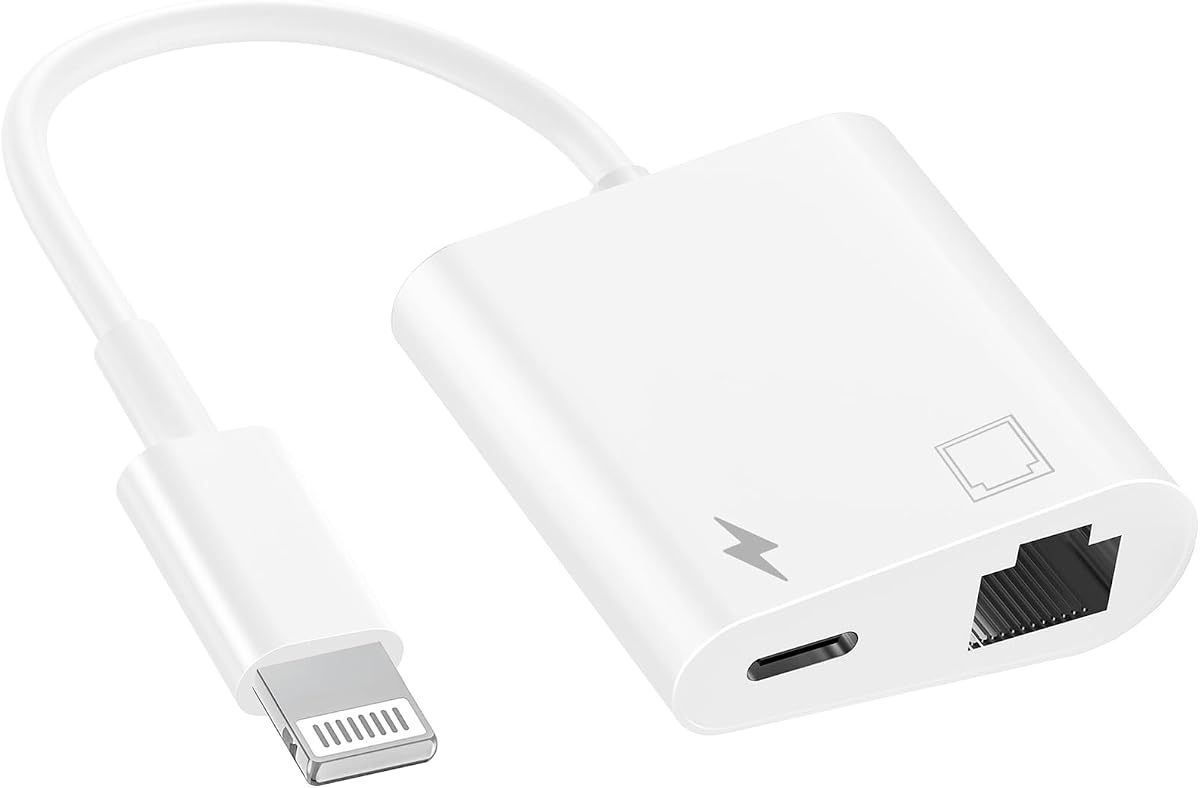
This two-in-one Lightning adapter is a strong choice for users who need internet access and charging at the same time. It has a 4.4 customer rating, Apple MFi certification, and a 100Mbps Ethernet connection. Its separate charging port allows an iPhone to remain connected to a wired network without requiring the adapter to sacrifice charging entirely.
We may earn a commission when you buy through this link, at no additional cost to you.
The product supports a long list of iPhone, iPad, and iPod models, including devices that use older Lightning versions. It works with stated iOS releases from 10 through 16, requires no downloaded program, and is ready to use after connecting. A blue indicator flashes when the mobile device and network are linked, providing a quick visual confirmation of activity.
A 60-month warranty and 24/7 customer service are stronger support details than those listed for many alternatives. However, the 100Mbps speed ceiling is lower than the 1000Mbps capability of the UGREEN, BENFEI, uni, and Belkin options. The older device and operating system emphasis may also be less relevant to someone with a recent USB-C iPhone.
Pick this adapter if your Lightning iPhone needs to remain powered during long network sessions or if you regularly use a single Lightning port for both data and charging. It is especially useful for extended work sessions, presentations, and travel. For a newer USB-C iPhone or a requirement for gigabit network performance, a USB-C model will usually be more appropriate.
The dedicated charging port is the defining advantage over network-only Lightning adapters. You can maintain a wired internet connection while the device is connected to a suitable charging source, which is helpful during long calls, meetings, or streaming sessions.
Compatibility with older iPhone, iPad, and iPod models makes this option relevant to people who still use legacy Lightning equipment. The listed five-year warranty also provides a meaningful assurance for a long-lived accessory.
We may earn a commission when you buy through this link, at no additional cost to you.
This dual-connector adapter is designed for people who move between Lightning and USB-C devices or want one accessory that can cover Apple and Android hardware. It supports 10/100Mbps Ethernet and includes a charging port, allowing network access and power to be used together. Its 4.2 rating places it in the middle of this group but still reflects generally positive customer feedback.
We may earn a commission when you buy through this link, at no additional cost to you.
The adapter can add wired networking to compatible Lightning and USB-C devices, including iPhones, iPads, iPods, and compatible Android equipment. Installation is advertised as driver-free and requires only plugging the connector into the device and linking an Ethernet cable to the RJ45 port. A compact casing helps it remain practical for travel and office use.
The main limitation is its 100Mbps maximum, which is modest beside the gigabit options in the guide. The broad “all USB-C” and “all Lightning” language should also be interpreted carefully because actual performance depends on the operating system, device model, and whether the selected connector is physically available. Some modern iPhones use USB-C but require compatible accessory support.
This adapter makes sense for a mixed-device household or for someone who wants charging and Ethernet in a single package. Choose it over a dedicated Lightning model when compatibility flexibility matters. If your primary need is maximum transfer speed or use with a recent high-end iPhone, a specifically documented USB-C alternative may provide a better match.
Supporting both Lightning and USB-C reduces connector-specific packing headaches. That flexibility is particularly useful for teams or families that carry several Apple and Android devices on the same trip.
The integrated charging function is useful when the device’s only available port is occupied by the network adapter. A suitable charging cable can be connected while the Ethernet link remains active.
We may earn a commission when you buy through this link, at no additional cost to you.
The Apple MFi Certified Lightning to Ethernet adapter offers a simple cable-style solution for iPhones, iPads, and compatible iPod models. It has a 4.0 customer rating and supports 10/100Mbps wired networking. The eight-pin Lightning connector and RJ45 end make the intended path between an iOS device and a router immediately understandable.
We may earn a commission when you buy through this link, at no additional cost to you.
No external power, driver, or application is required. Once the adapter is connected, the user can switch to the Ethernet network option in iOS and access the internet. Its compact construction suits travel, work, and home use, while the stated compatibility covers numerous iPhone generations from the 5-era through the 13 series, along with several iPad and iPod models.
The adapter provides internet access only and does not offer a charging pass-through. That means the iPhone’s Lightning port remains occupied for the duration of the network connection. Although the listing describes a connection to a high-performance Gigabit Ethernet network, the actual adapter specification is limited to 10/100Base-T, so it should not be treated as a gigabit adapter.
Choose this option for a simple Lightning connection where portability and straightforward operation matter most. It is well suited to short work sessions, online classes, and travel where avoiding Wi-Fi issues is important. If you need to charge while connected or want higher network performance, move up to one of the two-in-one or gigabit alternatives.
The cable-like format avoids the need to find a separate charging adapter during simple network tasks. It is a direct solution for users who want to connect an RJ45 network cable to a compatible Lightning iPhone quickly.
The small, compact design fits readily into a pocket, laptop sleeve, or travel organizer. It is a practical backup for hotels and conference venues where wireless congestion can be frustrating.
We may earn a commission when you buy through this link, at no additional cost to you.
Belkin’s USB-C Ethernet and Charge Adapter is the most feature-forward premium option in the guide. It supports Ethernet speeds up to 1000Mbps and power delivery up to 100W, allowing a compatible USB-C device to use a wired connection and charge at the same time. The product description explicitly calls out iPhone 17, Galaxy S26, and broader USB-C compatibility.
We may earn a commission when you buy through this link, at no additional cost to you.
Unlike basic adapters that only add an RJ45 port, this model preserves access to a USB-C charging connection. Its power delivery capacity is high enough for larger devices such as tablets, iPad Pro models, and MacBook computers, subject to device and charging protocol support. That makes it useful for a desk setup where one iPhone may be part of a broader multi-device workspace.
The housing contains at least 75% post-consumer recycled plastic, and Belkin includes two-year coverage. Its compact form is appropriate for travel, although the 100W charging capability and general feature set make it more specialized than a basic USB-C network adapter. Buyers should confirm that their iPhone, cable, and charging setup support the required standards.
Choose this adapter if you have a USB-C iPhone and value fast Ethernet, high-wattage charging, reputable support, and a durable travel format. It is particularly attractive for power users who also use an iPad or MacBook. If your iPhone has a Lightning port, you will need a Lightning-specific alternative instead.
Up to 100W power delivery separates this adapter from simpler charging adapters. That headroom can be useful when the same setup powers an iPhone alongside a tablet or larger computer, provided each device supports the relevant charging standard.
The two-in-one layout means the USB-C connection does not have to be devoted exclusively to networking. That makes the adapter convenient for long sessions where reliable internet access and reliable power are both required.
We may earn a commission when you buy through this link, at no additional cost to you.
This compact two-in-one adapter gives Lightning users both an RJ45 Ethernet connection and a charging port. It holds a 3.9 customer rating, the lowest among the products reviewed, but its stated functions address a common limitation of network-only Lightning adapters. It supports 10/100Mbps and can operate without any additional application or software.
We may earn a commission when you buy through this link, at no additional cost to you.
The adapter works with many iPhone generations, including models from the 5 and 5c through the 12 series, as well as listed iPad and iPod devices. A blue light flashes when the device and network are connected, helping users confirm that the adapter is active. The Ethernet port can be used by itself or alongside the charging port.
The product information says it supports iOS 11 and earlier, which is the most important caution. Buyers should not assume that every current iOS version or device configuration will be supported without checking current documentation. Its 100Mbps ceiling is also lower than several alternatives, and the 3.9 rating provides less customer feedback confidence than the leading products.
This model is worth considering for an older Lightning iPhone or iPad that needs a compact adapter with charging. It may suit a backup role in a travel kit, provided the operating system and connector are compatible. For a current device or an adapter expected to remain in service for years, an option with more clearly documented modern compatibility is preferable.
Combining Ethernet and charging in a small form factor helps reduce the number of accessories needed for a fixed workspace. The same adapter can handle a network session and maintain power when a suitable charging cable is attached.
The flashing blue indicator is a useful visual cue during setup. It can help distinguish a completed network connection from a loose cable, inactive router port, or device configuration that still needs attention.
We may earn a commission when you buy through this link, at no additional cost to you.
BENFEI’s USB-C to Ethernet adapter combines a 4.5 customer rating with gigabit capability and durable construction. It supports speeds up to 1000Mbps and remains compatible with 100Mbps and 10Mbps networks. The product is explicitly listed for iPhone 15 Pro and Pro Max models, making it a relevant wired option for compatible USB-C iPhones.
We may earn a commission when you buy through this link, at no additional cost to you.
Its braided nylon cable and aluminum casing are designed for durability and heat dissipation. A non-slip shape makes the connector easier to insert and remove, which also helps protect the device’s USB-C port. The stated compatibility covers a wide range of MacBook, iPad Pro, iMac, Dell XPS, Surface, Chromebook, Pixel, Samsung, and other USB-C devices.
There is no charging port, so a connected phone or tablet must rely on its battery or a separate charging method. Reaching the full 1000Mbps figure also requires a CAT6 or better Ethernet cable and compatible network hardware. The adapter is explicitly not compatible with Nintendo Switch, although that restriction has little effect on its iPhone use case.
Choose this adapter if you want a durable gigabit network solution for a USB-C iPhone and want one accessory to cover several other devices. The physical design should appeal to buyers who routinely travel with their equipment. If simultaneous charging is important, look instead to the Belkin or dedicated two-in-one Lightning options.
The braided cable and non-slip connector are practical features for an accessory used at desks, in hotel rooms, and in travel bags. They help the adapter withstand repeated handling while making it easier to connect quickly.
The stated compatibility makes this adapter useful for anyone who alternates among an iPhone, iPad, MacBook, and Android hardware. One adapter can reduce duplicated equipment while preserving access to faster Ethernet where the network supports it.
We may earn a commission when you buy through this link, at no additional cost to you.
The uni USB-C to Ethernet adapter is a polished, broadly compatible choice with a 4.6 customer rating and support for speeds up to 1000Mbps. Its driver-free operation simplifies setup on current computers and mobile systems, while backward compatibility with 100Mbps and 10Mbps networks allows it to work on more modest networks.
We may earn a commission when you buy through this link, at no additional cost to you.
Compatible iPhone 15 and 16 Pro or Pro Max models are listed, along with MacBook, iPad Pro, Dell XPS, Surface, Chromebook, Pixel, Samsung Galaxy, and other USB-C devices. The compact shape and non-slip design make it easy to connect, while the braided nylon cable and aluminum housing support durability and heat dissipation. It is designed not to block adjacent USB-C ports.
As with other gigabit adapters, reaching 1000Mbps requires CAT6 or higher Ethernet cabling and compatible network equipment. The product has no charging port, so its use on an iPhone is limited to network access. The listed compatibility is broad, but buyers should still confirm that their specific model and operating system support the adapter.
Choose this model for a USB-C iPhone or another modern device when you prioritize a strong rating, straightforward installation, and faster Ethernet capability. It works well in a shared accessory kit for a home or office where multiple USB-C devices need occasional wired access. For continuous charging and networking, select an adapter with a dedicated power function.
Driver-free operation is a major convenience for travel and quick work sessions. The adapter can be connected without searching for operating system software, which is especially useful when working across several modern devices.
The compact body, non-slip connector, braided cable, and aluminum shell focus on practical daily use. A design that fits snugly without blocking neighboring ports is particularly useful on smaller laptops and tablets.
We may earn a commission when you buy through this link, at no additional cost to you.
This Apple MFi Certified Lightning adapter is a practical two-in-one option for older iPhones, iPads, and iPods. It supports 10/100Mbps Ethernet while providing a separate charging connection, allowing a device to remain powered during extended network use. The 4.1 customer rating reflects positive usage feedback, though it trails several higher-rated alternatives.
We may earn a commission when you buy through this link, at no additional cost to you.
The listed device support extends back through iPhone 6, 6s, 7, 8, X, XR, XS, 11, 12, 13, and 14 families, including Pro, Max, Mini, and Plus variants where applicable. It also covers iPad Air, Mini, and Pro models. Compatibility is stated for iOS 10.3 and later, including the iOS 16 era mentioned in the product information.
Setup requires no application, driver, or special software. A blue status light flashes after the device and network connect, giving a straightforward visual cue. The main technical limitation is the 100Mbps maximum, and the product is irrelevant to iPhones that use USB-C rather than Lightning. As always, the network’s own speed will limit real-world results.
Choose this adapter if you use an older Lightning iPhone and need a dependable connection with the convenience of simultaneous charging. It is a good fit for long online classes, remote work sessions, and travel where preserving battery life is important. Newer USB-C iPhone owners should instead consider one of the explicitly USB-C-compatible models.
The separate charge port is especially valuable for older iPhones that may have less battery endurance during demanding tasks. It allows a wired session to continue without relying entirely on the remaining internal battery.
The extensive compatibility list makes this a useful accessory for households that still maintain older iPhones, iPads, or iPods. It avoids the need to replace older equipment solely to add a wired networking option.
We may earn a commission when you buy through this link, at no additional cost to you.
The most important decision is matching the adapter to your iPhone’s connector and workflow. Speed, charging support, certification, portability, and device compatibility should then be considered according to how and where you plan to use the wired connection.
Lightning and USB-C adapters are not interchangeable. Older iPhone models generally use Lightning, while recent iPhone generations use USB-C. The adapter must also be supported by the current iOS version; a physical connector match alone does not guarantee that the Ethernet networking function will be recognized. Review the product’s explicit model list and operating system statement before purchasing.
A network-only adapter occupies the iPhone’s connector and does not provide power. A two-in-one adapter adds a charging port, which is valuable during long work sessions, streaming, calls, and travel. The charging function still requires a suitable cable and compatible power source, and an adapter cannot charge a Lightning iPhone if your charging method also relies on Lightning.
Most dedicated Lightning options in this guide support 10/100Mbps Ethernet, while the UGREEN, BENFEI, uni, and Belkin USB-C adapters support up to 1000Mbps. A higher ceiling can help with large transfers and faster broadband, but the final result depends on the iPhone, adapter, Ethernet cable, router, network equipment, and internet plan. Older 100Mbps adapters may still feel faster than unstable Wi-Fi.
Plug-and-play language is most useful when the listing also states which iPhone models and operating system versions are supported. Some adapters list older operating systems that may not cover the version on your current phone. Apple MFi certification can provide additional confidence for Lightning accessories, while modern USB-C products should document recent iPhone compatibility and any system requirements.
Travelers should favor a compact adapter with a short, flexible cable and a connector that is easy to grip. Desktop users may appreciate an aluminum housing, braided cable, or reinforced connector that dissipates heat and withstands repeated plugging. A long cable can offer more placement flexibility, but it can also be less convenient to carry. Choose a form factor that suits the place where you will actually use the adapter.
Most Ethernet adapters do not include the cable needed to reach a router, wall outlet, or network switch. To achieve gigabit performance, the BENFEI, uni, UGREEN, and Belkin options call for CAT6 or newer Ethernet cabling. Even a 100Mbps adapter benefits from an undamaged cable with sound connectors. Check whether your location has an available Ethernet port before relying on this type of accessory.
Most current iOS and major desktop systems recognize Ethernet adapters without downloaded software. The process commonly involves connecting the adapter and Ethernet cable, turning off Wi-Fi and cellular data, and checking the Ethernet network option in Settings. UGREEN specifies that older Windows versions and Linux need drivers. For predictable use, a current iPhone and a straightforward plug-and-play adapter are generally the easiest combination.
A two-in-one Lightning adapter is focused on adding Ethernet and charging to an iPhone that has only one port. A multi-connector model can support both Apple and Android devices, while a premium USB-C adapter may add faster Ethernet and higher-wattage charging for a broader device ecosystem. Match the accessory to your actual devices rather than paying for functions you will never use or selecting one that excludes your primary hardware.
Start by identifying the correct end of the adapter for your iPhone. Plug the Lightning or USB-C connector into the device, then connect an RJ45 Ethernet cable to the adapter and the other end to a router, wall network outlet, or network switch. If the adapter has a separate charging port, connect a compatible charging cable only when you intend to use it and have a suitable power source available.
On an iPhone, open Settings and locate the Ethernet option after the adapter is connected. Turning off Wi-Fi and cellular data helps ensure that traffic uses the wired network rather than silently falling back to another connection. If the Ethernet option does not appear, reconnect the adapter, inspect both cable ends, confirm that the network port is active, and verify that the device and iOS version are supported.
To keep the adapter in good condition, avoid sharp bends in the cable, moisture, excessive heat, and repeated yanking from the iPhone’s port. Coil the cable loosely for storage and keep the RJ45 dust cover closed when the adapter is not connected. When troubleshooting a slow or intermittent link, test another Ethernet cable and network port, and remember that the actual speed is limited by the slower part of the network path.
Yes, compatible iPhones can use Ethernet through a Lightning or USB-C adapter with an RJ45 port. The adapter must support your specific iPhone model and iOS version. You will also need an Ethernet cable and access to a wired network connection.
A wired connection can feel faster and more consistent when Wi-Fi is weak, crowded, or unstable. The adapter does not increase the speed of your internet plan, however. Actual performance also depends on the router, Ethernet cable, local network, and server being used.
It is generally helpful to turn off Wi-Fi and cellular data so the iPhone uses the wired connection consistently. If the Ethernet setting is not available, check the physical connections and confirm that the adapter supports your iOS version before changing other network settings.
Only with an adapter that includes a separate charging port. A two-in-one Lightning model or a USB-C Ethernet and power adapter allows networking and charging simultaneously, but you still need a suitable charging cable and power source.
A Lightning adapter is intended for iPhones that have a Lightning port, not for models that use USB-C. Before buying, check the product’s connector type, explicit iPhone model list, and stated iOS compatibility. Recent USB-C iPhones require an adapter designed and documented for USB-C.
Any properly terminated RJ45 Ethernet cable can provide a basic wired connection, provided the network and adapter support it. For the full 1000Mbps rating listed by several products here, use CAT6 or newer cable. Standard Cat5e may still be suitable for 100Mbps networks.
First, confirm that the adapter is designed for your connector and that the product supports your iOS version. Reconnect the iPhone end and both Ethernet cable connections, then check that the router port is active. If the problem continues, try another cable or network port and consult the adapter manufacturer’s setup guidance.
The supplied product information focuses on internet access rather than features such as wired iPhone-to-computer transfers. Treat these accessories primarily as tools for connecting an iPhone, iPad, or other supported device to an IP network, and verify any additional functionality directly with the manufacturer.
The MFi Lightning Ethernet Adapter is the strongest general pick for Lightning iPhones because of its 5.0 customer rating, certified design, broad compatibility, and simple setup. For USB-C iPhones, the UGREEN adapter offers a strong budget combination of gigabit capability and broad device support, while the Belkin USB-C Ethernet and Charge Adapter is the premium choice for users who want faster networking and high-wattage charging.
Prioritize the connector and iOS support before considering any other feature. Then decide whether you need simultaneous charging, and choose 100Mbps or 1000Mbps based on your network and transfer requirements. Compactness, certification, cable durability, support coverage, and whether you also use Android or computer hardware can serve as secondary differentiators.
Product availability, technical details, and prices can change, so confirm the current listing before purchasing. Checking the exact iPhone model, iOS version, included accessories, cable requirements, and warranty terms will help ensure that the selected Ethernet iPhone adapter fits your device and workflow as intended.