
Tengchi RCA to HDMI Converter
4.4Editor score
Converts composite RCA video
Provides 1080p HDMI output
Supports multiple TV standards
Requires external USB power
Our guide compares 10 PlayStation HDMI Upscalers for PS1, PS2, PSP, PS3, PS4, and modern displays, covering signal types, latency, resolution, and setup
A PlayStation HDMI upscaler can transform an older console into a more practical setup for modern televisions and monitors. The right device preserves compatible video signals, provides cleaner output, and may offer resolution or aspect-ratio controls that make classic games easier to enjoy without complicated equipment.
The products in this guide cover dedicated PS1 and PS2 adapters, broader component converters, portable-system solutions, and 1080p-to-4K gaming processors. We compared supported console models, source and output signals, maximum resolution, latency claims, installation requirements, and important compatibility limitations.
Each review identifies the product most suitable for a particular need, from budget-friendly composite conversion to dedicated 4K60 upscaling. Product ratings and specifications may change over time, and current prices fluctuate, so readers should confirm the latest listing details before purchasing.
4.4Editor score

4.4Editor score

3.8Editor score
This side-by-side comparison highlights each converter's supported PlayStation models, signal path, maximum output, and primary advantage. Because these devices are not interchangeable, console compatibility and required source cables matter as much as headline resolution.



The LEVELHIKE HDMI Cable is the most focused option in this guide, combining an analog-to-digital converter with a dedicated PlayStation cable. It converts RGB video from the PS1 and PS2 into HDMI for modern televisions, monitors, and projectors. Its 4.4 rating reflects a generally positive user history, while the dedicated console support makes it easier to recommend than a generic converter.
We may earn a commission when you buy through this link, at no additional cost to you.
Its strongest feature is true RGB signal conversion, which provides a cleaner foundation than composite video. The adapter supports the original PS1, PS One, fat PS2, and slim PS2. A physical switch lets users choose between 4:3 and 16:9 output, helping preserve the original shape of games or fill a widescreen display according to personal preference. The detachable design also allows a separate or extended HDMI cable to be used.
The product does not create native 4K detail, and its advantages apply specifically to classic PlayStation hardware rather than modern consoles. Its listed low-latency claim and plug-and-play approach are particularly useful for action-oriented games, but buyers should still confirm the correct console-side connection and monitor settings before use. The one-year replacement warranty adds useful support for a product whose installation can vary by console model.
This is the strongest general recommendation for someone whose goal is a straightforward PS1 or PS2-to-HDMI connection. It avoids the ambiguity of a universal AV adapter, offers useful aspect-ratio control, and supports both major PS2 chassis styles. Choose it when preserving the intended RGB signal and changing the old system's aspect ratio are more important than 4K upscaling.
Because the adapter is designed around PlayStation RGB output, it offers a more focused path to a modern display than a composite-only converter. It is particularly useful for PS1 and PS2 owners who want digital output without investing in a large collection of legacy cables and switchers.
The 4:3 and 16:9 toggle gives players a practical choice between the geometry associated with classic games and a wider presentation. This control is valuable when different games or display settings produce inconsistent proportions.
We may earn a commission when you buy through this link, at no additional cost to you.
The 4K Gaming Upscaler and Enhancer is a general-purpose processor designed to turn 1080p HDMI signals into 4K60 output. Unlike the PlayStation-specific adapters, it supports Nintendo Switch, GameCube, Wii, Dreamcast, PS2, PS3, Xbox 360, first-generation Xbox, and other 1080p sources. No numerical customer rating was supplied, so its value should be judged primarily from its documented capabilities and strict compatibility requirements.
We may earn a commission when you buy through this link, at no additional cost to you.
Image sharpening, color tuning, depth-of-field enhancement, and zero-delay conversion are the main attractions. The product is aimed at players who already receive 1080p from a source and want a more detailed presentation on a compatible 4K television. Its broad console list makes it a one-device option for a varied game collection, and the claim of no dropped frames makes it relevant to fast games where smooth motion matters.
The requirements are exacting. The input must be 1080p, the display must accept 4K at 60Hz, and the connection should use an HDMI 2.0a or newer cable. A 4K30 or 1440p display is outside the supported range and may show a black screen. The original Nintendo Switch dock cable is also incompatible with the stated requirements. Those limitations make careful setup verification essential.
This converter is best for owners of several HDMI-capable consoles who have a true 4K60 television or monitor. It is less suitable for someone expecting the product to improve low-resolution composite output directly or to drive a 1440p screen. For the right display and source equipment, however, it provides the broadest 4K-oriented proposition in the guide.
The broad source compatibility can simplify a multi-console setup. Rather than changing between dedicated adapters, a player can use the same conversion and enhancement process across supported 1080p HDMI devices.
The processor does not merely label its output as 4K; it expects a compatible 4K60 environment throughout the chain. Confirming the source resolution, display refresh rate, and cable specification before buying can prevent the black-screen issues described by the manufacturer.
We may earn a commission when you buy through this link, at no additional cost to you.
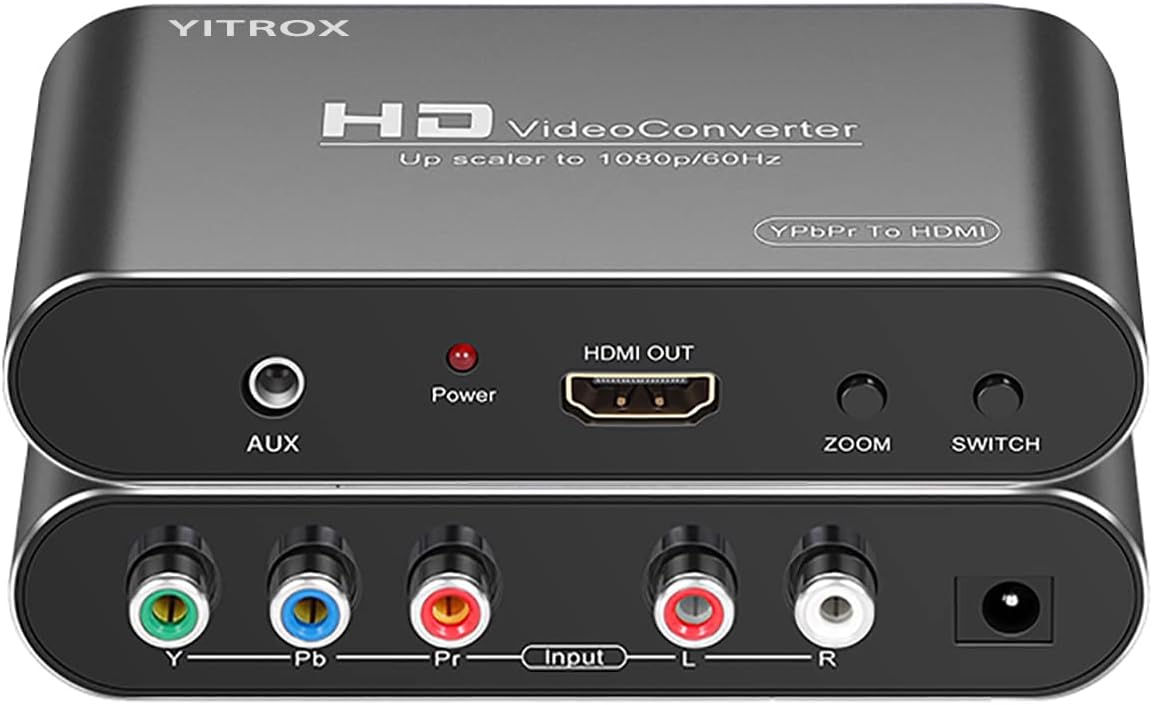
The Component to HDMI Converter Upscaler is a general legacy-video solution for devices with YPbPr output, including PS2, PS3, Wii, and Xbox 360. It converts analog component video and right and left audio channels into HDMI, with output adjustable up to 1080p. Its 4.1 rating places it among the stronger options here, although its feature set is more configurable than most simple adapters.
We may earn a commission when you buy through this link, at no additional cost to you.
Five selectable output resolutions and seven zoom modes offer a high degree of control. The converter supports component inputs at 480i, 480p, 576i, 576p, 720p, and 1080i or 1080p, depending on the source. Its processing is described as improving motion stability, contrast, color, and digital noise. An auxiliary audio output and synchronized audio-video output add convenience for systems with separate sound equipment.
The product is not a general HDMI-to-component converter, and using the wrong cable can produce a black-and-white image. PS2 owners must also change the console's AV output setting to YPbPr; otherwise a picture may not appear. A dedicated component cable is therefore necessary, and the number of controls may feel unnecessary for someone who only needs a quick connection.
This converter is an excellent choice for a mixed retro-entertainment setup where component quality and output flexibility matter. It offers more adjustment than a direct cable and broader legacy-device support than a dedicated PS1 or PS2 adapter. It is less appropriate for modern HDMI-only hardware or for composite sources that have not been configured correctly.
The five resolutions and seven zoom choices make it possible to tune the converted picture for different displays and source modes. This is useful when a fixed setting does not fill the screen cleanly or preserve the intended proportions.
Component video provides a better starting point than composite, and the converter's motion, color, contrast, and noise processing is designed to refine that source. The result is more appropriate for a modern screen than an untreated legacy signal.
We may earn a commission when you buy through this link, at no additional cost to you.
The PSP2000 and PSP3000 HDMI Converter is built for a narrow but clear purpose: connecting those two PlayStation Portable generations to modern HD televisions, monitors, or projectors. It converts the system's YPbPr picture and audio into HDMI. The 3.9 rating is reasonable, though the product's strongest advantages are its targeted model support and straightforward operation.
We may earn a commission when you buy through this link, at no additional cost to you.
Users can select 1080p or 720p output and choose from four screen-ratio magnification modes. The included signal processor is described as improving color, resolution, and detail, while simultaneous audio-video output reduces the need for a separate setup. Plug-and-play operation and the absence of drivers also make the adapter convenient for a portable or temporary gaming arrangement.
This solution does not serve owners of other PlayStation systems, and it cannot deliver the 4K60 output available from newer upscalers. Its benefit depends on using one of the two explicitly supported PSP models. Some buyers may also find a modern digital streaming or handheld device more practical for games that are no longer tied to physical PSP media.
The converter is a sensible pick for PSP2000 or PSP3000 collectors who want their hardware connected to a larger digital display. It provides meaningful resolution and magnification options without demanding complicated setup. For anyone seeking a universal PlayStation adapter, however, a broader component converter or dedicated 4K processor will be a better investment.
The device concentrates on PSP2000 and PSP3000 rather than attempting to cover every historical PlayStation output. That specificity simplifies the connection and keeps the relevant resolution and magnification options close at hand.
Four magnification modes help adapt the handheld's image to different television sizes. The 720p and 1080p selections offer more flexibility than a direct fixed-resolution connection.
We may earn a commission when you buy through this link, at no additional cost to you.
The Hyperkin HDTV Cable offers a simple route from PS1 and PS2 systems to modern HD televisions. Its 4.3 rating and no-setup-required design make it appealing for retro players who want a clear improvement over original analog connections. The package includes a 7-foot AV-to-HDMI cable and a 6-foot micro USB power cable for convenient placement around a television.
We may earn a commission when you buy through this link, at no additional cost to you.
Output can reach 720p, with component signal support available for the PS2. The product is designed to provide clearer visuals, improved color accuracy, and stereo audio, all of which are meaningful improvements for a classic PlayStation collection. Supporting both fat and slim PS2 models broadens its practical appeal across different hardware revisions.
The principal limitation is that component support applies only to PS2, leaving PS1 users with a less advanced signal path. There is also no 4K processing or detailed aspect-ratio control, so the product is better suited to a straightforward HDTV setup than a carefully calibrated enthusiast installation. Cable length and placement are not adjustable beyond the included leads.
This cable is a good recommendation for someone who wants a recognizable, uncomplicated way to connect PS1 or PS2 hardware to an HDTV. It is especially attractive for PS2 owners because component support can provide a better source. Players seeking deeper adjustment or 4K conversion should choose a more configurable processor instead.
The direct cable approach avoids menus, external processors, and display calibration. It suits a living-room setup where the goal is to connect a classic console and begin playing.
A 7-foot AV-to-HDMI lead and 6-foot power lead provide enough reach for many television stands. This reduces the need to find a separate extension or place the console in an awkward position.
We may earn a commission when you buy through this link, at no additional cost to you.
The SoundBeast AV to HDMI Converter 2.0 is a broader analog-media solution with a useful USB capture feature. It converts yellow, white, and red RCA signals into HDMI at 720p or 1080p. The 4.4 rating indicates strong user reception, and support for VCRs, camcorders, Hi8, gaming systems, PAL, and NTSC gives it a place beyond PlayStation collections.
We may earn a commission when you buy through this link, at no additional cost to you.
The updated aspect-ratio control is particularly valuable. A 4:3 mode preserves the original shape with black bars on the sides, while a 16:9 option fills a modern display. The converter can also record video to a PC or Mac at 640 by 480 pixels through USB, and the included capture software allows the device to serve as a bridge for creating simple digital recordings.
It only converts analog RCA input to HDMI and cannot work in reverse. It is also not tailored to a PlayStation's RGB or component options, so a dedicated adapter may produce a better starting picture. The computer-capture function is useful for simple archiving, but its 640 by 480 output is not intended to replace a dedicated high-resolution capture system.
Choose this converter when a household wants one device for several analog sources or needs occasional USB recording in addition to television display. It can be a practical companion to a PlayStation collection, although PS1 and PS2 players seeking the cleanest dedicated path should prioritize a PlayStation-specific RGB or component solution.
The 4:3 option keeps older recordings and game footage from being stretched horizontally. This makes the converter useful for displays whose automatic scaling does not preserve the source geometry.
Recording analog sources through USB can be useful for preserving a transfer of home video or legacy game footage. The included software and driver-free operation reduce the setup burden for basic archiving tasks.
We may earn a commission when you buy through this link, at no additional cost to you.
The Tengchi RCA to HDMI Converter is a budget-oriented adapter for older consoles and other devices with standard composite video. It converts analog RCA input to 1080p HDMI and supports PAL, NTSC 3.58, NTSC 4.43, SECAM, PAL/M, and PAL/N. Its 4.4 rating is strong for such a straightforward product, and the included HDMI and USB cables make it easy to begin using.
We may earn a commission when you buy through this link, at no additional cost to you.
The device is compatible with PS2, PS3, Xbox, Nintendo 64, set-top boxes, VHS players, and DVD players when those sources use standard composite connections. It outputs through HDMI 1.3 at 1080p, and external USB power keeps the conversion process simple without requiring a separate software installation. A one-year warranty provides a basic level of buyer reassurance.
The source limitation is important. Composite video carries less detail than RGB or component, so converting it cannot create the quality that those signals would provide if the console supports them. The product does not support 3D, 4K, or reverse HDMI-to-AV conversion. The included USB power lead also requires access to a suitable 5V, 1A source, which is not included.
This adapter is most appropriate for a player on a limited budget who wants a straightforward way to connect a composite-equipped console to an HD television. It is a strong fallback for N64, original Xbox, and other systems without HDMI, and it can also serve PS2 or PS3 when better source options are unavailable. Owners of RGB-capable hardware should consider a more specialized cable for maximum image quality.
The adapter broadens access to modern displays for older systems that lack HDMI. Its support for multiple broadcast standards and several console families makes it a versatile fallback device.
An RCA female input, HDMI output, and included USB power lead create a short installation path. The need for an external 5V source is a minor inconvenience, but it removes dependence on USB power from the original console.
We may earn a commission when you buy through this link, at no additional cost to you.
The Kaico PS1 and PS2 HDMI Cable is a dedicated adapter that allows users to move between RGB and component signals while using HDMI output. Its 4.2 rating reflects a solid overall reception, and the product targets a common challenge among classic PlayStation owners: finding a cable that supports more than one high-quality source configuration.
We may earn a commission when you buy through this link, at no additional cost to you.
The built-in RGB-to-YPbPr switch is the defining feature. Players can choose the appropriate mode for the connected system and display, while the product is described as supporting all PlayStation output resolutions. Its plug-and-play design removes the need for external drivers or complicated menu navigation, and the included 12-month repair or replacement warranty provides a defined support period.
The product does not upscale to 4K, so buyers expecting a modern gaming processor may find it limited. The mode switch also introduces a configuration step, and compatibility remains limited to PlayStation hardware. Incorrect settings or cable routing can lead to an unsuitable picture, making it important to follow the guide's mode guidance for the console in use.
This Kaico cable is a strong fit for a PS1 and PS2 collection where users want a single, purpose-built connection with access to both RGB and component options. It is particularly useful for experimenting with different signal modes. For 4K output, sharper processing, or compatibility with non-PlayStation sources, a dedicated gaming upscaler is the better choice.
RGB and component can produce better source quality than composite, but availability varies by console and game. The switch allows the adapter to accommodate both approaches without replacing the cable.
A dedicated PlayStation design reduces the guesswork involved with a universal converter. The product is shaped around the output needs of its intended systems rather than general AV equipment.
We may earn a commission when you buy through this link, at no additional cost to you.
The PS2 and PS3 YPbPr HDMI Converter is a direct component-video solution for players seeking a cleaner digital connection than composite provides. It supports PS2 and PS3 output through YPbPr, converts that signal to HDMI, and is designed for modern televisions, monitors, and projectors. Its 4.1 rating reflects a generally positive reception.
We may earn a commission when you buy through this link, at no additional cost to you.
The adapter supports the PS2's 480i, 576i, and 480p display modes and uses signal processing intended to improve color, resolution, clarity, and motion. The product is described as producing smooth, blur-free visuals without lag. It also works without installing drivers, an HDMI cable, or additional software, making it a relatively compact and portable solution.
The crucial restriction is that it only accepts YPbPr or YCbCr signals, not CVBS composite. The PS2 must therefore be placed into YPbPr or YCbCr output mode; otherwise the display may report an out-of-range signal. It also does not offer 4K output or the wider menu of scaling controls found in a full-featured component converter.
This is a useful, straightforward option for a PS2 or PS3 player who understands the difference between component and composite and is willing to configure the console correctly. It is best suited to a clean two-console setup. Buyers seeking broader resolution choices, an aspect-ratio menu, or compatibility with other legacy devices should choose a more configurable component converter.
YPbPr separates important color information and provides a better source for conversion than CVBS. That advantage makes this adapter more appropriate when the console can be configured correctly.
The converter's compact design and lack of driver requirements suit temporary setups or secondary displays. It can be moved between compatible systems without installing additional software.
We may earn a commission when you buy through this link, at no additional cost to you.
The Mcbazel PhotoFast 4K Gamer+ is a dedicated 1080p-to-4K60 processor built primarily for Nintendo Switch and Switch OLED dock setups. It also supports Wii U, PS4, Chromecast, Apple TV, and other sources with 1080p HDMI output. Its 3.8 rating is lower than those of several adapters here, but the product serves a distinct premium purpose: converting an existing 1080p feed into a 4K60 signal with image enhancement.
We may earn a commission when you buy through this link, at no additional cost to you.
A dedicated video processor rebuilds the incoming image at 4K60, applying sharpening, color processing, and added depth of field. The frame rate of the source is not reduced, so the output remains smooth. The processing is an upconversion rather than native 4K rendering, an important distinction when judging what the added resolution means for image quality.
The display requirements are strict. The output side must be a 4K screen that accepts 60Hz; a 1080p television, 1440p monitor, or 4K30 display is unsupported. The source must send 1080p, and the connection should use an HDMI 2.0a data-capable cable. Handheld Switch mode sends no HDMI signal, while the PS5 and Xbox Series X already provide 4K and do not need this processor.
The package contains the unit, a 27-centimeter HDMI extender, and a 150-centimeter USB-A to Type-C power lead, but not an HDMI cable. Buyers should therefore budget for the correct cable and have access to external power. This is a strong premium choice for Switch or PS4 owners with the required 4K60 television, though it is not the most broadly compatible option in the guide.
Unlike a general display scaler, the Gamer+ is oriented toward gaming and includes sharpening, color processing, and depth effects. Its design is intended to make a 1080p source look more detailed without lowering the source frame rate.
The small unit, short HDMI extender, and power lead are practical for a television cabinet or travel kit. It is particularly relevant to Switch OLED owners who dock the console but want a 4K60 presentation.
We may earn a commission when you buy through this link, at no additional cost to you.
Choosing a PlayStation HDMI upscaler starts with the console and its available video output. Signal type, display capabilities, resolution, latency, controls, and installation requirements matter more than a broad compatibility claim.
Choose a converter explicitly designed for the hardware you own rather than one that mentions PlayStation only as part of a long compatibility list.
Prioritize the signal type your console can actually output, and check whether the adapter includes the correct source cable.
Confirm source resolution, display refresh rate, and cable specification as one complete chain.
Treat 4K output as a processing feature, not a guarantee of native 4K image quality.
Choose a converter that advertises low or zero added latency, especially for competitive or action-heavy play.
Look for a clear aspect-ratio option that preserves shape without requiring repeated on-screen adjustments.
Confirm every included cable and power requirement to avoid an incomplete setup after delivery.
Choose based on the consoles, sources, display, and features you actively plan to connect.
Begin by identifying the output used by the PlayStation. A PS1 or PS2 may need RGB, YPbPr, or composite depending on the model and selected AV setting. Connect the appropriate source cable to the converter, then attach the converter's HDMI output to the television or monitor. If the device uses external USB power, connect that lead before powering on the console. For 4K60 models, use an HDMI 2.0a or newer data-capable cable and ensure the display is set to accept 4K at 60Hz.
Configure the console before changing television settings. On systems with an AV or video output menu, select YPbPr or YCbPr when the converter requires component input. A dedicated RGB adapter may instead need the console left in its normal RGB-compatible mode. For the general component converter, choose an output resolution and zoom mode that fills the screen without unnecessary cropping. The Mcbazel and other 4K processors have strict 1440p and 4K30 exclusions, so a black screen often indicates an unsupported display mode or incompatible cable rather than a defective product.
Allow the picture and sound to stabilize after connecting, then check for correct proportions, synchronization, and input selection. Keep the converter and cables dry, supported, and free from tension. Do not repeatedly reconnect a cable that has bent sharply or developed a loose connector. If using a capture function, test the basic television connection before adding a computer, and consult the included manual for compatible software and settings. Periodically review console video settings when changing games, because titles may use different output modes.
Latency depends on the converter and its processing. Dedicated PS1 and PS2 adapters generally perform straightforward signal conversion, while some products explicitly claim low or zero added delay. More elaborate 4K processors may apply sharpening and color processing, so the manufacturer's latency information remains important. Keep the connection direct and avoid unnecessary switchers or capture devices when timing matters most.
A compatible converter can turn composite video into HDMI and present it on a modern screen, but it cannot restore detail that the composite source never contained. RGB and component signals generally provide a better starting point when the console supports them. Check whether a product accepts only YPbPr, only composite, or both before purchasing.
No. A 1080p-to-4K60 unit upconverts the incoming picture and may sharpen edges or improve color, but it does not render new native 4K game graphics. The result can look useful on a large television, but the underlying source remains 1080p and the original frame rate is preserved.
The console may still be set to output composite video, or the converter may only accept YPbPr. PS2 owners should enter the system's AV output settings and select YPbPr or YCbCr where required. Also confirm that the correct source cable is attached and that the television is selecting the converter's HDMI input.
The display must accept 4K at 60Hz. A 1080p screen, a 1440p monitor, or a display limited to 4K at 30Hz falls outside the requirements of the featured 4K60 models. The input source must also provide 1080p, and an HDMI 2.0a or newer data-capable cable is generally required.
RGB is generally the preferred PS1 source, while component is a strong PS2 option when the console supports it. Composite is the fallback when the hardware or setup does not offer better output. The correct choice also depends on the adapter's input, since a YPbPr-only converter cannot accept composite and a composite-only converter cannot exploit RGB.
Modern PlayStation systems already output HDMI, so a basic PS1-to-HDMI cable is not necessary. A 1080p-to-4K60 processor can be relevant for a PS4 or docked Switch, but the PS5 already outputs 4K. The dedicated adapters in this guide primarily serve the PS1, PS2, PSP2000, and PSP3000.
No. Some dedicated PlayStation cables draw power from the console, while several universal converters and 4K processors require an external USB connection. Check the product's package and instructions for the required voltage and connector. The featured Tengchi converter specifically calls for a 5V, 1A source that is not included.
The LEVELHIKE PS1 and PS2 HDMI Cable is the most versatile recommendation for classic PlayStation hardware because it supports RGB conversion, several PS2 models, and both 4:3 and 16:9 output. The Tengchi RCA to HDMI Converter is the best budget option for basic composite connections, while the Mcbazel PhotoFast 4K Gamer+ provides the most specialized premium experience for owners of a 4K60 display and 1080p sources.
The central buying priority is the complete signal chain rather than the largest advertised resolution. Confirm the PlayStation model, source type, converter input, display capability, refresh rate, and cable standard before ordering. RGB or component input generally offers the best foundation for older consoles, while a 4K processor makes the most sense when the console already delivers 1080p and the television accepts 4K60.
Features such as aspect-ratio switching, low-latency conversion, external power, and USB capture should be considered according to the intended setup. Current product details and prices can change, so review the latest listing, package contents, and compatibility instructions before making a final purchase decision.