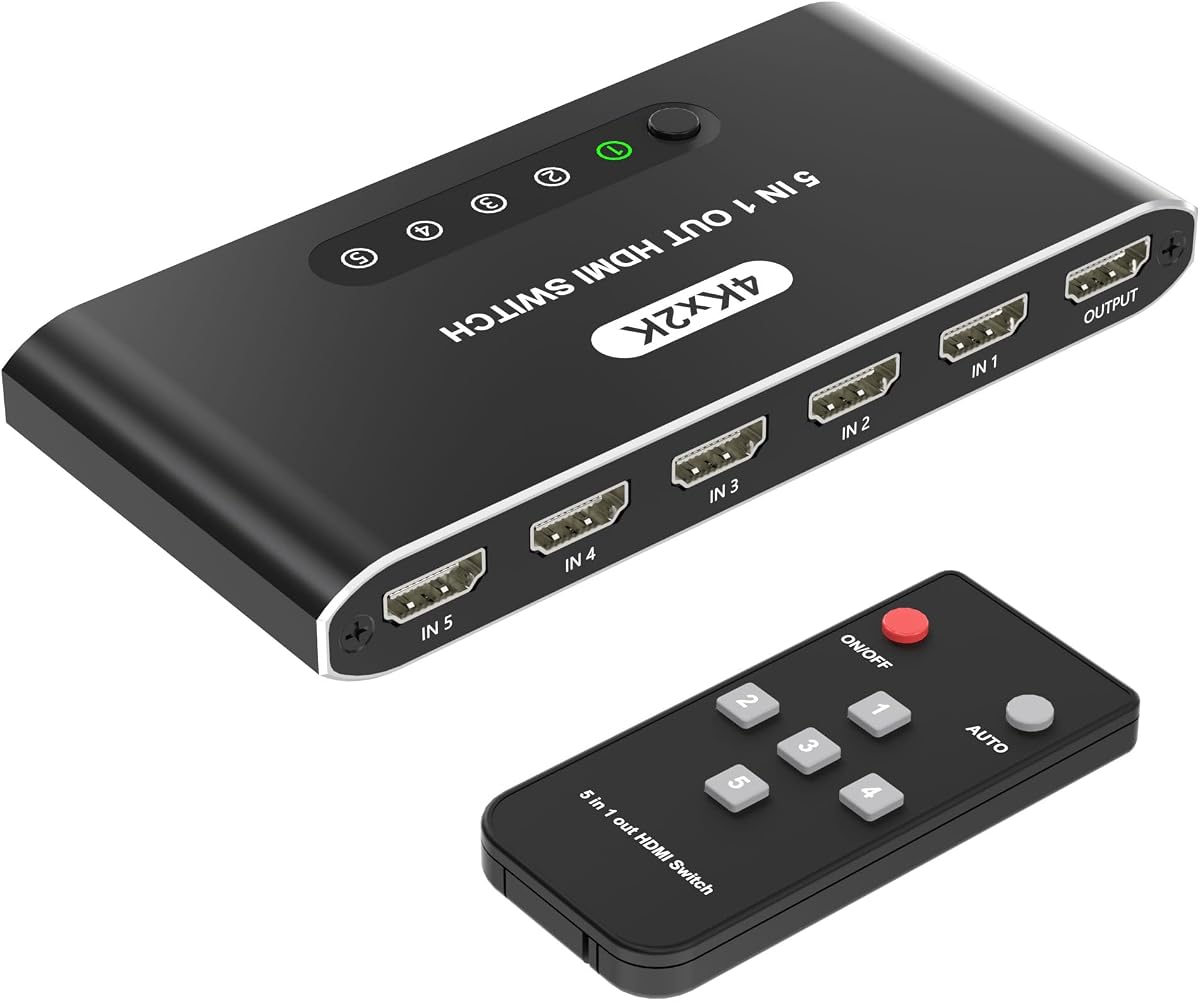
5 in 1 HDMI Switch with Remote
4.6Editor score
5K30 high-definition output
Automatic source detection
USB-powered operation
Compare the best 5 Port HDMI Switch options, reviewing resolution, bandwidth, switching modes, remote controls, device compatibility, and setup needs for
A 5 Port HDMI Switch gives multiple consoles, streaming boxes, Blu-ray players, and computers access to one television or projector without repeatedly reconnecting cables. A worthwhile model should balance clean signal transmission, convenient source selection, dependable power, and compatibility with the displays and devices already in your entertainment center.
We compared ten five-input HDMI switches based on the specifications and features listed in their product information. The guide covers supported resolutions, refresh rates, bandwidth, HDR and audio formats, remote or button controls, automatic switching, cable-length limitations, included accessories, and important restrictions involving ARC or eARC.
Each pick highlights a different use case, from a straightforward 4K model to high-bandwidth options for 8K displays and demanding gaming setups. Ratings and product details can change over time, and current prices fluctuate, so shoppers should verify the latest specifications, accessories, and availability before purchasing.
4.6Editor score

4.7Editor score

4.6Editor score
The comparison below places all ten switches by resolution, bandwidth, switching methods, and major compatibility considerations, making it easier to identify the model that best fits your display, source devices, and preferred way of changing inputs.


The UGREEN HDMI Switch 5 in 1 Out combines five input ports with 4K at 60Hz support and a 4.3 rating. It stands out as a versatile option for homes that alternate among gaming consoles, streaming devices, Blu-ray players, and computers without wanting a complicated installation.
We may earn a commission when you buy through this link, at no additional cost to you.
Its 18Gbps bandwidth supports 4K at 60Hz, 2560 by 1440 at 120Hz, and 1080p at 240Hz when suitable cables and source equipment are used. HDR, VRR, 3D, and CEC support strengthen its appeal for modern televisions and compatible gaming systems, while five LEDs make the selected source easy to identify.
Switching is handled by the included remote or a physical button, and the remote reaches up to 33 feet. The important limitation is that automatic switching is not supported, so users must select sources deliberately. It also does not support ARC or eARC, and the power adapter and HDMI cables are not included.
This is the strongest general recommendation for a mixed entertainment system because it combines useful modern features with broad source compatibility. Choose it when you want manual control, 4K60 output, VRR, and HDR support, and you are willing to connect it to a suitable power source.
Five inputs provide ample room for consoles, streaming sticks, disc players, and PCs. The switch is compatible with numerous HDMI devices, including current and older gaming hardware, Apple TV, Roku, Fire TV, projectors, and notebooks.
VRR and 4K60 support make this a practical choice for mixed gaming and media setups. To preserve the stated high-resolution performance, the combined input and output cable length should remain within the specified limit.
We may earn a commission when you buy through this link, at no additional cost to you.
The Acer 5 in 1 Out HDMI Switch delivers 4K at 60Hz, HDMI 2.0 compatibility, and a 4.1 rating in a straightforward entertainment hub. It is a logical option for households or offices that need to connect several HDMI sources to one television, projector, or presentation display.
We may earn a commission when you buy through this link, at no additional cost to you.
Its 18Gbps transmission capacity supports high-resolution video along with HDR, 3D, and high-bandwidth audio formats. Users can change sources through the included remote or the physical controls, and five LED indicators reveal the active input. The metallic-style enclosure and bottom vents are designed to assist with durability and heat dissipation.
Automatic switching is unavailable, which may inconvenience users accustomed to a receiver that changes inputs by itself. The package includes a USB-A to USB-C power cable but not a power adapter, remote batteries, or HDMI cables, so those essentials may need to be supplied separately.
Pick this model for a straightforward 4K60 switch in a living room, office, or conference room. Its feature set is well matched to PS5, Xbox, Nintendo Switch, Roku, Apple TV, laptop, and projector users who prefer deliberate remote or button-based selection.
The five-input layout reduces the need to reconnect equipment whenever a console, media player, or computer is moved to the front of the room. It works equally well as a home-theater or shared presentation hub.
A wide-range IR receiver supports convenient source changes from a seated position. The front or top controls provide a useful fallback when the remote is not within line of sight or its batteries need replacing.
We may earn a commission when you buy through this link, at no additional cost to you.
This HDMI 2.1 Switch 5 in 1 Out targets high-end displays with support for 8K at 60Hz, 4K at 120Hz, and 2K at 240Hz. Its 4.3 rating reflects a feature-rich design aimed at modern gaming PCs, current consoles, advanced televisions, projectors, and other high-bandwidth equipment.
We may earn a commission when you buy through this link, at no additional cost to you.
The stated 48Gbps bandwidth provides headroom for demanding formats. Gaming-oriented functions include VRR, ALLM, and QFT, while HDR10+ and Dolby Vision are listed among the supported visual features. Sources can be changed with the remote, through manual controls, or by automatic detection when a signal becomes active.
A manual mode helps prevent accidental changes during competitive gaming or presentations, while automatic detection offers convenience in less critical situations. The package includes the switch, remote, manual, power adapter, USB cable, and an anti-slip mat. Two AAA batteries for the remote must be purchased separately.
This premium model makes the most sense for users with an 8K television, a 120Hz or 240Hz gaming display, and source devices capable of driving those modes. Its specifications offer a clear upgrade path for future high-end equipment, although the full benefit depends on compatible cables, GPUs, consoles, and displays.
The 48Gbps specification supports modern high-refresh formats, while VRR and ALLM cater to compatible gaming environments. Actual mode availability still depends on the source, display, graphics settings, and HDMI 2.1 cable quality.
Automatic detection makes daily switching easier when sources turn on reliably. Locking the unit into manual mode offers greater control in gaming tournaments, streaming sessions, or professional presentations where an unwanted source change would be disruptive.
We may earn a commission when you buy through this link, at no additional cost to you.
The Kinivo 550BN combines five HDMI inputs with 4K at 60Hz, an 18Gbps bandwidth rating, and a 4.4 customer rating. It is designed as a versatile hub for current consoles, streaming platforms, disc players, computers, projectors, and a wide assortment of legacy HDMI devices.
We may earn a commission when you buy through this link, at no additional cost to you.
HDR10, Dolby Vision, Dolby Atmos, VRR, ALLM, and HDCP 2.2 provide a generous feature set. Its 24K gold-plated connectors and aluminum alloy shell are intended to support stable connections and heat dissipation. Switching can be performed with the IR remote, the physical switch button, or automatic detection where supported.
The manufacturer specifically notes that automatic switching will not work with every device, including certain Apple TV, Xbox One, PS5, PS4, and Roku configurations. Its backward-compatible 2K120 mode should also not be confused with 4K120, so high-refresh 4K users should not assume the same level of gaming performance.
This is a strong choice for a household that values compatibility and a well-established support structure over cutting-edge 8K performance. Its two-year warranty and listed lifetime customer support add confidence, particularly when connecting an eclectic mix of modern and older entertainment devices.
The compatibility list spans current consoles, older PlayStation and Xbox systems, Nintendo hardware, streaming devices, set-top boxes, projectors, computers, and Raspberry Pi. That breadth is valuable for mixed-device homes and secondary viewing spaces.
HDR10, Dolby Vision, Dolby Atmos, VRR, and ALLM provide broad appeal for modern televisions and compatible consoles. Gold-plated connectors and an aluminum enclosure complement the switch with a more permanent-looking construction.
We may earn a commission when you buy through this link, at no additional cost to you.
The UGREEN 8K HDMI Switch offers five inputs, 8K at 60Hz, and 4.2 rating in an aluminum enclosure. It is aimed at gamers and home-theater users who want more than standard 4K capability without moving to the very highest-bandwidth category in this list.
We may earn a commission when you buy through this link, at no additional cost to you.
Its listed 40Gbps bandwidth supports 8K at 60Hz and is backward compatible with 4K at 60Hz and 1080p at 240Hz. The feature set includes HDMI 2.1, 3D, Dynamic HDR10+, Dolby Atmos, HDCP 2.3, CEC, and VRR. Five LED indicators and both remote and box-button controls make source selection straightforward.
The main trade-offs are a lack of automatic switching and the absence of ARC pass-through. The specified high-refresh cable guidance is also restrictive: the input cable should be within one meter and the output cable within two meters for the stated 8K60 performance. A power adapter is included, which simplifies setup.
Choose this model when your television or monitor supports 8K and your active equipment benefits from VRR or high refresh rates, but you do not need the absolute bandwidth of a 48Gbps switch. It is a compelling middle ground for a modern gaming-focused entertainment center.
The switch supports 8K60 and higher refresh modes when every part of the chain can support them. Source devices, display capabilities, settings, and cable quality all influence whether the highest listed mode is available.
The remote offers a control range of up to 33 feet, while a one-click physical control and five status LEDs help identify the active source. The included power adapter avoids uncertainty over obtaining the correct power supply.
We may earn a commission when you buy through this link, at no additional cost to you.
The OREI 8K HDMI Switch is a high-performance five-input switch with a 4.6 rating and a full 48Gbps FRL bandwidth rating. It is especially relevant to owners of 120Hz or 240Hz gaming monitors, high-end 8K televisions, and capable gaming PCs.
We may earn a commission when you buy through this link, at no additional cost to you.
The switch supports 8K at 60Hz, 4K at 120Hz, and 4K at 240Hz through Display Stream Compression. It also lists 4K120 4:4:4 12-bit and 8K60 4:2:0 12-bit support. Gaming features include VRR, ALLM, QMS, QFT, and SBTM, while HDR10+, Dolby Vision, HLG, Dolby Atmos, Dolby TrueHD, DTS:X, and LPCM broaden the media capabilities.
Automatic switching, front-panel controls, and the included IR remote provide several ways to manage sources. Reaching 4K240 requires a DSC-capable source, graphics processor, display, driver, cable, and EDID configuration, so the headline specification will not apply to every setup. The product's advanced feature set also demands compatible downstream and upstream equipment.
This is the strongest premium recommendation for a dedicated high-end gaming setup. It is less compelling when the connected display only accepts 4K60, but it provides useful headroom for advanced formats, smooth switching, and a broad range of next-generation sources.
The 48Gbps FRL rating gives this switch more bandwidth than most 5-in-1 models in the comparison. That makes it a sensible match for modern high-end GPUs, 8K panels, and refresh-rate-focused monitor configurations.
VRR and ALLM complement high-refresh output, while the extensive HDR and audio formats suit mixed gaming and home-theater use. The included remote and front controls offer convenient alternatives for changing sources.
We may earn a commission when you buy through this link, at no additional cost to you.
This 5 Port HDMI Selector Box is a straightforward option for users who need several sources connected to a single display but do not need 4K60 or high-refresh gaming modes. Its 4.1 rating reflects a practical design with automatic, manual, and IR remote switching.
We may earn a commission when you buy through this link, at no additional cost to you.
The switch supports 4K at 30Hz, 1080p, 720p, HDR, 3D, HDCP, and HDMI 1.4. It advertises input cables up to 16.4 feet and output cables up to 82 feet, though actual performance depends on source resolution, cable quality, and signal conditions.
Its 4K30 ceiling is the main limitation. Modern televisions may still accept 4K30, but gamers, high-end PCs, and owners of newer consoles may prefer a switch with 4K60, VRR, or 8K support. The metal body and vent-oriented construction help with heat dissipation, and no software is required.
This model makes sense for a secondary display, legacy console collection, basic conference room, or setup where 4K30 is the highest mode needed. It provides a broad choice of control methods and dependable basic connectivity without paying for advanced specifications that would go unused.
Automatic detection, the physical control, and the IR remote let users choose the method that suits their routine. The remote is particularly convenient when the switch is placed inside a cabinet or entertainment center.
The listed compatibility covers PS3, PS4, Xbox, Blu-ray players, PCs, televisions, and projectors. It is a practical option when the main goal is organizing several older or entry-level HDMI devices.
We may earn a commission when you buy through this link, at no additional cost to you.
The 5 in 1 HDMI Switch with Remote offers an approachable way to organize consoles and streaming devices while adding automatic source detection. Its 4.6 rating is among the strongest in the group, although the switch is limited to 4K at 30Hz.
We may earn a commission when you buy through this link, at no additional cost to you.
It supports 4K30, 1080p at 60Hz, 3D, and HD content with HDCP 2.2. A remote control with an included battery lets users change inputs from a couch, and the box automatically detects an active device. LEDs reveal which of the five inputs is currently selected.
USB power keeps the box simple to install because no separate power adapter is needed, and the power cable is included. The main compromise is image performance: 4K60, 4K120, 8K, and advanced gaming functions are outside the listed capabilities. Automatic switching can also depend on how quickly and consistently a source wakes.
This is a well-regarded choice for users who value convenience and a clean setup more than high-end specifications. It works well for Fire Stick, Roku, Apple TV, PS5, Xbox, a laptop, and other HDMI sources connected to a 4K television that is comfortable operating at 4K30.
The switch detects an active source and changes inputs without requiring a remote command. This is helpful for streaming devices that wake inconsistently or for users who frequently move between entertainment and gaming.
USB power removes the need for a bulky adapter, and the included remote battery improves the out-of-box experience. The package also includes the power cable, switch, remote, and manual.
We may earn a commission when you buy through this link, at no additional cost to you.
The HBAVLINK HDMI Switch combines 4K at 60Hz, 18Gbps bandwidth, and a 4.7 rating, the highest listed rating among these ten products. It delivers a balanced feature set for a broad range of modern homes without requiring 8K-oriented equipment.
We may earn a commission when you buy through this link, at no additional cost to you.
HDR10, 3D, Dolby Vision, Dolby Atmos, and CEC are among the supported features. Sources can be selected with the remote or the button on the unit, while intelligent automatic switching detects active devices. A built-in memory function restores the last selected input after a power cycle.
Source changes are stated to take approximately two to three seconds, which is worth considering for fast game sessions. The remote uses two AAA batteries that are not included, although a power adapter and manual are supplied. It also remains a standard 4K60-class switch rather than an 8K model.
This is the most balanced recommendation for households that want 4K60, automatic convenience, manual control, and useful memory behavior. It is especially suitable for PS5, Xbox, Fire TV, Apple TV, Roku, Chromecast, Blu-ray players, and mixed legacy HDMI equipment.
Automatic switching handles routine changes, while the physical button gives users direct control when needed. The memory function is a thoughtful addition that reduces repeated selections after reconnecting power.
The listed dimensions of 5.4 by 2.5 by 0.8 inches make the aluminum housing easy to accommodate in an entertainment center. Its compact footprint is useful where space and cable management matter.
We may earn a commission when you buy through this link, at no additional cost to you.
The BlueRigger HD545 provides five HDMI inputs, 4K at 60Hz, and a 4.4 rating. It is a practical middle-ground switch for people who want modern 4K performance, HDR10+, and remote operation without paying attention to the very latest HDMI bandwidth specifications.
We may earn a commission when you buy through this link, at no additional cost to you.
Its 18Gbps transmission supports 4K60 and 2K120, along with HDCP 2.3, HDR10+, and 3D. The advanced chipset and nickel-plated connectors are intended to provide stable, lossless audio and video transmission. Users can choose between manual switching and the included IR remote.
Unlike several competing models, automatic switching is not listed. The included power adapter should remain connected for optimal performance. While 2K120 is useful for compatible high-refresh displays, this is not a 4K120 or 8K switch, and its gaming-specific feature list is less detailed than that of the premium models.
Choose the BlueRigger for a conventional 4K60 entertainment center filled with mixed devices. Its broad compatibility list, straightforward controls, two-year warranty, and lifetime U.S.-based support make it an accessible option for everyday console and streaming use.
The 18Gbps bandwidth and 4K60 output align with the needs of most current televisions and consoles. HDR10+ and 3D support add flexibility without requiring an 8K-capable display.
PS5, PS4, PS3, Xbox systems, projectors, Apple TV, Fire TV, Roku, set-top boxes, DVD players, and Blu-ray players are all listed as compatible. That makes it a practical choice for households with varied media habits.
We may earn a commission when you buy through this link, at no additional cost to you.
The right HDMI switch depends less on the number of ports, which is the same across this list, and more on display capabilities, source formats, control preferences, power requirements, and cable limitations. These are the main factors to evaluate before buying.
Start with the highest resolution and refresh rate your television or monitor accepts, then work backward to the source devices. A 4K30 switch is adequate for some streaming and legacy setups, but 4K60 is the more broadly useful target for modern consoles and PCs. High-end users may prefer 8K60, 4K120, or even 4K240 support when the entire signal chain is compatible.
Choose a model whose maximum output matches your actual display rather than paying for unused capabilities.
Bandwidth indicates how much uncompressed video data the switch can handle. An 18Gbps design is commonly associated with 4K60-class operation, while 40Gbps and 48Gbps models support higher-resolution and refresh-rate combinations. The HDMI version alone does not guarantee the advertised output; source devices, cables, display settings, and the connected equipment all influence the result.
Match bandwidth to your intended resolution and refresh rate, and verify the required cable specifications.
VRR can reduce visual tearing on compatible displays, while ALLM can enable a display's low-latency gaming mode automatically. QFT, QMS, and SBTM may also appear on high-end models. These features require support from the source, graphics output, display, and game itself, so the switch should be considered one part of a compatible gaming chain.
Prioritize VRR and ALLM for competitive or high-refresh play, and check whether your console or PC actually enables them.
Manual buttons are dependable but require reaching the unit, while IR remotes offer comfort from a sofa. Automatic detection is convenient when a source reliably wakes and emits a signal, although some streaming devices and consoles may not trigger it consistently. A memory function that restores the previous input after power cycling is another useful convenience.
Consider automatic switching for everyday convenience, but retain manual or remote control as a reliable alternative.
HDR10, HDR10+, Dolby Vision, HLG, Dolby Atmos, Dolby TrueHD, DTS:X, and 3D broaden the switch's media compatibility. CEC can provide limited control over connected devices through the television, but it does not make the switch an audio extractor or guarantee universal control. Check whether your preferred audio format is carried through the selected mode.
Choose pass-through formats your display and sound system can actually decode, and treat CEC as a convenience rather than a guarantee.
Cable limitations vary significantly among these products. Some specify a combined input and output length of up to 10 feet for 4K60, while 8K models may require short input and output runs. Other switches advertise much longer cables for lower-resolution use. Premium HDMI 2.1 cables may also be necessary for 8K or 120Hz operation.
Measure your installation first and use quality cables that meet the required bandwidth for the desired mode.
Some models use a USB power connection, while others include a dedicated power adapter. A few packages omit the adapter, batteries, or HDMI cables, which can make the setup less convenient than the product description initially suggests. Always check the package contents before ordering, particularly if you need to place the switch inside a cabinet or operate the remote immediately.
Confirm that the necessary power supply, remote batteries, and connection cables are included or already available.
Several switches explicitly do not support ARC or eARC. If you rely on a television's built-in speakers and return audio through that path, you need a different arrangement, such as a compatible receiver or separate audio extraction device. The switch's physical design also matters: some models fit neatly into entertainment centers, while infrared remotes require line of sight to the receiver.
Verify audio-return requirements and remote placement before finalizing your setup.
Begin by identifying which five devices will occupy the input ports. Connect each source to the switch with an HDMI cable of the required length and quality, connect the switch output to the television or projector, and attach the appropriate power supply. If the unit uses USB power, connect the included cable to a suitable power source before testing the signal.
Power on the display and selected source, then change inputs with the remote, physical button, or automatic detection as supported. LED indicators should reveal the active port. If a high-resolution mode is missing, check the source resolution, display settings, cable specifications, HDCP status, and whether the connected cable exceeds the manufacturer's recommended length.
For maintenance, keep the enclosure in a ventilated area and avoid stacking it beneath equipment that could trap heat. Do not connect or disconnect cables while the system is powered unless the manufacturer permits it. Clean the exterior with a dry or lightly damp cloth, keep liquids away from the ports, and periodically confirm that the power connection and selected source remain stable.
A 5 Port HDMI Switch accepts signals from up to five HDMI source devices and sends the selected source to one display output. It reduces the need to reconnect cables whenever you want to use a different console, streaming box, disc player, or computer. Most models also provide remote, button, or automatic source selection.
A switch is better when you need to choose one active source among several devices, while a splitter normally sends one source to multiple displays. The products in this guide are switches, not one-to-five splitters. Their single output prevents simultaneous viewing of all five connected sources.
Yes, provided the console, television, switch, and cables support a common resolution and refresh rate. Modern gaming features such as VRR and ALLM work only when the entire chain is compatible. For high-end gaming, pay close attention to the switch's HDMI version, bandwidth, and cable requirements.
Some models do, while others are limited to 4K at 30Hz or focus on 8K output. The UGREEN, Acer, Kinivo, HBAVLINK, and BlueRigger models list 4K60 support, while the OREI and higher-bandwidth models are designed for advanced 8K and high-refresh combinations. Check the source and display capabilities as well.
Manual switching requires pressing a button or issuing a remote command whenever you change sources. Automatic switching detects a new active signal and changes to it without user input. Automation is convenient, but it may not work consistently with every streaming device, console, or sleep mode.
Not all of them do. The listed UGREEN HDMI Switch models specifically do not support ARC or eARC, and buyers should verify the same detail for any model they are considering. If you need television audio returned through an audio system, choose a compatible receiver or audio extraction device rather than assuming a basic switch will handle it.
You need sufficiently capable cables for the resolution and refresh rate you intend to use, especially with an 8K switch. An 8K product does not guarantee 8K output with an older cable. Models with 8K60 specifications generally require HDMI 2.1 cables, and shorter or certified premium cables may be preferable.
Requirements vary by model. Some include a power adapter, others use an included USB power cable, and at least one product in the list does not include the power adapter. Follow the supplied instructions and keep the switch connected to power during use for stable performance.
The UGREEN HDMI Switch is the strongest all-around option for a mixed 4K entertainment system, combining 4K60, gaming features, broad device compatibility, and remote control. The HBAVLINK model stands out for 4K60 performance, automatic switching, and input memory, while the OREI 8K model leads the premium category with 48Gbps bandwidth and support for exceptionally high refresh rates.
Prioritize the features your current equipment can actually use. A 4K30 model may be sufficient for basic streaming, but 4K60 is a better target for modern consoles and PCs. High-end users should also examine VRR, ALLM, DSC, bandwidth, and cable length, while anyone relying on television audio return should confirm ARC or eARC status before ordering.
Ratings, accessory bundles, firmware behavior, and prices can change, and product listings may be updated over time. Before making a final purchase, check the current specifications, package contents, cable guidance, compatibility notes, and availability on the linked product page.