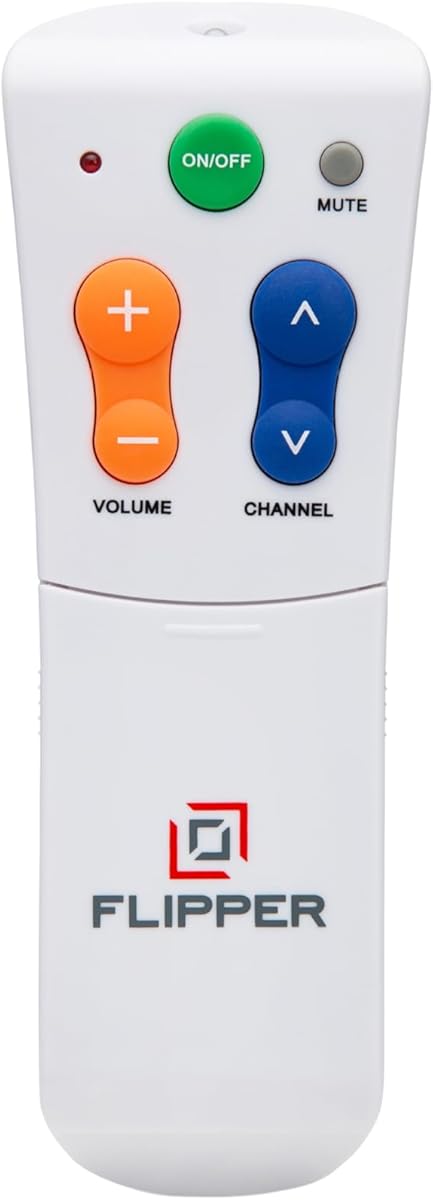
Flipper Big Button TV Remote
4.2Editor score
Four color-coded basic buttons
Customizes 25 favorite channels
Controls TVs and set-top boxes
Discover the best easy to use TV remote for seniors by comparing large buttons, programming, backlighting, device support, and everyday usability.
An easy to use TV remote for seniors should make everyday viewing less frustrating, not introduce another complicated device. Large controls, clear labeling, visible buttons, straightforward programming, and comfortable handling matter most for users with low vision, limited dexterity, memory changes, or difficulty distinguishing small symbols.
This guide compares ten remotes using the product information provided, focusing on button size, control layout, TV compatibility, programming requirements, backlighting, multi-device support, and helpful extras. It covers remotes for traditional television viewing as well as models that add streaming navigation, customizable channels, protective accessories, or learning functions.
Each pick highlights a distinct approach to senior-friendly control, from minimalist remotes with only essential functions to illuminated models and universal remotes designed for several brands. Ratings and availability can change, and prices also vary over time, so readers should confirm current product details before purchasing.
4.2Editor score

4.4Editor score

4.3Editor score
The table below compares all ten remotes by their primary senior-friendly features, including button visibility, setup, television compatibility, and device-control options. It is intended to make it easier to identify the model that matches a particular television setup and daily viewing habits.


The EZclicker Big Button Universal TV Remote is a practical traditional-TV replacement with a 4.2 rating. Its defining feature is an accessible layout built around large universal controls, an extra-large enter button, and tactile feedback. Those details make it a sensible option for seniors who have trouble finding small buttons, pressing a crowded keypad, or judging whether a command has registered.
We may earn a commission when you buy through this link, at no additional cost to you.
The remote is designed for TVs from leading manufacturers rather than for streaming boxes. Programming follows a straightforward procedure: turn on the television, point the remote toward it, and hold the Mute and Volume+ buttons together for as long as needed, up to 60 seconds. Releasing them when the volume changes completes the relevant step. The approach may require more patience than a brand-preset button, but it avoids complicated onscreen navigation.
Its strongest trade-off is limited scope. The product explicitly does not work with cable boxes, Firestick, or Roku Stick, and it is not a streaming remote. That means it is best for households whose television receives conventional broadcast programming or whose cable or streaming functions are handled separately. The 7-by-2-by-1-inch body is also a positive, remaining easy to hold and store without feeling bulky.
This EZclicker is most appropriate for a senior who mainly needs power, volume, channel, and navigation controls for a compatible television and prefers visible, substantial buttons over a feature-dense layout. It is also a sensible gift option because the setup process is explained directly and the physical design communicates its purpose. Buyers should confirm the compatible television model list before ordering, especially if the household relies on a set-top box.
The extra-large enter key and enlarged standard controls reduce the precision required for common actions. Tactile feedback also helps users distinguish the buttons by touch, which can be particularly useful in low light or when vision is limited.
This model focuses on basic television control rather than app navigation. It works best when the user does not need one remote to operate the television, cable box, and streaming platform together.
We may earn a commission when you buy through this link, at no additional cost to you.
The Flipper Big Button TV Remote has a 4.2 rating and is built around a remarkably clear idea: show only the controls needed for ordinary television viewing. Its face contains four large, color-coded buttons for power, volume, channel, and mute, while additional controls remain hidden until they are needed. That clean separation between daily and occasional functions is especially valuable for older adults, caregivers, and people living with dementia or memory difficulties.
We may earn a commission when you buy through this link, at no additional cost to you.
Color is used functionally rather than decoratively. Green identifies power, orange handles volume, blue handles channels, and gray marks mute. Because the labels are large and the controls are tactile, a user can often identify an action by appearance or position without learning a dense arrangement of nearly identical keys. The remote can also be programmed with up to 25 favorite channels, turning channel changes into a short trip through familiar options rather than an extended hunt through hundreds of channels.
Flipper goes beyond a television-only remote by supporting basic functions on many major TV brands, major cable and satellite providers, and compatible soundbars and infrared devices. The product information lists support for brands such as Samsung, Sony, LG, Vizio, Toshiba, Panasonic, Insignia, and Hisense, plus providers including Xfinity, Spectrum, DirecTV, Dish, AT&T, and TiVo. Compatibility is still important to verify before buying.
The central limitation is streaming-app navigation. Although the remote controls basic television functions on smart TVs, it lacks navigation controls for Netflix, YouTube, Prime Video, Hulu, Roku, Google TV, Apple TV, and Fire TV. It also requires two AA batteries, which are not included. This is nevertheless the strongest pick for a household that wants one unusually understandable remote for broadcast, cable, or satellite viewing and prefers fewer exposed buttons over a feature-packed layout.
Keeping the everyday face limited to power, volume, channel, and mute makes the remote easier to understand and remember. Users do not have to search among many small keys to locate the control needed at that moment.
Preprogramming up to 25 favorite channels gives the user direct access to familiar content. For a senior who cannot comfortably remember channel numbers, this feature can make routine viewing feel substantially more independent.
We may earn a commission when you buy through this link, at no additional cost to you.
The GE BigEZ OneTouch Universal TV Remote carries a 4.3 rating and balances accessibility with more familiar universal-remote features. It is designed for Samsung, LG, Vizio, Sony, and Roku televisions and can also operate one auxiliary device such as a cable box, set-top box, streaming player, soundbar, or disc player. That makes it a strong option for households that need more than basic television control without confronting a dense premium remote.
We may earn a commission when you buy through this link, at no additional cost to you.
Visibility is addressed through an extra-large white body, oversized buttons, and a fully backlit keypad. A blue volume button and orange channel button provide additional visual differentiation. These details are especially helpful for users with low vision or color vision limitations, while the larger key area reduces the chance of pressing an adjacent function. The directional pad also permits menu navigation on compatible televisions.
Programming is refreshingly direct. After inserting two AA batteries, the user presses the TV button corresponding to the television brand, presses power, and operates the television normally. The AUX button is preset for Roku boxes, though it can be reprogrammed for another device. Free U.S.-based technical support and online setup videos are also available, which can be useful for a family member helping with initial configuration.
The GE is well suited to a senior who wants a large, illuminated remote with straightforward setup and potentially one additional device. The main limitation is that the auxiliary function is preset for Roku, so owners of a different streaming or set-top device may need to reset that button. It also needs two AA batteries, which are not included. For compatible televisions and a simple additional device, it offers one of the strongest combinations of visibility, setup convenience, and control.
The entire keypad illuminates, making the controls easier to locate without relying on the television screen for guidance. This is particularly useful during evening viewing or for anyone who struggles to distinguish printed labels in poor light.
Preset television-brand buttons reduce the number of programming steps. A senior or caregiver can select the matching brand, test power, and begin using the familiar controls without navigating a technical menu.
We may earn a commission when you buy through this link, at no additional cost to you.
The EZclicker TV Remote for Seniors is a compact traditional-remote option with a 4.2 rating. Like the other EZclicker model in this guide, it emphasizes large universal controls, tactile feedback, and a simplified design intended for seniors and people with low vision or limited dexterity. The distinction is its shorter 6-inch body, which may be easier to hold, carry between rooms, or place in a small storage area.
We may earn a commission when you buy through this link, at no additional cost to you.
Its face is not burdened with app-specific controls. The result is a remote that keeps the visual hierarchy uncomplicated and concentrates on commands used during conventional television viewing. Large buttons reduce the precision needed for power, volume, channel, and navigation, while tactile feedback provides confirmation when the user cannot easily see whether a key has been pressed.
Programming takes a hold-button approach. The user turns on the TV, points the remote toward the screen, and holds the Mute and Volume+ buttons together for up to 60 seconds. When the television's volume changes, the user releases the buttons. This is less selective than a remote with separate preset keys for several brands, but the procedure is direct and does not require a phone, website, or complicated code entry.
Compatibility is the essential caveat. The remote is for TVs only and explicitly does not support cable boxes, Firestick, Roku Stick, or streaming applications. A household whose television is connected to a separate box may need more than one remote unless the user only requires basic television power and volume. For a senior who wants an uncomplicated replacement for a compatible television's original remote, however, this is a lightweight, approachable choice.
At 6 inches long, the remote is easier to grip and store than many full-size alternatives. Its compact dimensions may also make it more approachable for a user who feels overwhelmed by a crowded handset.
The model is designed for basic television control and should not be selected by a viewer expecting to launch apps or operate a cable box. Checking the supplied compatibility list before purchase helps prevent disappointment.
We may earn a commission when you buy through this link, at no additional cost to you.
The Big Button Universal Remote earns a 4.4 rating, tying for the highest customer rating among the ten products considered. It offers a combination of enlarged buttons, tactile feedback, broad television compatibility, and simple operation. The layout includes an extra-large enter button and prominent universal controls intended to reduce both visual uncertainty and accidental presses.
We may earn a commission when you buy through this link, at no additional cost to you.
Its compatibility list is notably broad, covering Samsung, LG, VIZIO, Sony, Hisense, Philips, Panasonic, Sharp, and other televisions. The product information specifically notes that it does not support streaming devices, cable boxes, or unrelated TV platforms. That distinction matters because a television brand appearing on the compatibility list does not mean the remote can operate a separate set-top device connected to that television.
For Samsung owners, the setup is especially convenient. Once batteries are inserted, the remote can begin working with a compatible Samsung television without programming or pairing. Other compatible brands may require setup according to the included instructions. This is a useful middle ground between a preset remote with limited brand choices and a more complex model that asks the user to identify and enter a device code.
The remote is a good fit for a senior who primarily watches conventional programming on a compatible television and values immediate use over multi-device flexibility. Its 4.4 rating is encouraging, although ratings do not guarantee that every television model or signal type will work. Prospective buyers should confirm the full compatible-model list, keep the remote pointed at the television during setup, and use fresh batteries for the most reliable operation.
Support for numerous major television manufacturers makes this a more versatile basic remote than a single-brand replacement. It may suit families with different televisions across the home, provided each set is on the compatible list.
The absence of required programming for Samsung televisions removes a common source of setup frustration. Other supported brands may need a brief configuration process before normal use.
We may earn a commission when you buy through this link, at no additional cost to you.
The Large Button TV Remote Control has a 4.4 rating and focuses on an uncomplicated layout with extra-large, clearly marked keys. It is intended for elderly users and people with limited vision who want easy access to common television functions. Its appeal comes from physical clarity rather than elaborate automation, making it a straightforward option for traditional viewing.
We may earn a commission when you buy through this link, at no additional cost to you.
The simple arrangement helps users understand where power, channel, volume, and navigation controls are located. Large buttons are easier to see and press, which can reduce misclicks when fine motor control or eyesight is limited. The listing also describes the body as lightweight and ergonomic, with a shape intended to sit comfortably in the hand during extended viewing sessions.
The remote supports most major television brands, but the product information excludes DVD players, cable boxes, niche television brands, and voice-remote systems. It is therefore not a universal solution for a household with multiple devices. The design centers on controlling a television rather than providing a smart-phone-style remote for streaming applications.
This model is a strong recommendation for a senior who watches broadcast television or uses another remote for a cable box and wants a separate, easy-to-see controller for the television itself. Its 4.4 rating places it among the strongest choices in the guide, while the clear layout supports a straightforward learning curve. Buyers should confirm their television brand is covered and avoid expecting voice commands, app launching, or integrated box control.
A plain arrangement of large, clearly marked controls makes the remote easier to learn than a dense multi-purpose handset. The user can locate a function by sight and use the same placement every day.
The lightweight, ergonomic construction is intended to reduce hand fatigue while watching television. Comfort is especially valuable for users who may have arthritic hands or limited grip strength.
We may earn a commission when you buy through this link, at no additional cost to you.
The Philips BigEZ OneTouch Remote is a 4.2? No: it carries a 3.8 rating, the lowest among the products in this guide, while offering a broad and accessible feature set. It is a full-size universal remote with a fully backlit keypad, large blue volume button, large orange channel button, and directional navigation controls. These features make it more comprehensive than the most minimal traditional remotes.
We may earn a commission when you buy through this link, at no additional cost to you.
The remote provides preset device buttons for Samsung, LG, Sony, Vizio, and Roku televisions. OneTouch setup allows the user to program a compatible television after inserting two AA batteries with a single button press, avoiding a lengthy sequence of code searches. The AUX button starts out programmed for Roku boxes but can be reset for a different set-top box, cable or satellite receiver, streaming player, soundbar, or similar device.
Unlike many simple senior remotes, this model includes play/pause, fast-forward, and rewind capability for smart televisions and streaming devices. That makes it more useful for a household that wants to navigate selected apps in addition to changing channels and adjusting volume. It still does not eliminate the need to understand each streaming platform's menus, but the additional navigation keys are more capable than a basic traditional remote.
The 3.8 rating calls for a measured recommendation. Buyers should weigh the useful backlighting and OneTouch setup against the weaker customer feedback relative to the leading options. The remote is best for a senior whose household uses a supported television brand and a common streaming platform, and who benefits from full illumination. It is also a strong candidate for caregivers who want access to technical support and online programming videos.
The illuminated keypad makes labels and controls visible in a dim room. Separate large blue and orange keys for volume and channel add useful visual cues without requiring the user to memorize symbols alone.
Playback and directional controls extend the remote beyond channel changing. These functions are helpful for compatible smart televisions and streaming devices, although app behavior still depends on the television and service.
We may earn a commission when you buy through this link, at no additional cost to you.
The Big Button Universal Remote for Seniors has a 3.0 rating, the lowest customer score in this comparison. Despite that weaker feedback, its listed design addresses a clear audience with a simple layout, extra-large buttons, and tactile controls. It is positioned for elderly users, people with low vision, and anyone who prefers a traditional remote without voice functionality or a dense collection of smart features.
We may earn a commission when you buy through this link, at no additional cost to you.
The primary benefit is visual and physical accessibility. Large controls are easier to locate, and the clear arrangement can be learned more quickly than a compact multi-function remote. Tactile feedback makes it easier to confirm a press. The product is intended as a replacement for a basic television remote rather than as a tool for managing several connected devices.
Compatibility covers most major television brands but excludes DVD players, cable boxes, Firestick, Roku Stick, and streaming applications. Voice remote control is also unavailable. These limitations are significant for households that depend on a cable service or a streaming stick, because users may need to keep another remote nearby.
This model may still be worth considering when a compatible television is the only device that needs control. Its low rating encourages more caution, so checking the compatible television list and customer feedback is important. It is best suited to a senior who wants the smallest possible learning burden and does not need advanced navigation. For more established support or a richer feature set, options with higher ratings and clearer compatibility documentation may be preferable.
A short list of large controls is easier to remember than a crowded universal handset. This can be helpful for users who experience confusion when too many similar buttons are presented at once.
The remote supports televisions but not common boxes, streaming sticks, or app navigation. Verifying the exact television model and how the household receives programming prevents an unsuitable purchase.
We may earn a commission when you buy through this link, at no additional cost to you.
The Backlit Big Button TV Remote Replacement for Samsung TV has a 4.4 rating and stands out for immediate operation, strong visibility, and useful included accessories. It is designed specifically for Samsung smart televisions across LCD, LED, HDTV, UHD, OLED, 3D, and 4K categories. The result is a focused alternative for a Samsung household that values simplicity more than universal device support.
We may earn a commission when you buy through this link, at no additional cost to you.
The oversized, large-print buttons remain illuminated for 30 seconds, allowing a user to locate controls without squinting or fumbling in a dark room. The lighting is particularly relevant to older adults and people with poor vision, while the soft silicone material is designed to feel gentle under sensitive fingers. The ergonomic shape also allows the buttons to be reached with one hand without excessive stretching.
Setup is almost entirely eliminated. After inserting batteries, the remote can control a compatible functional Samsung television without pairing or programming. The package includes a protective silicone cover and a mount hook. The cover helps protect against cracks and spills, while the hook keeps the remote from disappearing between couch cushions and places it within reach. These are meaningful advantages for users with tremors, poor vision, or a tendency to misplace small objects.
The product information specifies a 49-foot range and a 0.1-second response time, along with high-strength ABS plastic and soft silicone construction. Compatibility is the main constraint: it is not designed for streaming devices, cable boxes, or other television brands. This Editor's Choice is therefore ideal for a senior who primarily uses a Samsung television, values illumination and no programming, and benefits from a protected, easy-to-store remote.
The buttons illuminate long enough to locate a control during a brief adjustment without leaving lights on continuously. This supports nighttime use while keeping the operating approach uncomplicated.
A silicone cover adds protection against ordinary household damage, while the supplied hook provides a dedicated home. Keeping the remote in a consistent visible location is especially helpful for a user who may otherwise search for it repeatedly.
We may earn a commission when you buy through this link, at no additional cost to you.
The Anderic RR1004 Big Button Remote carries a 4.0 rating and is designed for simplicity, controlled environments, and the steady use of traditional infrared televisions. It is especially relevant to assisted living facilities, home-care settings, and households seeking a remote with very few exposed commands. Extra-large glow-in-the-dark keys make the core functions easier to locate in low-light conditions.
We may earn a commission when you buy through this link, at no additional cost to you.
The everyday interface is intentionally minimal. It includes Power, Volume, Channel, Mute, and Closed Captioning, eliminating menus and many secondary buttons. That reduced density can be helpful for seniors and caregivers because the number of actions a user must understand remains small. The large key shapes also support users with low vision, arthritic hands, or limited dexterity.
The remote is preprogrammed for LG televisions and includes instructions for other compatible infrared brands. Its learning function can copy commands from an existing infrared remote, potentially adding an input or streaming-related button. This is a useful distinction, but the feature cannot copy RF or Bluetooth commands. Line of sight and adequate signal strength are required, and the product cannot guarantee simultaneous television and cable-box control across every setup.
The Anderic is best for a household using a standard infrared television, particularly an LG set, that prioritizes minimalism over app navigation. It is less appropriate for Roku, Fire TV, Jubilee, Xfinity, or other RF and Bluetooth systems. Initial programming may require assistance, but the simple end state is a dependable remote for essential viewing. Its focus on a small set of large, identifiable functions is well aligned with the needs of care facilities and shared household spaces.
Keeping only power, volume, channel, mute, and closed captioning on the main interface makes the remote easier for new users to learn. Caregivers can explain the limited controls without introducing a complicated menu structure.
The learning function can reproduce commands from a compatible infrared remote, offering a way to add specific functions. It does not make the product compatible with Bluetooth or radio-frequency devices, so the original remote's signal type matters.
We may earn a commission when you buy through this link, at no additional cost to you.
The right senior-friendly remote depends on the television, connected devices, vision needs, hand dexterity, and tolerance for setup. Comparing those factors before ordering is more reliable than choosing solely by button size, because some models trade simple daily control for broader compatibility or extra features.
Begin by identifying the television brand and model, then determine whether it uses infrared, Bluetooth, or radio-frequency control. A traditional universal replacement may work with a compatible infrared television but fail with a voice remote or a Bluetooth-only television. Some products are intentionally limited to one brand, while others support many major brands. Verify the complete compatible-model list rather than assuming that a familiar brand name guarantees support.
In short, match the remote to the exact television and its signal type before considering any other feature.
A television remote does not automatically control a cable box, set-top box, Firestick, Roku device, or other streaming hardware. Some senior remotes coordinate basic functions across a television and one external device, while others are strictly TV-only. The Flipper supports television and major set-top providers, the Philips and GE models can handle an auxiliary device, and several EZclicker-style remotes exclude boxes and streaming platforms. Identify every device used for viewing before making a selection.
In short, count the connected devices and verify each one, rather than assuming a universal label includes every component.
Large buttons are only helpful when they are easy to distinguish and reach. Look for an extra-large enter or OK key, separated volume and channel controls, high-contrast labels, and a layout without closely packed functions. Users with tremors or arthritis benefit from tactile feedback and distinct shapes or colors, not merely larger dimensions. A minimalist face with four daily controls may be easier to remember than a full-size remote with dozens of keys.
In short, choose buttons that are visible, separated, tactile, and easy to reach without looking closely.
Low vision and poor lighting can make even a clear button difficult to locate. Fully backlit keypads illuminate the entire control area, while models with glow-in-the-dark keys remain visible in a dim room without continuous illumination. Color coding can further help, particularly when blue and orange distinguish volume from channel. Consider the viewing environment, the user's visual acuity, and whether a light-colored or dark-colored body is easier to find against the surrounding furniture.
In short, prioritize backlighting or glow-in-the-dark keys when the television is watched in low light.
No-setup remotes are the easiest for a senior who cannot comfortably complete programming, and some are immediately ready for a specific television brand. Other remotes use a one-button brand selection or a short hold-button procedure. Learning-function remotes can be more flexible but may require assistance. A simple process is valuable only if the person setting it up understands it, so read the instructions and determine whether a family member or caregiver can provide initial support.
In short, choose the least demanding setup that still supports the required television and devices.
Basic power, volume, and channel controls are enough for conventional viewing, but a smart television may still require navigation for menus and applications. The Philips model includes directional and playback controls, while the Flipper deliberately omits streaming-app navigation. Basic remotes that cannot open apps may still control the television's power and volume, but they cannot provide a complete smart-TV experience. Choose according to how the user actually watches rather than assuming every television requires the same navigation tools.
In short, add directional and playback buttons only when the user genuinely navigates smart-TV menus and streaming services.
Favorite-channel presets can be valuable for users who cannot remember numbers, and a learning function can reproduce selected commands from an existing infrared remote. Protective covers help where spills or drops are concerns, while a storage hook keeps the remote from disappearing between cushions. Technical support and online programming videos are also valuable because remote setup can be confusing even for a straightforward product. These extras are most useful when they solve a specific problem in the home.
In short, favor accessories and support that address known difficulties rather than adding novelty features.
The remote should fit comfortably in the user's hand without requiring a tight grip. A lightweight, balanced body can reduce fatigue, while a slightly larger form may be easier to hold securely. Soft silicone surfaces, tactile keys, and high-strength plastic are useful for users with sensitive fingers or limited grip strength. Size also affects storage: a compact model may be easier to place in a consistent location, but it should still offer enough separation between buttons to prevent accidental presses.
In short, select a comfortable body with clearly separated keys, then establish a fixed storage place for it.
Start by confirming the television and any cable or streaming device that must be controlled. Install the specified batteries, noting the required type and quantity, and test the remote from a reasonable distance. If programming is required, follow the brand-button or hold-button sequence exactly while keeping the remote pointed at the television. Allow enough time for the signal to register, and avoid pressing other buttons during the setup process.
Create a simple routine after setup. Teach the user where power, volume, channel, mute, and navigation controls are located, then practice those functions in a familiar order. If the remote includes favorite channels, program only the stations used most often and label them in a way that matches the color-coded buttons. Keep the remote in the same location each evening; a hook, charging area, or small table-mounted tray can reduce repeated searching.
For care, remove the batteries if the remote will be stored for a long period, wipe the surface with a dry or lightly damp cloth, and avoid abrasive cleaners or liquid entering the button gaps. Replace weak batteries with the specified type, and keep the remote away from food, drinks, and extreme heat. If commands become inconsistent, check the orientation, battery condition, signal-blocking objects, and the compatible-device list before assuming the remote has failed.
The easiest remote is usually the one with the fewest visible functions, the largest distinct buttons, and the clearest labels. A fully backlit model such as the GE BigEZ OneTouch is especially useful in dim rooms, while the backlit Samsung remote offers no programming and includes a cover and storage hook. The best choice still depends on the television brand and the user's vision needs.
Not necessarily. Many large-button remotes control only a compatible television and explicitly exclude cable boxes, Firestick, Roku Stick, and streaming applications. The Philips BigEZ OneTouch includes navigation and playback controls for compatible smart televisions and streaming devices, while the Flipper can operate some set-top boxes but cannot navigate streaming apps. Always compare the remote's supported device list with the actual viewing setup.
Programming requirements vary considerably. The Samsung-focused backlit remote and the Big Button Universal Remote can begin working with a compatible Samsung television without programming, while the GE and Philips models use a brand-specific OneTouch process. EZclicker remotes use a hold-button procedure, and the Anderic can learn commands from another infrared remote. A caregiver can make the initial setup easier, but choosing the simplest required method is best.
Extra-large, widely separated buttons generally require less precision than a standard compact keypad. Tactile feedback is also valuable because it confirms a press without requiring the user to look closely at the remote. Models with a large enter button, color-coded volume and channel controls, and a lightweight or silicone-covered body may be more comfortable for users with stiff or painful fingers.
A senior-friendly remote can replace a voice remote for basic television functions if the television uses a compatible infrared signal. It generally cannot reproduce the microphone, voice search, and app-launching features of a modern voice remote. The Big Button Universal Remote for Seniors explicitly does not offer voice control, and several other models are also intended for traditional television functions rather than voice search.
Some do, but compatibility is model-specific. The Flipper supports basic control of a television and compatible cable or satellite box, and the GE and Philips models can be configured for one auxiliary device. Other remotes, including several EZclicker options, support televisions only. Check the listed providers, device types, and signal requirements before purchasing to avoid needing a second remote.
Place it in a consistent, easy-to-reach location and practice the same few actions. Programming favorite channels, labeling controls consistently, and keeping a written guide with pictures can reinforce the routine. If the user has low vision, choose good room lighting or a backlit model, and ensure the television and remote are positioned to maintain a clear signal path.
Replace the batteries first, then confirm that the remote is aimed directly at the television and that no object is blocking the signal. Recheck the television and box settings, including any soundbar or input control. If the remote was programmed, repeat the setup sequence. Persistent problems may indicate that the television or connected device uses an unsupported signal, such as Bluetooth or radio frequency.
The Flipper Big Button TV Remote is the most focused premium choice because it exposes only four daily controls, adds favorite-channel programming, and can handle compatible television and set-top-box functions. The GE BigEZ OneTouch offers an excellent backlit and relatively affordable all-around package, while the backlit Samsung remote provides no-programming operation along with a protective cover and storage hook.
Prioritize compatibility before features. The most spacious buttons and clearest layout cannot overcome an unsupported television, cable box, or streaming platform. For a user with low vision, backlighting and color coding deserve special attention; for someone with memory changes, a minimal four-button face and favorite channels may be more useful than extra navigation keys. Caregivers should also consider setup effort, battery requirements, storage, and access to support.
Before ordering, verify the exact television model, the connected viewing devices, the signal type, and the remote's complete compatibility list. Ratings can change and prices fluctuate, so check current product information and availability at the time of purchase. A careful compatibility check will do more to create a smooth daily experience than choosing solely on appearance.