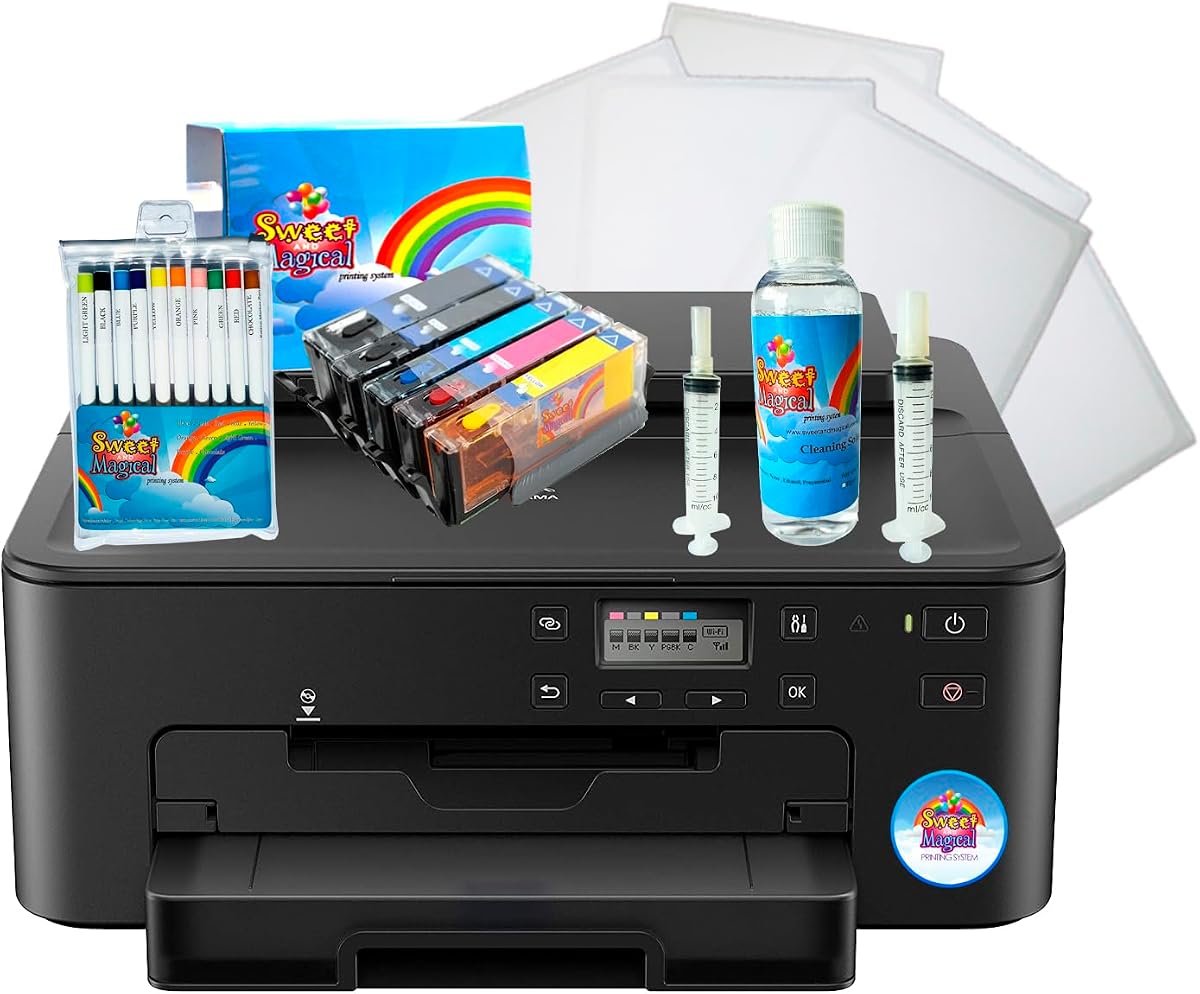
Cake Birthday Printer Bundle
4.2Editor score
Five ink cartridges included
Frosting paper and markers
Printhead cleaning kit
Frosting and wafer support
Decorating bundle format
Discover the best edible ink printers for cakes, frosting, wafer paper, coffee, and drinks, with features, compatibility, performance details, and care tips
Edible ink printers turn photographs, logos, messages, and illustrations into decorations for cakes, cupcakes, cookies, chocolates, coffee, and cocktails. A capable system should pair vivid output with foodsafe media, straightforward ink handling, accurate placement, and an easy workflow for both home bakers and professional dessert businesses.
This guide compares ten products that fall into several practical categories: all-in-one printer bundles, dedicated cake-image printing kits, consumable ink cartridges, a handheld coffee printer, and a replacement pod for the EVEBOT PrintPen. The evaluation considers included accessories, media compatibility, output details, ease of use, and the information supplied by each manufacturer.
Each review explains what the product is best suited to, where it stands out, and where buyers should temper their expectations. The top selections represent the strongest choices for broad cake decorating, bundled ink capacity, and premium beverage customization, while current availability, accessories, and pricing can change over time.
4.2Editor score

4.1Editor score

The table below compares all ten selections by product type, core capability, supplied accessories, and practical limitations, making it easier to distinguish complete printer bundles from ink, media, and handheld beverage-printing products.


The Ediblethingz Cake Topper Image Printer Bundle Kit is the most complete conventional printer package in this guide. Its 4.1 rating reflects a solid mix of useful hardware and generous edible-media supplies. Unlike products that provide only cartridges or a small replacement component, this bundle combines a wireless four-in-one printer, 50 sheets of 0.4-millimeter premium wafer paper, 12 supreme icing sheets, and a printer cleaning kit.
We may earn a commission when you buy through this link, at no additional cost to you.
Its standout strength is versatility. The printer supports print, scan, copy, and fax functions, while its 4800-by-1200-DPI resolution is suitable for detailed edible designs. A three-inch LCD touchscreen provides local control, and built-in Wi-Fi, AirPrint, and Mopria support make it possible to work from an iPhone, iPad, Android device, tablet, laptop, or PC. The 35-sheet automatic document feeder and automatic duplex printing add convenience for busy users, even though they go beyond the minimum needs of cake decorating.
The included media is particularly important. Starting with compatible 8.5-by-11-inch wafer paper and letter-size icing sheets reduces the need for a separate purchase before the first project. The cleaning kit also helps protect print quality over time. The tradeoff is that this is a full-size multifunction device, so buyers wanting a compact dedicated cake printer may find it larger and more complex than a handheld or specialized system.
This is the strongest recommendation for a baker who wants a complete desktop setup rather than a narrowly focused accessory. It suits households producing multiple decorated cakes as well as small food businesses that also value scanning, copying, and wireless workflows. Verify printer dimensions, food-printing software, and exact media handling before purchase, but as a ready-to-start bundle it offers the broadest support among the selections.
The bundle already includes substantial quantities of wafer paper and icing sheets, so new users can begin designing without immediately sourcing compatible media. The cleaning kit is another meaningful inclusion because routine printhead care can help maintain consistent output in a frequently used food-printing setup.
Wi-Fi, AirPrint, and Mopria support allow design files to be sent from several device families rather than restricting the workflow to a single computer. The touchscreen, duplex capability, and document feeder make it more practical for users who may also handle conventional office tasks.
We may earn a commission when you buy through this link, at no additional cost to you.
The Cake Birthday Printer Bundle is a budget-minded decorating system with a 4.2 rating, the highest rating among the complete bundles highlighted here. Its contents are designed around practical cake decoration: five ink cartridges, frosting paper, ten markers, and a printhead kit. The result is a more focused package than a conventional office printer bundle, with consumables positioned around birthday and celebration work.
We may earn a commission when you buy through this link, at no additional cost to you.
The inclusion of both frosting and wafer paper compatibility is important because bakers may work with different surfaces. Five cartridges reduce the likelihood of an immediate refill, while the ten markers add a manual way to add highlights, borders, messages, or small corrections. The printhead kit supports routine maintenance, which can be particularly valuable in a setup exposed to residue from specialty edible media.
The main limitation is that the supplied information is brief. It confirms the main media uses and the included accessories, but it does not provide resolution, printer dimensions, wireless support, paper dimensions, or a detailed description of the printer itself. Buyers should therefore treat this as a convenient all-in-one choice, but verify the machine specifications and confirm that it supports the editable designs they intend to print.
It is best for a first-time cake printer who prefers a package containing ink, media, markers, and maintenance supplies rather than assembling those pieces separately. It can also serve celebratory bakers who want dedicated frosting and wafer options. The recommendation depends on confirming compatibility with the user's preferred designs and software; within that limitation, it offers a generous, well-rated starter bundle.
Five cartridges, frosting paper, ten markers, and printhead supplies create a broader decorating package. That combination can be more useful for a beginner than purchasing only an ink set and discovering later that the required paper or maintenance materials are still needed.
The product is clearly oriented toward birthday cakes and festive desserts. Its media compatibility supports direct decoration workflows, although buyers should confirm dimensions and software requirements because those details are not provided in the available listing information.
We may earn a commission when you buy through this link, at no additional cost to you.
The Birthday Printer Bundle is a closely focused cake-printing package that includes five ink cartridges, 12 premium frosting sheets, ten markers, and printhead cleaning supplies. Unlike many general-purpose alternatives, it explicitly supports chocolate transfer sheets in addition to frosting and wafer paper, giving it useful flexibility across several dessert surfaces.
We may earn a commission when you buy through this link, at no additional cost to you.
Its three media options are a major advantage for users who decorate more than one type of treat. Chocolate transfer sheets are particularly useful when a project calls for a printed layer that can be placed onto a chocolate surface, while frosting and wafer sheets support direct decorative applications. Ten markers allow the user to finish designs manually, and the included cleaner supports upkeep of the printhead.
This listing does not have a numerical customer rating in the supplied information, so there is no basis for comparing it directly on rating strength. It also provides less detail about the printer hardware than the Ediblethingz bundle. That makes it difficult to judge resolution, connectivity, printing speed, or physical setup from the listing alone, and those points should be confirmed before buying.
The bundle is most appropriate for a celebratory baker who wants frosting sheets, wafer paper, and chocolate transfer capability in one kit. It may be especially appealing to someone who values manual markers as part of the finishing process. Confirm the printer's software, supported file formats, and exact media dimensions, then choose it if its included accessories align with the range of desserts you actually decorate.
The ability to print on frosting sheets, wafer paper, and chocolate transfer sheets is more useful than a single-media setup for many dessert makers. It supports different textures, finishes, and presentation styles without requiring separate equipment for each category.
Five cartridges, twelve frosting sheets, and ten markers provide the core materials for popular cake projects. The printhead cleaner helps complete maintenance needs, reducing the chance that a new user overlooks essential upkeep.
We may earn a commission when you buy through this link, at no additional cost to you.
The Tekmall Compatible 280XL and 281XL set has a 4.7 rating, making it the highest-rated product in this comparison. It is an ink-focused solution rather than an edible printer bundle, providing one large PGI-280XXL black, one small CLI-281XXL black, and cyan, magenta, and yellow cartridges. It is most relevant to buyers who already own a compatible Canon PIXMA printer and need ink for cake-image or other decorative printing.
We may earn a commission when you buy through this link, at no additional cost to you.
Compatibility is the defining benefit. The listed models cover a broad range of TS and TR series printers, including the TS702, TR8620a, TR8620, TS9520, TS9521C, TR8520, TR8500, TR7620, TR7520, TR7500, and numerous other supported models. The XXL format is presented as a high-capacity option that can reduce replacement frequency for home or office use.
The stated yields are substantial: 600 pages for the large black, 6,360 pages for the small black, and 830 pages for each color cartridge. Those figures are manufacturer-supplied specifications rather than results from an independent test, so actual output will depend on coverage and printing conditions. The package explicitly does not include Photo Blue, which matters for printers and projects requiring that particular pigment.
This product is a practical choice for someone who needs dependable ordinary ink across many supported models, especially where continuous printing volume matters. It does not include edible media, a printer, printhead supplies, or design software, so it is a supplemental purchase rather than a complete edible-printing system. Check the exact model number and color requirements before ordering.
The extensive list of supported PIXMA models is the strongest reason to consider this set. Buyers should locate their printer's exact model identifier and compare it with the listing, especially when purchasing a used machine or an older regional variant.
Large black and small black cartridges offer different yield profiles, while the three standard colors support ordinary color work. For repeated edible-image production, the advertised capacity may reduce interruptions, subject to actual page coverage and usage.
We may earn a commission when you buy through this link, at no additional cost to you.
This refillable 280XL and 281XL cartridge set combines one large black, one small black, and three color cartridges. Its 4.1 rating places it among the stronger-reviewed ink products, while its refillable format distinguishes it from disposable alternatives. The set is aimed at users of compatible PIXMA printers who want to create vivid decorations for birthdays, weddings, annual parties, and other events.
We may earn a commission when you buy through this link, at no additional cost to you.
The upgraded smart chip is designed for automatic recognition, installation without errors, and real-time ink-level monitoring. That feature can make a refillable system feel more integrated with the printer than a basic cartridge set. Wide compatibility includes the TS702, TS702a, TR8620, TR8620a, TR7620, TS6120, TS6220, TS6320, TS8120, TS8220, TS8320, TR7520, TS9520, TS9521C, TR8520, and TS9120.
Advertised yields reach 600 pages for the large black, 6,360 pages for the small black, and 850 pages for each color at 5% coverage on A4 or Letter paper. Actual edible-image output will vary substantially with image density, scaling, and cleaning cycles. Refillable cartridges also require more care than sealed units, so proper filling and installation are essential to maintain reliability.
This set makes the most sense for a committed user who already has the right printer and values repeatability and refillability. It could support a growing home cake business or frequent party decorator, but it is not a standalone printer package. Confirm compatibility, obtain appropriate refill supplies, and follow the cartridge manufacturer's handling guidance before relying on it for an important event.
A refillable format can support repeated cake and event work without replacing every cartridge as a sealed unit. The trade-off is that users must refill carefully and store the cartridges properly between sessions.
The built-in recognition chip is intended to communicate cartridge status accurately to compatible printers. That makes remaining ink easier to monitor and helps reduce uncertainty when scheduling a large decorating order.
We may earn a commission when you buy through this link, at no additional cost to you.
The second refillable 280XL and 281XL set offers a similar configuration to the previous ink option but carries a slightly stronger 4.3 rating. It includes one PGI-280XL large black cartridge, one CLI-281XL small black, and CLI-281XL yellow, magenta, and cyan cartridges. Buyers therefore get both black formats and a complete standard-color set.
We may earn a commission when you buy through this link, at no additional cost to you.
Its smart chip is described as accurately monitoring remaining ink in real time. The cartridge design is intended for simple installation, which can reduce uncertainty for first-time users. The listed compatibility covers the PIXMA TS702, TS702a, TR8620, TR8620a, TR7620, TR7620a, TS6120, TS6220, TS6320, TS8120, TS8220, TS8320, TR7520, TS9520, TS9521C, TR8520, and TS9120.
Color performance is a stated priority, with the product described as producing clear results and rich, vibrant hues for vivid images. Its listed yields are 6,360 pages for the small black, 600 for the large black, and 850 pages for each color cartridge at 5% coverage. As with any page-yield claim, actual consumption will depend on image density and the number of cleaning cycles required.
This is a sensible alternative for a compatible printer owner who wants refillable ink and reliable status reporting. It may be a better fit than the other refillable set for someone who places more emphasis on color vibrancy or a slightly stronger rating. It still lacks a printer and edible media, and the refill process adds maintenance that should be considered before ordering.
Vivid cyan, magenta, and yellow output is especially relevant when reproducing photographs, colorful logos, or illustrated cake toppers. The refillable format supports continued use once the initial set has been installed and refilled properly.
Real-time monitoring through the smart chip gives compatible printers a clearer indication of remaining ink. This is useful for planning larger decorating sessions and avoiding an unexpected mid-project cartridge change.
We may earn a commission when you buy through this link, at no additional cost to you.
The S & M Topper Image Cake-Printer Bundle is a specialized system with a 4.0 rating. It includes a branded printer intended for cake images, five S & M ink bottles containing 100 milliliters each, and 25 premium wafer sheets. Its focused birthday-party positioning makes it most relevant to a baker who primarily prints photographic or illustrative toppers for celebration cakes.
We may earn a commission when you buy through this link, at no additional cost to you.
The quantity of ink is a notable feature. Five individual 100-milliliter bottles provide a sizable starting supply, while 25 wafer sheets are enough for multiple projects. The dedicated topper concept also suggests a workflow aimed at edible cake-image printing rather than general document handling, which may appeal to users who do not need scanning, copying, or office functions.
The supplied information does not specify resolution, connectivity, cartridge mechanics, supported software, or printer dimensions. It also does not explain whether the ink bottles are empty or pre-filled, so that point should be confirmed in the current product listing. Although the bundle appears substantial, buyers should verify the included components against the package contents before ordering.
It is best for a user whose decorating needs center on birthday cake toppers and who prefers a package with abundant ink and wafer media. Compared with a general printer bundle, it may offer a more specialized and simpler concept, but the missing technical details make careful verification essential. Choose it when the supplied materials and focused workflow fit the intended projects.
Five 100-milliliter ink bottles give the package a high-volume starting point. For a decorator producing many photographic toppers, having more ink on hand can reduce the need for early replenishment.
Twenty-five premium wafer sheets support the core image-transfer workflow. This makes the package more relevant for topper-focused projects than for users who only want generic ink or beverage-printing accessories.
We may earn a commission when you buy through this link, at no additional cost to you.
The Edible Ink Coffee Printer is the premium specialty selection in this guide. Unlike conventional ink cartridges or wafer-paper bundles, it is a handheld device designed to place logos, text, graphics, and decorative patterns directly on drinks and desserts. It is aimed at cafés, bars, bakeries, and event businesses that want personalized beverage presentation.
We may earn a commission when you buy through this link, at no additional cost to you.
Its maximum design area measures 5 by 10 centimeters, giving users more room than compact handheld models. A built-in camera and touchscreen preview provide real-time visual positioning, allowing the operator to inspect placement before printing. The 300-DPI specification supports crisp logos, fine patterns, and detailed graphics, while the larger canvas makes more ambitious branding possible.
The five-inch touchscreen is another substantial advantage. Users can upload or select designs, adjust their position, and customize output without installing or navigating a mobile app. Standalone operation reduces dependence on a nearby smartphone and keeps the workflow focused at the service counter. The device can also work on foam drinks, cocktails, and desserts rather than being limited to a single beverage format.
Because no numerical rating is provided, customer feedback cannot be compared with the rated products. The listing also leaves questions about ink supply, cleaning procedures, and exact food-contact media requirements that should be clarified before commercial deployment. Even so, it is the strongest choice here for premium, customized beverage presentation, especially where visual alignment and standalone controls are priorities.
The 5-by-10-centimeter working area supports broader logos and decorative compositions than very compact pens. It is well suited to branding that would feel cramped on a smaller print surface.
A built-in camera and live preview make placement easier to control. Operators can adjust alignment before committing the design, reducing guesswork when reproducing a logo across multiple drinks.
We may earn a commission when you buy through this link, at no additional cost to you.
The EVEBOT PrintPen FancyBox is a food-grade replacement pod for the EVEBOT PrintPen handheld system. With a 3.6 rating, it has the lowest numerical score in the guide, but that should be interpreted in the context of what it is: a small consumable accessory rather than a complete printer. It enables personalized printing on desserts, coffee, cakes, beer, macarons, chocolates, cappuccinos, and cocktails.
We may earn a commission when you buy through this link, at no additional cost to you.
The pod holds 20 milliliters and is advertised to support 7,000 prints at a 26-by-50-millimeter size. That makes it attractive for high-volume, repeat-order use where the same design may be applied to many individual items. Four color choices—brown, red, black, and matcha—allow the output to suit different drinks and desserts, while the food-grade claim supports culinary use.
Cleaning and installation are straightforward. If a design becomes lighter or uneven, the pod can be removed and the contact surface gently wiped in one direction with a soft tissue. The protective clip should be used if the pod will sit unused for two or three days, and the transparent protective paper is removed before installation. Unopened shelf life is listed as 12 months, with a recommendation to use within six months after opening.
This product makes sense for an existing EVEBOT PrintPen owner who wants a replacement or wants multiple colors available. It is not a standalone printer and therefore is a poor fit for someone seeking a complete system. Its lower rating may reflect the limited nature of the accessory, but buyers should still check compatibility and food-contact requirements before introducing it into a professional food workflow.
The stated 7,000-print capability at a 26-by-50-millimeter size makes the 20-milliliter pod practical for repeated service. Actual output depends on design density, image coverage, and how consistently the print head is maintained.
Pressing both sides of the protective clip releases the pod, after which the transparent paper can be removed and the pod installed. Simple, one-direction cleaning helps protect color consistency and contact quality.
We may earn a commission when you buy through this link, at no additional cost to you.
This refillable PGI-280XXL and CLI-281XXL set combines one large black cartridge, one small black cartridge, and cyan, yellow, and magenta color cartridges. Its 4.5 rating is the second-highest numerical rating in the guide, giving it a strong customer-feedback profile among the ink options. It is designed for owners of compatible Canon PIXMA printers who already have or plan to build an edible-image workflow.
We may earn a commission when you buy through this link, at no additional cost to you.
Compatibility is extensive. The listing includes the TS702, TR8620a, TR8620, TS9520, TS9521C, TR8622, TR8520, TR8500, TR7620, TR7520, TR7500, TS6100, TS6120, TS6200, TS6220, TS6300, TS6320, TS702a, TS8100, TS8120, TS8200, TS8220, TS8222, TS8300, TS8320, TS8322, TS9100, and TS9120. Buyers should still confirm the exact model designation before purchase.
The yield claims position the set as a high-volume option. The CLI-281XXL black is listed at approximately 6,360 pages, the PGI-280XXL black at about 600 pages, and each color at around 830 pages under standard 5% coverage. Crisp text and vivid color are also stated goals, both relevant when reproducing logos, lettering, and full-color images on edible media.
This is the best-balanced refillable ink set for a compatible user who values strong ratings, broad model support, and substantial output. It does not include a printer, wafer paper, frosting sheets, or a cleaning kit, so it should be considered an ongoing-supply purchase rather than a complete entry point. Check compatibility and refill requirements first.
The advertised yields are especially high for the small black cartridge and substantial for the color set. These figures can help reduce interruptions during multi-cake or event-production schedules when coverage is controlled.
The extensive PIXMA compatibility list gives the set broad utility across many compatible printers. Exact model checking remains essential because similarly named series can include multiple hardware variants.
We may earn a commission when you buy through this link, at no additional cost to you.
Choosing an edible ink printer means matching the machine or accessory to the surface you want to decorate, the volume of work you expect, and the level of convenience you need. The following factors distinguish complete bundles, standard ink sets, and dedicated handheld beverage systems.
The first decision is whether you need a desktop printer for cake images and edible sheets, a beverage-printing device, or simply ink for a printer you already own. The Ediblethingz and birthday bundles combine a printer with consumables, while the coffee printer and EVEBOT pod target drinks, foam, and individual desserts. Cartridge sets support compatible PIXMA models but create no complete system by themselves.
Buy by workflow rather than by the broad term edible ink printer. A sheet-based printer is appropriate for full-color toppers on cakes and cookies, whereas a handheld device may be better for logos on coffee and cocktails.
A printer cannot create an edible image without matching ink, media, and equipment. Desktop users should verify supported media dimensions, cartridge models, printer models, file formats, and driver support. The refillable 280XL and 281XL sets list extensive Canon PIXMA compatibility, but buyers must compare the printer's exact model code before ordering.
For handheld systems, confirm that the replacement pod is accepted by the intended pen. The EVEBOT FancyBox is specifically an EVEBOT PrintPen accessory, so it is not a substitute for the printer itself.
Resolution matters most when designs contain faces, fine lettering, logos, or complex illustrations. The Ediblethingz bundle specifies 4800 by 1200 DPI, while the coffee printer offers 300 DPI within a smaller 5-by-10-centimeter area. These figures describe different kinds of output and should not be compared without considering the media and surface being printed.
Look for enough detail for your typical artwork rather than assuming the highest stated number automatically produces the best finished design. Media absorption, ink settings, scaling, and source-image quality can all influence the result.
Occasional home baking does not require the same ink capacity as repeated event or business production. Bundles with five cartridges, five 100-milliliter bottles, or refillable high-yield sets provide more runway. A small pod may still be economical for high-volume service when it is compatible with an existing handheld printer and produces thousands of small prints.
Compare the number of projects rather than page yield alone. A full-color photograph uses more ink than a simple line drawing, and printer cleaning can consume additional material. Established page-yield estimates are useful for planning but are not guaranteed results for every image.
A full printer bundle should fit smoothly into how you prepare artwork. Wi-Fi, AirPrint, Mopria, and mobile-device support give the Ediblethingz printer a flexible workflow, while the coffee printer's five-inch touchscreen and no-app-required operation favor direct counter-side control. Other bundles provide fewer technical details, so software support should be confirmed.
Think about where the device will live and who will use it. A conventional multifunction printer needs appropriate counter or desk space, while a handheld system may be easier to move between stations but still requires a dedicated storage and cleaning routine.
Paper is not an interchangeable afterthought. Wafer paper, frosting sheets, and chocolate transfer sheets have different surfaces, thickness requirements, and intended uses. The Ediblethingz bundle supplies 50 wafer sheets and 12 icing sheets, the Birthday Printer Bundle includes 12 frosting sheets, and the S & M bundle includes 25 wafer sheets.
Check sheet dimensions against your printer's supported media. For repeated projects, unopened media should be stored dry and protected according to the supplier's instructions. A full starter supply is convenient, but the correct type matters more than the number of sheets.
Cake toppers often require careful image sizing and alignment, while drink printing may emphasize rapid placement and visual preview. The coffee printer includes a camera and touchscreen preview, allowing operators to check alignment before printing. At the other end of the spectrum, conventional ink sets depend on the user's existing editing software and printer setup.
Choose the interface that matches your comfort level. A bundle that includes markers can support manual finishing, while an automatic preview may reduce trial and error for branded beverages. Neither approach is universally better; it depends on the intended artwork and operator.
Print quality in food applications depends on clean equipment and correct ink setup. The Ediblethingz bundle and both birthday bundles include cleaning supplies, while the EVEBOT pod provides specific cleaning instructions and recommends removing it when unused for two or three days. Refillable cartridges also require careful filling and installation.
Establish a cleaning routine before using edible media. Follow the printer, ink, paper, and device instructions, keep food and drinks away from nonfood printing areas, and never use a cartridge or medium in a way that conflicts with its supplied safety guidance.
Begin by confirming compatibility before loading any consumable. Check the printer model, cartridge identifiers, sheet dimensions, and supported design software. Prepare a high-resolution image with the intended colors, crop it carefully, and test its scale on a small edible sheet before committing to a full cake topper. For handheld beverage systems, create a simple design first and learn how the camera preview maps the image to the drink surface.
Install ink and media according to the respective instructions. For refillable cartridges, fill each reservoir with the correct color, avoid overfilling, and confirm that the smart chip is seated properly. For cartridge bundles, remove any protective packaging and run the required setup cycle. Position frosting, wafer, or chocolate transfer sheets squarely in the feed path, and keep fingers away from the printhead and food-contact surfaces.
After each project, follow the maker's cleaning guidance promptly. Wipe the relevant contact surface gently in one direction, as specified for the EVEBOT pod, and allow parts to dry before storage. Protect unopened sheets in a dry place, clip or seal removable pods as directed, and do not use a pod left outside its protective clip for extended periods. If output becomes light or uneven, pause and inspect the ink, printhead, settings, and media before changing cartridges.
An edible ink printer produces designs on specially prepared surfaces such as wafer paper, frosting sheets, chocolate transfer sheets, or compatible drinks and desserts. Common projects include birthday toppers, wedding imagery, logos, photographs, messages, and personalized beverages. The correct printer or accessory depends on the surface and the artwork you want to reproduce.
The refillable 280XL and 281XL products described here are general printer ink sets with food-decoration use emphasized by sellers. Buyers should not assume any ordinary printer ink is edible. Confirm that the cartridge, ink, printer configuration, media, and printing process are approved for the intended food contact before printing anything intended to be eaten.
Some advanced systems can work with multiple food surfaces, but the products in this guide serve different categories. Desktop printer bundles focus on edible sheets, the coffee printer is designed for drinks and desserts, and the EVEBOT pod is a handheld PrintPen accessory. Choose the device built for your main use rather than assuming a conventional sheet printer can decorate foam or beverages.
The answer depends on the decorating method and printer's approved media. Wafer paper is commonly associated with cut-out toppers, while frosting sheets are intended for images applied directly to frosting. Chocolate transfer sheets provide another route for chocolate projects. Always check dimensions, thickness, and printer-loading requirements before buying.
Start with a clean printhead, correctly filled cartridges, and an approved image profile or suitable print settings. Use a test sheet before a large project, because dense photographs and bright colors can consume more ink and may require adjustment. Store sheets away from moisture and follow the device's cleaning schedule to maintain clear output.
No. The EVEBOT FancyBox is a 20-milliliter replacement food pod for the EVEBOT PrintPen. It requires a compatible handheld printer, and its 7,000-print claim corresponds to a stated 26-by-50-millimeter size. It is most useful for owners who already have the correct device or want additional color choices.
Check the printer's exact model code against the compatibility list, confirm whether you need large or small black cartridges, and verify the required colors. The sets here include two black formats plus cyan, magenta, and yellow. Also review refill instructions and installation requirements because the reusable design adds handling steps compared with sealed cartridges.
Yes. Regular cleaning helps prevent residue, faded output, blocked nozzles, and inconsistent placement. Several bundles include a cleaning kit, while the EVEBOT accessory has specific pod-care directions. Follow the manufacturer's cleaning cycle, avoid mixing incompatible cleaning methods, and keep the device away from food preparation areas when it is not actively printing approved media.
The Ediblethingz Cake Topper Image Printer Bundle Kit is the strongest all-around choice because it combines a wireless multifunction printer with 50 wafer sheets, 12 icing sheets, a touchscreen, mobile printing support, and a cleaning kit. The Cake Birthday Printer Bundle is a compelling budget option with five cartridges, frosting paper, ten markers, and printhead supplies, while the Edible Ink Coffee Printer stands out for premium, camera-assisted beverage customization.
Prioritize the surface you want to decorate, the compatibility of every consumable, and the workflow you can maintain. Cake-image printers should be matched to edible sheets and supported file workflows, coffee printers should offer enough positioning control for fast service, and cartridge buyers should verify exact printer models. A complete starter bundle is convenient, but a reliable compatible system may be more economical for a user who already owns the right hardware.
Finally, check current pricing, package contents, ratings, availability, and manufacturer instructions before purchasing. Product configurations and included accessories can change, and the strongest choice depends as much on the types and volume of projects as on any single specification. Use the comparison and buying guide to build a safe, maintainable workflow rather than selecting only on cartridge quantity or headline resolution.