
VCE HDMI 90 and 270 Degree Adapter 2-Pack
4.7Editor score
Dual-angle 90/270 design
HDMI 2.0, 4K60 support
Gold-plated connectors
Our HDMI L Shape 90 Degree Adapter guide compares ten right-angle options for tight spaces, 4K or 8K performance, gaming features, and easy setup at home.
An HDMI L Shape 90 Degree Adapter redirects a cable sideways so it can connect to equipment positioned close to a wall, shelf, or entertainment cabinet. The right-angle form reduces awkward cable bending while improving access to recessed HDMI ports. A useful adapter should match your source device, display, cable standard, and required audio-video features.
We compared ten adapters using the supplied specifications, including connector orientation, supported resolutions, bandwidth, gaming functions, build materials, pack contents, and device compatibility. The guide covers HDMI 2.0 models for straightforward 4K installations and HDMI 2.1 options for 8K, high-frame-rate gaming, HDR, VRR, and advanced audio. Every recommendation is a pass-through male-to-female adapter.
Each review explains what makes the product distinctive, where it fits best, and any compromises revealed by its specifications. The shortlist includes single-orientation pairs, mixed 90- and 270-degree packs, flat designs, and four-piece combinations. Product ratings and listings can change, while pricing and availability frequently vary, so confirm the current details before ordering.
4.7Editor score

4.7Editor score

4.7Editor score
This side-by-side comparison evaluates each right-angle adapter by angle coverage, maximum resolution, bandwidth, major HDMI features, construction, and intended setup. It highlights whether a model is better for basic 4K entertainment, modern 8K systems, gaming, or installations needing several connectors.


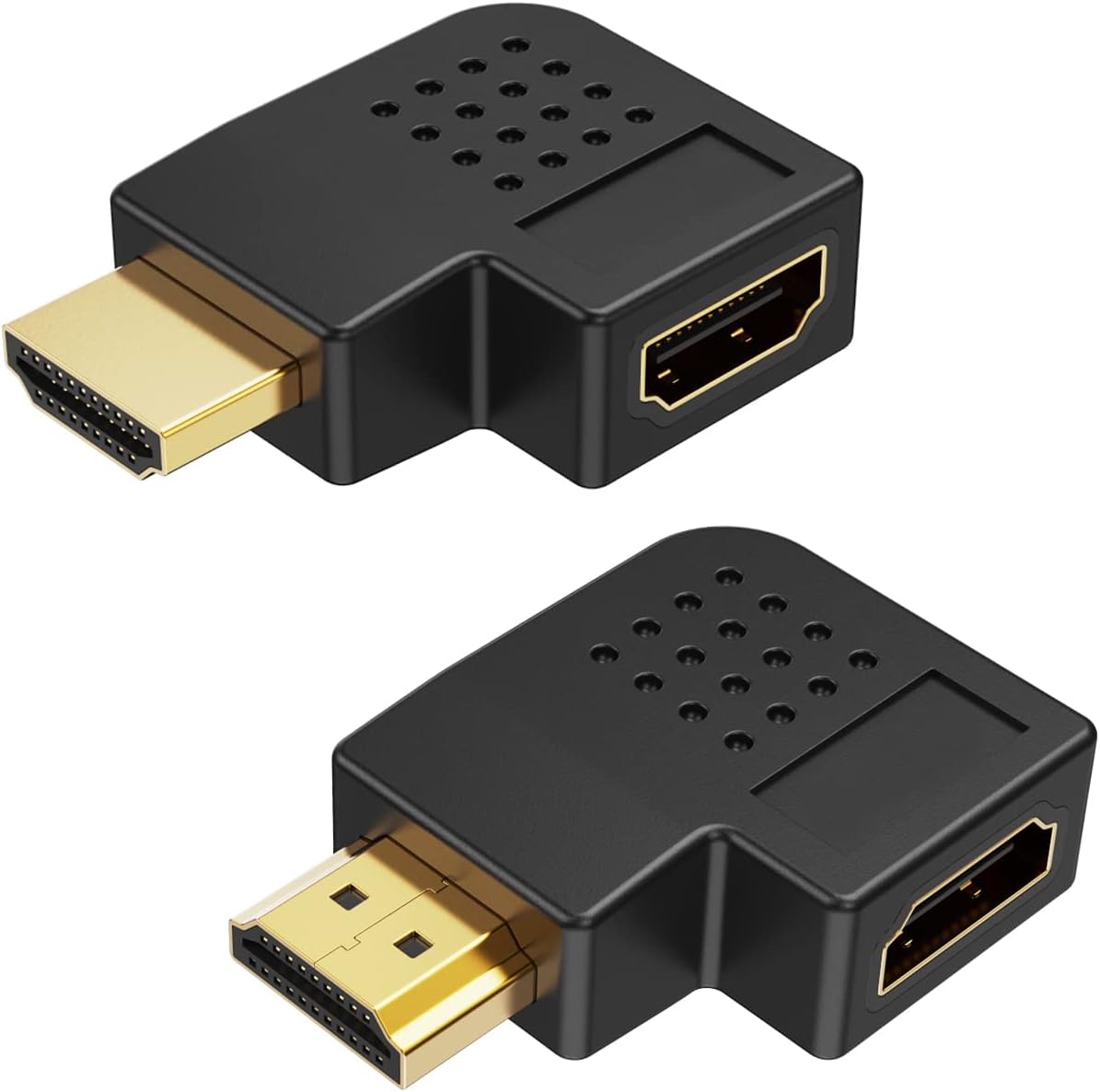


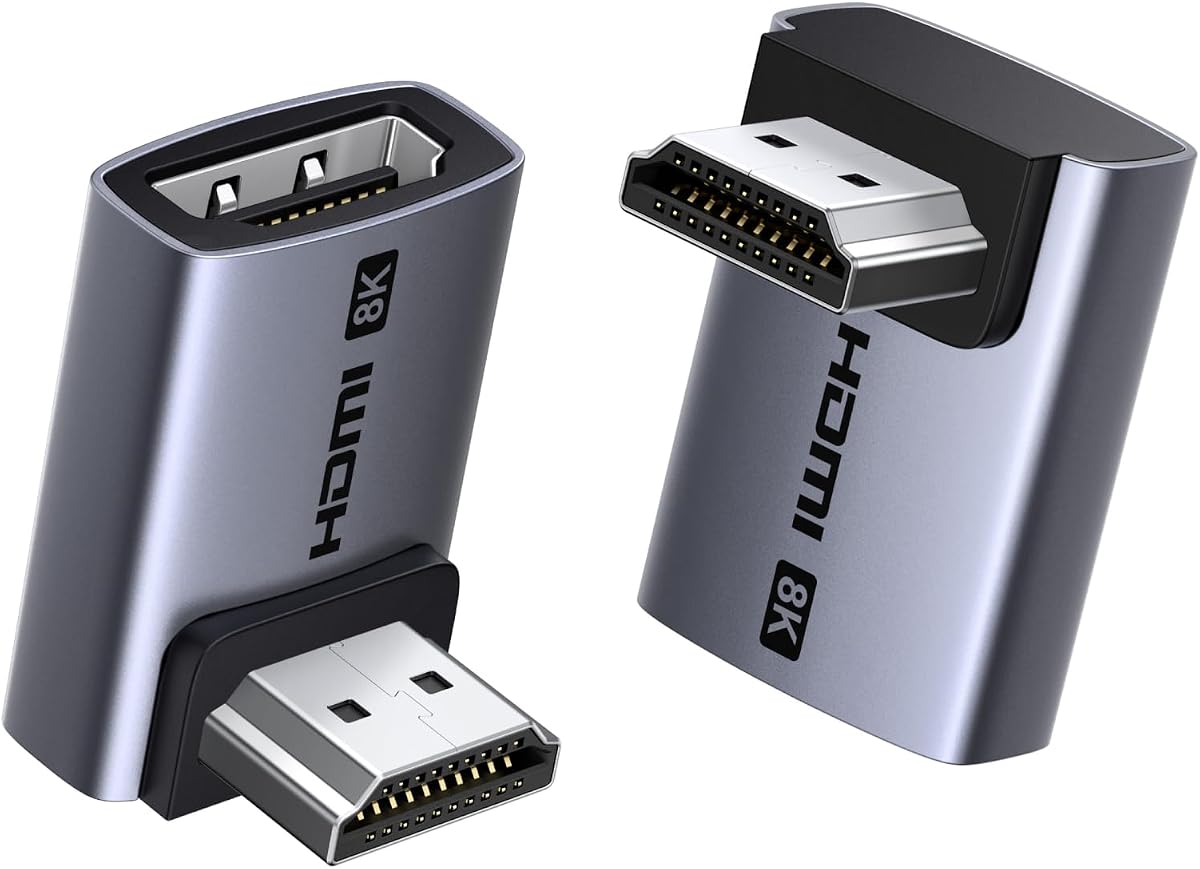
The Togconn 8K 90 Degree HDMI 2.1 Adapter has a 4.6 rating and stands out for combining space-saving right-angle routing with an unusually broad set of HDMI 2.1 features. Its 90- and 270-degree pairing gives installers two cable directions, while the specified support for 8K at 60Hz and 4K at 120Hz makes it appropriate for current high-resolution displays and modern gaming systems.
We may earn a commission when you buy through this link, at no additional cost to you.
Its feature list extends beyond basic video transfer. The product supports VRR, ALLM, HDR, Dynamic HDR, Dolby Vision, Dolby Atmos, eARC, HDCP 2.3, and three-dimensional video. Gold-plated contacts and an aluminum alloy shell are intended to improve corrosion resistance, signal transfer, and heat dissipation. The supplied description also notes backward compatibility with HDMI 2.0, although the full 8K capabilities still require matching source and display equipment.
The main compromise is that the adapter cannot improve the capabilities of an older cable or device. Its 8K and high-refresh modes need HDMI 2.1-compatible ports and cables, and the listed advanced features depend on the entire signal chain supporting them. Some installations will also need only one orientation, making the two-piece set more than strictly necessary.
This is a strong choice for a wall-mounted television, compact gaming area, or modern entertainment center where both right-angle directions could be useful. Buyers who want a broad feature checklist and plan to use current-generation displays will appreciate the combination of compact routing, 48-class-era feature coverage, and durable materials. It is a versatile all-around choice for an 8K-capable system.
The included upward and downward orientations help route a flat HDMI cable away from walls, cabinets, and stands. This reduces the sharp bend at the device port and makes recessed sockets easier to reach.
VRR, ALLM, HDR, and high-frame-rate modes make this adapter more relevant to modern gaming than a basic 4K coupler. Verify that the console, television, and connected cable support every feature you intend to use.
We may earn a commission when you buy through this link, at no additional cost to you.
The VCE HDMI 90 and 270 Degree Adapter 2-Pack carries a 4.7 rating and offers a practical solution for standard HDMI 2.0 installations. It supports resolutions up to 4K at 60Hz, along with 2K and 1080p, while its 18Gbps bandwidth aligns with the HDMI 2.0 specification. For many televisions, projectors, streaming devices, and game consoles, that is the appropriate level of performance.
We may earn a commission when you buy through this link, at no additional cost to you.
The principal benefit is physical rather than computational. Changing the connector direction reduces cable strain and makes it easier to connect a device placed close to a wall or inside a cabinet. Gold-plated contacts are specified for corrosion resistance and dependable signal transfer, while the housing is designed to dissipate heat. The package contains both 90- and 270-degree adapters, allowing the cable to approach from different directions.
This is not a dedicated HDMI 2.1 gaming adapter. Its specifications do not claim 8K output, 4K at 120Hz, VRR, or ALLM. That limitation is reasonable for an ordinary 4K television setup, but it would matter for a user with a next-generation console, high-refresh-rate display, or 8K system who expects every advanced format to pass through.
Choose this VCE pack when the goal is dependable 4K, broad device compatibility, and convenient routing without paying for capabilities the rest of your setup may never use. It is particularly suitable for wall-mounted televisions, basic entertainment centers, monitors, projectors, and everyday streaming arrangements. The two orientations make it one of the more flexible basic options in this guide.
The 18Gbps HDMI 2.0 profile comfortably covers mainstream 4K at 60Hz use. It is a better fit for conventional displays than for installations requiring 8K, 4K at 120Hz, or other high-bandwidth gaming modes.
Having both a 90-degree and a 270-degree connector is useful when the available space or desired cable path changes. It also gives an installer a ready alternative if the first orientation creates an awkward bend.
We may earn a commission when you buy through this link, at no additional cost to you.
The VCE 4-Pack HDMI 90/270 Degree Adapters has a 4.7 rating and is built for households or installations with more than one recessed port. The assortment includes two 90-degree and two 270-degree adapters, providing enough flexibility to correct several cable routes or reserve a connector for another device. That makes it more versatile than a simple two-piece set with one of each orientation.
We may earn a commission when you buy through this link, at no additional cost to you.
Signal specifications are based on HDMI 2.0 and 18Gbps, supporting increased bandwidth and 4K-class video. The adapters are listed as compatible with standard HDMI 1.4 and HDMI 2.0 devices, including 4K televisions, monitors, PS5 and Xbox systems, Apple TV, and Fire Stick. Audio Return Channel, HDMI Ethernet Channel, and 3D are also listed among the supported features, adding useful functions for compatible home-entertainment setups.
The trade-off is bandwidth. No 8K, 4K at 120Hz, VRR, or ALLM performance is claimed, so this set is better suited to established HDMI 2.0 systems than to a new high-end gaming installation. Gold-plated connectors and reinforced housings address long-term durability, although the larger quantity does not improve signal capacity.
This four-piece VCE bundle is most attractive to buyers who want several adapters, mixed cable directions, or coverage for multiple wall-mounted displays. It is a practical option for a gaming room, media center, or service rack where port access is limited. Choose it for breadth and convenience rather than for cutting-edge 8K performance.
Two units of each angle can serve several devices without requiring additional purchases. This is helpful when a television, console, receiver, and streaming device all have awkwardly positioned HDMI sockets.
ARC, HEC, 3D, and 4K support cover the core requirements of many mainstream displays. The set remains limited by its 18Gbps specification when used with newer high-bandwidth devices.
We may earn a commission when you buy through this link, at no additional cost to you.
The CableCreation HDMI Adapter 2 Pack has a 4.6 rating and emphasizes a small, unobtrusive body for connections in narrow spaces. Its miniature L-shaped profile is designed for use behind wall-mounted televisions and inside compact entertainment units, where a conventional connector can leave too little room for the cable to curve naturally.
We may earn a commission when you buy through this link, at no additional cost to you.
The set includes one 90-degree and one 270-degree female-to-male right-angle adapter. Full 4K resolution is supported, along with Audio Return Channel, HDMI Ethernet Channel, Dolby TrueHD 7.1 audio, and 3D video. Compatibility is broad across laptops, desktops, hubs, DVD players, Xbox systems, Roku devices, and PS5 systems on the source side, as well as televisions, monitors, and projectors on the display side.
One practical point is that the adapters are pass-through couplers rather than complete cables, so two suitable HDMI cables are required. Its specification does not identify HDMI 2.1 bandwidth, 8K support, VRR, or ALLM. Consequently, it is a better fit for 4K entertainment and general use than for a display and console combination that depends on the newest gaming modes.
CableCreation is a good choice when physical size matters more than cutting-edge bandwidth. It is especially helpful for a Fire TV-style device behind a television, a laptop against a wall, or any installation where a tiny connector prevents an unnecessary cable bend. The mixed-angle pack provides practical routing options while keeping the setup visually tidy.
The pocket-sized body reduces the amount of clearance needed behind a screen or inside a cabinet. It is particularly helpful for slim streaming devices and equipment positioned close to a wall.
ARC, HEC, Dolby TrueHD 7.1, and 3D support make the pair relevant to a broad range of displays and source components. Check the capabilities of every connected device because the adapter cannot add unsupported features.
We may earn a commission when you buy through this link, at no additional cost to you.
The VCELINK 10K 8K HDMI 2.1 Right Angle Adapter earns a 4.7 rating and stands as the most elaborately engineered option in the group. It supports HDMI 2.1, 48Gbps transmission, 8K at 60Hz, 4K at 120Hz, and 4K at 240Hz with DSC. Its feature set also includes VRR, ALLM, QMS, QFT, HDR, Dolby Vision, Dolby Atmos, eARC, and DTS:X.
We may earn a commission when you buy through this link, at no additional cost to you.
Construction is a major selling point. The product uses a double-layer metal shell, with an outer nickel-plated layer intended to limit external interference and an inner gold-plated connector for signal transmission. A protective PVC casing encloses the female port, while a performance chip is intended to reduce overheating during extended use. The supplied specifications describe this as a three-shell design intended to improve durability and stability.
The unavoidable limitation is that advanced adapter specifications only work when the source, television, and cable also support them. FourK at 240Hz specifically requires devices with DSC compression, and 8K performance requires compatible HDMI 2.1 equipment. The adapter also cannot remove lag or improve picture quality on a display whose own capabilities are lower.
This is the strongest choice in the guide for a premium television, PS5, Xbox Series, advanced receiver, or professional display setup that uses HDMI 2.1 features. Its layered construction and broad gaming support make it especially attractive for installations where connector stress and heat management matter. For users seeking comprehensive high-end performance, the additional construction detail sets it apart.
The metal and protective casing layers address physical connector wear, external interference, and heat. This design is particularly useful where the adapter remains plugged in or is repeatedly moved behind a mounted display.
The 48Gbps specification, 4K at 120Hz capability, VRR, and ALLM align with contemporary high-performance displays. FourK at 240Hz remains dependent on DSC being supported throughout the connected chain.
We may earn a commission when you buy through this link, at no additional cost to you.
The PANPEO 8K HDMI Adapter 4-Pack has a 4.7 rating and combines current resolution support with one of the broadest physical assortments in the guide. It is designed for 8K at 60Hz and 4K at 120Hz, with additional backward-compatible resolution modes including 4K at 144Hz and 2K at 240Hz. The 3D support makes it suitable for compatible legacy and modern entertainment equipment.
We may earn a commission when you buy through this link, at no additional cost to you.
The set is especially useful when several devices have limited clearance. Its right-angle connectors change the direction of the attached cable, reducing the stress caused by forcing a full-size plug into a sharp bend. The compact aluminum alloy housing is described as durable and thermally capable, while gold-plated connectors are intended to resist corrosion. Installation requires no extra software or drivers.
The specifications do not explicitly claim 48Gbps bandwidth, VRR, ALLM, Dolby Vision, or eARC. That makes the list less transparent than it is for some HDMI 2.1-focused competitors. It also provides four adapters, which may be unnecessary for a single television or console but valuable for a home theater, game room, or several wall-mounted screens.
PANPEO is most suitable for buyers who need several compact right-angle connectors and operate modern 4K or 8K equipment. It offers a broad device list that includes PCs, laptops, monitors, televisions, Fire TV Sticks, Nintendo Switch systems, PlayStation consoles, DVD players, and TV boxes. The four-piece format and angle variety make it a flexible installation accessory rather than a specialized single-device coupler.
The four-piece pack can address several hard-to-reach ports across a home theater or gaming room. It is also a convenient way to keep matching right-angle connectors available as equipment is rearranged.
Support for 8K at 60Hz and 4K at 120Hz provides useful headroom for modern displays. The absence of a stated 48Gbps figure means buyers should verify the complete specification with the seller before relying on advanced HDMI 2.1 modes.
We may earn a commission when you buy through this link, at no additional cost to you.
The Cable Matters Combo-Pack 8K Right Angle HDMI 2.1 Adapter has a 4.7 rating and offers an excellent balance of physical design, modern bandwidth, and entertainment features. The two-piece set contains one 90-degree and one 270-degree male-to-female adapter, allowing the cable to approach a recessed port from different directions.
We may earn a commission when you buy through this link, at no additional cost to you.
The adapters support HDMI 2.1 and 48Gbps bandwidth. Listed resolution targets include 8K at 60Hz and 4K at 240Hz, while ALLM and VRR serve modern gaming applications. Audio and image features include 5.1 and 7.1 surround sound, Dolby TrueHD, Dolby Atmos, and HDR. The supplied information positions the adapters for home theaters, gaming systems, and professional displays where both space and modern signal performance matter.
The key trade-off is compatibility rather than an obvious weakness in the adapter. EightK, 4K at 240Hz, and advanced gaming features require source devices, displays, and cables that support them. Because the package includes only two units, users with several wall-mounted screens may need additional connectors or a larger multipack.
This is a strong general recommendation for modern high-end systems because it provides the two useful orientations without a bulky four-piece assortment. It also avoids the ambiguity of adapters that advertise 8K resolution but omit a bandwidth figure. For a contemporary gaming television, PS5 or Xbox setup, or premium home theater, this Cable Matters combo is among the most balanced choices.
A stated 48Gbps capacity gives buyers a clear basis for matching the adapter to high-end HDMI 2.1 equipment. The source, cable, and display must all provide the required bandwidth for the target resolution.
VRR and ALLM make the pair suitable for modern console gaming, while Dolby audio and HDR support fit cinema-oriented installations. The flat 90-degree approach is equally helpful in equipment racks and professional displays.
We may earn a commission when you buy through this link, at no additional cost to you.
The Poyiccot 8K HDMI 90 Degree Adapter has a 4.6 rating and offers a distinct left-angle alternative within a category dominated by general-purpose right-angle connectors. The two-piece set changes the interface direction to reduce cable bending and relieve strain on ports located close to walls or other equipment.
We may earn a commission when you buy through this link, at no additional cost to you.
Its stated HDMI 2.1 performance includes 48Gbps bandwidth, 8K at 60Hz, 4K at 120Hz, 3D, and HDR. Dynamic HDR, eARC, HDCP 2.2 and 2.3, and DTS-HD Master Audio are also listed. Both extended and mirrored display modes are supported, making the adapters relevant to computers as well as televisions, monitors, and game consoles.
The main limitation is orientation. Only a 90-degree left-angle version appears in the product description, so the set may not solve a different routing problem. The LED light and buckle hole make the connectors easier to identify and attach to a lanyard or keychain, but these are handling conveniences rather than improvements to image or sound quality.
This Poyiccot set is best for a specific setup where a left-facing connector matches the available space and the rest of the system supports high-resolution HDMI. It may suit a compact workstation, wall-mounted screen, or gaming display. Buyers needing upward and downward options should choose a mixed 90- and 270-degree pack instead.
The left-angle format can be ideal when clearance exists on only one side of the port. A mixed-angle set offers greater flexibility if furniture placement or equipment orientation may change.
Extended and mirror modes are useful for computer users who switch between a primary display and a larger workspace. The 8K and 4K at 120Hz capabilities suit compatible high-end monitors and laptops.
We may earn a commission when you buy through this link, at no additional cost to you.
The Cable Matters Combo-Pack 8K Flat Right Angle HDMI 2.1 Adapter has a 4.6 rating and is designed for installations where every fraction of clearance matters. Its flat profile helps route an HDMI cable beside a wall-mounted television, inside an entertainment center, or behind equipment where a standard right-angle body may still appear bulky.
We may earn a commission when you buy through this link, at no additional cost to you.
The set includes a flat 90-degree adapter and a flat 270-degree adapter. Both are specified as HDMI 2.1 pass-through devices with 48Gbps bandwidth. Resolution support reaches 8K at 60Hz and 4K at 240Hz, while VRR, ALLM, HDR, Dolby TrueHD, Dolby Atmos, 5.1 and 7.1 surround sound, and 3D are listed among the relevant functions.
Like other advanced adapters, it depends completely on the rest of the signal path. The connected devices and cables must support the desired resolution, refresh rate, and gaming features. Its low-profile design also changes only the connector geometry; it does not create extra clearance for a bulky cable housing that cannot bend at the required radius.
This Cable Matters flat pair is a strong choice for neatly mounted displays and tightly organized entertainment centers that also use current HDMI 2.1 equipment. It combines space-saving construction with one of the clearest high-bandwidth specifications in the guide. For one display, the two orientations provide excellent flexibility; for multiple devices, another pack may be needed.
The flat housing is particularly useful where a television sits close to a wall or a console is positioned behind a cabinet panel. It keeps the cable path visually tidy and reduces sharp connector bends.
Despite its small size, the adapter retains HDMI 2.1 bandwidth and major gaming functions. The physical design changes, while the supported signal capabilities remain aligned with modern displays and consoles.
We may earn a commission when you buy through this link, at no additional cost to you.
The UGREEN 10K 8K HDMI 2.1 Right Angle Adapter has a 4.5 rating and is the final recommendation in the guide. It combines 90- and 270-degree orientations with HDMI 2.1 performance, making it relevant to wall-mounted televisions, streaming sticks, game consoles, computers, projectors, and other standard HDMI equipment.
We may earn a commission when you buy through this link, at no additional cost to you.
The adapter is specified for 48Gbps transmission, 8K at 60Hz, and 4K at 240Hz. It also supports 3D, HDCP 2.3, HDR10+, VRR, ALLM, dynamic HDR, eARC, Dolby Vision, and HD Dolby 5.1 or 7.1 audio. An aluminum alloy housing is intended to improve heat dissipation and reduce interference, while the plug-and-play design requires no drivers or software.
Two qualifications keep the specification realistic. FourK at 240Hz works only when the connected devices support DSC compression, and advanced features require compatible hardware and cables. The stated compatibility list is broad, but no adapter can communicate with a device through a physical port the device does not provide.
UGREEN is a practical recommendation for a user who wants modern bandwidth, two orientations, and a broad device range in one set. It is especially suitable for a mixed home setup containing a television, console, streaming device, and computer. The pair also offers backward compatibility with older HDMI versions, making it a flexible choice when equipment changes over time.
The compatibility list spans streaming devices, consoles, computers, televisions, monitors, and projectors. This broad coverage is useful for a home where several source components share the same right-angle form factor.
The aluminum alloy shell is specified to help dissipate heat and limit signal interference. It also gives the connector a durable alternative to more basic plastic-bodied adapters.
We may earn a commission when you buy through this link, at no additional cost to you.
The best right-angle HDMI adapter is the one that matches your spatial constraints, display capabilities, and connection standard while avoiding unnecessary complexity. Consider orientation, resolution, bandwidth, supported features, construction, and the number of devices you need to connect before purchasing.
A 90-degree adapter and a 270-degree adapter create different cable paths even though both are described as right-angle or L-shaped. The difference determines whether the attached cable travels upward, downward, left, or right from the device. Inspect the port in the intended mounting position and choose the orientation that lets the cable leave without a tight fold, pressure against a wall, or interference with surrounding equipment.
A mixed 90- and 270-degree pack gives the most freedom. A single-orientation set may be more appropriate when the device position is fixed, such as a permanently mounted television whose HDMI sockets face downward. Always compare the adapter's direction with the source and display housings, not merely with the cable socket.
The headline resolution is only one part of performance. 4K at 60Hz is sufficient for many televisions and everyday viewing, while 8K at 60Hz and 4K at 120Hz are more relevant to premium displays, modern consoles, and high-refresh computer monitors. An adapter cannot exceed the weakest component in the chain, so the source device, display, and HDMI cable must all support the mode you want.
Check the exact frame rate rather than relying on a general 4K or 8K label. Some devices support 4K at 120Hz while others require compression. If high-refresh gaming matters, prioritize an adapter with clear 48Gbps specifications and the required VRR and ALLM functions.
HDMI 2.0 adapters are commonly specified at 18Gbps and generally cover mainstream 4K at 60Hz installations. HDMI 2.1 adapters can support up to 48Gbps and are better suited to 8K, high refresh rates, and modern gaming functions. The version should also align with the weakest link in your setup: an HDMI 2.0 television cannot benefit from 48Gbps transmission.
Prefer products that publish a clear bandwidth figure and feature list. A detailed specification provides more confidence than an ambiguous 8K claim and helps prevent disappointment when a high-end console is paired with a display that has more limited capabilities.
Video resolution does not tell the entire story. Features such as ARC, eARC, HDR, Dolby Vision, Dolby Atmos, VRR, and ALLM may matter for home theater or gaming. Review the support list carefully and make sure each feature is supported by the television, source component, sound system, and cable as well as the adapter.
For a basic living-room setup, standard 4K and 3D support may be enough. For a modern gaming room, VRR and ALLM deserve particular attention. For an audio-focused installation, verify the exact surround formats and return-audio functions your receiver or soundbar requires.
Right-angle adapters solve cable-bending problems, but their physical dimensions still need to fit. Measure the gap between the equipment and the wall, cabinet panel, shelf, or stand. A compact flat body may be necessary for slim streaming devices or a wall-mounted display with almost no rear clearance, while a more robust housing may be preferable for a permanent installation.
Also consider the cable itself. A connector can change the direction without making an unrealistically sharp bend safe, and a thick cable jacket may need more room than the adapter provides. If space is extremely tight, compare both the adapter body and the bend radius supported by your existing cable.
Gold-plated contacts are common in this category and are intended to resist corrosion while maintaining a stable connection. Aluminum alloy housings can improve heat dissipation, particularly for high-bandwidth HDMI 2.1 adapters. Layered shells may add further physical protection but can also make the connector bulkier, so material quality should be balanced against available space.
Look for reinforced housings and secure-fit contacts rather than treating plating alone as a guarantee of longevity. For permanently installed equipment, a durable enclosure and strain-relieving cable path may matter more than a decorative LED or other secondary feature.
A two-piece set is common and often includes one 90-degree and one 270-degree adapter. That is enough for a single display but may not cover a receiver, console, and streaming device. Four-piece sets provide two adapters of each angle and are better for multiple equipment locations, a home theater, or keeping spares available.
Avoid buying several unnecessary connectors if one will remain unused, but consider a multipack when the same tight-clearance problem repeats throughout a room. A larger pack is particularly useful for installers who want consistent cable routing across several wall-mounted screens or game consoles.
A warranty can provide recourse if a connector is defective, intermittently unstable, or physically incompatible with your equipment. Some products in this guide advertise multi-year replacement support, while others offer shorter coverage. These terms provide useful context, although they do not guarantee that every installation will be trouble-free.
For a permanent home-theater installation, favor a product with clear warranty information and responsive support. For a temporary or inexpensive setup, connector design, compatibility, and price may be the dominant priorities. Check the current listing because warranty terms and included accessories can change over time.
Before connecting anything, power off or safely disconnect the source and display if practical, then identify the exact direction in which the cable must leave the HDMI port. Connect the adapter to the device first with firm, even pressure, and attach the appropriate HDMI cable to the adapter's female socket. Route the cable without folding it sharply at the connector or pulling against the television or console.
Once connected, power the source and display and confirm the intended resolution, refresh rate, and audio output. If the picture is missing, reseat the adapter and cable, try a different source port if the device provides one, and inspect the connector for dust or bent contacts. Advanced modes such as 8K, 4K at 120Hz, VRR, or eARC require compatible hardware and settings, so switching to a lower mode can help isolate a specification issue.
For care, keep the adapter dry and avoid pulling the attached cable to remove it. Hold the housing when unplugging, and keep the gold contacts free from adhesive residue, dust, and fingerprints. Periodically check that the connector remains secure and that the cable has enough movement to prevent leverage on the device port.
An HDMI L Shape 90 Degree Adapter changes the direction of an HDMI connection so the attached cable does not need to bend sharply away from a device. It is especially useful behind wall-mounted televisions, inside entertainment cabinets, and beside monitors. The adapter can also make a recessed HDMI port easier to access.
A quality pass-through adapter should preserve the signal when every cable and device supports the selected mode. However, the adapter cannot increase bandwidth beyond the weakest connected component. Check that the source, display, and cable support the resolution, refresh rate, and audio features you want to use.
HDMI 2.0 is generally sufficient for mainstream 4K at 60Hz setups, while HDMI 2.1 is better for 8K, 4K at 120Hz or 240Hz, VRR, and other modern features. Choose according to your display and source equipment rather than the adapter label alone. Buying HDMI 2.1 does not add capabilities to older hardware.
The two ratings describe opposite right-angle cable directions. A 90-degree adapter may route the cable upward or sideways depending on the connector design, while a 270-degree adapter provides the complementary orientation. Mixed packs are useful when the port direction or available clearance is not entirely clear.
Yes, these products are pass-through adapters rather than complete extended cables. You need a suitable HDMI cable between the adapter and the source or display. Match the cable to the desired bandwidth, particularly for 8K or high-refresh-rate operation.
Yes, provided the console and television support the adapter's stated HDMI features. A modern console paired with an HDMI 2.1 display benefits from an adapter that supports 48Gbps, VRR, and ALLM. A basic HDMI 2.0 adapter can still provide ordinary 4K connectivity if that is all the system requires.
The source, display, cable, and adapter must all support the selected resolution and refresh rate. DSC support may also be required for modes such as 4K at 240Hz. Try a lower resolution, reseat all connectors, confirm the cable specification, and review the display's input settings before assuming the adapter is defective.
Use the adapter to create a gentler cable path and avoid adding sharp bends beyond the adapter. Do not pull the cable when unplugging, and leave enough slack to prevent leverage on the port. Check the connection periodically because movement behind a mounted television can gradually place stress on the plug.
The VCE HDMI 90 and 270 Degree Adapter 2-Pack is the strongest straightforward choice for mainstream 4K installations, while the Cable Matters Combo-Pack 8K HDMI 2.1 is the most balanced option for modern high-bandwidth equipment. The VCELINK 10K model takes the premium position through its 48Gbps specification, layered construction, extensive gaming support, and detailed thermal-management claims.
When choosing, prioritize the physical orientation first and then confirm bandwidth, resolution, refresh rate, and required gaming or audio features. A small flat model may solve a difficult clearance problem more effectively than a more advanced connector, while an HDMI 2.1 adapter is valuable only when the rest of the system can use its capabilities. Multi-device rooms may gain more from a four-piece set than from extra specifications they will never use.
Finally, check the current product listing, compatibility notes, included accessories, warranty terms, and pricing before purchasing. Ratings, designs, and seller information can change, and a listing that appears ideal on paper still needs to match the exact position and direction of your HDMI ports.