
HP OmniBook 5 16
5.0Editor score
Sixteen-core Intel processor
32GB DDR5 memory
Wi-Fi 6E connectivity
An Intel Core Ultra 9 Laptop is built for demanding users who want fast performance, capable integrated graphics, and modern on-device AI without relying on a desktop. A good model should also balance its large display, memory, battery, cooling, and everyday portability rather than maximizing only one specification.
We compared ten Core Ultra 9 systems across processing capability, memory, storage, display quality, connectivity, chassis design, operating system, and specialized features. The list includes large business laptops, compact OLED models, creator systems, and machines with dedicated graphics, allowing shoppers to match hardware to their work.
Each review identifies the strongest qualities and practical compromises of its featured model. Ratings and specifications can change, and retailer availability and prices fluctuate, so readers should verify the current configuration before purchasing.
5.0Editor score

4.5Editor score

4.6Editor score
As an Amazon Associate we earn from qualifying purchases.
The following side-by-side comparison highlights the major differences among all ten featured laptops, including processor generation, display format, memory, graphics, and portability. It shows that the best Core Ultra 9 laptop depends heavily on whether priority goes to business manageability, compact OLED quality, gaming capability, or expansive workspace.





The Dell 16 Plus Touchscreen earns the Editor's Choice position because it combines a current Intel Core Ultra 9 288V processor with a spacious 16-inch 16:10 touchscreen, 32GB of fast LPDDR5X memory, and a 1TB PCIe NVMe SSD. Its 4.5 rating reflects a balanced package for productivity, communication, and light creative work.
We may earn a commission when you buy through this link, at no additional cost to you.
The Core Ultra 9 288V provides 12 cores with speeds up to 5.3 GHz, while the dedicated NPU supports AI workloads such as Studio Effects. Intel Arc 140V graphics make the system more useful for video editing, digital content creation, and media than a basic integrated solution. The 300-nit WVA touch display also feels practical for extended office work.
Connectivity is a major strength. The laptop includes Wi-Fi 7, Bluetooth 5.3, USB-A, USB-C with DisplayPort and Power Delivery, Thunderbolt 4, HDMI 2.1, and an audio jack. A backlit keyboard, numeric keypad, fingerprint reader, and FHD+ webcam complete a practical business workspace. The main compromise is the substantial size of a 16-inch machine, along with the use of Windows 11 Home.
This model is well suited to office professionals, hybrid workers, and students who need a large display without adding a separate monitor. It is less convincing for travelers who value minimal weight. For desktop-style productivity, modern connectivity, and balanced AI-capable performance, it remains the strongest all-around choice in this list.
Thunderbolt 4, HDMI 2.1, USB-A, USB-C, and Wi-Fi 7 give this Dell the connectivity commonly required in modern offices. The backlit keyboard, numeric keypad, fingerprint reader, and FHD+ webcam make it convenient for long workdays and frequent video calls.
The Core Ultra 9 288V combines CPU, Intel Arc graphics, and a dedicated NPU for AI-assisted communication. This combination is particularly appropriate for office applications, content creation, and Microsoft Studio Effects without requiring a discrete graphics card.
We may earn a commission when you buy through this link, at no additional cost to you.
This Dell 16 Plus configuration stands out with a perfect 5.0 rating and a straightforward balance of major capabilities. It pairs the Intel Core Ultra 9 288V with 32GB LPDDR5X memory, a 1TB PCIe SSD, and a 16-inch 1920×1200 touchscreen suited to work, study, media, and routine creative tasks.
We may earn a commission when you buy through this link, at no additional cost to you.
The processor reaches speeds up to 5.1 GHz and works with a dedicated Intel AI Boost NPU. Intel Arc 140V integrated graphics support high-resolution media, photo editing, light video creation, and presentations. A 1080p FHD webcam and dual-array microphones strengthen the laptop's value for remote collaboration, online classes, and team meetings.
Its practical extras include Wi-Fi 7, Bluetooth 5.3, Thunderbolt 4, USB-C, HDMI 2.1, USB-A, a backlit keyboard, and a fingerprint reader. The 16:10 aspect ratio offers more vertical room than a conventional widescreen panel. As a trade-off, users seeking Windows 11 Home may find that the Pro edition adds software they do not need.
Choose this model for office workers, analysts, students, and remote professionals who want generous memory and a large touch display. It is particularly suitable for moving between spreadsheets, presentations, browser research, meetings, and creative applications. The five-star rating is encouraging, although prospective buyers should still verify the current configuration and warranty terms.
Thirty-two gigabytes of LPDDR5X gives the system ample headroom for many open applications and browser tabs. The 1TB SSD also provides useful room for business documents, media libraries, presentations, and active project files.
The 1080p webcam, dual-array microphones, backlit keyboard, and fingerprint reader make daily communication and sign-in convenient. Wi-Fi 7 and Bluetooth 5.3 provide modern wireless support for busy offices and shared networks.
We may earn a commission when you buy through this link, at no additional cost to you.
The Dell 16 Plus QHD+ is built around a high-resolution 16:10 screen, making it attractive for users who routinely compare documents, analyze spreadsheets, edit timelines, or arrange multiple windows. Its Core Ultra 9 288V processor and 32GB of memory support demanding everyday productivity, while the supplied rating is 4.3.
We may earn a commission when you buy through this link, at no additional cost to you.
The major attraction is display resolution. A QHD+ panel provides more usable space and sharper detail than a standard FHD display, which is valuable for professional work and multitasking. Windows Hello through the FHD+ webcam provides convenient face-based sign-in, and the laptop's aluminum construction and military-grade testing emphasize reliability.
Dell adds one year of onsite service, which is meaningful for business buyers who want hardware support without repeatedly transporting a large notebook. Dell Migrate is also included to help move files to the new system. The available product description focuses on the display, construction, and service experience rather than listing every port and detail.
This laptop is best for office-based professionals, creators who work with detailed visual information, and students who prefer a large canvas. It makes less sense for users constantly commuting or those who need a dedicated gaming GPU. Its stronger screen makes it a compelling alternative to the more conventional FHD+ Dell 16 Plus listings.
The QHD+ 16:10 panel offers a generous combination of width and vertical space. That format is particularly useful for side-by-side applications, long spreadsheets, detailed timelines, and document comparisons.
One year of onsite service can reduce disruption when a covered hardware issue cannot be resolved remotely. This makes the model more attractive to organizations and home-office users who value convenient support.
We may earn a commission when you buy through this link, at no additional cost to you.
The HP OmniBook 5 16 is the value-oriented selection among these ten laptops, combining a 16-core, 16-thread Intel Core Ultra 9 processor with 32GB of DDR5 memory and a 1TB PCIe SSD. Its 5.0 rating and inclusion of Windows 11 Pro make it especially appealing for business users, students, and creators.
We may earn a commission when you buy through this link, at no additional cost to you.
Its anti-glare 1920×1200 IPS touchscreen supplies a practical 16-inch workspace, while Intel Arc 140T graphics support photo and video editing, gaming, and multimedia. The claimed processor uplift and AI Boost NPU are aimed at complex workflows, while the generous RAM helps keep numerous applications and browser tabs responsive.
A backlit keyboard, 1080p IR camera, privacy shutter, DTS Ultra audio, and Windows Studio Effects improve everyday usability. Connectivity includes Wi-Fi 6E, Bluetooth 5.3, two USB-A ports, two USB-C ports with power delivery and video, and HDMI 2.1. It can support three external displays for a multi-screen office setup.
The main limitation is that Wi-Fi 6E is not the newest wireless standard represented in the list, and a 16-inch laptop is less convenient for constant travel. Even so, this model balances processing power, memory, storage, and business software unusually well. It is the Best Budget pick for users who want a capable Core Ultra 9 configuration without prioritizing a premium OLED panel or discrete GPU.
The sixteen-core, sixteen-thread processor provides substantial parallel computing capability. Combined with 32GB of memory, it suits heavy multitasking, programming, engineering coursework, and demanding office applications.
USB-C video output, HDMI 2.1, and support for up to three external displays make the OmniBook useful with a desktop dock or multiple monitors. It can create a much larger workspace without requiring a discrete graphics card.
We may earn a commission when you buy through this link, at no additional cost to you.
This Dell 16 Plus Creator configuration combines the eight-core Intel Core Ultra 9 288V, up to 48 TOPS of AI capability, 32GB of RAM, and a 1TB SSD. Its 16-inch WUXGA touchscreen and Windows 11 Pro configuration make it a credible choice for business and creative users who value specific enterprise features.
We may earn a commission when you buy through this link, at no additional cost to you.
Integrated Intel Arc 140V graphics support everyday content creation and video work, while the NPU is intended to accelerate local AI functions. The port selection includes USB-A, USB-C, Thunderbolt 4, and HDMI 2.1, which is enough to connect a monitor, storage, and common peripherals. Waves MaxxAudio Pro and Dolby support the media experience.
Its 3.3 rating is the lowest among the selected products, so buyers should be cautious about interpreting the hardware specifications as a guarantee of universal satisfaction. The display is also more ordinary than the QHD+ Dell model, and the listing's emphasis on creator and business use may be broader than the underlying configuration warrants.
The system makes the most sense for a professional who specifically needs Windows 11 Pro, a numeric-friendly large chassis, and a capable Core Ultra 9 platform. It may be less compelling for buyers whose priorities are color accuracy, high-resolution visuals, or gaming performance. Buyers should examine current customer feedback and the exact warranty configuration.
Windows 11 Pro provides a stronger business foundation than Home, while the backlit keyboard, fingerprint reader, and modern port selection support daily professional work. The large display also offers room for spreadsheets and communication windows.
The Core Ultra 9 288V's neural processing hardware can accelerate supported local AI tasks. This is most useful for communication effects, content workflows, and applications that take advantage of the platform's dedicated NPU.
We may earn a commission when you buy through this link, at no additional cost to you.
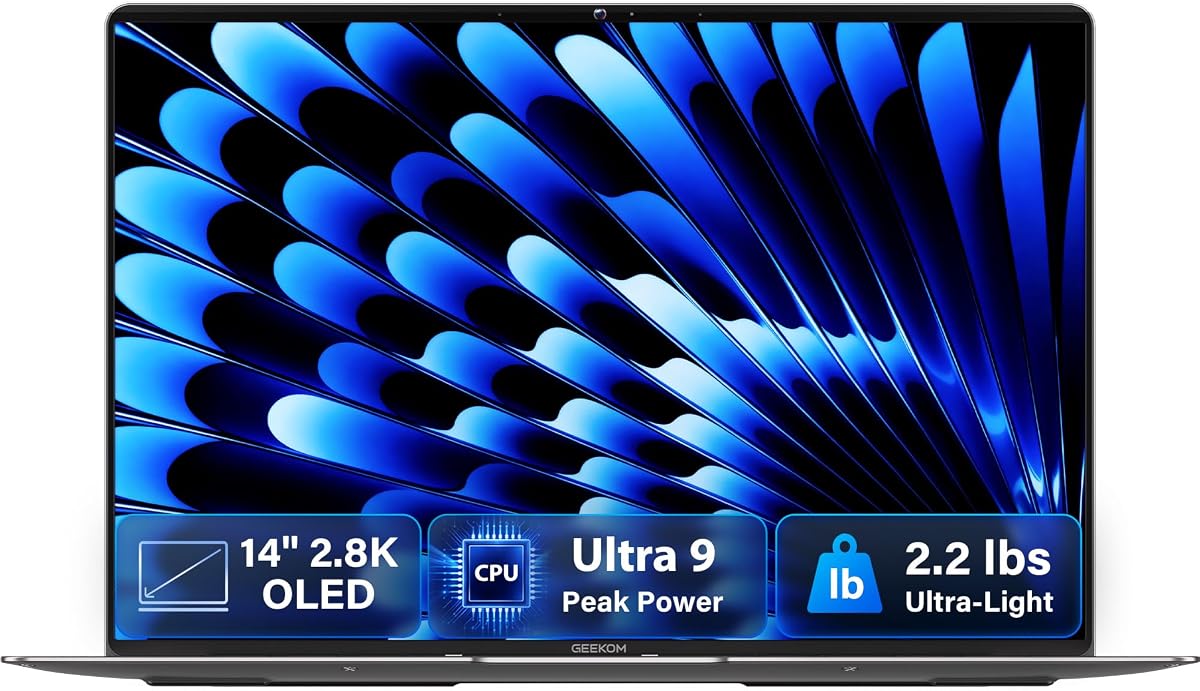
The GEEKOM GeekBook X14 Pro is the clearest compact option in the list, combining a Core Ultra 9 185H with 32GB of LPDDR5X memory, a 1TB PCIe Gen4 SSD, and a striking 14-inch 2.8K OLED display. At 2.2 pounds and 0.23 inches thick, it offers a much smaller footprint than the 16-inch alternatives.
We may earn a commission when you buy through this link, at no additional cost to you.
The display covers 100% of DCI-P3, reaches up to 450 nits, and refreshes at 120Hz. Those characteristics make it attractive for photo review, video editing, entertainment, and general creative work. Intel Arc graphics also support XeSS, ray tracing, and AV1 encoding, while the dedicated NPU enables local AI features.
Two 40Gbps USB4 ports support charging, data transfer, DisplayPort 2.1, and up to three 4K displays. The included dock adds convenient connectivity, while the 72Wh battery and compact 65W GaN charger support travel. A fingerprint reader and physical camera shutter provide welcome privacy controls, and the included support adds reassurance.
The processor uses Intel's Meteor Lake architecture rather than the newer 288V generation found in several Dell models, and the smaller screen offers less physical workspace. Even so, this is a capable Core Ultra 9 laptop for frequent travelers, creative professionals, and anyone who values OLED quality and low weight more than a full-size numeric keypad.
The magnesium-alloy unibody keeps the laptop exceptionally light without presenting as a fragile plastic notebook. Its 2.8K OLED panel makes the system particularly compelling for media consumption and color-sensitive creative work on the move.
Two USB4 ports provide high-bandwidth connections and broad display support, reducing the need for a laptop to rely on basic USB-A. A fingerprint reader and physical camera shutter make private working and quick sign-in more straightforward.
We may earn a commission when you buy through this link, at no additional cost to you.
The Dell 14 Plus balances a compact 14-inch form factor with a high-resolution 16:10 display, the Core Ultra 9 288V processor, 32GB LPDDR5X memory, and a 1TB SSD. Its 3.8 rating indicates a capable configuration, but one that may appeal to a narrower group of buyers than the top-rated alternatives.
We may earn a commission when you buy through this link, at no additional cost to you.
The 2560×1600 panel is the defining feature. It offers more detail and more workspace than a standard FHD screen, making the laptop useful for document editing, coding, research, and multitasking. Intel's advanced client compute engines support newer AI experiences, including help drafting emails, summarizing documents, and creating text or visuals.
Dell emphasizes aluminum construction and military-grade testing for durability. A backlit Copilot key makes the built-in AI functionality easy to access, while Intel Arc graphics improve the experience for coding, collaboration, photo work, video editing, and entertainment. Dell Migrate is included to simplify moving data from an older computer.
This model fits users who want a sharp screen and current processor without carrying a full 16-inch notebook. It is less compelling for buyers needing a numeric keypad, extensive port details, or the lowest possible weight, and its 3.8 rating warrants reviewing recent customer feedback. For a 14-inch productivity laptop, however, the core configuration is strong.
The 2560×1600 resolution increases text clarity and leaves room for several application windows. Its taller ratio is especially useful when scrolling through long documents, web articles, code, and task lists.
The Core Ultra 9 288V is designed to support on-device AI alongside conventional computing. A dedicated Copilot key gives users quick access to functions such as summarization, drafting, and visual creation.
We may earn a commission when you buy through this link, at no additional cost to you.
The LG gram Pro 16 is the premium performance selection, pairing the Intel Core Ultra 9 285H with an NVIDIA RTX 5050 Laptop GPU, 32GB of DDR5 memory, and a spacious 2TB SSD. Its 4.6 rating reflects a well-rounded package for creators, gamers, and professionals who need more graphics capability than integrated silicon provides.
We may earn a commission when you buy through this link, at no additional cost to you.
The RTX 5050 brings dedicated graphics performance for gaming, rendering, and AI-assisted creative work. LG's hybrid gram AI solution combines local intelligence with cloud-based functions for document creation, data analysis, scheduling, summaries, and writing suggestions. The Core Ultra 9 processor and 32GB of memory support demanding multitasking alongside those workloads.
Despite the large 16-inch display, the chassis weighs only three pounds and measures 0.6 inches thick. A 90Wh battery is advertised for up to 27 hours of video playback, and an internal dual-cooling system helps maintain efficiency. The variable refresh rate spans 31Hz to 144Hz, while LG gram Link can connect with up to ten Android and iOS devices.
This is the strongest option in the group for users who need discrete graphics, substantial storage, and low weight in a large-screen notebook. It also offers seven military-grade standards for resilience. The premium cost and Windows 11 Home edition are the main drawbacks, but this laptop delivers the most complete performance configuration for creators and gamers.
The RTX 5050 is the decisive feature for rendering, gaming, and graphics-heavy creative applications. It provides a substantial step up from the integrated Intel Arc configurations used by most other models in this roundup.
A three-pound 16-inch chassis is unusual and valuable for users who want a large canvas without carrying a heavy workstation. The 90Wh battery, dual cooling, and adjustable 144Hz refresh rate further improve its mobile capability.
We may earn a commission when you buy through this link, at no additional cost to you.
The Dell Plus 16 Touchscreen combines a perfect 5.0 rating with the Core Ultra 9 288V, 32GB of memory, a 1TB SSD, and Windows 11 Pro. Its 16-inch 1920×1200 touchscreen provides a roomy work area, making it well suited to business users, students, and home offices.
We may earn a commission when you buy through this link, at no additional cost to you.
The processor's eight cores can reach 5.1 GHz, and its NPU supports up to 48 TOPS for low-power AI workloads. Features such as noise cancellation and instant transcription benefit from that dedicated hardware. The integrated graphics are positioned for AI-accelerated content creation and video editing with applications such as Adobe.
A backlit keyboard, fingerprint reader, and 300-nit WVA touchscreen cover essential daily needs. The display is suited to web browsing, streaming, document work, and general entertainment. Wi-Fi 6 provides solid wireless performance, although it is one generation behind the Wi-Fi 7 models elsewhere in the comparison.
This laptop is a good match for organizations and professionals that specifically want Windows 11 Pro without moving to a premium creator configuration. Its rating is encouraging, but the 32GB memory is identified as LPDDR5 in this listing, and buyers should confirm whether it is soldered or upgradeable. For touch-enabled productivity and business software, the package is compelling.
Windows 11 Pro is the key distinction for many organizations and advanced users. It provides a familiar business environment alongside the large touchscreen, backlit keyboard, and secure fingerprint sign-in.
The 16-inch 1920×1200 panel makes spreadsheets, browser pages, presentations, and communication apps easier to view at once. Touch input can also offer a direct way to navigate documents and applications.
We may earn a commission when you buy through this link, at no additional cost to you.
The Dell XPS 13.4 OLED is the premium compact conclusion to the list, combining a Core Ultra 9 288V, 32GB of upgraded RAM, a 13.4-inch 2.5K OLED touchscreen, and a 2.59-pound chassis. Its 4.3 rating makes it an attractive option for professionals who value visual quality and mobility.
We may earn a commission when you buy through this link, at no additional cost to you.
The OLED display delivers vivid contrast, rich color depth, and responsive touch interaction. Intel Arc graphics support daily work, browsing, entertainment, and creative tasks, while the processor handles demanding productivity and multitasking. A backlit keyboard and fingerprint reader provide practical comfort and secure sign-in.
Two Thunderbolt 4 ports with DisplayPort 2.1 and Power Delivery enable modern accessory and display connections, while Wi-Fi 7 and Bluetooth support current wireless standards. The storage package includes a 1TB SSD and a 1TB docking station set, along with a 7-in-1 dock, microSD card, cables, and a cleaning cloth.
This laptop is ideal for mobile professionals, students, and creative workers who want a polished display in a compact body. Its 13.4-inch workspace is the smallest here, however, and the upgraded seal and accessory-based storage arrangement deserve careful review. It is best considered a premium travel laptop rather than a replacement for a large desktop workspace.
The 2.5K OLED panel provides strong contrast and color depth in a small footprint. This makes the XPS useful for reviewing images, working with creative applications, presenting information, and enjoying media while traveling.
Thunderbolt 4, Power Delivery, DisplayPort 2.1, and Wi-Fi 7 give the compact laptop modern connection options. The included dock expands usability for users who want to connect several accessories at a desk.
We may earn a commission when you buy through this link, at no additional cost to you.
The best Core Ultra 9 laptop is the one that matches its processor, display, graphics, memory, and chassis to your workload. Because this category spans business notebooks, compact OLED systems, and creator laptops with discrete GPUs, comparing the whole platform is more useful than focusing on processor speed alone.
An Intel Core Ultra 9 designation indicates a high-tier processor, but the specific generation and core count still matter. The Dell models in this guide use the Core Ultra 9 288V with up to 12 cores and speeds as high as 5.3 GHz, while the GEEKOM uses the 16-core, 22-thread Core Ultra 9 185H. The LG gram Pro uses the Core Ultra 9 285H, and the HP OmniBook listing describes a 16-core, 16-thread processor. More cores can help with rendering, compiling, engineering, and sustained multitasking, while higher turbo speeds benefit short bursts of demanding work. The integrated NPU and power efficiency also influence how well a laptop handles background AI tasks without placing unnecessary strain on the main processor.
In short, match the processor generation and core count to your workload rather than relying on the Core Ultra 9 label alone.
Most Core Ultra 9 laptops use Intel Arc integrated graphics, which is sufficient for office applications, high-resolution media, presentations, photo editing, and lighter video work. The Intel Arc 140V and 140T configurations also benefit from hardware acceleration and work with AI-assisted creative applications. The LG gram Pro is the exception because its NVIDIA RTX 5050 provides a dedicated GPU, making it the stronger choice for more demanding rendering, gaming, and graphics-intensive creation. Integrated graphics typically help preserve portability, battery life, and a quiet cooling profile, whereas a discrete GPU adds bulk, heat, and power requirements. Consider the software you actually use before deciding that additional graphics capability is necessary.
Choose integrated graphics for productivity and lighter creative work, but prefer a discrete GPU for serious gaming, 3D work, or demanding rendering.
Every model featured here provides 32GB of memory, which is a strong starting point for heavy multitasking and contemporary applications. The Dell 16 Plus uses LPDDR5X, the HP OmniBook uses DDR5, and the GEEKOM uses 7500MHz LPDDR5X. Memory capacity helps when many browser tabs, communication apps, spreadsheets, and creative tools remain open simultaneously. Because compact laptops often use soldered LPDDR memory, buyers should verify whether RAM can be upgraded before purchase. The Dell Plus 16 listing specifically identifies 32GB LPDDR5, making that detail worth confirming. Fast memory can improve responsiveness, but its effect is most visible in demanding multi-application use rather than simple document editing.
Prioritize 32GB for modern workloads, and verify memory type and upgradeability before finalizing a purchase.
A 16-inch display provides room for spreadsheets, side-by-side documents, video timelines, and communication windows, while a 13.4- or 14-inch model is easier to carry. Resolution is equally important: the GEEKOM offers a 14-inch 2.8K OLED, the Dell 14 Plus offers a 14-inch 2.5K panel, and the Dell 16 Plus QHD+ provides a higher-resolution 16-inch screen. Several other models use 1920×1200 FHD+ touchscreens, which remain useful and touch-friendly. The GEEKOM adds 100% DCI-P3 coverage, a 120Hz refresh rate, and up to 450 nits, making it particularly attractive for color-sensitive work. Screen size and quality should therefore be balanced against the laptop's physical footprint.
Choose a large screen for workspace, a compact screen for mobility, and OLED or high resolution for visual detail.
Core Ultra 9 performance no longer requires a heavy workstation, but large displays still affect portability. The GEEKOM weighs 2.2 pounds at 14 inches, the Dell XPS weighs 2.59 pounds at 13.4 inches, and the LG gram Pro manages three pounds in a 16-inch chassis. By contrast, the Dell and HP 16-inch models make more sense as desk-based productivity machines. Consider not only listed weight but also thickness, keyboard size, charger size, and battery capacity. A magnesium unibody, such as the GEEKOM's, can improve perceived durability without adding much bulk. Users who travel regularly should prioritize weight and battery more strongly than a full-size keyboard and expansive screen.
Travelers should prioritize weight and battery capacity, while desk-based users can favor larger screens and full-size keyboards.
Battery capacity is only one part of endurance because processor efficiency, display brightness, graphics load, and thermal design all matter. The GEEKOM includes a 72Wh battery and advertises up to 16 hours of use, while the LG gram Pro carries a larger 90Wh battery and advertises up to 27 hours of video playback. The GEEKOM's compact 65W GaN charger is designed to recharge the battery to 80% in about an hour, making it especially convenient for mobile use. Apple's and Dell's business models offer varying battery claims in their available descriptions. Actual runtime will vary with settings and workload, so buyers should treat maximum figures as comparative guidance rather than guaranteed daily results.
For all-day mobile use, examine battery capacity, charger size, efficiency, and the manufacturer's realistic workload claims together.
Modern connectivity can eliminate daily dependence on adapters. Thunderbolt 4 and USB4 support high-speed storage, external displays, charging, and compatible docks, while HDMI 2.1 simplifies monitor connections. The GEEKOM includes a dock and supports up to three 4K displays. The HP OmniBook supports triple external displays, and the Dell 16 Plus provides USB-A, USB-C, Thunderbolt 4, and HDMI 2.1. Wi-Fi 7 appears in several Dell configurations, the GEEKOM and Dell XPS, while the HP uses Wi-Fi 6E and one Dell Plus listing uses Wi-Fi 6. For a stationary office, check whether a docking solution is included and whether your preferred peripherals require USB-A or legacy connections.
Prioritize Thunderbolt or USB4, HDMI, adequate USB-A support, and the wireless standard your workplace relies on.
Windows 11 Home is sufficient for many consumers, students, and general business users, while Windows 11 Pro may be preferable for organizational management, advanced security settings, and professional software requirements. The Dell 16 Plus 288V, Dell 16 Plus Creator, Dell Plus 16, Dell XPS, and HP OmniBook include Pro according to the supplied information. Other business features include fingerprint readers, Windows Hello, backlit keyboards, and Dell's vPro platform on selected configurations. Onsite service can also matter for commercial users. The right operating system depends on required applications, device-management policies, and whether the laptop will be enrolled in an organizational IT environment.
Choose Home for simplicity and Pro for business management, security, and enterprise device requirements.
Start by completing the operating-system setup, signing into your preferred account, and installing the current device-management, security, and driver updates provided by the manufacturer. When moving data from an older computer, use a structured transfer tool such as Dell Migrate or another reputable backup utility. Copy important files, verify that they open correctly, and only then remove old data. If the laptop includes a docking station or storage accessory, label each component and document the arrangement so setup remains repeatable.
To get the most from a Core Ultra 9 system, use the power mode that matches your workload. Balanced mode is appropriate for routine office tasks, while a higher-performance setting can help with sustained rendering or other demanding workloads. Keep system software current, maintain reasonable free storage, and let the laptop sleep or shut down when it will be unattended. For a Core Ultra 9 model with a dedicated NPU, verify that applications actually support the relevant acceleration features; otherwise, the processor and GPU will handle most tasks.
Protect the display and chassis by using a padded sleeve for portable models, avoiding pressure on an OLED panel, and cleaning the screen with a soft microfiber cloth. Keep vents clear on larger machines, and avoid placing the laptop on soft bedding during intensive work. For storage and accessories, follow the manufacturer's guidance and keep important files backed up separately. Periodic cleaning, careful transport, and current software preserve both performance and long-term reliability.
It may provide more capability than basic document editing requires, but it can still be worthwhile for frequent multitasking, large spreadsheets, browser-heavy workflows, and connected AI features. The processor, cooling system, and battery also influence real-world results. A Core Ultra 7 or lower model may be sufficient for lighter use, while the Core Ultra 9 is better suited to demanding productivity and creative workflows.
The 288V is a newer Core Ultra generation with a dedicated NPU and strong integrated graphics, while the 285H and 185H are high-performance H-series processors with more traditional CPU and GPU layouts. The 288V emphasizes efficiency and on-device AI, while the H-series chips generally emphasize sustained performance. Actual differences depend on thermal design, memory, storage, and the software being used.
Thirty-two gigabytes is ample for office productivity, programming, large browser workloads, and many applications open at once. It also gives creative tools comfortable headroom. The main remaining question is whether the memory can be upgraded, particularly in compact models that use soldered LPDDR5X.
That depends on the project and the application. Intel Arc integrated graphics can handle photo editing, presentations, and lighter video work, especially with hardware acceleration. A discrete NVIDIA RTX 5050 provides more headroom for demanding timelines, effects, 3D rendering, and games, making the LG gram Pro the strongest choice in this group for intensive graphics work.
OLED displays generally offer deeper blacks, stronger contrast, and more vibrant colors, while high-resolution LCD panels can provide excellent clarity and a larger workspace. The GEEKOM's 2.8K OLED is especially compelling for media and creative tasks, while large FHD touchscreens may be more practical for users focused on documents and business applications.
The GEEKOM GeekBook X14 Pro is the lightest at 2.2 pounds, followed by the Dell XPS 13.4 OLED at 2.59 pounds. The LG gram Pro remains portable for its 16-inch size at three pounds, but the other 16-inch Dell and HP models are better treated as desk-oriented machines. Charger size and battery capacity also affect the real burden of traveling.
Home is appropriate for general use, personal projects, and many student tasks. Pro is more relevant for organizations, advanced security controls, business applications, and centralized device management. Several models in this comparison include Pro, so buyers should confirm the operating system before ordering.
A 1TB SSD is a practical starting point for operating-system files, applications, documents, and active media. The 2TB options provide extra room for large project libraries, games, and backups, but storage needs can expand quickly. Keeping at least a reasonable amount of free space also helps maintain system responsiveness.
The Dell 16 Plus Touchscreen is the strongest overall choice because it blends the Core Ultra 9 288V, 32GB of LPDDR5X memory, a 1TB SSD, a 16-inch touchscreen, and excellent business connectivity. The HP OmniBook 5 16 stands out as the Best Budget option with a 16-core processor and Windows 11 Pro, while the LG gram Pro 16 takes the premium position with RTX 5050 graphics, 2TB storage, and a remarkably light chassis.
Prioritize the features your work actually demands. Choose a large FHD or QHD screen for documents, an OLED panel for media and visual work, a discrete GPU for intensive rendering, or a compact chassis for travel. Memory, thermals, ports, operating system, and warranty support are just as important as the processor label, so compare the complete configuration before choosing.
Ratings, stock availability, bundle contents, and prices can change over time. Before purchasing, verify the processor, memory, storage, display, ports, operating system, and warranty on the current retailer listing. That final check helps ensure the selected Intel Core Ultra 9 Laptop matches your priorities and includes everything you expect.