
UBUYONE Wireless Presenter Remote
4.6Editor score
Plug-and-play wireless control
Bright red laser pointer
Broad operating system support
Explore the best Office Presentation Remotes with a detailed comparison of compatibility, range, pointer type, controls, batteries, portability, and setup.
Office presentation remotes put slide control, pointer functions, and essential presentation commands within easy reach. A useful model should feel comfortable, work with your computer and software, provide dependable wireless performance, and remain easy to operate in a dim room or busy meeting space.
We compared ten presentation remotes by examining their stated compatibility, control range, pointer technology, available functions, power systems, receiver design, and portability. The list covers affordable plug-and-play models, rechargeable options, air mouse controls, and remotes designed for teachers, lecturers, and business presenters.
Each numbered review explains the product’s strongest features, practical trade-offs, and ideal user. Together, the recommendations show how capabilities vary across the category, from simple slide advancers to advanced remotes with green lasers, timers, cursor control, and USB-C connectivity. Prices and availability can change.
4.6Editor score

4.6Editor score

4.6Editor score
The table below compares all ten remotes across their principal controls, receiver arrangement, pointer type, range, and power approach, making it easier to identify the model that matches your presentation setup.


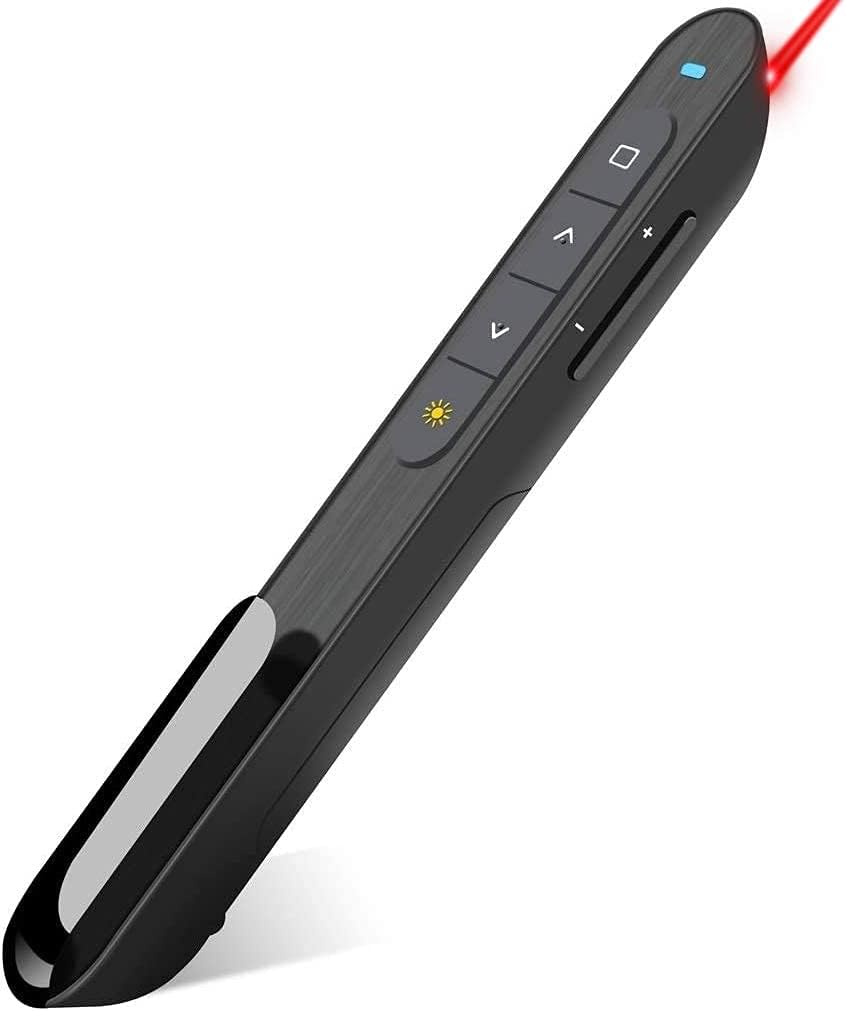


The UBUYONE Wireless Presenter is a budget-minded slide advancer that combines basic navigation with hyperlink, window switching, full-screen, black-screen, and volume functions. Its 4.6 rating reflects a generally well-received feature set, while the stated 100-foot control distance makes it suitable for classrooms, offices, and conventional meeting rooms where the presenter moves beyond the computer.
We may earn a commission when you buy through this link, at no additional cost to you.
A major strength is the combination of functions and compatibility in a straightforward package. The remote supports Windows, Mac OS, Linux, and Android systems, along with PowerPoint, Keynote, Prezi, Word, Excel, and other listed software. Its bright red pointer is designed to highlight slide elements, and the receiver-based design means there is no application to install. The included AAA battery also removes the inconvenience of preparing a replacement battery before an important session.
The trade-offs reflect the remote’s accessible design. It uses a single AAA battery rather than a rechargeable cell, and the product information notes that Mac users may need to complete simple setup. The 100-foot operating range is adequate for most rooms, although it is shorter than the stated range of the QUI model. The pointer and control figures also describe different functions, so buyers should distinguish the slide-control distance from the red-light distance.
This is a strong recommendation for teachers, students, office workers, and occasional presenters who want dependable core controls without paying for specialized timing or cursor features. It is particularly useful for someone who presents in different venues and needs broad software support. For basic presentations, it offers a capable feature set in a straightforward format.
Support for major operating systems and presentation platforms makes this remote adaptable to offices, classrooms, and shared meeting spaces. Its plug-and-play approach reduces setup time, while the stated Mac setup requirement is minor for regular users.
Hyperlink activation, volume adjustment, window switching, and screen controls extend the remote beyond forward and backward navigation. These functions can make it unnecessary to return to the keyboard during a talk.
We may earn a commission when you buy through this link, at no additional cost to you.
The Dual USB Receiver Presenter stands out because its receiver incorporates both USB-A and USB-C connectors. That design reduces the need to carry an adapter when moving between a newer Type-C computer and a traditional USB-A PC. It carries a 4.4 rating and offers a broad set of controls, a red pointer, and stated 100-foot slide-control range.
We may earn a commission when you buy through this link, at no additional cost to you.
Its other strengths are practical. The remote works without installing software and supports Mac OS, Windows, Linux, PowerPoint, Keynote, Google Slides, and Prezi. Page navigation, full-screen and black-screen functions, volume adjustment, and window switching cover common presentation needs. An intelligent sleep function is advertised to provide more than 30 days of standby time, while a magnetic slot in the body helps keep the receiver from being misplaced.
The main inconvenience is that the two AAA batteries are not included, despite the convenience of avoiding unusual battery sizes. Its red pointer is specified for highlighting content, but visibility can depend on the display and ambient lighting. The 100-foot control range is also a stated maximum rather than a guarantee for every environment. Even so, the combination of a dual-interface receiver and low-power design is especially convenient for people who alternate between computer types.
Choose this model if adapter-free portability and broad presentation support are priorities. It suits business professionals, teachers, and frequent travelers who want a compact remote that can be connected to either major USB interface. It is less compelling for someone who needs an integrated timer or rechargeable battery, but it delivers an unusually practical connectivity solution.
The integrated USB-A and USB-C receiver is the defining feature, allowing the same remote to serve newer Type-C systems and older USB-A machines. It is especially helpful when presentation venues do not provide a suitable adapter.
Page movement, screen toggling, volume adjustment, and window switching cover common actions during slides. The soft-touch, contoured body is intended to remain comfortable through longer speaking sessions.
We may earn a commission when you buy through this link, at no additional cost to you.
The DINOSTRIKE Air Mouse Presenter is the most specialized model in this guide, adding cursor control to conventional slide navigation. It has a 4.4 rating and provides page movement, full-screen and black-screen commands, volume control, hyperlink activation, window switching, and a red laser pointer. The additional air mouse function gives it potential for live demonstrations that require moving or selecting on-screen items.
We may earn a commission when you buy through this link, at no additional cost to you.
Its rechargeable design separates it from most competitors. A built-in 300mAh battery is said to provide weeks of use after a three-hour charge, and the remote enters sleep mode when inactive. Range is also impressive for its class: the listing states 164 feet for wireless slide control, 82 feet for air mouse operation, and 656 feet for the light itself. The USB receiver stores in the rear housing, while a pen-like clip makes the remote convenient to attach to a pocket or notebook.
Air mouse operation is not a substitute for every physical mouse, and the additional mode may feel unnecessary to a presenter who only advances slides. Users may need practice to activate and control the cursor smoothly. The 82-foot air mouse range is shorter than the general wireless-control range, and actual responsiveness may depend on the environment. These are considerations for technically confident users rather than drawbacks for everyone.
This remote is ideal for software demonstrations, training sessions, lectures, and presentations that involve interacting with the computer beyond simple slide changes. It is also a sensible rechargeable option for someone who prefers not to manage disposable batteries. Buyers who want the richest control set in this list should examine the DINOSTRIKE closely.
The air mouse function can help presenters move the cursor and interact with visible content without touching the laptop. A dedicated mode button separates cursor control from ordinary slide commands.
The internal battery offers a three-hour charging process and automatic sleep behavior. This makes the remote practical for recurring classroom, training, and business use.
We may earn a commission when you buy through this link, at no additional cost to you.
The Logitech Wireless Presenter R800 combines a green laser, tactile slideshow controls, and an LCD timer in a polished presentation remote. Its 4.6 rating makes it one of the strongest options in the group, particularly for speakers who want more control over timing and audience attention than a basic slide advancer provides.
We may earn a commission when you buy through this link, at no additional cost to you.
The green pointer is described as bright and visible on LCD and plasma displays and in brightly lit rooms. Its timer can provide silent, vibrating alerts, helping presenters manage a schedule without repeatedly checking the clock. The receiver offers up to 100 feet of control, and a reception indicator helps the user avoid moving beyond the operating area. Buttons are positioned for recognition by touch, while the curved body is designed for a comfortable grip.
Setup is straightforward: the wireless receiver plugs into a USB port without software installation and then stores inside the remote for packing. The trade-off is that its specialized timer and established feature set place it in a higher tier than basic models. Users should also consider whether a green pointer is appropriate for every venue, since pointer visibility and permission can depend on the display and environment.
The R800 is the most complete general-purpose choice for business presenters, lecturers, teachers, and public speakers. It suits anyone who values a timer, a visible pointer, and a receiver that will not be lost. Compared with remotes focused only on slide navigation, it offers a more structured experience for pacing a presentation and moving around the room.
The integrated LCD timer provides a clear time reference and offers silent vibrating alerts. This is valuable for speakers who need to stay within a meeting or lecture schedule without checking a computer.
The green laser is intended to remain visible on common displays and in bright rooms. It gives presenters a focused way to call attention to specific details on a slide.
We may earn a commission when you buy through this link, at no additional cost to you.
The Magnetic Receiver Presenter is a compact 2.4GHz remote with a practical combination of navigation, hyperlink, volume, and screen controls. Its 4.4 rating reflects a solid feature set for users seeking more than a two-button slide changer, while its stated 100-foot range suits conventional rooms.
We may earn a commission when you buy through this link, at no additional cost to you.
The remote is immediately usable with a computer: connect the USB receiver and no software download is required. A one-piece magnetic storage area helps prevent the receiver from being lost, and soft, raised rubber buttons should be easier to identify by touch. Page forward and backward, hyperlink navigation, volume adjustment, window switching, and full- or black-screen commands provide useful control away from the keyboard.
The listing explicitly advises against using the red pointer on LCD, LED, or television screens, where it may be difficult to see. Its AAA battery is not included, although an automatic sleep function is designed to conserve power and stretch battery life. As with other remotes, the stated 100-foot range represents a maximum under suitable conditions rather than a guarantee across every room layout.
This is a sensible recommendation for an office presenter who wants dedicated hyperlink and volume functions but does not need a timer, rechargeable cell, or air mouse control. It also works for teachers and students who need a compact presenter with a receiver that stays attached to the remote. Buyers searching for maximum pointer visibility should consider a green-light model instead.
The integrated magnetic USB storage keeps the receiver attached when the remote is not in use. This reduces the chance of leaving the essential connection behind after a meeting.
Soft, bumped buttons are intended to be distinguishable by touch, while hyperlink and volume commands reduce the need to return to the keyboard during a talk.
We may earn a commission when you buy through this link, at no additional cost to you.
The QUI Volume Control Presenter is defined by its ambitious 328-foot stated wireless control range, the longest in this group. It has a 4.2 rating, which is the lowest among the ten products, but the underlying specification set offers a convincing option for large halls, lecture spaces, and events where the presenter may need to move far from the computer.
We may earn a commission when you buy through this link, at no additional cost to you.
Its standard controls include page up and down, hyperlink navigation, volume adjustment, power, and full-screen or black-screen switching. The red pointer is described as visible in large conference rooms and lecture halls. Compatibility spans Mac OS and Windows as well as PowerPoint, Keynote, Google Slides, Excel, ACDSee, and Prezi. Installation is plug-and-play, and the clip allows the remote to be attached to a notebook or pocket.
The product requires one AAA battery, which is not included. Its 4.2 rating is lower than those of the other remotes, suggesting comparatively less favorable customer feedback, though it remains above four stars. The very long range is a stated maximum and may depend on the room, interference, and positioning. The absence of a timer, rechargeable battery, and dual-interface receiver also makes it less feature-rich than some alternatives.
This model makes the most sense for people presenting in unusually large spaces or using remote slide control across a broad area. It is a straightforward, portable option for meetings, classrooms, and training sessions. For a smaller room, a model with a green pointer, integrated timer, or rechargeable design may offer more value.
A stated control distance of 328 feet gives the QUI remote an advantage in lecture halls and large conference rooms. It allows presenters to interact with audiences farther from the connected computer.
Support for major operating systems and presentation software makes the remote broadly usable. Dedicated hyperlink and volume controls also cover actions that are frequently needed during meetings.
We may earn a commission when you buy through this link, at no additional cost to you.
The Ergonomic Laser Presenter is a balanced, conventional remote for people who want straightforward slide control, a pointer, and a comfortable body. Its 4.6 rating is tied for the highest in the guide. The design emphasizes large, distinct buttons and a soft-touch surface, both useful when a presenter needs to locate controls quickly.
We may earn a commission when you buy through this link, at no additional cost to you.
The remote offers a 98-foot slide-control range and a stated 328-foot laser range. It works with Windows, Mac OS, and Linux systems and supports Google Slides, Microsoft Word, Excel, and PowerPoint. The USB receiver fits into a slot in the handle, which is a simple way to prevent it from being separated from the remote. Two AAA batteries are included, and a side on/off switch helps preserve power when the remote is not being used.
The main limitation is the red pointer. Although useful for marking information, red can be less visible on certain modern displays than a green laser. At 58 grams, the remote remains lightweight and easy to carry, while the disposable batteries require occasional replacement. It also lacks a timer, air mouse mode, and USB-C receiver option, so it is better suited to conventional slide advancement than detailed software demonstrations.
This is a strong all-purpose recommendation for office presentations, teaching, and meetings. It works particularly well for a buyer who values straightforward setup, physical button separation, and included batteries over premium additions. It is also a safe choice for anyone who primarily needs to move between slides and highlight a point.
The soft-touch surface and contoured shape are designed for steady handling. A 58-gram weight and slim profile make the remote easy to carry between venues.
The USB receiver stores in a dedicated handle slot, while two AAA batteries are included. A side power switch provides an additional way to conserve energy between uses.
We may earn a commission when you buy through this link, at no additional cost to you.
The Green Light USB-C Presenter combines a 532nm green laser with USB-C rechargeable power, targeting teachers and presenters who need a highly visible pointer and dependable everyday operation. Its 4.6 rating reflects a strong reception, and the feature set goes beyond what most entry-level slide remotes provide.
We may earn a commission when you buy through this link, at no additional cost to you.
The primary advantage is pointer visibility. The green light is designed to cut through ambient light and remain clear on projection screens and whiteboards. The remote also supports forward and backward navigation, hyperlink activation, window switching, black- and full-screen functions, and dedicated volume controls. Its receiver snaps magnetically into the body, reducing the chance of losing a small but essential part.
The rechargeable design removes the recurring search for AAA batteries. A one-hour USB-C charge is advertised to provide weeks of daily classroom use, and a charging cable is included. Setup remains plug-and-play without drivers, pairing, or software. The trade-off is that USB-C charging access is necessary, and a green pointer may not be appropriate in every room or under every institutional policy.
This remote is an excellent choice for educators, lecturers, and business presenters who work regularly and place a premium on visible pointing and rechargeable convenience. It is especially relevant for classrooms and meeting rooms with bright projection screens. Compared with disposable-battery models, it offers a cleaner long-term power routine and a more specialized pointer.
The 532nm green light is designed to remain visible on projection screens and whiteboards, including under ambient light. It is a meaningful upgrade when a conventional red pointer is hard for the audience to see.
A one-hour USB-C charge is stated to support weeks of regular classroom use. The included cable and rechargeable cell eliminate the need to keep spare disposable batteries on hand.
We may earn a commission when you buy through this link, at no additional cost to you.
The Dual Interface Laser Presenter offers a simple two-button-era slide remote with a modern twist: a receiver that fits both USB-A and USB-C ports. Its 4.5 rating indicates strong customer approval, while the inclusion of two AAA batteries makes it immediately ready for use.
We may earn a commission when you buy through this link, at no additional cost to you.
The remote provides page advancement, a red laser pointer, and broad compatibility with Windows, Mac OS, and Linux computers. Google Slides, Microsoft Word, Excel, and PowerPoint are among the listed software options. A 98-foot control range and 328-foot stated pointer range allow the presenter to move around a typical presentation area, and an on/off switch helps conserve power.
Its soft-touch, ergonomic body and large buttons are intended to reduce accidental presses and make controls easy to find. The principal trade-off is the lack of specialized features. It does not offer the R800’s timer, the DINOSTRIKE’s air mouse, or the premium model’s rechargeable design. As with the other red-pointer products, visibility on LCD, LED, and television displays may be less than ideal.
This is a practical recommendation for anyone who wants one receiver to work with both major USB interface types and prefers a disposable-battery format. It is especially useful for office presentations where quick slide movement and pointing are enough. The model balances portability, ease of use, and broad compatibility without adding unnecessary complexity.
The combined USB-A and USB-C receiver makes the remote easier to deploy across different computers. It is a practical solution for users who alternate between an older PC and a newer Type-C laptop.
Two AAA batteries are included, and no drivers or complex instructions are required. The side on/off switch adds simple control over battery use between sessions.
We may earn a commission when you buy through this link, at no additional cost to you.
The Compact CLIKBUTM Presenter is the lightest dedicated remote in this guide at 38 grams with batteries included. Its 4.5 rating and compact 109-millimeter size make it appealing to presenters who carry minimal equipment or need a remote that slips easily into a pocket.
We may earn a commission when you buy through this link, at no additional cost to you.
The feature set covers the essentials with a stated 98-foot control range, 328-foot red pointer range, and support for Windows, Mac OS, and Linux. Listed software includes Keynote, Google Slides, Microsoft Word, Excel, PowerPoint, websites, and PDF files. No drivers are required; the user plugs in the USB dongle and presses the connection button on the back.
A single AAA battery powers the remote and is stated to last about two months, although actual duration depends on use. The USB dongle stores inside the battery compartment, giving the compact design a practical storage solution. The limitations are the absence of a USB-C receiver, an integrated timer, air mouse control, and rechargeable battery. A red light can also be less visible on some digital displays.
Choose this model for travel, teaching, and office presentations where low weight and small size matter most. It is a solid option for someone who needs dependable slide navigation and pointing but does not require advanced controls. Buyers who routinely use USB-C-only computers may prefer one of the dual-interface alternatives.
At 38 grams and 109 millimeters long, the remote is easy to carry in a pocket or small bag. Its compact dimensions make it especially convenient for people who present in several locations.
The plug-in receiver and rear connection button provide a straightforward operating process without drivers. Listed system and software compatibility covers common presentation environments.
We may earn a commission when you buy through this link, at no additional cost to you.
The right presentation remote depends on the room, computer, software, and speaking habits. These factors help narrow the field before comparing individual models.
Start by confirming that the remote supports the operating system and presentation software you actually use. Across this guide, the stated combinations range from Windows and Mac OS to Linux, Android, PowerPoint, Keynote, Google Slides, Prezi, PDF, Word, and Excel. A product that works with a computer may still use different commands or software-specific functions, so checking the detailed control list is important. USB receiver format deserves equal attention. USB-A remains common on many PCs, while newer laptops may use USB-C exclusively, and a conventional receiver may require an adapter that is not included.
Compare stated wireless control distance with the size of your typical venue. Most remotes in this list cover approximately 98 to 100 feet, which is appropriate for many classrooms and meeting rooms, while the QUI model advertises 328 feet for larger spaces. Also distinguish the slide-control range from laser-pointer distance; they are different measurements and should not be treated as interchangeable. Walls, electronic equipment, room layout, and interference can affect real-world performance, so choose extra range when the computer will be far from the speaking area.
A pointer is most useful when the audience can clearly see the spot it creates. Red lasers are common and generally straightforward to use, but one product specifically advises against them on LCD, LED, and television screens, while the Logitech R800 highlights green visibility on LCD and plasma displays. The premium model uses a 532nm green light designed for projection screens and whiteboards. Choose based on the display in your most common venue rather than treating pointer color as a purely aesthetic decision.
Every presenter should look for dependable forward and backward navigation, but additional controls can reduce interruptions. Useful options include hyperlink activation, volume adjustment, window switching, and full-screen or black-screen toggles. The R800 adds a timer and vibrating alerts, while the DINOSTRIKE provides air mouse cursor control for live demonstrations. Decide which functions you will genuinely use. A remote with many buttons is not automatically better if the layout is confusing, whereas a simpler model can be more effective for someone who only advances slides.
Power options affect both routine convenience and long-term ownership. Most products use one or two AAA batteries, and several include them, while the DINOSTRIKE has a built-in 300mAh rechargeable battery and the premium green-light model uses USB-C charging. Disposable batteries are simple to replace, but a presenter may need to keep spares available. Rechargeable models remove that recurring task but require charging access. Automatic sleep, standby behavior, and an on/off switch can further extend battery life and should be considered alongside the power source itself.
A small USB receiver is easy to leave behind, yet losing it can stop a presentation before it begins. Several models solve this with a magnetic slot, a compartment in the handle, or another built-in storage location. Compactness also matters for people who travel between venues. The CLIKBUTM is listed at 38 grams, the dual USB receiver model at 55 grams, and the ergonomic laser remote at 58 grams. Consider body size, pocket fit, attached clip, and whether the receiver remains attached to the remote when packed.
A presenter remote is often held continuously and used without looking directly at it. Soft-touch surfaces, curved profiles, distinct raised buttons, and logical thumb placement can make operation less disruptive. Several products in this guide specifically emphasize tactile buttons or an ergonomic grip. Balance that comfort with control complexity: models with additional hyperlink, volume, screen, and cursor functions need a layout that remains understandable under pressure. A pen-style clip may also be useful for users who prefer the remote to stay attached to a notebook.
Advanced needs deserve specialized features. Speakers under strict time limits may value the R800’s LCD timer and vibrating alerts, while presenters running live software demonstrations may prefer the DINOSTRIKE’s air mouse mode. Teachers working across multiple classes may favor the premium model’s rechargeable design and visible green pointer. These additions improve particular workflows but increase bulk, complexity, or charging requirements. For a short in-office slideshow, a simpler remote can be the more effective and less distracting choice.
Before a presentation, install the required batteries or fully charge the remote, connect the supplied USB receiver, and confirm that the computer recognizes it. Test forward and backward navigation, hyperlink and volume functions if needed, and activate the pointer in a safe direction away from people and equipment. For models with an on/off switch, turn the remote off after the session. Opening the program in presentation mode beforehand can also prevent the need for corrective keystrokes in front of an audience.
Store the receiver in the remote’s dedicated compartment, magnetic slot, or handle whenever possible. Keep the device away from moisture, direct heat, and physical impact, and clean the buttons and body with a dry or lightly damp cloth rather than immersing it. If the pointer is a laser, avoid directing it toward eyes or aircraft-related equipment, and follow any venue rules about laser use. Store rechargeable models with enough charge to remain ready for the next class or meeting.
For a recurring schedule, assign a place for the remote near your laptop bag and keep a spare set of the correct batteries if the model uses disposable cells. Check the receiver connector before traveling to a venue, especially when your computer has only USB-C. Test the remote before leaving home or arriving early at the location, and verify that the battery compartment or charging connection is closed and dry. These simple habits reduce the most common causes of presentation-day interruption.
Most models in this guide state support for Windows and Mac OS, but you should verify the exact system requirements and receiver connector before purchasing. Mac users may occasionally need to complete an extra setup step or adjust system permissions. Compatibility with the computer and slide software should both be confirmed, especially when using a USB-C-only computer.
It depends on the receiver design. A dedicated USB-A or USB-C receiver may need an appropriate adapter, while the two models in this guide with combined USB-A and USB-C receivers are designed to cover both interface types. Check the product listing and the shape of the computer’s port rather than assuming every compact receiver supports both standards.
A green laser can be more visible on many projectors, whiteboards, and bright displays, which is why the Logitech R800 and premium USB-C model emphasize green pointers. Red lasers remain suitable in many environments and are common across this guide. The best choice depends on the screen, ambient light, room size, and any local restrictions on laser use.
Control range describes how far the presenter can be from the computer while operating slide controls. Pointer range describes how far the light may be visible from the remote. A product can have a much longer pointer range than control range, so both figures matter depending on whether the remote must reach the computer or only illuminate a distant screen.
Air mouse control is unnecessary for simple slideshow navigation but can be helpful for live demonstrations, moving the cursor, or interacting with on-screen elements. The DINOSTRIKE is the model in this guide built around that capability. If your presentations consist mainly of prepared slides, a conventional remote with clearer slide controls may be simpler and less distracting.
Rechargeable models are convenient for frequent presenters because they remove the need to find replacement batteries before a session. Disposable AAA models are simple, widely understood, and can be changed quickly. Consider how often you present, whether you have reliable USB-C charging access, and whether you are willing to keep spare batteries with your equipment.
Choose a model with built-in receiver storage and return the dongle to that location after every use. Several products use a magnetic slot or compartment designed to keep the receiver attached. Keeping the entire remote in one labeled pouch can add another layer of protection, especially during travel between classrooms or meeting rooms.
Every model featured in this guide is described as plug-and-play and does not require software installation. You still need to connect the USB receiver and, for some models, press a pairing or connection button. Testing the controls before the audience arrives is still recommended, particularly when using a computer or presentation platform for the first time.
The strongest all-around option in this guide is the Logitech Wireless Presenter R800, which combines a visible green pointer, an integrated timer, tactile controls, and receiver storage. For the best balance of features and cost, the UBUYONE Wireless Presenter offers broad compatibility, useful hyperlink and volume controls, and a 100-foot range without installation complexity.
The best premium alternative is the Green Light USB-C Presenter, which combines a 532nm pointer with rechargeable power and magnetic receiver storage. The DINOSTRIKE is the strongest choice when cursor control and live demonstrations matter, while the QUI model suits unusually large rooms. For frequent travel, the compact CLIKBUTM or one of the dual-interface models offers a practical balance of size and connection options.
Before buying, confirm the software, operating system, receiver connector, room range, and power method that match your needs. Also consider the type of screen where you present, because pointer color can affect visibility. Product prices, promotions, and availability can change, so check the current listing and recent customer feedback before making a final purchase.