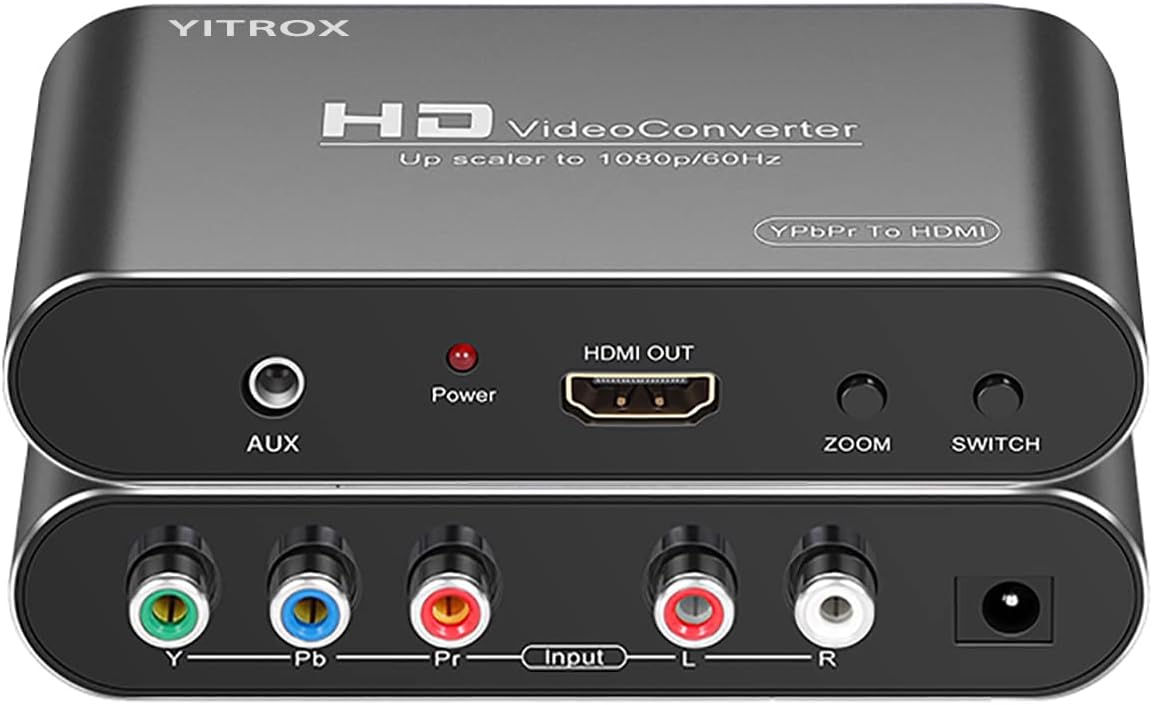
Component to HDMI Converter Upscaler Scaler
4.1Editor score
Five selectable output resolutions
Supports 1080p output
Works with multiple legacy devices
Our Original Xbox Upscaler guide compares 10 converters and cables for signal type, image quality, compatibility, setup, and reliable modern-TV use today.
An Original Xbox upscaler can make a classic console much easier to enjoy on a modern television, projector, or computer display. The important distinction is that most of these devices convert the console’s existing analog video into HDMI rather than adding detail that the original hardware never produced.
We compared all ten products by examining their supported Xbox signals, output resolution, power requirements, included accessories, installation needs, and stated image-processing features. The list covers dedicated adapters, broader component converters, scan converters, and complete AV-to-HDMI cable sets for first-generation Xbox owners.
The three leading selections reflect different priorities: a dedicated plug-and-play adapter, a versatile component converter, and a premium scan converter. Ratings and availability can change over time, and current prices should be checked before ordering because converter bundles and accessories may vary.
4.1Editor score

4.4Editor score

4.1Editor score
This side-by-side comparison highlights the signal paths, maximum stated output, power arrangements, and practical limitations of each Original Xbox upscaler, helping you identify the option that best matches your console, display, and installation preferences.


This general-purpose YPbPr-to-HDMI converter is a strong choice for owners who want more than a dedicated Xbox cable. It carries a 4.1 rating and stands out for offering five selectable output resolutions, multiple zoom options, and compatibility with a broad collection of older game systems and media devices.
We may earn a commission when you buy through this link, at no additional cost to you.
Its input can accept 480i, 480p, 576i, 576p, 720p, and 1080i or 1080p component signals, depending on the source. The output can be set to 480p, 576p, 720p, or 1080p at the supported refresh rates, which makes it easier to match the console to different modern displays.
The product description also highlights three-dimensional image compensation, motion optimization, color optimization, and digital noise reduction. These features do not create detail absent from the original source, but they are intended to reduce visible jitter, improve clarity, and make the converted image more suitable for a modern screen. Audio and video synchronization is another useful strength.
The main limitation is that it converts component video into HDMI and cannot work in the reverse direction. It also needs a proper component cable, and its broad menu of adjustments may feel excessive for someone who only wants a simple Xbox setup. Even so, it is a versatile choice for a multi-console collection or for a display that has difficulty with the console’s native output.
This is our top overall selection for versatility. Choose it when adjustable output, broad legacy support, and built-in processing are more important than the smallest possible footprint. A simpler owner with a first-generation Xbox may prefer the dedicated Jadebones adapter, while a more advanced retro-gaming setup may benefit from the OSSC.
After connecting the Original Xbox through its component output, select a resolution and zoom mode that fills the television without excessive stretching. The converter’s range of controls makes it a practical central device for several classic consoles, not merely an Xbox-specific accessory.
The five output settings let you match the converted image to a television, projector, or computer monitor without relying exclusively on automatic scaling. This is particularly useful when a display handles 720p better than 1080p or when the original source is only capable of lower resolution.
Image compensation, color optimization, and noise reduction can make an analog source look more consistent on a modern display. The improvement is primarily corrective and presentational, since a converter cannot manufacture the texture or detail missing from the original Xbox signal.
We may earn a commission when you buy through this link, at no additional cost to you.
The Jadebones adapter is one of the most approachable options because it focuses on one job: converting the Original Xbox’s YPbPr component signal to HDMI. Its 4.4 rating is the highest listed among the products with an available star rating, which indicates generally favorable customer reception.
We may earn a commission when you buy through this link, at no additional cost to you.
Installation is refreshingly straightforward. The adapter connects to the console and to a modern HDTV or monitor through HDMI, with no external power supply required. That reduces cable clutter and removes the need to locate a separate power adapter, although you still need an HDMI cable because one is not included.
The component signal is transferred to preserve the available colors and details. The description is appropriately clear that the adapter only transfers the signal and cannot improve the source quality. It is therefore best understood as a bridge between the Xbox and a modern screen rather than as a magical image enhancer.
Its focused design also means it will not provide the resolution menus, zoom controls, or broad multi-device support of a more elaborate converter. Players who want to fine-tune the picture may find a general scaler more satisfying, and owners using composite video will need a different solution entirely.
This is the best budget recommendation for a straightforward Original Xbox installation. It is particularly attractive for buyers who value simplicity, a compact dedicated design, and no external power requirement over advanced processing. The trade-off is straightforward: purchase a suitable HDMI cable and accept the quality inherent to the console’s component output.
For the best experience, connect the adapter to the Xbox’s component sockets, use a properly rated HDMI cable for the display side, and select the matching input on the television. Because the adapter performs only conversion, the game’s own video mode remains the determining factor for the final image.
Drawing power directly from the console’s connection makes setup simpler and reduces the number of accessories around the television. It is a meaningful convenience for a permanently installed classic gaming setup.
A dedicated adapter avoids the larger menus and extra connections found on general-purpose converters. It suits players who want a reliable HDMI route from the Xbox and do not need to manage multiple legacy devices through one box.
We may earn a commission when you buy through this link, at no additional cost to you.
The Mcbazel OSSC is the premium choice in this roundup because it is designed as a professional-style open-source scan converter rather than a simple console cable. Its 4.1 rating reflects a well-regarded product, and its ability to serve many classic gaming systems makes it appealing to enthusiasts.
We may earn a commission when you buy through this link, at no additional cost to you.
The converter supports retro platforms including Spectrum, Amiga, SNES, PAL GameCube, Saturn, Mega Drive, and PlayStation. It is particularly valuable for owners with multiple RGB-capable systems because it can consolidate high-quality legacy sources into a flexible display setup.
The package includes the scan converter, remote control, US-plug power supply, and manual. Output connections support modern workflows, while the remote makes menu adjustments easier than repeated button presses. The specification also allows users to refine the image through the converter’s processing options.
The trade-offs are significant. A suitable high-quality SCART cable is not included, and the product requires proper RGB input rather than a converted or split composite connection. It will not work with the Nintendo N64, a non-RGB-modified Nintendo NES, or an NTSC GameCube, and a JP21 adapter is needed for relevant JP21 RGB cables.
This converter is best for a serious retro-gaming collection in which image control, input flexibility, and long-term usefulness matter more than a minimal footprint. It is less suitable for a first-generation Xbox owner seeking one uncomplicated adapter, since the Xbox lacks the RGB input offered by some of the other supported consoles.
Confirm the source and output standards before buying, obtain the correct cable, and read the manual’s compatibility notes. If the plan is to connect several classic consoles to one television, the OSSC offers the most ambitious and reusable solution in the group.
The unusually broad system support means this purchase can serve more than one console over time. It is a better long-term option for a collector who understands the difference between composite, component, and RGB video.
The included remote and scan-conversion menu provide more control than a simple adapter. These settings are useful for matching geometry and scaling to different displays, although careful setup and appropriate source cables remain essential.
We may earn a commission when you buy through this link, at no additional cost to you.
This retro console converter is a straightforward option for connecting an Original Xbox to a modern television. It has no listed customer rating, so the evaluation must rely on the supplied product information rather than a visible review score.
We may earn a commission when you buy through this link, at no additional cost to you.
Its most useful specification is support for all native Xbox output resolutions: 480i, 480p, 720p, and 1080i. The product is described as converting the console’s analog component signals into digital HDMI while carrying audio and video without requiring separate converters or additional power.
That combination can make installation easier for someone who already understands the Original Xbox’s component connection. The adapter is intended to fit the original Xbox component-cable arrangement, providing a relatively direct path to a television that has modern HDMI inputs but no legacy analog video connection.
The description contains fewer technical details than some competing products, and it does not explain whether there are menu-based resolution, scaling, or color adjustments. That reduced documentation can make comparison difficult, especially for buyers who want fine control over geometry and image presentation.
The adapter is best recommended for owners who prioritize a simple, powered-free connection and do not need advanced processing. The lack of a published rating means there is no clear customer-feedback advantage over the better-rated Jadebones option, although the stated resolution support remains useful.
Verify the package contents and connector arrangement before ordering, because the supplied information does not itemize every included cable. Once connected, select the appropriate Xbox video mode and the matching HDMI input on the display to establish a stable baseline picture.
Supporting 480i, 480p, 720p, and 1080i gives the converter flexibility across games and display preferences. It is a signal-routing advantage, not an upgrade beyond the console’s native capabilities.
Combining analog component video and audio into HDMI avoids the need for a separate legacy audio connection. The adapter also needs no external power, which keeps the installation relatively clean.
We may earn a commission when you buy through this link, at no additional cost to you.
The Hyperkin Panorama HD Cable combines the familiarity of a physical Xbox accessory with a direct route to a modern display. It carries a 3.8 rating and is officially licensed by Xbox, which differentiates it from many unbranded adapter products.
We may earn a commission when you buy through this link, at no additional cost to you.
The cable is compatible with HDTVs and all Original Xbox models, according to the supplied information. It supports output up to 1080i, subject to the compatibility of the particular game. A seven-foot length provides enough room for many common television and entertainment-center arrangements.
Its appeal lies in simplicity. A player can connect the cable to the Original Xbox and a compatible television without assembling a larger external converter or navigating scan-conversion menus. The description promises a clear picture and crisp audio, though it does not detail separate image-processing controls.
The main limitation is that 1080i is the stated maximum. It also does not offer the resolution selection, zoom controls, or broader source compatibility of a general converter. Buyers wanting a dedicated 1080p mode or sophisticated scaling should examine the more feature-rich alternatives in this guide.
This is a strong choice for someone who values official licensing and a tidy installation. It may be particularly reassuring to original Xbox owners who prefer a recognizable accessory over an unfamiliar box with settings and external power. The output still depends on the game and the television’s handling of the converted signal.
Plan the cable route before installation, especially if the console is farther from the television than the included length allows. For most setups, its combination of official design, straightforward connection, and support for common HDTVs makes it a dependable specialist accessory.
Official licensing can provide reassurance that the accessory was designed around Xbox expectations. It is particularly useful for collectors who want recognizable, console-specific hardware.
The cable-based approach avoids scan-conversion menus and most external accessories. That simplicity is the primary benefit for players who want their classic console ready to use with a modern television.
We may earn a commission when you buy through this link, at no additional cost to you.
The Y.D.F cable is built around the Original Xbox’s native YPbPr component output. It has a 3.9 rating and distinguishes itself with a physical on-off switch, precise signal processing, and support for multiple standard Xbox display modes.
We may earn a commission when you buy through this link, at no additional cost to you.
Those modes include 480i, 576i, 480p, 720p, and 1080i. The product can carry audio and video to an HDTV, monitor, or projector through the converter arrangement described in its features, while the advertised processing is intended to improve color, resolution, and detail presentation.
The physical switch is a small but useful feature in a permanent installation. It lets the user turn the device off when it is not needed, which is more convenient than leaving it powered continuously or dismantling connections. The plug-and-play format also reduces setup time for most buyers.
An important caveat is that the product is only compatible with the Original Xbox. It also does not genuinely improve the source beyond the console’s capabilities; it primarily transfers and processes the highest-quality signal the console can provide.
This cable is best for an Original Xbox owner who wants direct component-signal processing and prefers a simple physical switch. It is less attractive for a multi-console library because its narrow platform support rules out broader use.
Use the highest compatible game mode that the television handles cleanly, then adjust the console’s video settings if necessary. Because conversion can expose scaling differences between 4:3 games and widescreen displays, leaving room for manual adjustment is wise.
The on-off switch provides a quick way to deactivate the converter without unplugging the installation. It is especially convenient for fixed setups beside a television.
The product emphasizes the Xbox’s YPbPr signal rather than beginning with composite video. That makes it a better starting point for owners seeking the highest-quality signal available from the original hardware.
We may earn a commission when you buy through this link, at no additional cost to you.
The COMeap bundle is a practical all-in-one option for Original Xbox owners who still have the classic red, yellow, and white AV connectors. It has a 3.8 rating and includes an AV cable, an AV-to-HDMI converter, a USB power lead, and a six-foot HDMI cable.
We may earn a commission when you buy through this link, at no additional cost to you.
The converter accepts PAL or NTSC sources and supports 720p and 1080p HDMI output according to its description. That output should be understood as conversion from the available composite source rather than a native high-resolution signal. A major advantage is that nearly everything needed for the connection is already in the box.
Setup follows a simple three-step process: connect the Xbox to the converter with the AV cable, connect the converter to the television with the HDMI cable, and provide power through the included USB lead. The television then needs to be switched to the correct HDMI input.
Composite video is the least detailed standard available from the Original Xbox, so this route will not deliver the image quality of a component-based converter. The bundle also requires USB power, and the product is specifically for the first-generation console rather than the Xbox 360 or Xbox One.
This package is best for a straightforward installation or a buyer without the necessary legacy cables. It is also useful for anyone who wants a ready-made AV-to-HDMI setup for related retro devices, since the converter is described as supporting several source formats.
Check that the original console’s video mode matches the television’s expectations, especially for PAL or NTSC systems. Once connected, give the display a moment to synchronize, and avoid expecting the visual clarity available through the Xbox’s component output.
The bundled HDMI cable, AV lead, converter, and USB power cable reduce the chance of discovering a missing essential after delivery. It is a convenient option for a first-time classic-console installation.
Supporting both major television standards broadens the converter’s usefulness across different Original Xbox regions. Buyers should still confirm the correct console video setting for their television.
We may earn a commission when you buy through this link, at no additional cost to you.
The Mcbazel OSSC appears again in the detailed ranking because it is one of only two products here designed to accommodate a large retro-gaming ecosystem rather than a single connection type. It has a 4.1 rating and includes a US-plug power supply.
We may earn a commission when you buy through this link, at no additional cost to you.
Its scan-converter architecture accepts RGB and component video and provides VGA and HDMI outputs. This makes it useful for owners who want to connect classic consoles to varied displays, compare connections, or establish a single high-quality routing system for an entire collection.
Compatibility extends to Spectrum, Amiga, SNES, PAL GameCube, Saturn, Mega Drive, and PlayStation. A remote control, power supply, and manual are included. Those accessories make the device more complete than a bare adapter, although a suitable RGB SCART cable must still be purchased separately.
It does not work with Nintendo N64, a non-RGB-modified NES, or an NTSC GameCube because those systems provide S-Video rather than RGB in the relevant configuration. It also cannot use a converted or split cable connection, and JP21 cabling needs an appropriate adapter. The seller explicitly recommends understanding the product before purchase.
For Original Xbox owners, the OSSC is most attractive as part of a larger high-end retro setup. The Xbox itself is not listed among the principal compatible systems in the supplied description, so a buyer should confirm the precise input arrangement rather than assuming immediate compatibility.
Read the manual, identify the source cable required for each console, and use the remote to configure scaling and geometry after connecting the display. The extra effort is justified when the goal is a flexible, collector-grade signal hub rather than a quick one-console solution.
The device shines when several high-quality retro sources need access to modern displays. Its broad platform support reduces the need to replace converters as a collection expands.
VGA and HDMI outputs make it easier to pair the converter with projectors, computer monitors, and televisions. The remote then provides convenient control over presentation settings.
We may earn a commission when you buy through this link, at no additional cost to you.
This HD Link cable is a compact way to connect the Original Xbox to an HDMI television or monitor. It has a 3.6 rating, the lowest numerical rating among the rated products, but it also offers an integrated design that removes the need to buy a separate HDMI cable.
We may earn a commission when you buy through this link, at no additional cost to you.
The adapter converts the console’s video and audio into HDMI and includes a button for selecting 720p or 1080p output. Its stated one-meter length is shorter than the six-foot and seven-foot options elsewhere in this roundup, so placement requires more careful planning.
Although the converter performs the signal conversion, it requires an external USB power connection before use. A micro USB power cable is included, but the product does not include a USB power adapter. A wall adapter or another suitable five-volt USB source therefore needs to be arranged separately.
The switchable output modes are convenient, though the product description offers no extensive menu or image-processing details. The 3.6 rating suggests that some buyers may have found aspects of its installation or performance less satisfying, making it prudent to check the latest customer feedback before purchase.
This is a practical choice when minimizing separate cables matters and the console sits close to the television. It may also be useful for owners who want a straightforward male-to-male HDMI connection rather than a converter box with a separate display-side cable.
Plan for both the one-meter connection distance and the USB power lead. Select the desired output mode with the button, then choose the matching television input. This setup is best when compactness outweighs the benefits of a more feature-rich scaler.
The integrated HDMI cable eliminates one purchase and reduces visible clutter around the console. It can make a compact entertainment center look tidier.
A button for 720p and 1080p modes allows the owner to match the adapter to the display. This is a simple alternative to converters with more complex on-screen menus.
We may earn a commission when you buy through this link, at no additional cost to you.
The Hyperkin Panorama HD Cable is included again because it represents a notably different approach from converter boxes and menu-driven scalers. Its 3.8 rating, official Xbox licensing, and simple cable format make it relevant to buyers who value a familiar accessory.
We may earn a commission when you buy through this link, at no additional cost to you.
It works with HDTVs and all Original Xbox models, supports up to 1080i depending on game compatibility, and provides a seven-foot cable. The result is a direct, uncluttered setup that does not require a separate external power supply or a large collection of menu controls.
For a player with a straightforward goal—connecting the classic console to a modern television—this licensed cable may provide a more attractive experience than a generic converter. The design communicates its purpose immediately and avoids the process of learning an unfamiliar interface.
Its ceiling is 1080i rather than a stated 1080p mode. It also offers few or no documented geometry and color controls, so users with unusual television overscan or scaling behavior may find the result less adaptable. The 3.8 rating should prompt buyers to consider recent feedback if possible.
The cable is best recommended for a single Original Xbox installation that values official design and simple operation. It is less suitable for collectors who need a converter to support several systems or want the flexibility to tune picture geometry.
Place the console where the seven-foot cable reaches comfortably, then choose the best supported Xbox video mode for the game. The licensed design and unobtrusive installation remain its strongest advantages even when more advanced products are available.
The licensed branding is a meaningful differentiator for buyers who want an accessory clearly intended for the Original Xbox. It can also simplify the experience of setting up a themed or period-correct system.
The seven-foot length provides greater placement flexibility than shorter integrated adapters. It can reach a television positioned somewhat farther from the console without immediately requiring an extension.
We may earn a commission when you buy through this link, at no additional cost to you.
The right Original Xbox upscaler depends on the console’s available video output, the display you want to use, and how much control you need over scaling. Signal type, included accessories, power demands, and verified platform support deserve attention before purchase.
The Original Xbox can produce composite and component video, and the difference affects the quality you can preserve. Component video separates color information into red, green, and blue signals and generally provides a clearer image than the combined red, yellow, and white composite connection. A product described as YPbPr, component, or HD Link is usually better suited to preserving the console’s stronger output than a composite AV converter.
Choose a component-based solution whenever the console and television arrangement allow it. Composite remains useful for a lower-cost, all-in-one package, but it starts with less source detail and cannot be recovered by an upscaler.
A converter’s output resolution is not automatically the same as the quality of the original source. Look for clear statements about supported input and output modes, especially whether 1080p is merely an available conversion setting or a mode the connected Xbox can actually feed into the device. Refresh-rate compatibility matters too, particularly for the 4K gaming upscaler, which requires a 1080p input and a 60Hz 4K display.
Match the available modes to your television or monitor rather than choosing solely by the largest headline number. A converter that works cleanly at 720p may be more reliable than one promising 4K under incompatible conditions.
Most Original Xbox converters transfer or transform an existing signal; they do not add missing graphical detail. Claims of clearer images can refer to scaling, sharpening, color correction, noise reduction, and improved synchronization rather than higher native game detail. A dedicated adapter may therefore produce a good result while a more advanced scaler provides extra controls and source flexibility.
Prioritize accurate conversion and stable synchronization if your main goal is a dependable picture. Choose a feature-rich box when fine adjustment, multiple input standards, or broad retro-console support matter to your setup.
Some adapters draw power from the Original Xbox and need no separate supply, while others require a USB power lead or a power adapter. The included components matter because a complete bundle can simplify installation, but a missing wall adapter can create an unexpected extra step. Also check whether an HDMI cable is included, because several products require the buyer to supply one separately.
For a simple dedicated setup, a no-external-power adapter is convenient. For a general converter, a reliable USB power source is easy to provide and may be necessary for stable operation.
Every product in this category is relevant to the Original Xbox, but not all are restricted to it. A dedicated YPbPr adapter or Xbox component cable is usually the least complicated choice. A general scan converter may support numerous retro systems, yet it can also require specialized cables and fail with consoles that lack the necessary RGB or component connection.
Check the explicit source format rather than assuming that an adapter labeled for Xbox will accept composite, S-Video, or RGB interchangeably. Ensure that the console’s output and the converter’s input match exactly.
Modern televisions often apply their own scaling to legacy 4:3 content, and an upscaler may be useful for controlling that process. Look for selectable resolutions, zoom settings, aspect-ratio handling, or remote-controlled geometry. These options matter most with projectors, computer monitors, and televisions that crop the edges of a 4:3 image.
Use a device with a wider adjustment menu when the default picture does not fill the screen correctly. Choose a simpler converter when the television already handles the Xbox signal well and you value a less complicated setup.
The location of the console relative to the television determines whether a short integrated cable is sufficient. Multi-foot accessories offer more placement freedom, while compact one-meter designs can reduce clutter when the console sits close to the screen. A full converter may need several connections and therefore enough room behind or beside the television.
Measure the intended route before ordering and note whether the included cable reaches the display comfortably. A longer cable is helpful, but a converter with poor connector fit or awkward controls can be more troublesome than a shorter, purpose-built solution.
Customer ratings offer a useful signal about real-world installation experiences, but they should be considered alongside the technical specifications. Some listings in this roundup do not show a numerical rating, making manufacturer support, warranty coverage, and detailed instructions especially important. A converter that includes a manual and clearly documented compatibility notes can be easier to configure than one with sparse guidance.
Review recent customer feedback for recurring complaints about synchronization, scaling, power, or missing accessories. Use those comments to determine which risks matter most in your intended setup.
Begin by identifying the output on the original Xbox and the input on the converter. Component-based setups should use the console’s YPbPr connectors and a matching cable, while composite setups use the familiar red, yellow, and white AV plugs. Connect the display-side cable before powering on the console, and consult the manual if the converter requires USB power.
Power the system, select the appropriate HDMI input on the television, and begin with the converter’s default resolution. If the image is absent, confirm that the correct input is selected, the cables are firmly seated, and the Xbox is configured to output the expected signal. A 4K converter additionally requires 1080p input, an HDMI 2.0a-or-better cable, and a display capable of 4K at 60Hz.
For best results, adjust the console’s video mode and the converter’s scaling one setting at a time. Use zoom or aspect controls to remove black borders without distorting characters, and avoid aggressive sharpening that creates halos around sprites and text. Keep the converter ventilated, protect its power and signal cables from sharp bends, and disconnect power before rearranging connections.
Usually not in the native-detail sense. An upscaler can convert the Xbox’s existing video into a higher-resolution HDMI signal, but it cannot restore graphical detail that the original console never produced. The 4K Gaming Upscaler & Enhancer accepts 1080p input and offers 4K at 60Hz output, yet the source remains a classic 1080p signal.
Component video is normally the better choice when both the console and converter support it. It carries more color and detail information than the combined composite signal. Composite is a practical fallback for simple installations, particularly when a complete AV-to-HDMI bundle is preferred, but the resulting picture will generally have less detail.
No. The Jadebones adapter and the Retro Video Game Console Converter are described as requiring no external power, while other products need a USB power lead. Check the specific listing because a micro USB cable is not always the same as a complete USB power supply.
No. The Jadebones adapter requires the buyer to supply an HDMI cable, while the COMeap package includes a six-foot HDMI cable. The Hyperkin Panorama HD Cable is itself a combined accessory, and the OSSC offers HDMI as one of its outputs. Confirm the package contents before placing an order.
Black borders commonly result from a mismatch between the console’s 4:3 output and a widescreen television. Try the supported Xbox video modes, then use the converter’s zoom, aspect, or scaling controls if it offers them. Avoid stretching the image beyond its natural proportions because sprites and text can look noticeably distorted.
General-purpose component converters and scan converters can support several systems, provided each console offers a matching input signal. Dedicated Original Xbox adapters are less flexible. The Mcbazel OSSC supports a wide range of RGB and component retro platforms, but it also requires appropriate source cables and does not support every console.
Check that the television is on the correct HDMI input, the signal cables are secure, and the console is producing the expected resolution. The 4K Gaming Upscaler specifically requires 1080p input, an HDMI 2.0a-or-better cable, and a 4K 60Hz display. Also verify that the converter has power if its design requires USB power.
It can improve how the existing signal is presented, but it cannot add true source detail. Conversion, scaling, color processing, noise reduction, and synchronization may make the image cleaner or better proportioned on a modern display. The underlying graphics and the game’s own supported video mode still determine what you see.
The Jadebones HDMI Adapter Converter is the most straightforward dedicated choice, offering a 4.4 rating, simple component-to-HDMI conversion, and no external power requirement. The Component to HDMI Converter Upscaler Scaler is the most versatile option for multiple legacy devices, while the Mcbazel OSSC stands apart as the premium, collector-oriented scan converter.
Prioritize the source signal first. Component video is preferable when the converter supports it, followed by careful attention to output resolution, power requirements, included cables, and actual Xbox compatibility. Players with one console and a modern television may value simplicity more than extensive controls, while collectors should prioritize broad input support and appropriate high-quality cables.
Ratings, bundle contents, and current prices can change, so check the latest listing and customer feedback before ordering. Most importantly, confirm that the converter’s input matches the Original Xbox output and that the television supports the selected output mode. With those details right, even a basic adapter can provide a much more satisfying classic-gaming experience.