
Overhead Tripod for Mini Projector
4.8Editor score
Adjusts from 11 to 17 inches
Universal quarter-inch attachment
Foldable portable design
A pico projector stand mount keeps a compact projector securely positioned while you cook, craft, teach, stream, or present. A useful model combines a stable base, flexible joints, useful height adjustment, and a secure attachment system that fits your projector without interfering with cooling or controls.
The products in this guide range from compact desktop tripods to weighted floor stands and elaborate dual-device creator systems. We compared the stated compatibility, mounting mechanisms, adjustment ranges, stability features, portability, and practical use cases, giving particular attention to stands that also hold phones for recording and projection.
Each review highlights the stand most likely to suit a particular workflow, from light portable setups to more specialized creator arrangements. Product specifications and availability can change, and current prices vary, so readers should confirm dimensions, attachment compatibility, and current product details before making a purchase.
4.8Editor score
4.6Editor score

3.9Editor score
As an Amazon Associate we earn from qualifying purchases.
The following comparison places every stand side by side, emphasizing attachment type, supported devices, height or angle adjustments, and the most practical form factor for each setup.



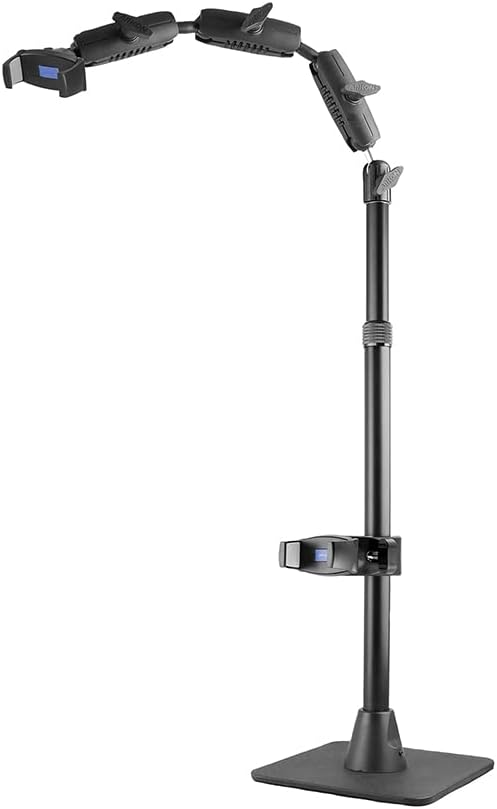
The ARKON Mounts Remarkable Creator Cookie Decorator is a feature-rich stand for people who want to project a design while recording the work from another angle. It carries a 4.6 rating, and its defining advantage is the ability to combine a phone and a pico projector or hold two phones at once. That makes it more than a basic projector perch.
We may earn a commission when you buy through this link, at no additional cost to you.
The stand accommodates phones up to 3.9 inches wide and mini or pico projectors using a quarter-inch 20 camera adapter. Its telescoping stand and extendable overhead arm reach up to 41 inches, allowing the projector to be raised above a work surface while a recording phone takes an overhead view. The phone clamp can also be repositioned around the mounting system for front-facing, side, or elevated perspectives.
A non-skid weighted base is central to the design because projecting and filming can make small movements more noticeable. The flexible arm system gives users better control than a simple fixed shelf, although the stand's size and number of adjustment points make it less convenient for spontaneous travel use. The listed capacity is not the issue; setup and portability are the practical trade-offs.
This is a strong choice for cookie decorating, cooking demonstrations, drawing tutorials, crafting videos, and overhead vlogging. Choose it when recording and projection are both central to your workflow. A simpler tripod is easier to carry, but this ARKON system offers a much more coordinated creator station.
The dual-device design lets a phone capture the process while a pico projector displays a reference image on the work surface. Holders can be placed at different points on the system, making it possible to combine overhead and front-facing views without assembling separate stands.
Height adjustment to 41 inches provides enough clearance for tables, counters, and compact work areas. The broad adjustment range also allows the projector to sit above a phone rather than directly competing with it for the same position.
We may earn a commission when you buy through this link, at no additional cost to you.
The ChromLives Photo Copy Stand is a compact, light option for overhead phone work and simple projection-related tasks. Its 4.3 rating reflects a straightforward design that prioritizes portability, quick angle changes, and a stable tabletop footprint. It weighs just 1.5 pounds, making it substantially easier to move than a weighted floor or creator stand.
We may earn a commission when you buy through this link, at no additional cost to you.
The phone spring clip accepts phones between 6 and 10 centimeters wide, which covers many common smartphones. The stand shortens to 8 inches and extends to 16 inches, while its photographic angle can be adjusted from 30 to 90 degrees. The main rod is aluminum alloy, and the base uses cast iron, producing a reassuringly solid lower structure for a small tabletop device.
One limitation is that the supplied description identifies a cellphone spring clip rather than a clearly documented quarter-inch projector mount. The title refers to pico projector use, but users wanting a guaranteed standard projector connection should verify the physical interface before buying. The listed tilt range also depends on phone weight, so a heavier device may settle at a smaller angle than the maximum.
The ChromLives stand is best for creators who need an inexpensive, portable overhead phone position and may also use a compatible mini projector. It is less suitable for a permanent installation or a heavy projector. If portability and compactness matter more than elaborate dual-device control, this is a capable entry-level choice.
The folding legs and low stated weight make the stand easy to place in a bag and reposition around a room. A cast-iron base and broad legs help it feel more planted than a stand made entirely from thin folding tubes.
The telescoping section provides quick height changes, and the spring clip makes it straightforward to move a phone in and out. That simplicity is useful for livestreams, demonstrations, and repeated filming sessions.
We may earn a commission when you buy through this link, at no additional cost to you.
This foldable gooseneck stand is built for creators who need quick changes between overhead, vertical, and horizontal device positions. It has a 3.9 rating, and its defining feature is a gooseneck arm that can bend through 360 degrees. That flexibility makes it useful for projecting onto different surfaces or repositioning a camera without rebuilding an entire stand.
We may earn a commission when you buy through this link, at no additional cost to you.
A standard quarter-inch interface allows the arm to work with phones, mini projectors, action cameras, webcams, and entry-level DSLR cameras. The triangular base folds for storage and has a non-slip silicone pad intended to reduce sliding on smooth desktops. Installation requires no complicated tools, which makes the stand approachable for beginners and convenient for quick creative sessions.
The central trade-off is inherent to a gooseneck design. Flexible construction can be less rigid under heavy loads or when touched, so it is better suited to light devices and controlled desktop use than to a busy studio. Its stated compatibility is broad, but projector weight and balance remain important, and the product information does not provide a load rating.
This is a good option for cookie-decorating projection, teaching, scanning, makeup tutorials, live streaming, and compact home use. Buy it when repositioning speed and easy storage matter most. For heavy equipment or a large floor-standing setup, a more rigid pole or weighted base would be a better match.
The quarter-inch interface broadens the stand beyond smartphones, allowing compatible cameras, webcams, and compact projectors to share the same support. That versatility is valuable in a shared studio or mixed-content workspace.
The triangular base collapses when the stand is not needed, making it easier to retain desk space in a home office. The silicone contact points also help it stay in place during projection and recording.
We may earn a commission when you buy through this link, at no additional cost to you.
The Portable Desktop Projector Stand focuses on a stable, adjustable platform for compact projectors and other quarter-inch devices. It has a 4.0 rating and uses an aluminum alloy body with a heavy base. The stated load capacity reaches 11 pounds, giving it a reassuring foundation for a suitable mini or pico projector.
We may earn a commission when you buy through this link, at no additional cost to you.
The included quarter-inch screw creates a familiar attachment method, while the head rotates through 360 degrees and tilts up or down by 12 degrees. That is enough movement to correct the orientation of a desktop projector, though it offers less vertical freedom than a full articulated arm. Anti-slip rubber pads protect the desk and help control movement during use.
As its name suggests, this is primarily a desktop stand rather than an overhead creator rig. The fixed vertical reach and relatively limited tilt mean it works best when the projection surface and projector are close together. A user seeking dramatic overhead positioning or simultaneous phone recording should look at an articulated creator mount instead.
This stand is a practical option for home-theater viewing, office presentations, classrooms, compact movie nights, and travel where a full-size tripod is inconvenient. It is also useful as a general camera or smartphone support when a quarter-inch connection is available. The easy setup and strong base make it more specialized and dependable than a flimsy plastic shelf.
The weighted construction and 11-pound capacity offer a stable base for properly compatible projectors. Rubber pads reduce the chance of scratching a desk while helping manage small vibrations.
Full horizontal rotation is useful when the projector needs to face another surface. The 12-degree tilt can make small framing corrections, although users should not expect the broad pitch range of a multi-jointed overhead stand.
We may earn a commission when you buy through this link, at no additional cost to you.
The ARKON Cookie Decorators Mount Stand is purpose-built for projects that combine a pico projector, a recording phone, and careful visual presentation. Its 3.9 rating does not lead the field, but the product is more specialized than its rating alone suggests. It includes a pair of Mobile Grip 5 holders, allowing two phones or one phone and one pico projector.
We may earn a commission when you buy through this link, at no additional cost to you.
The multi-angle arm provides 360-degree movement for overhead, unconventional, and front-facing views. A pink extension pole expands from 17 to 29 inches, making it possible to raise the projector and recording equipment over a work area. The solid weighted base is designed to minimize vibration, an important consideration when a small camera is filming detailed work.
The trade-offs are bulk and specialization. A creator rig takes more space and effort to transport than a folding desktop tripod, and buyers focused on casual projection may find the system more elaborate than necessary. The lower 3.9 rating also means buyer feedback has been less uniformly positive than the top-rated options, so attachments, fit, and intended use deserve extra attention.
It is best for cookie artists, livestreamers, and content creators who want both projection and simultaneous filming from multiple angles. Choose it when a purpose-built arrangement matters more than minimal size. If you only need one compact projector pointed at a wall, one of the simpler desktop or tripod models will usually be more efficient.
Holding a projector and phone together allows the projected reference and the recording view to coexist above a project. This is particularly useful for detailed decorating, illustration, and tutorial content where viewers need both guidance and a close view.
The 360-degree multi-angle arm permits creative perspectives without adding several independent stands. The weighted base helps keep those changes calm, reducing abrupt movement in the recorded image.
We may earn a commission when you buy through this link, at no additional cost to you.
The 25-Inch Dual Phone Holder is a well-rated option for creators who want overhead recording with the option to add a mini projector. Its 4.7 rating is among the strongest in this group, while the stated reach of approximately 31.5 inches gives it more elevation than most compact desktop stands.
We may earn a commission when you buy through this link, at no additional cost to you.
It fits phones up to about 4.33 inches wide and accommodates mini projectors with a quarter-inch 20 adapter. Two phones can be mounted at once, or one phone can be exchanged for a compatible projector. Holders can attach to the arm or vertical pole, allowing the camera and projection device to occupy different positions.
The weighted, non-slip base is a clear strength for long-form recording, although reaching farther from the center can magnify small movements. Buyers should therefore tighten every joint and avoid casually touching the extended arm during recording. The quarter-inch adapter requirement also means not every pico projector can be attached without checking its interface.
This stand is well suited to tutorials, cooking demonstrations, instructional video, crafting, and vlogging that needs a high angle. It is a compelling choice for people who already know their projector uses the stated adapter. For extreme portability or very low-cost setups, a smaller folding tripod remains more convenient.
The extended arm can clear more of the table than a compact desktop stand, giving the camera a broader overhead view. It is useful when a close-up lens would otherwise obstruct the work area.
Two phone positions can support a front-facing and overhead recording simultaneously. Replacing one phone with a mini projector creates a combined filming and projection arrangement without requiring a separate support for each device.
We may earn a commission when you buy through this link, at no additional cost to you.
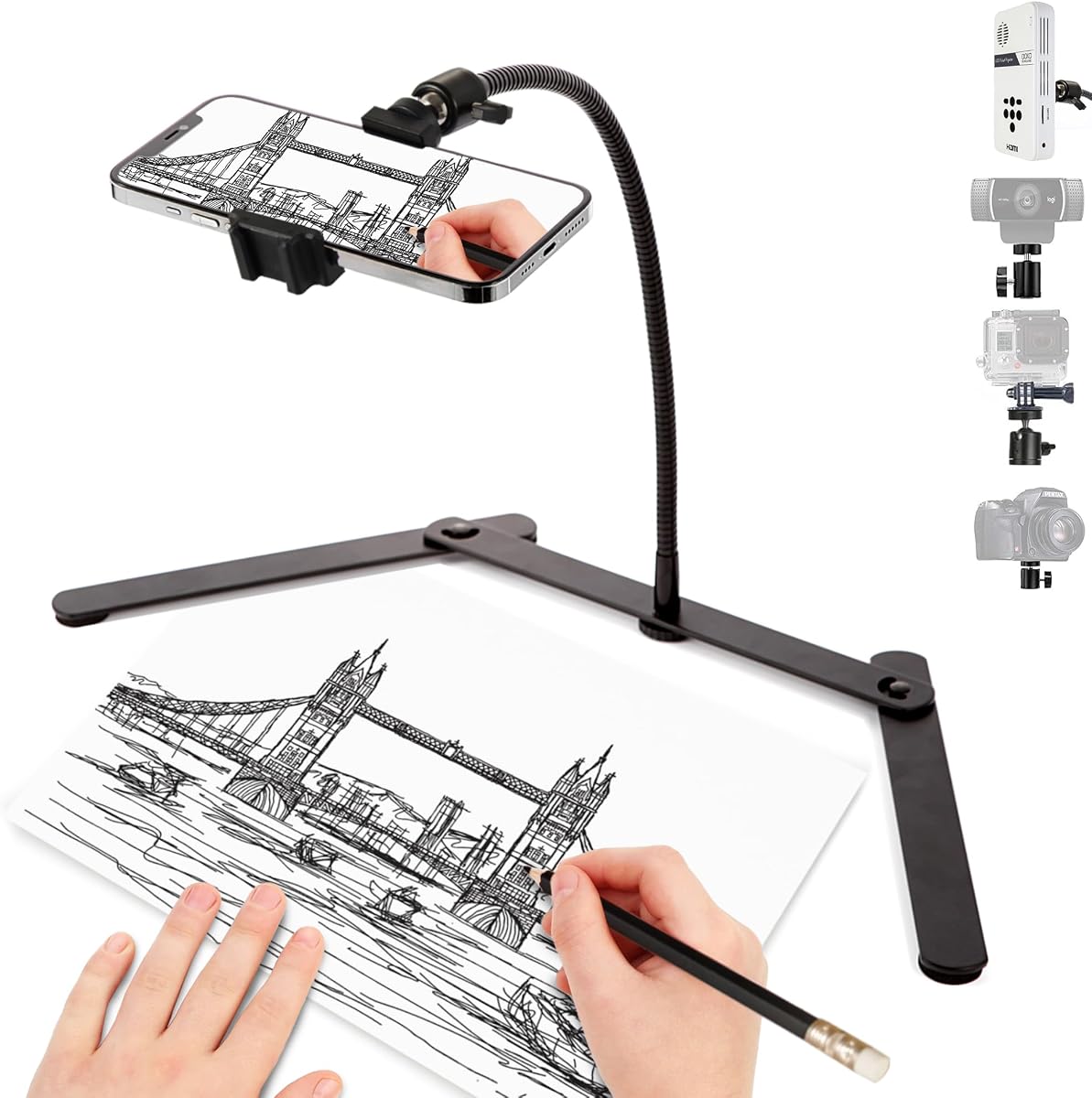
The Overhead Tripod for Mini Projector is a compact, highly rated stand for light devices and close-range creative work. It carries a 4.8 rating, the highest among the ten products, and combines an aluminum pole, cast-iron base, universal quarter-inch mount, and rotating ball head in a foldable design.
We may earn a commission when you buy through this link, at no additional cost to you.
Height adjusts from 11 to 17 inches, while the main rod rotates 180 degrees and the ball head rotates through 360 degrees. A phone holder is included, and the mounting system can also support webcams, mini cameras, and cookie projectors. An expansion slot offers a place to add a fill light or microphone, which expands its usefulness beyond basic overhead positioning.
Its most important limitation is the stated 0.8-pound maximum load. That figure makes clear that it is intended for light equipment, so a heavier projector or an overextended configuration may not be stable. The 17-inch maximum height also limits how far the device can be lifted above a large work surface.
This is an excellent budget choice for compact home movie nights, cookie decorating, online classes, livestreaming, and overhead phone shots. It is especially attractive for users who need a light stand that folds down and moves easily. Users with heavier or larger projectors should choose a stand with a clearly higher capacity and greater vertical reach.
The 360-degree ball head allows substantial repositioning without repeatedly removing the device. That makes it convenient to alternate between overhead, low-angle, front-facing, and self-facing views during a session.
The detachable, foldable structure and 1.2-pound weight make this tripod easier to store than a permanent stand. A cast-iron base and reinforcing bar help maintain stability within the product's stated load limit.
We may earn a commission when you buy through this link, at no additional cost to you.
The PUTORSEN Universal Projector Stand is a floor-standing option for people who want to place a compatible projector near a wall, screen, sofa, or bed. It has a 4.1 rating and combines carbon steel construction with a stainless coating. The square all-metal base supports up to 11 pounds.
We may earn a commission when you buy through this link, at no additional cost to you.
Height changes from 36.6 to 48.75 inches, while the ball head provides 360-degree horizontal rotation and up to 90 degrees of tilt. The low-profile L-shaped design is especially useful behind furniture, where a conventional tripod could take up too much room. It can also support cameras and webcams that use the same quarter-inch interface.
Compatibility is the critical qualification. The projector must have a quarter-inch hole at the bottom center, and buyers should verify that before purchasing. This is a viewing and presentation stand rather than an overhead filming rig, and its wide floor footprint may be inconvenient in a small workspace.
Choose this model for home movie nights, office presentations, outdoor use, or a dedicated media corner where height and stability matter. It offers a notably tall viewing position without a large vertical pole. It is less appropriate for cookie decoration, overhead crafting, or creators who need to record and project simultaneously.
The tall adjustment range can place a projected image at a comfortable level above the floor. A narrow L-shaped base also fits more easily behind a sofa or bed than a broad tripod footprint.
The steel body and square base provide a firm foundation within the stated capacity. The coated finish also gives the stand a clean appearance that can blend into a living room or office.
We may earn a commission when you buy through this link, at no additional cost to you.
The ARKON Phone Holder Full Kit is a complete overhead filming system rather than a dedicated pico projector stand. It earns a 4.7 rating and is particularly attractive for creators who want an adjustable camera position, a stable tabletop base, and integrated lighting in one package. The kit also supports tablets, which can display recipes, instructions, or reference material.
We may earn a commission when you buy through this link, at no additional cost to you.
Five ultra-secure articulation points let the arm move from horizontal overhead views to straight-on and intermediate angles. The universal phone holders fit devices up to 3.9 inches wide, while the tablet holder supports units up to 7 by 18.4 inches. A stabilizing base allows use on tables, counters, and desktops for baking, drawing, painting, repairs, makeup, nail art, and other detailed tasks.
The important limitation is that the supplied specifications do not identify a quarter-inch pico projector connection. This kit should therefore be considered for overhead recording and reference-display workflows rather than assumed to work with every projector. Its multiple arms and larger base also occupy more desk space than a compact desktop mount.
This is a strong pick for serious hobbyists and professionals who film hands-free content and value lighting as part of the setup. Buyers whose primary requirement is projecting with a pico projector should prioritize a model with a documented projector interface instead. For general overhead creation, however, the five-point arm and included ring light form a capable station.
Multiple points of articulation allow the camera to move between overhead and front-facing positions while retaining the final position. That flexibility is valuable when a creator alternates between demonstration shots and direct-to-camera segments.
The integrated ring light and tablet support expand the kit beyond a bare holder. A tablet can display instructions or source material while the phone records, reducing the need for separate desk equipment.
We may earn a commission when you buy through this link, at no additional cost to you.
The HVAYING Floor Projector Stand is a sturdy tray-based mount for projectors and other supported equipment. It has a 4.0 rating and a stated capacity of 13 pounds. A generous 15.04-by-11.14-inch tray gives larger devices more support than a simple quarter-inch screw stand.
We may earn a commission when you buy through this link, at no additional cost to you.
The tray includes support lips, sponge spacers, and an elastic band intended to keep equipment from slipping. Height adjusts from 16 to 48 inches, providing a much broader range than most desktop models. A sturdy floor base and no-drill setup make it convenient for offices, homes, stages, studios, and temporary event spaces.
This is a floor stand, so it needs enough space to remain stable and may sit awkwardly in a compact room. Unlike a screw-mounted model, it is not intended to elevate a pico projector by its threaded connection; the device rests on the tray. The long advertised height range also differs between the title and product description, so buyers should verify the configuration they expect.
The HVAYING stand is best for larger projectors, books, recorders, music materials, and sound media equipment in a fixed area. It can also work for a compatible pico projector that fits securely on the tray. For a small projector requiring precise aiming, a quarter-inch articulated head may be more appropriate.
The wide tray offers more physical support than a single screw or narrow bracket. Lips, padding, and the retaining band work together to reduce movement and help protect the device.
The floor base can be positioned close to a wall without drilling and moved when the room layout changes. Broad height adjustment supports viewing positions ranging from low tabletop presentations to elevated screens.
We may earn a commission when you buy through this link, at no additional cost to you.
The right pico projector stand depends on the projector connection, available space, viewing angle, stability needs, and whether you also want to record with a phone. Use the following factors to narrow the field before making a purchase.
Begin with the underside of your pico projector. Several stands in this guide use a standard quarter-inch screw, while others rely on a spring clip, phone cradle, or broad supporting tray. A title may say that a model works with a projector without specifying the exact connection, so physical verification is important. Also check whether the attachment is centered on the bottom, what thread it uses, and whether the projector can safely sit in a cradle without blocking vents, ports, focus controls, or speakers.
A front-facing movie stand and an overhead creator mount solve different problems. If you are projecting toward a wall or screen, look for horizontal rotation, useful vertical tilt, and a height that places the image at eye level. If you plan to project a design onto a work table or film the process from above, choose a gooseneck, ball head, or articulated arm that can reach over the surface without obstructing your hands.
A stand should support more than the combined weight of the projector and any attached phone or camera. Pay attention to whether the base is weighted, cast iron, rubber-padded, or simply narrow folding tubing. Long overhead arms and projector trays can create leverage even when the device itself is light. If a product does not publish a capacity, use the lower, more conservative option rather than assuming a heavier projector will be safe.
Measure the area where the stand will be used. Compact desktop models often reach only 11 to 17 inches, which is useful for close work but limited for large tables. Mid-height creator stands can approach 30 inches, while floor stands may exceed 40 inches. More height provides better projection clearance, but it can also increase vibration, occupy more visual space, and make the setup less convenient to move.
Creator mounts that hold a phone and projector together are valuable when projecting a reference and recording the result at the same time. Some can also hold two phones for front and overhead views. If you only need a projector, a simpler stand may be more reliable and less crowded. If you already record with a separate phone support, combining both devices on one base can save desk space and simplify alignment.
Portable stands should fold, detach, or collapse into a manageable shape without loosening their adjustment knobs. Cast-iron and weighted creator bases improve stability but add bulk. A lightweight folding tripod is easier to carry between classrooms, kitchens, and event locations, whereas a fixed floor stand is better for a permanent viewing area. Consider both the folded dimensions and the weight of the complete assembly.
Look for non-slip pads, rubber feet, sponge spacers, tray lips, and retaining bands. These features can reduce scratches, slipping, and movement. The mount should also leave the projector's cooling path unobstructed. Avoid arrangements that press against vents or place the device where heat can accumulate, especially during long projection sessions. A stable mounting position is only useful if it does not interfere with safe operation.
A desk-mounted option works well for compact rooms, but it may compete with a keyboard, mouse, crafting tools, or cooking area. A floor stand needs a clear path and enough room for the base. Overhead arms provide excellent camera positions but can obstruct a person's hands if set too low. Think through where the projector, recording device, subject, and screen will all be before finalizing a selection.
Begin by placing the stand on a level surface and fully extending or locking its base before attaching any equipment. Confirm that the projector fits the mount and that the bottom connection, cradle, or tray can support its weight evenly. Tighten the relevant locking screws, but avoid forcing the device into a position that presses against its casing, buttons, lens, or ventilation openings.
Next, adjust the height and viewing direction in small increments. Turn on the projector and use its image-position controls to correct the final frame after the stand is set. If the system includes a phone, position the phone independently so it can record the surface or the creator without blocking the projection. Tighten joints after every major movement, and keep hands and tools clear of the extended arm while recording.
For care, wipe metal and aluminum surfaces with a soft, dry or lightly damp cloth, and clean non-slip pads with mild soap when needed. Do not submerge the stand, use abrasive cleaners, or allow moisture to enter moving joints. Before storing a folding model, release locking clamps and collapse the sections carefully. Periodically check screws, adapters, rubber feet, and locking knobs for looseness, especially after carrying or repositioning the stand.
The most important factor is the mount type, not only the projector's size. Quarter-inch screw stands require a matching bottom-center thread, while cradle and tray designs depend on physical dimensions and weight. Check the projector's dimensions, weight, underside connection, and ventilation clearance before purchasing. A projector that physically fits should still be able to rest securely without blocking its controls or air vents.
Several creator-oriented stands in this guide are designed to hold both a phone and a compatible projector. This arrangement is useful for projecting a pattern while recording the process from an overhead or front angle. Check whether the listed holders use the correct quarter-inch 20 adapter, and make sure both devices can be positioned without blocking one another.
A weighted or broad base improves stability, especially when a phone is added or the arm is extended. Very small projectors may be manageable on a light desktop stand, but even modest leverage can cause visible movement. For long recording sessions, an extended overhead arm, or a projector with a higher center of gravity, a solid base is the safer choice.
An articulated overhead stand with a stable base gives the projector enough clearance to cast a design onto the work surface. A phone-and-projector configuration can also record the creator's hands. Look for flexible angle changes and a non-slip base, and set the arm high enough that the holder does not interfere with the work area.
Many models can, provided they meet your viewing-height and stability needs. A ball-head or floor stand with broad rotation is more suitable for directing an image toward a wall or screen. A small desktop model works better for close-range projection, and a large tray stand may accommodate projectors too heavy or bulky for a compact attachment.
Use the most stable base appropriate for the device, tighten all joints, and avoid touching the arm once recording starts. Keep the projector balanced and do not extend the arm farther than necessary. Positioning the stand away from foot traffic and using a non-slip surface can further reduce movement. A dedicated camera and projector arrangement may also be steadier than placing both on one lightly supported arm.
Some models are marketed for indoor and outdoor environments, but the material alone does not make every stand weather-resistant. A coated steel floor stand may handle a protected patio better than a fine-machined desktop mechanism. Keep electrical equipment dry, avoid wet surfaces, and confirm that the wind cannot easily move the base. Foldable and lighter stands generally need extra care outdoors.
Confirm that the projector has a compatible quarter-inch thread at the bottom center and that the included adapter matches it. The adapter must also be long and wide enough to support the projector without letting it rest directly on another surface. Check for blocked vents, controls, ports, and focus mechanisms before tightening the connection.
The ARKON Creator Cookie Decorator Mount is the most versatile option for creators who want to project and record at the same time, while the Overhead Tripod for Mini Projector offers a lightweight, highly rated budget setup. The ARKON Cookie Decorators Mount Stand provides the most specialized creator arrangement, with two device holders, a multi-angle arm, and a weighted base.
For other workflows, prioritize the connection first and the form factor second. A compact folding tripod suits light equipment and limited storage, a rigid desktop stand works well for close-range viewing, and a tall floor model is better for a permanent screen or home-theater arrangement. Users who need precise overhead framing should favor a ball head, gooseneck, or articulated arm over a simple fixed perch.
Product specifications, attachment designs, and current prices can change, so verify the projector's underside connection, weight, dimensions, and ventilation needs before ordering. Checking the current product listing also helps confirm that the included adapter and holder are appropriate for the intended device and setup.