
ORQRQO Replacement Voice Remote
4.0Editor score
Broad Fire device support
Integrated voice function
Omni and Ember coverage
Manual included
Replacement Remote for Insignia Fire TV guide comparing ten options for voice control, app shortcuts, compatibility, setup, and use at home.
A replacement remote can restore voice search, navigation, and convenient app access to an Insignia Fire TV after the original remote is lost or damaged. The right choice depends on the television model, streaming platform, voice features, shortcut layout, and whether infrared or Bluetooth-style pairing is required. A close visual match alone does not guarantee compatibility.
This guide compares ten replacement remotes using the supplied compatibility lists, control methods, feature descriptions, customer ratings, and physical characteristics. It separates Fire TV and Fire TV Edition models from conventional Insignia televisions, highlights remotes with voice control, and considers setup methods, app shortcut buttons, luminous keys, included manuals, and battery requirements.
Each entry explains what the remote is designed to control, where it may not be appropriate, and which users should favor it. Ratings reflect the supplied customer feedback rather than a personal hands-on test. Availability, features, seller information, and prices can change, so confirm your exact television model and compare the current listing before buying.
4.0Editor score

4.4Editor score

4.8Editor score
The table below compares all ten remotes by platform, voice-control support, setup method, shortcut features, and key limitations. The most important distinction is whether you own a Fire TV Edition television, a separate Fire TV streaming device, or a conventional Insignia television that does not use Fire TV.




This Insignia replacement voice remote carries a 4.4 customer rating and stands out as the most purpose-built option for Insignia and Toshiba Fire TV Edition televisions. Rather than asking buyers to interpret a broad cross-platform compatibility claim, it focuses on televisions associated with the Fire TV experience and offers Alexa-enabled voice operation.
We may earn a commission when you buy through this link, at no additional cost to you.
The long compatibility list includes numerous NS-DF, NS-F, and NS-RCF-series models, as well as specific Toshiba CT-RC1US-21, TF, and LF television models. That makes it particularly attractive for owners who still have an older Fire TV Edition set and want a remote visually and functionally aligned with the original. Voice search can be useful when typing a title or entering a longer search term is inconvenient.
Its main limitation is that it is not presented as a general replacement for every Fire TV Stick, Fire TV Cube, or modern streaming device. The extensive list is also difficult to scan, and the listing does not clearly describe the pairing method or whether batteries are included. Buyers should therefore confirm their full television model number before choosing it.
Overall, this is the strongest recommendation for a user whose Insignia or Toshiba television appears in the published list and whose priority is a dedicated voice remote rather than a universal streaming-device controller. It offers the most focused platform match in the group, making it the best overall option for compatible Fire TV Edition hardware.
The remote focuses on Insignia and Toshiba Fire TV Edition sets rather than claiming broad support for unrelated smart-TV platforms. A matching full model number provides the most reliable basis for purchase.
The integrated Alexa function lets compatible users request and launch content by voice. This is particularly useful for longer queries, although the remote still needs a functioning Fire TV voice service.
We may earn a commission when you buy through this link, at no additional cost to you.
This universal Fire voice remote has a 4.3 rating and combines compatibility with several Fire streaming devices, four dedicated channel shortcuts, and a voice function. It is described as an option for Insignia, Toshiba, Ember, Omni, 2-Series, and 4-Series Fire-compatible televisions, as well as a selection of Amazon streaming devices.
We may earn a commission when you buy through this link, at no additional cost to you.
Its compatibility list covers TV Stick 4K Max generations one and two, TV Stick 4K generations one and two, the Plus and Select versions, TV Stick HD, third-generation TV Stick, third-generation TV Cube, and both TV Stick Lite generations. The listing emphasizes a simple setup process that involves following the manual rather than entering a code list.
The important limitation is platform scope. It is intended for Fire-series smart TVs and is explicitly not for Google, Android, or Roku systems. Two AAA batteries are required but not included, and the product supports four shortcut keys rather than being described as a pixel-for-pixel replacement for an original television remote.
This is a practical budget choice for a household with a compatible Fire streaming device or television and a preference for shortcut buttons. Buyers should verify both the television operating system and the exact Fire device generation before ordering, because broad brand compatibility does not remove platform restrictions.
The stated device coverage includes several generations of Fire TV Sticks, Cubes, and Lite models. This makes it more adaptable than a remote tied to one television model, provided your hardware appears in the list.
Four channel shortcuts provide direct access to favorite applications. They are valuable for users who watch the same services every day and want to avoid repeatedly entering the Fire TV interface.
We may earn a commission when you buy through this link, at no additional cost to you.
This universal replacement for Insignia televisions has a 4.6 rating, the highest among the remotes explicitly designed for non-Fire and non-Roku sets. It supports a substantial list of older D-series and related models and is presented as a direct, ready-to-use substitute without programming or code entry.
We may earn a commission when you buy through this link, at no additional cost to you.
Installation simply requires installing two AAA batteries, which are not included. The listing states that the remote offers the same functions as the original and works with almost all listed Insignia models, including NS-32D311NA17, NS-40D420NA18, NS-55D420NA18, NS-50D510NA17, and several other conventional televisions.
The exclusion is decisive: this remote does not work with Insignia Fire TV or Insignia Roku TV. It therefore has no voice functionality for Fire TV, no need for Fire-style pairing, and no suitability as a Firestick remote. Its strong rating reflects performance within its clearly defined non-Fire category.
Choose this option if your television is a conventional Insignia model listed in the compatibility details. It is fast, uncomplicated, and well reviewed, but it would be the wrong purchase for anyone searching specifically for a voice-enabled replacement remote for an Insignia Fire TV.
The remote is designed to work directly after battery installation. Users of compatible legacy Insignia televisions avoid searching for code lists or navigating a setup menu.
The explicit Fire TV and Roku TV exclusions are not minor caveats. Confirm the operating system printed in your television's settings or on its model label before buying.
We may earn a commission when you buy through this link, at no additional cost to you.
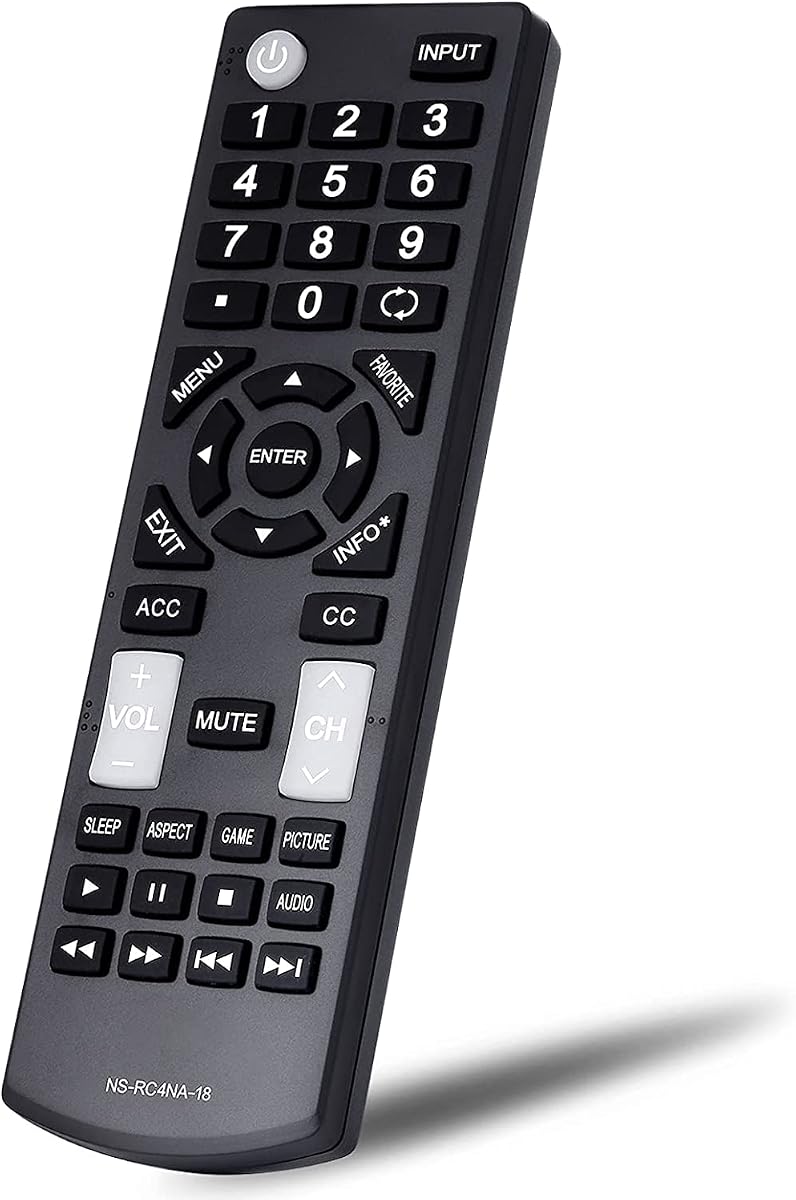
This Insignia LED LCD remote replacement carries a 4.3 rating and offers a distinct advantage for nighttime use: its power, channel, and volume buttons are luminous. It is designed as an upgraded alternative to common NS-RC4NA-14, NS-RC4NA-16, and NS-RC4NA-18 remotes.
We may earn a commission when you buy through this link, at no additional cost to you.
It supports a wide range of conventional Insignia models, including examples from the NS-32D311, NS-40D420, NS-49D420, NS-55D420, NS-39D310, NS-50D510, and NS-24D310 families. Setup requires only two AAA batteries, and no pairing or programming process is needed.
Like the other traditional Insignia remotes in this roundup, it explicitly does not support Insignia Roku or Fire TV systems. The luminous feature is helpful but limited to three key groups rather than every button, and batteries are not included. The listing also mentions one year of after-sale service.
This is a good choice for a non-Fire, non-Roku Insignia television when you often operate the set in a dark room and want easier access to power, volume, and channel commands. It should not be considered for a voice-controlled Fire TV setup.
The glowing power, channel, and volume controls make common commands easier to locate without turning on a lamp. The feature is focused and practical rather than decorative.
The remote's stated function matches common Insignia NS-RC4NA controls. Users can replace a damaged original without programming once they install suitable batteries.
We may earn a commission when you buy through this link, at no additional cost to you.
The ORQRQO replacement voice remote has a 4.0 rating and provides one of the broadest device statements in the group. It supports numerous Fire TV Stick, TV Stick 4K, TV Stick Lite, and TV Cube generations, along with compatible Omni, Ember, Insignia, Toshiba, and Pioneer smart televisions.
We may earn a commission when you buy through this link, at no additional cost to you.
Its most useful feature is voice control for finding content. The listing directs users to the included instructions for pairing, making it a practical one-remote option for a mixed household containing several generations of Fire hardware. The package contains the remote and a user manual.
Two AAA batteries are required and not included. The 4.0 rating is the lowest among the listed products, so the broad compatibility claims deserve particular care; users should check their exact model and follow the pairing process closely. The remote also offers fewer explicitly documented conveniences than some rivals, such as no detailed shortcut-button claim.
This remote is a value-oriented choice for someone who wants voice functionality across a wide range of Fire devices and compatible smart televisions. It is less compelling for buyers who prioritize a highly rated dedicated replacement, a silent button, or precisely documented Fire TV Edition television support.
Support spans several TV Stick, Lite, 4K, 4K Max, and Cube generations. This broad scope can simplify household setup when different rooms use different Fire hardware.
Compatible devices can use spoken requests to locate content. The feature reduces repeated directional-button navigation, especially for long titles or search terms.
We may earn a commission when you buy through this link, at no additional cost to you.
The L5B83G replacement remote has a 4.2 rating and offers voice control, preset application buttons, and unusually explicit setup instructions. It supports third-generation Fire smart TVs, second- and third-generation TV Sticks, first- and second-generation TV Stick 4K, TV Stick Lite, TV Stick 4K Max, and several TV Cube generations.
We may earn a commission when you buy through this link, at no additional cost to you.
The pairing process is described clearly: hold the Home button for approximately 10 to 15 seconds until the LED flashes rapidly, then allow around 30 to 60 seconds for automatic pairing. Its voice function can search for and launch content, and the shortcut buttons are intended to open favorite applications quickly.
Compatibility exclusions are equally important. The listing says the remote does not support first- or second-generation smart TVs, first-generation TV Stick, or smart TVs edition televisions. Two AAA batteries are not included. Those limitations make it unsuitable for owners of the Fire TV Edition sets emphasized by the first pick.
This is a good option for modern Fire streaming devices whose generation appears in the supported list and for users who appreciate clear pairing directions. It balances voice features and shortcuts, though buyers should check the exclusion list carefully before ordering.
The supplied sequence explains what to press, how long to hold it, and what the LED should do. Clear guidance is valuable when a replacement remote does not connect automatically at first.
Dedicated application shortcuts are useful for viewers who repeatedly open the same services. They shorten the path from the Fire TV home screen to a favorite app.
We may earn a commission when you buy through this link, at no additional cost to you.
This Fire-Insignia remote has a 4.8 rating and combines voice control, four dedicated app shortcuts, and an unusual silent-button design. Its compatibility statement covers second- and third-generation Smart TV Sticks, 4K, 4K Max, Lite, all generations of the Smart TV Cube, and Omni and Omni QLED systems.
We may earn a commission when you buy through this link, at no additional cost to you.
The silent button is the most distinctive feature. It allows a user to suppress sound while reading, which can be convenient at night or when a program is playing quietly. Voice commands can handle searches, weather requests, music, and other supported tasks, while the shortcut keys open favorite applications with less menu navigation.
Pairing uses the familiar Home-button method: hold it for 10 to 15 seconds until the LED flashes faster. The listing recommends removing batteries from the old remote before pairing, a useful step for avoiding interference. Batteries are not included.
Among the universally styled Fire remotes, this has the most attractive combination of everyday features and a strong 4.8 rating. It is a particularly good fit for users who value a quiet button, shortcuts, and broad streaming-device support, provided the pairing behavior works with their Fire system.
The dedicated silent control can reduce audio while a viewer reads or browses. It is a simple feature that many standard voice remotes do not provide.
Voice functions and four one-touch application buttons cover both search and repeated viewing habits. This combination makes the remote convenient for frequent Fire TV users.
We may earn a commission when you buy through this link, at no additional cost to you.
This replacement remote for Insignia LED LCD smart TVs has a 4.2 rating and emphasizes straightforward operation. It requires no setup or programming; installing two AAA batteries is all that is needed. The batteries themselves are not included.
We may earn a commission when you buy through this link, at no additional cost to you.
The listing highlights strong ABS plastic construction and a compact form factor designed to fit comfortably in the hand. Those are practical qualities for a remote used every day, particularly if the original has been lost, cracked, or unresponsive.
The remote is explicitly not intended for Fire TV or Roku TV. It also has no voice feature and does not claim a detailed model list, so compatibility is less transparent than with several legacy-focused alternatives. It is best understood as a simple replacement for compatible Insignia LED LCD sets rather than a Fire streaming controller.
For a conventional Insignia television, this can be an uncomplicated choice when the manufacturer label identifies it as an LED LCD model. It is not an answer to a Fire TV remote search, and owners of Roku-equipped sets should choose a remote explicitly designed for that platform.
There are no codes, pairing steps, or television-side setup instructions. Users can restore basic remote control by installing a fresh pair of batteries.
The small form factor is intended to sit comfortably in one hand. A straightforward shell also avoids unnecessary complexity for users who only navigate standard television menus.
We may earn a commission when you buy through this link, at no additional cost to you.
This universal remote has a perfect 5.0 supplied rating and targets the widely used Insignia NS-RC4NA-18, NS-RC4NA-14, and NS-RC4NA-16 control layouts. It also lists a broad collection of compatible LED LCD and HDTV model numbers, including the NS-32D311NA17 and NS-50D510NA17 families.
We may earn a commission when you buy through this link, at no additional cost to you.
The remote requires no pairing, programming, or code entry. Once two AAA batteries are installed, it is ready to control power, volume, channels, input selection, menu navigation, and smart-TV features on compatible non-Roku and non-Fire sets. Power, channel, and volume buttons glow for easier operation in low light.
Its exclusions are unambiguous: it does not work with Insignia Roku TV or Fire TV. The 5.0 rating is an encouraging customer-feedback signal, but ratings alone cannot confirm that every television behaves identically. Checking the full model number remains more dependable than relying on broad product wording.
This is an excellent choice for a compatible older Insignia television whose original remote carried one of the listed NS-RC4NA numbers. It combines the highest rating with a feature-rich traditional layout, but it should not be selected for a Fire TV Edition set.
The supplied 5.0 rating is the strongest numerical result in the lineup. It makes the remote a strong candidate for legacy Insignia owners seeking a straightforward replacement.
Illuminated essential keys help with nighttime operation, while the remote supports the usual television functions. It combines familiar controls with immediate battery-powered operation.
We may earn a commission when you buy through this link, at no additional cost to you.
This infrared remote has a 4.8 rating and is tailored to a specific group of Insignia DF and F-series television models. It includes examples such as NS-43DF710NA21, NS-50DF710NA21, NS-55DF710NA21, NS-58F301NA22, NS-65DF710NA21, and several NS-RCFNA-19 and DF710NA19 variants.
We may earn a commission when you buy through this link, at no additional cost to you.
The remote uses infrared operation and does not have voice control. It nevertheless includes one-touch buttons for major streaming services, including Netflix, Prime Video, HBO, Vue, IMDb TV, and Hulu. That combination may suit users who prefer predictable button commands but still want quick access to common applications.
Compatibility is the central concern. Unlike the universal remotes, this option gives a detailed list of compatible model numbers and additional references to certain Pioneer and Amazon television models. It is not described as a general remote for every Insignia or Fire device, and it cannot provide Alexa-style voice search.
This is a strong choice when your television model appears in the list and voice functionality is unnecessary. Its high rating and useful shortcut buttons compensate for the lack of voice control, while its narrower scope rewards careful model verification.
The detailed model list helps buyers understand the remote's intended scope. Check the complete label on the back of the television rather than relying only on screen size or series family.
Dedicated buttons for popular services retain some app-launch convenience. The remote avoids dependence on microphones, speech recognition, or an internet-connected voice service.
We may earn a commission when you buy through this link, at no additional cost to you.
The correct replacement remote starts with the platform and model number, not appearance. After confirming those details, consider voice operation, pairing, shortcuts, lighting, battery needs, and whether the remote must serve several Fire devices or one specific television.
An Insignia Fire TV Edition television and a separate Amazon Fire TV streaming device are related but not identical hardware. Some replacement remotes are built around Fire TV Edition television models, while others are designed for Fire TV Stick, Fire TV Cube, Lite, or 4K Max hardware. A remote can look identical and still fail because its compatibility list does not include the exact generation or television series you own.
Start by identifying what is powered directly into your television's HDMI port. If a Fire TV Stick, Cube, or similar device is connected separately, choose a remote designed for that device. If the television itself runs Fire TV Edition, locate its full model number and compare it with the remote's supported list.
Voice control is the defining convenience of many Fire TV remotes, but not every product in this category includes it. The Insignia and Toshiba-focused remote supports Alexa, while several universal Fire remotes provide a microphone for searching and launching content. Other Insignia television remotes intentionally use only infrared and conventional buttons.
Consider whether voice is essential or merely optional. Voice search is especially useful for entering long titles, performing general searches, or controlling supported functions hands-free. However, it depends on the television or Fire device having working voice services and network access. A non-voice remote can still provide reliable navigation, power, volume, and channel control.
A brand name alone is not enough because Insignia sells televisions with different operating systems and control protocols. The strongest listing provides a long list of full model numbers, while broad wording such as “fits all Insignia TVs” should be treated cautiously. A full model number is more informative than a series name, product family, or screen size.
Look for the NS number found on the television's rear label, in the support menu, or on the original remote. Compare the complete number with the listing rather than relying on a partial match. If your set is absent, look for a remote that specifically mentions your series or platform and purchase only when the seller documents the fit.
Traditional Insignia remotes often work through infrared and require only batteries. Fire streaming-device remotes commonly require pairing through the Home button or another device-specific procedure. Some listings describe a process involving a 10- to 15-second hold, a rapidly flashing indicator, and a waiting period before automatic connection.
Favor a remote with specific, understandable instructions and make sure a user manual is included. If the listing mentions pairing, do not expect a purely plug-and-play experience. Keep the remote near the device during setup, remove batteries from the old remote if advised, and allow enough time for the connection process to complete.
Dedicated app buttons can save time if your household watches a small group of streaming services every day. Several voice remotes in this list include four shortcuts or preset application keys for services such as Netflix, Prime Video, Hulu, IMDb TV, HBO, and Vue. The exact labels and behavior should be checked in the listing because button assignments can differ.
Shortcuts are helpful for habitual viewers but may be less important if you rarely use one-click app access. They also consume several buttons on the remote face, leaving fewer positions for other functions. Choose a layout whose dedicated keys match the applications you open most often.
Infrared remotes send signals directly toward the television and generally work without an active pairing process. Connected Fire remotes may use a pairing procedure and voice services, making them more versatile for streaming navigation. A connected remote can still fail if the device rejects pairing, while an infrared remote can fail when the line of sight is blocked or the model protocol differs.
Choose based on the functions you need rather than assuming one technology is universally better. A basic infrared model is dependable for conventional television functions. A paired Fire remote is more appropriate for app shortcuts, voice search, and current streaming interfaces.
Most of the remotes use two AAA batteries, and nearly all relevant listings state that batteries are not included. That small detail matters when replacing a remote after the original batteries have leaked, expired, or are no longer readily available. A fresh pair of alkaline batteries can improve button response and reduce the chance of incomplete commands.
Check whether a user manual is included. One listing does not mention a manual, while the others describe one or provide pairing instructions in the package. Batteries and a manual may be inexpensive additions, but the remote itself should still meet your compatibility requirements before you focus on extras.
Luminous power, channel, and volume buttons are useful in a dark room and are offered by two of the traditional Insignia remotes. A silent button, found on the premium Fire-Insignia option, supports quiet reading or browsing at night. Layout and grip matter as well, especially if the remote has shortcut keys, a microphone, or additional top-row controls.
Compare the pictured button arrangement with the original remote and your most-used functions. A well-organized interface can reduce accidental presses, while a compact body may be more comfortable during long viewing sessions. Choose the layout that feels familiar rather than one with more features that you will not use.
Before installing batteries, confirm the television or streaming-device model and compare it with the remote's compatibility information. For a Fire TV device, read the pairing instructions included with the product. If the remote is intended for a conventional Insignia television, confirm that it is not a Fire or Roku model, then insert two fresh AAA batteries with the correct polarity.
To pair a compatible Fire remote, follow the supplied sequence. Most of the listed products instruct users to hold the Home button for approximately 10 to 15 seconds until the LED flashes rapidly, then wait for automatic pairing. Keep the remote close to the television or streaming device, and remove the old remote's batteries if the manufacturer recommends doing so. Test power, navigation, voice, and application buttons after the connection is established.
For a non-voice infrared remote, point it directly at the television and test a few basic commands. If response is weak, replace the batteries and try again from a clear position. Avoid leaving a remote near heat, moisture, or direct sunlight, and remove batteries if storing it for a long period. Clean the surface with a soft dry cloth, and never spray liquid into the buttons.
Some universal Fire remotes in this list are designed for both compatible Insignia televisions and several Fire TV device generations. However, the exact television and streaming-device models must appear in the compatibility list. A remote dedicated to Insignia Fire TV Edition televisions may not support every Fire TV Stick generation, so verify both hardware categories before buying.
Only remotes that include a voice function can issue Alexa-style commands. The purpose-built Insignia and Toshiba option explicitly supports Alexa, and several universal Fire remotes also provide voice search. Traditional infrared remotes for conventional Insignia, Roku, and non-Fire models do not offer voice control even if they replace the physical remote perfectly.
A visual match does not guarantee the correct infrared code or wireless communication protocol. The television may be a Fire TV Edition, Roku TV, conventional Insignia set, or a different series with a similar exterior. Compare the complete model number with the seller's list and confirm the platform before ordering.
Most listings specify that two AAA batteries are required but not included. The remote may look complete because batteries are installed during production or testing, but that does not guarantee a fresh or reliable set. Purchase a new pair of suitable batteries before setup, especially if the original remote was damaged by leakage or corrosion.
The exact timing varies by remote, but the most detailed instructions recommend holding Home for about 10 to 15 seconds until the LED flashes faster, followed by a 30- to 60-second wait. Keep the remote close to the device and follow the included manual if the first attempt does not connect. Power-cycling the television or streaming device can also help reset the process.
No. Insignia televisions may use different operating systems and distinct remote protocols. Products in this roundup include dedicated Fire TV Edition remotes, universal Fire streaming-device remotes, and infrared remotes for conventional LED LCD or specific DF-series sets. Full model-number verification is the safest approach.
The traditional remotes explicitly marked for non-Fire televisions are not designed to operate Fire TV or Roku TV. A Fire TV Edition set requires a compatible Fire remote, while a separate Fire streaming device requires a remote listed for that device generation. Using the wrong category may prevent even basic power, volume, and navigation commands.
Shortcut buttons open assigned applications directly, while voice control lets you search for and launch content by speaking a request. Shortcuts are fast for the same few services, while voice is more flexible for varied searches. Some remotes provide both, and others provide only one of these capabilities.
The Insignia Replacement Voice Remote is the most focused recommendation for compatible Insignia and Toshiba Fire TV Edition televisions, while the ORQRQO option offers broad device coverage and voice control at a budget-minded level. The Fire-Insignia remote stands out for its 4.8 rating, four application shortcuts, and silent button. For conventional Insignia televisions without Fire TV, several no-programming remotes are more appropriate.
Prioritize the exact model number and operating system before considering any secondary feature. A voice microphone, silent button, luminous keys, or shortcut row cannot compensate for an incompatible control system. Once compatibility is settled, choose the setup process and button layout that best match your television or Fire streaming device and the applications you use most often.
Remember that product availability, seller details, included accessories, ratings, and prices can change after publication. Review the current Amazon listing before purchasing, confirm whether a manual and batteries are included, and recheck the pairing instructions for the specific remote. That final verification helps avoid an otherwise easy replacement purchase from becoming a compatibility headache.