
Fusion5 Built in USA 10.1” Windows 11 Professional Tablet PC FWIN232 PRO N5
3.7Editor score
HDMI-equipped Windows tablet
Intel 13th Gen processor
12GB RAM and 512GB SSD
Two-year accidental-damage coverage
A tablet with HDMI output can serve as a compact, flexible computer for presentations, media playback, kiosk applications, and expanded desktop workflows. The best model depends on display quality, operating system, wired connectivity, processing power, battery life, and whether the device must also work as a permanently installed industrial panel.
This guide compares ten relevant products, including Windows tablets, Android tablets, industrial panel PCs, and USB-C adapters that add an HDMI connection. We focused on confirmed specifications, output capabilities, connectivity, mounting options, portability, and suitability for different users rather than treating every similarly named device as a conventional tablet.
Each numbered review explains who the product is most likely to serve and where it falls short of the alternatives. The top selections provide the strongest balance of capability, while budget, embedded, portable, and adapter options address narrower needs. Product availability, configurations, and prices can change, so confirm current listing details before purchasing.
3.7Editor score

5.0Editor score
2.7Editor score
As an Amazon Associate we earn from qualifying purchases.
The comparison includes native HDMI tablets, industrial panel computers, and USB-C display adapters. It highlights the important differences in operating system, display expansion, mounting, processing, and portability so readers can distinguish a full tablet from a smaller companion device.


This 15.6-inch Android 12 panel PC combines a large Full HD touchscreen with the durability expected from an embedded industrial computer. Its 3.6 rating reflects mixed experiences, but the confirmed specifications distinguish it clearly from a conventional entertainment tablet: a fanless aluminum-alloy enclosure, sealed front, moisture-resistant rear, and options for PPC and VESA installation make it intended for sustained operation in demanding environments.
We may earn a commission when you buy through this link, at no additional cost to you.
The 1920×1080 display provides substantially more workspace than most portable tablets, while the G+G ten-point capacitive panel is designed to remain responsive with wet or gloved hands. HDMI 2.0 output extends the visual experience to another display, while integrated Wi-Fi 5, Bluetooth 4.2, and a 1000M LAN port support both wireless peripherals and stable network communication. The RK3399 platform, 4GB RAM, and 64GB ROM provide the foundation for dashboards, kiosks, warehouse interfaces, and automation controls rather than demanding workstation workloads.
There are meaningful limitations. Android 12 is less accommodating than Windows when a business depends on legacy desktop applications, professional device management, or a particular Windows utility. The 4GB memory and 64GB internal storage also leave less room for intensive multitasking than the 8GB Windows panel computers in this guide. As a permanently mounted unit, its size and industrial design also make it less convenient to carry between meetings or move around a building.
Despite those trade-offs, this is the strongest option in the list for a large, fixed touchscreen that must withstand moisture, vibration, or frequent interaction. Choose it for a warehouse station, production cell, restaurant display, or custom kiosk where ruggedness and screen area matter more than conventional tablet portability. It is less suitable for shoppers seeking a lightweight personal tablet, travelers, or users who need full Windows application support.
The sealed waterproof front, integrated rear enclosure, fanless cooling, and aluminum-alloy frame are more relevant than conventional thinness here. Together, they reduce the number of exposed moving parts and support use in environments where a consumer tablet would be exposed to dust, splashes, vibration, or constant touch input.
HDMI 2.0 lets the unit share content with a compatible external display, while PPC hooks and rear VESA holes support cabinet, wall, and desktop installation. This makes the tablet-style computer practical for turnkey control panels rather than a freestanding screen that depends on an external stand.
We may earn a commission when you buy through this link, at no additional cost to you.
This Windows 11 embedded panel PC earns one of the top recommendations because it combines a usable ten-point touchscreen with unusually flexible external-display support. Its 4.5 rating is among the stronger results in the group, and the combination of Windows 11 Pro, an Intel N5095 processor, 8GB of LPDDR4x memory, and dual HDMI outputs makes it especially suitable for operators who need more than one visible screen.
We may earn a commission when you buy through this link, at no additional cost to you.
The built-in 10.1-inch IPS panel has a 1280×800 resolution and can operate without a separate mouse or keyboard. More importantly, the two HDMI ports can drive two monitors at up to 4K 60Hz through the integrated UHD Graphics 600. That capability is valuable for control rooms, CNC interfaces, warehouse workflows, and office automation where a detailed primary display can be accompanied by a larger reference screen. A microSD slot supports storage expansion up to 512GB.
Connectivity is another strength. The specification lists DB9 RS232 ports, four USB 3.0 ports, HDMI 2.0, USB-C 3.1, Wi-Fi 5, and Bluetooth 5.0. Windows 11 Pro, TPM 2.0, remote desktop access, and support for custom operating systems make the unit easier to incorporate into managed IT environments. The trade-offs are its modest 1280×800 built-in resolution and the limited mobility of a device designed around embedded mounting.
This is a strong all-around recommendation for a business that wants a tablet-like operator interface with genuine Windows compatibility and multiple external displays. It suits developers, automation specialists, warehouse managers, and kiosk integrators better than shoppers seeking a thin entertainment tablet. Confirm that the supplied mounting hardware and application environment are appropriate before integrating it permanently.
The two HDMI outputs can present separate content on two 4K monitors, allowing operators to keep controls, schematics, inventory records, or live status information visible at the same time. This is more meaningful in industrial workflows than a simple mirrored screen and reduces the need to move between separate applications.
A valid Windows 11 Pro license, TPM 2.0, remote desktop support, and USB-C display connectivity make this a more approachable deployment platform than the Android models. It is also better positioned for business applications, IoT development, and mixed fleet management where standard Windows tools are already part of the workflow.
We may earn a commission when you buy through this link, at no additional cost to you.
The Samsung Galaxy Tab A11+ is the most consumer-oriented tablet in this comparison, with a 4.6 rating, an 11-inch screen, and a slim design intended for everyday family use. It is a strong media and browsing device, but the supplied product information does not identify a built-in HDMI port. That distinction matters when the keyword is interpreted literally rather than as a general request for a tablet capable of screen expansion.
We may earn a commission when you buy through this link, at no additional cost to you.
Its 90Hz refresh rate, bright display, quad speakers, and Dolby Atmos support suit streaming, games, video calls, and casual productivity. The listed configuration includes 6GB of RAM and 128GB of storage with expandable storage, while a 5MP front camera supports conversations. Long battery life and fast charging also align well with the intended mobile use, and features such as Google Gemini and Circle to Search make the interface convenient for everyday questions and visual lookups.
The key drawback is that no HDMI output is confirmed. Users who need a wired external display may be able to use a compatible USB-C adapter, but the adapter must support DisplayPort Alternate Mode, and the tablet's exact port and firmware behavior should be verified. The product also cannot match the industrial models on mounting, RS232 connectivity, gigabit Ethernet, or always-on embedded operation. Android applications also offer less flexibility for specialist Windows software.
Choose the Galaxy Tab A11+ for entertainment, browsing, schoolwork, and portable family use when you want a polished tablet rather than an industrial computer. For a guaranteed wired display connection, one of the native-HDMI Windows models is the safer recommendation. This Samsung earns its place in the guide as a performance comparison and a reminder that excellent tablets are not always equipped for every kind of external-display connection.
The 11-inch 90Hz panel offers smoother motion than many standard 60Hz tablets, while the four-speaker Dolby Atmos system adds value for movies, music, and games. These qualities make the device more compelling for relaxation and media consumption than the functionally focused panel PCs elsewhere in the list.
Because the listing does not confirm a native HDMI output, buyers should inspect the exact port layout and ask the seller whether video alternate mode is supported. An adapter can solve some display needs, but it should never be assumed to work when the underlying USB-C port lacks display capability.
We may earn a commission when you buy through this link, at no additional cost to you.
The Fusion5 FWIN232 PRO N5 is the premium selection in this guide because it pairs a native HDMI connection with a full HD Windows touchscreen and more generous internal specifications than most alternatives. Its 3.7 rating is not the highest, but the confirmed hardware—12GB of RAM, a 512GB SSD, an Intel 13th Gen N100 processor, and Windows 11 Pro—offers a capable platform for mobile work and external displays.
We may earn a commission when you buy through this link, at no additional cost to you.
The 10.1-inch IPS touchscreen has a 1920×1080 resolution and 500-nit brightness, making it a better fit for detailed documents, creative work, and presentations than the 1280×800 industrial panels. The Alder Lake N100 is a four-core processor that can turbo up to 3.4GHz, and the integrated graphics support the stated productivity and content-creation roles. A 512GB microSD slot adds another storage avenue when internal capacity is insufficient.
Native HDMI and USB-C make external-display connections considerably more straightforward than on consumer tablets that rely on optional adapters. The two-year full warranty and coverage for up to two accidental-damage incidents add reassurance, while the claim of assembly in Pasco County, Florida may appeal to buyers who value domestic assembly. However, the lower customer rating suggests that buyers should assess the current listing carefully and verify expectations against the product's own specifications.
This model is best for a professional who wants Windows 11, a bright Full HD panel, generous memory, and fast storage in a portable form. It is also a strong choice for streaming or presenting to a larger HDMI display. It is less suited to permanent factory installation because the supplied information does not mention VESA mounting, RS232 ports, or a sealed enclosure.
The combination of 12GB RAM and a 512GB SSD creates comfortable headroom for multiple open applications, larger files, and Windows software. Compared with the 4GB Android panel and the 8GB industrial computers, it is better positioned for users who need responsive multitasking without attaching to a desk.
A 24-month warranty and accidental-damage coverage can be particularly useful for a portable device that travels between offices, homes, and client sites. Registration is required, so purchasers should complete that process promptly and retain the documentation.
We may earn a commission when you buy through this link, at no additional cost to you.
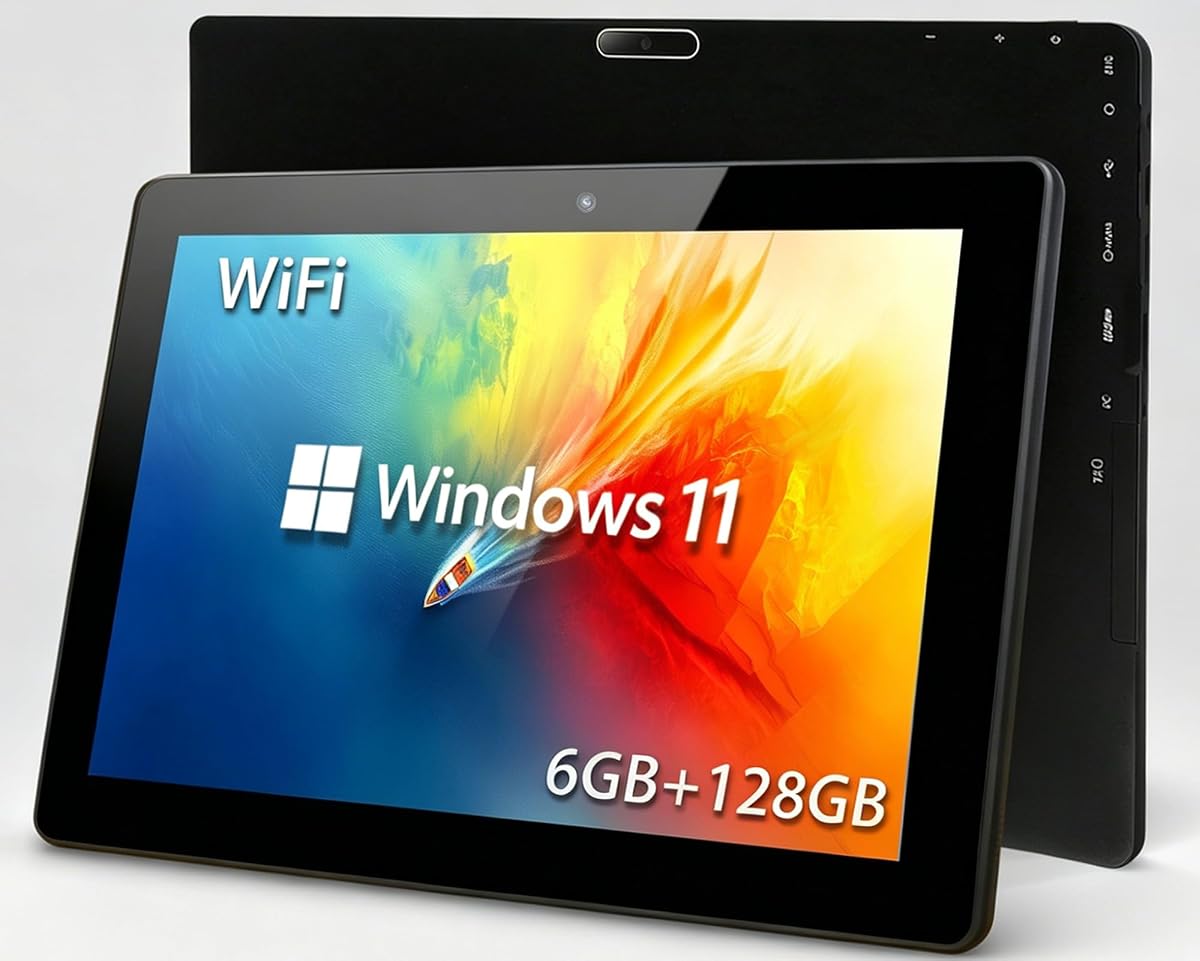
This budget-focused Windows tablet stands out because it includes a native HDMI output, something many similarly affordable consumer tablets do not clearly provide. Its 2.7 rating is the lowest in the group, so buyers should expect a device built around basic productivity, education, browsing, and presentations rather than demanding professional workloads.
We may earn a commission when you buy through this link, at no additional cost to you.
The 10.1-inch capacitive touchscreen has a 1280×800 resolution and supports note-taking, drawing, media viewing, and general touch interaction. An Intel Celeron 1.6GHz quad-core processor, 6GB RAM, and 128GB flash storage form the performance platform. A TF card slot supports expansion up to 512GB, allowing users to move documents and media without filling the built-in storage.
HDMI output and OTG support are the central advantages for the keyword. The tablet can connect to a compatible monitor or projector, which helps during office presentations and home entertainment. Dual-band 2.4GHz and 5GHz Wi-Fi, Bluetooth 4.2, a 6000mAh battery, and a lightweight enclosure reinforce its portability. The supplied information claims up to 12 hours of standby and video playback, although real outcomes depend on settings and use.
Its trade-offs are performance and customer feedback. The entry-level Celeron and 1280×800 screen will feel modest for intensive editing, large spreadsheets, or complex multitasking, and the 2.7 rating warrants careful attention to recent reviews. It is still a sensible choice for students, travelers, and occasional workers who specifically need a low-cost Windows tablet with a guaranteed HDMI connection.
The built-in HDMI port removes the uncertainty that comes with an adapter-only tablet. It is especially convenient for travelers who can connect the device to a hotel television or presentation display without carrying a separate USB-C video dongle.
A 6000mAh cell, dual-band Wi-Fi, and a slim chassis make the device practical for classes, commuting, and travel. Battery results will vary with screen brightness, wireless activity, and workload, so the stated playback figure should be treated as a best-case guideline.
We may earn a commission when you buy through this link, at no additional cost to you.
This dual-HDMI industrial tablet earns the top rating in the supplied product data at 5.0. It also has one of the clearest use cases: a compact Windows 11 operator station that can connect to two 4K monitors while retaining a ten-point touch interface. The 10.1-inch built-in panel makes it smaller than the 15.6-inch Android industrial model while retaining an embedded form designed for control cabinets, kiosks, and automation.
We may earn a commission when you buy through this link, at no additional cost to you.
Its Intel N5095 quad-core processor, 8GB of LPDDR4x memory, and 128GB of storage are appropriate for information systems, remote administration, and interactive dashboards. Two HDMI ports support 4K 60Hz output on separate monitors, while a USB-C 3.1 port provides another display option. Four USB 3.0 ports and DB9 RS232 connections add useful peripheral and serial-device support, and the microSD slot allows storage expansion.
The practical weakness is that this is not a lightweight personal tablet. Its 1280×800 built-in resolution is lower than the Fusion5's Full HD panel, and its value depends on being mounted or positioned as a dedicated control interface. Windows 11 Pro, TPM 2.0, remote desktop access, and custom-OS support are positives for integrators, but less relevant to users who simply want casual entertainment or note-taking.
For office automation, warehouse stations, cabinet controls, and two-monitor kiosk systems, this is a particularly balanced recommendation. The perfect customer rating is encouraging, though it should not replace checking recent feedback, installation requirements, and application compatibility. For a buyer who needs native Windows, expansive I/O, and multiple 4K screens in one embedded unit, it offers one of the strongest feature sets in the guide.
Running separate 4K screens at up to 60Hz allows one display to hold controls while another presents live information, diagnostics, or reference material. This can reduce screen switching in warehouse, workshop, and production environments where operators need frequent access to multiple data sets.
Four USB 3.0 ports, dual HDMI, USB-C, RS232, wired and wireless networking, and a touchscreen in one enclosure simplify deployment. Rather than pairing a mini PC with a separate monitor and input device, an installer can use a single panel for compact control stations.
We may earn a commission when you buy through this link, at no additional cost to you.
The Crelander 8.7-inch Android 16 tablet is a compact general-purpose device with a 335g body, IPS HD display, and a combined 16GB memory configuration. Its 3.3 rating is modest, and the supplied specifications do not mention HDMI output, so it does not directly meet the central requirement of the keyword. It is included to distinguish a small media and browsing tablet from a display-expansion solution.
We may earn a commission when you buy through this link, at no additional cost to you.
The 1340×800 IPS screen is suitable for browsing, streaming, and basic document work, while 128GB of storage provides room for apps and media. The stated 16GB combined memory can include both physical RAM and virtual storage, so buyers should distinguish it from dedicated system memory when comparing specifications. A 5000mAh battery, Wi-Fi, Bluetooth, front and rear cameras, and an included case make it a convenient companion for travel and entertainment.
The 8.7-inch size is smaller than the other full-size tablets, which improves one-handed portability but reduces workspace for presentations, creative work, and complex forms. The 3.3 customer rating may reflect consistency, support, or overall experience issues that are not explained by the listed features. Users should examine recent customer feedback and confirm the apps they need are available for Android 16.
Choose this model for compact entertainment, reading, casual browsing, and travel rather than external-monitor work. If an external display is the priority, use one of the native-HDMI Windows tablets or a compatible USB-C dock with a device that supports display alternate mode. As a general-purpose tablet it is manageable, but it is not one of the strongest answers to the precise HDMI-output question.
At 335g and with an 8.7-inch screen, the tablet is easier to hold for reading, browsing, and travel than a 10.1-inch or 15.6-inch device. The included case adds a layer of protection for commuting and frequent handling.
The 16(3+3+10)GB notation can be unclear because it may describe different combinations of physical memory and expandable storage. Consumers should check the final component breakdown and available user storage instead of treating the full figure as equivalent to dedicated RAM.
We may earn a commission when you buy through this link, at no additional cost to you.
The Warrky USB-C to HDMI cable is not a tablet, but it offers a practical way to add external-display capability to a compatible USB-C tablet. Its 4.5 rating reflects a generally favorable accessory, and the straightforward six-foot cable avoids the need for a bulky powered dock when the only requirement is mirroring or extending a display.
We may earn a commission when you buy through this link, at no additional cost to you.
The cable is advertised for 4K at 60Hz and backward-compatible resolutions and refresh rates. HDCP compliance supports protected media streaming, while a gold-plated connector, thicker copper wiring, aluminum housing, and braided nylon jacket are intended to maintain a dependable signal and withstand regular bending. The included Velcro tie makes the cable easier to organize during travel.
Compatibility is the decisive issue. The source device must use a USB-C port with DisplayPort Alternate Mode, and the listed product description notes that a cable alone cannot supply power or data to a device that lacks video output. It is also a display-only solution: unlike the BENFEI dock, it adds no Ethernet, USB ports, card reader, or power delivery. A six-foot length is useful for a desk but may not reach a distant display comfortably.
This is the best choice for a tablet that already supports USB-C video and needs occasional presentation, classroom, or travel display connections. It is less appropriate as a complete workstation solution or for a tablet with only a charging-oriented USB-C port. Buyers should verify the tablet's specifications and use an adapter with an appropriate signal source rather than assuming every USB-C connection supports HDMI.
A direct cable is often simpler than a multiport dock for users who only need picture. It also avoids power negotiation, firmware, and driver requirements, making setup predictable when the source tablet supports the required USB-C video mode.
USB-C describes a connector, not a universal video standard. The tablet must support DisplayPort Alternate Mode, and some operating systems or applications may impose resolution limits. Checking the tablet manual and the cable's compatibility notes before buying prevents an expensive mismatch.
We may earn a commission when you buy through this link, at no additional cost to you.
The BENFEI foldable tablet dock is the highest-rated accessory in the guide at 4.7. It combines a 360-degree rotating aluminum stand with a nine-port USB-C hub, giving compatible tablets a more complete desktop-style connection point. Its most relevant feature for this topic is 4K at 60Hz HDMI output, but the addition of Ethernet, USB, card readers, and charging makes it much more versatile than a simple cable.
We may earn a commission when you buy through this link, at no additional cost to you.
The hub includes 1000Mbps Ethernet, a 5Gbps USB-C connection, three USB 3.0 ports, and an SD/TF card reader stated at 170MB/s. It also accepts 100W power delivery while providing an 85W output, allowing many compatible tablets to charge while the dock handles displays and peripherals. The open-back aluminum design keeps device cooling vents exposed, and silicone pads help prevent slipping and scratching.
Compatibility is again the main limitation. The product is designed particularly for USB-C-enabled iPad Pro, Air, and Mini models and other compatible tablets, but every device must support the necessary display and power protocols. The dock adds no processing power, so it cannot turn an Android tablet into a Windows workstation or provide native RS232 connectivity. The rotating stand may also be less useful for a permanently installed industrial unit.
This dock is a strong choice for a compatible tablet used as a desk-based productivity or media station. It offers more functionality than the Warrky cable while remaining more compact and portable than a fixed docking setup. Buyers should confirm their tablet's USB-C video, Ethernet, and charging support before ordering, and they should use an appropriate cable if the included connection is not present.
Combining a charging stand, wired network connection, display output, card reader, and USB hub can simplify a compact workstation. A tablet can connect to a monitor and Ethernet while charging, with peripherals connected through the same compact folding unit.
The folding aluminum construction and 360-degree rotation make the dock easier to position than a fixed monitor stand. The open-back arrangement also preserves airflow, while the silicone grip pads help keep the tablet stable during touch interaction.
We may earn a commission when you buy through this link, at no additional cost to you.
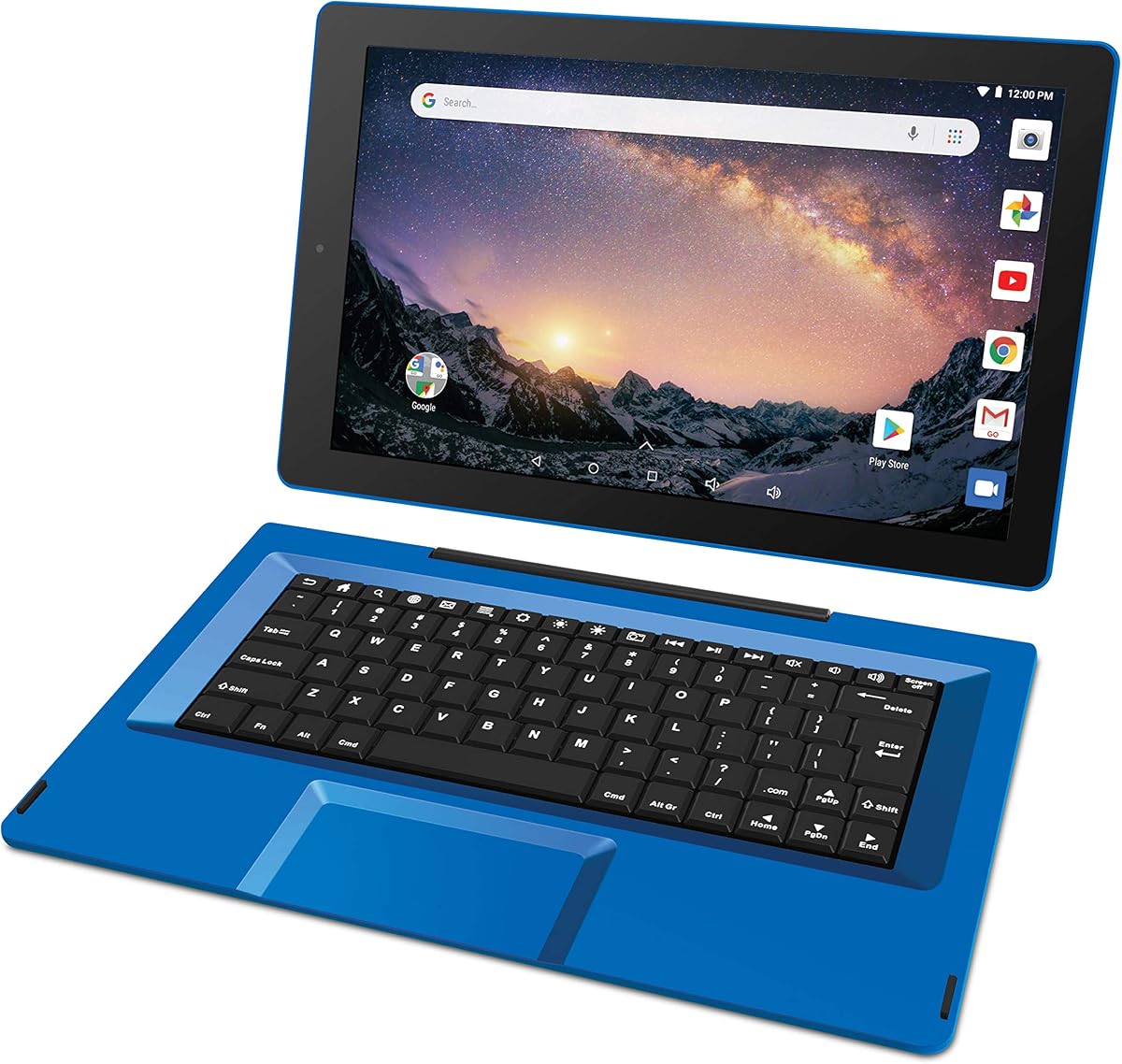
The RCA Galileo 11.5-inch tablet provides a large touchscreen and the convenience of a detachable keyboard at an entry-level level. Its 3.8 rating is adequate for basic use, and the included travel keyboard, AC adapter, and Google Play compatibility make it approachable for browsing, simple applications, and light typing. However, the supplied information does not confirm an HDMI output.
We may earn a commission when you buy through this link, at no additional cost to you.
The hardware includes a quad-core 1.3GHz processor, 1GB of memory, and 32GB of flash storage, with MicroSD expansion available. The 1024×600 touchscreen is large but has a relatively low resolution by current standards. Wi-Fi, Bluetooth, a webcam, front and rear cameras, a headphone jack, and full-size USB port support basic daily needs, while the keyboard converts the device into a small notebook-style system.
The 1GB of memory and older Android 8.1 Go Edition are major limitations for modern multitasking, current applications, and demanding web use. Storage and processor capacity are also modest. Since no HDMI port or compatible display-adapter method is identified, this model should not be chosen when reliable external-monitor output is the primary requirement. Its age may also affect application and security compatibility.
Choose the Galileo for inexpensive browsing, media, simple educational tasks, and users who value a large screen and removable keyboard more than modern performance. For a tablet with explicit HDMI output, move up to one of the Windows models with a native port. This roundup places it last because the keyword requires display connectivity that the supplied specifications do not confirm.
The removable keyboard gives users a more comfortable way to type documents or enter information without buying a separate accessory. When the keyboard is removed, the large touchscreen becomes more convenient for browsing, media, and kiosk-style interaction.
Android 8.1 Go Edition and 1GB of memory are the decisive constraints. Buyers should check whether their required applications remain supported and avoid expecting the responsiveness of a current Windows tablet or a modern Android device with several gigabytes of memory.
We may earn a commission when you buy through this link, at no additional cost to you.
The most important decision is whether you need a native display port, an industrial control interface, or an adapter for a compatible USB-C tablet. Processing power, operating system, mounting, network support, and portability should then be matched to the environment in which the device will be used.
A native HDMI port provides the most direct and predictable connection to a monitor, television, projector, or control console. It is especially valuable when a device must be installed permanently or used by people who will not carry adapters. The Windows tablets in this guide either include HDMI or list it as a core feature, while the consumer Android models do not confirm native output. A USB-C adapter is a practical alternative only when the tablet's port supports DisplayPort Alternate Mode, because the physical USB-C connector alone does not guarantee video.
Native HDMI is generally the safer choice for reliable displays, presentations, and kiosk deployments.
Windows 11 Pro models are generally better for organizations already standardized on Windows applications, remote access, TPM, and professional management tools. They can also present multiple 4K monitors through built-in HDMI and USB-C outputs. Android is more approachable for streaming, casual browsing, and touch-first interfaces, but it may not run the specialist software used by industrial controls or established business workflows. Choose the operating system based on the applications that must run, not merely on the word tablet.
Select Windows for broad desktop compatibility and Android for a lighter, touch-focused experience.
A processor with four modern cores and at least 8GB of memory gives Windows users more room for browser tabs, office applications, remote desktops, and background services. The Fusion5's 12GB of RAM, 512GB SSD, and Intel 13th Gen N100 make it the strongest portable performance option here. The industrial N5095 models offer 8GB and targeted control-panel performance, while the 4GB Android RK3399 unit is better for simple interfaces. Very old or low-memory Android systems are most appropriate for basic tasks, not productivity suites.
Match memory and processor capability to the workload rather than the screen size alone.
The best embedded models in this list support two 4K displays at 60Hz, allowing separate screens for controls and reference information. Resolution alone does not guarantee smooth motion or full compatibility, however. Check whether the tablet itself can drive the intended number of displays, whether the operating system recognizes both, and whether the application supports multiple screens. For a single presentation display, a native HDMI tablet with a suitable adapter can be enough, while a dock may be more useful when Ethernet and USB peripherals are also required.
For detailed or simultaneous screens, prioritize verified 4K multi-display support.
A panel intended for a cabinet, warehouse, restaurant, or factory should be evaluated differently from a personal tablet. Look for a sealed front, fanless construction, moisture resistance, a durable frame, and vibration tolerance. VESA holes and dedicated mounting hooks make installation much easier. The 15.6-inch Android panel offers the strongest sealed construction, while the 10.1-inch Windows models provide VESA-compatible installation and industrial I/O. A slim consumer tablet may be more attractive aesthetically but is generally less suitable for permanent use.
For fixed or harsh installations, durability and mounting should outweigh portability.
External display capability is only one part of a working installation. The industrial models add gigabit Ethernet, RS232, and multiple USB 3.0 ports, which are important for data acquisition, serial equipment, keyboards, scanners, and other peripherals. Wi-Fi 5 and Bluetooth 5.0 are convenient for accessories, although a wired connection can be more consistent in busy facilities. The BENFEI dock also adds 1000Mbps Ethernet and USB ports to a compatible tablet, making it useful where the tablet itself lacks full-size connections.
List every peripheral the setup requires before choosing between a tablet and dock.
A portable tablet should be easy to carry for a full day without a charger. The Galaxy Tab A11+ emphasizes entertainment, a 90Hz screen, and long battery life, while the portable Windows tablet lists a 6000mAh battery and dual-band Wi-Fi. The Fusion5 prioritizes a Full HD display and stronger specifications, making it better for active productivity but less specialized for media. Larger screens improve readability and touch interfaces, while smaller devices are easier to hold. Balance screen size against the time and weight involved in carrying the device.
Choose the lightest tablet that still provides the screen size and runtime you need.
Before connecting a display, confirm the tablet's operating system recognizes HDMI and that the adapter, if required, supports the exact video mode of the source port. Power the tablet and display separately, attach the cable, and select the correct input on the monitor or television. Windows users can adjust display resolution, scaling, and whether images are extended or mirrored through system display settings. For an industrial installation, set the intended screen as the startup display and test every touch target before deploying the panel.
Choose the correct refresh rate and resolution for the external screen rather than forcing a higher setting than the hardware supports. Update the tablet's operating system and graphics software, particularly if using a newly introduced USB-C dock. Industrial installations should use secure wired networking where possible, assign static network information when appropriate, and protect the panel from power surges, excessive heat, moisture beyond its stated protection level, and direct impact.
For portable models, clean the touchscreen with a soft lint-free cloth and avoid harsh liquids around the display. Keep charging ports and connectors free of dust, and do not leave a battery-powered tablet in a hot vehicle for extended periods. Detachable keyboard cases should be removed when the tablet is mounted permanently. Safe, consistent connections, regular software updates, and appropriate cleaning will preserve functionality and make the device easier to maintain.
The Fusion5 FWIN232 PRO N5 is a strong presentation choice because it includes native HDMI, a Full HD IPS touchscreen, Windows 11 Pro, and more capable 12GB RAM and 512GB SSD specifications. The budget Windows tablet also has native HDMI but a lower-resolution screen and entry-level processor. For fixed presentation stations, a dual-HDMI panel PC can also be useful when a larger display or a second reference screen is required.
No. A USB-C connector can carry data, power, video, or a combination, depending on the device. The tablet must support DisplayPort Alternate Mode, and the adapter must be designed for display output. Some tablets also require a particular adapter or operating-system configuration. Check the manufacturer's specifications before buying an accessory, because a USB-C-to-HDMI cable will not create video capability that the tablet lacks.
The 10.1-inch Windows 11 panel computers are the strongest all-around options because they combine VESA-compatible mounting, touch operation, multiple HDMI outputs, Ethernet, USB, and RS232. The 15.6-inch Android 12 model is preferable when a larger display, sealed construction, and rugged enclosure matter most. Whichever platform is chosen, verify the mounting pattern, electrical environment, application requirements, and stated moisture protection before installation.
A wired HDMI connection is generally more consistent for presentations, industrial controls, and prolonged display use because it avoids network latency and wireless-driver complications. Wireless display can be convenient for occasional streaming or quick setup. If latency, image stability, or a guaranteed 4K connection matters, choose a tablet with native HDMI or a verified USB-C video adapter.
The two 10.1-inch Windows 11 panel computers explicitly support two 4K monitors at 60Hz through dual HDMI outputs. Their USB-C 3.1 connection may add another display path, subject to the operating system and application. The 15.6-inch Android model, the portable Windows tablet, and the consumer Galaxy Tab A11+ do not have confirmed equivalent multi-monitor configurations in the supplied information.
A panel PC is a tablet-shaped embedded computer intended to be mounted in equipment, on a wall, or at a workstation. It usually emphasizes sealed construction, VESA compatibility, serial ports, continuous operation, and touch-first control. A conventional tablet is lighter and more portable, with stronger emphasis on battery life, media use, cameras, and handheld convenience. Both can provide external-display output, but their mounting and application priorities differ.
Buy a native-HDMI tablet when reliable video output is essential, the device may be transported, or you do not want to depend on adapter compatibility. A dock is better for a compatible tablet that needs a complete desk setup with Ethernet, USB devices, charging, and a stable monitor position. The BENFEI dock provides 4K at 60Hz, 1000Mbps Ethernet, USB ports, and card readers, but it cannot compensate for a tablet that lacks USB-C video support.
For browsing, streaming, and occasional documents, 4GB of memory and 32GB or 64GB of storage may be workable, especially on Android. Windows productivity tasks benefit from at least 8GB of RAM, with 128GB of storage a more comfortable baseline for applications and updates. The Fusion5's 12GB and 512GB configuration is the most generous portable option here, while microSD or TF expansion can supplement storage where supported.
The 10.1-inch Windows 11 dual-HDMI panel computer stands out as the most complete integrated solution, combining a 5.0 rating, Windows 11 Pro, two 4K outputs, extensive I/O, and VESA-compatible mounting. The Fusion5 FWIN232 PRO N5 is the premium portable option, pairing native HDMI with a Full HD touchscreen, 12GB of RAM, and a 512GB SSD. For value-focused buyers, the portable 10.1-inch Windows tablet provides native HDMI and Windows 11 at a more modest level of performance.
Prioritize the output method before anything else: native HDMI for certainty, a verified USB-C adapter for occasional expansion, and a dock when Ethernet, charging, and USB connectivity are also required. Then choose the operating system, screen size, processing power, mounting system, and environmental durability needed by the actual workflow. A media tablet may be excellent for personal use yet less appropriate for a permanently mounted office console.
Before making a final purchase, verify the current listing, port layout, supported display resolution, application compatibility, and included accessories. Product configurations and prices can change over time, and customer ratings may shift as additional reviews appear. Checking the latest information helps ensure that the chosen tablet or adapter remains a practical fit for the intended display setup.