
PUSUN PT-Mini Pro
4.1Editor score
Phone and remote control
Seven fundamental drill modes
Lightweight 17.6-pound body
Cordless three-to-five-hour runtime
Our tennis ball machine with app control guide compares ten options for drill control, speed, spin, portability, battery life, court coverage, and ease.
A tennis ball machine with app control can turn an empty court into a structured practice session by changing speed, spin, feed timing, and placement without requiring a manual adjustment after every ball. The right model should deliver repeatable patterns for fundamentals while also supporting random movement, match-style drills, and convenient control from the sideline.
This guide compares the supplied machines across control options, ball capacity, speed ranges, spin adjustment, launch patterns, portability, power systems, and intended court size. It includes models built specifically for tennis as well as two app-controlled table tennis robots, which are clearly identified so readers can distinguish incompatible products from genuine tennis training options.
Each pick explains the strongest reasons to consider it, along with practical limitations. The UUU TS-09 stands out for broad drill control, the PUSUN PT-Mini Pro is especially approachable, and the Titan ACE targets advanced programming. Availability, ratings, features, and current prices can change, so confirm the latest listing details before ordering.
4.1Editor score

5.0Editor score

5.0Editor score
The comparison below places the ten supplied products side by side, emphasizing app compatibility, control methods, training capacity, speed, and portability. Two entries are table tennis robots rather than tennis ball machines, making the sport distinction especially important before purchase.


The UUU TS-09 is the strongest all-around choice in this guide for players who want a dedicated tennis machine with extensive app-based control. Its listed rating is 5.0, and its headline features include 28 preset modes, adjustable feed intervals, multiple spin options, direction changes, and programmable patterns. That combination makes it suitable for both fundamentals work and more varied solo sessions.
We may earn a commission when you buy through this link, at no additional cost to you.
Control is handled through the TenniSmash Remote app on iOS or Android over Bluetooth, allowing a player to adjust speed, feed interval, topspin, backspin, direction, and operating mode without walking to the machine. Fixed-line feeds support deliberate repetition, while random feeds force movement. The machine also supports forehands, backhands, volleys, footwork, and placement-oriented practice, giving users several ways to structure a session.
Its 20–125 km/h adjustment range, maximum speed of 135 km/h, and 1.7–10-second feed interval provide a generous working range. The 110-ball hopper is another meaningful advantage because it can keep a practice block moving without frequent pauses. Two included 8Ah lithium batteries provide approximately four to six hours per battery under normal use, and each has an indicated charging time of about three hours.
There are two important limitations. This model uses app control but does not include a physical remote, and it does not offer Apple Watch control. Buyers who strongly prefer turning a handheld remote or watch should examine the PT-Smart Pro or Titan models instead. Even so, the TS-09 offers an unusually balanced feature set, making it a strong recommendation for independent players who want phone control, generous capacity, and extensive training modes.
The TenniSmash app is the TS-09's central advantage because it exposes speed, spin, interval, direction, and mode controls in one place. Players can move from a predictable stroke repetition to a randomized movement drill without repeatedly approaching the machine.
A 110-ball hopper and two included removable batteries reduce the two common interruptions in solo practice: reloading balls and finding an outlet. Actual runtime depends on normal-use conditions, while feed consistency also benefits from clean, dry balls with similar pressure and wear.
We may earn a commission when you buy through this link, at no additional cost to you.
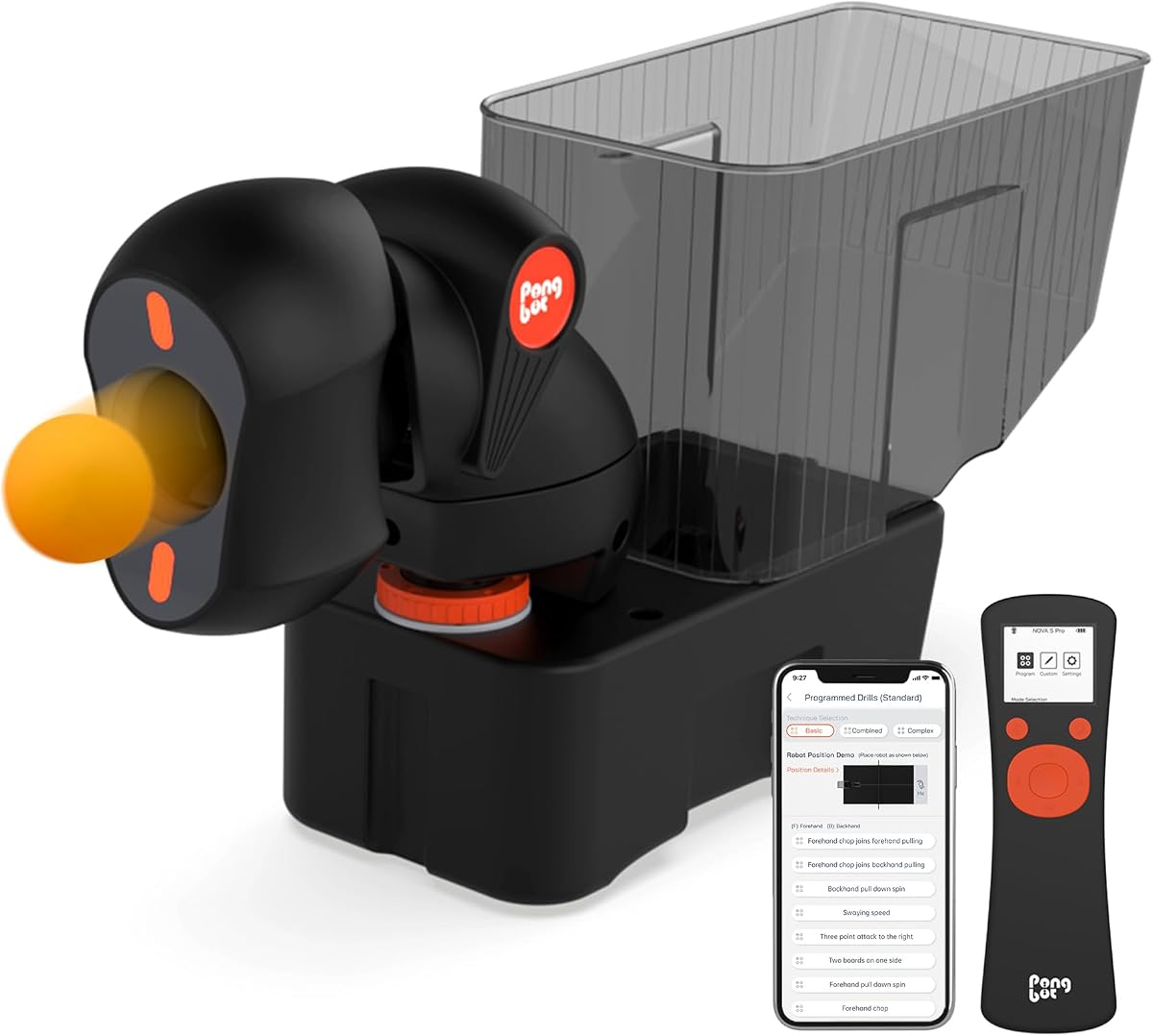
The PONGBOT NOVA S Pro is an app-controlled training robot for table tennis, not a tennis ball machine. Its 4.3 rating and extensive feature list make it relevant to readers searching broadly for connected ball machines, but it cannot serve tennis balls or reproduce tennis-court placement. It should only be considered by someone who wants to improve table tennis.
We may earn a commission when you buy through this link, at no additional cost to you.
The robot provides 264 preset drills, custom drill programming, and controls for spin, rotation intensity, landing point, speed, height, and frequency. Its app includes a simulated landing-spot animation, which can help users visualize where a feed will arrive. It also offers combinations, count-based feeds, double-bounce serving, and a near-net trajectory for practicing mid-table and aggressive techniques.
Its two BASF ball-throw wheels can produce feed frequencies from 30 to 90 balls per minute, a maximum of 0.66 seconds between balls, 21 speed levels, and 21 rotation-speed levels. Nine spin types are supported. A 150-ball capacity further reduces interruptions during demanding table tennis repetitions.
The important limitation is fundamental rather than a minor drawback: table tennis balls, ball diameter, court geometry, and feed behavior differ completely from outdoor or indoor tennis practice. In addition, 40 mm-plus table tennis balls and two AAA batteries are not included. It is a capable connected robot for its own sport, but it is not a valid selection for this tennis-focused keyword.
The 264-drill library and programmable combinations give table tennis players many structured options. Speed, height, frequency, spin, and landing-point controls make it useful for beginners developing consistency as well as more experienced players working on tactical returns.
The simulated landing-spot animation offers a way to preview planned feeds before practicing them. This feature is particularly valuable for users who are still learning how changes in launch and rotation affect the receiving position.
We may earn a commission when you buy through this link, at no additional cost to you.
The PUSUN PT-Mini Pro is the most approachable dedicated tennis machine in the group, with a 4.1 rating and a design emphasis on beginners, juniors, coaches, and small training areas. It combines app control with an included physical remote, giving users more than one way to change a drill while the machine is positioned across the court.
We may earn a commission when you buy through this link, at no additional cost to you.
Its Bluetooth 5.0 connection has a stated range of 50–80 meters. Through the app, users can adjust speed, topspin, backspin, feed frequency, depth, and random mode. Seven modes cover forehands, backhands, volleys, a fixed point, and random horizontal feeds. A launch-angle adjustment of 20–70 degrees and a stated reach of more than 14 meters allow it to cover approximately 60 percent of a singles court.
Portability is a defining feature. The machine weighs 17.6 pounds and is described as roughly basketball-sized, with a built-in carry handle. Its internal lithium battery supports approximately three to five hours of cordless operation, while the hopper holds more than 65 balls and uses an adjustable 1.6–8-second feed interval.
Its maximum speed of 60 km/h makes it less versatile for advanced players seeking to reproduce faster match feeds. The relatively small hopper also requires more frequent replenishment than the 110- or 130-ball machines. Within those limits, however, it offers a balanced package of app control, remote access, lightweight construction, and beginner-friendly feeds, making it a practical budget-oriented recommendation.
At 17.6 pounds with a built-in handle, the PT-Mini Pro is designed to move from a car to a court without requiring another person. That makes it attractive for coaches moving between facilities and players who do not have a dedicated court setup.
The included remote is useful when the phone is occupied, while Bluetooth app control provides access to more detailed settings. The app and remote together make it easier to transition between forehand, backhand, volley, fixed-point, and random drills.
We may earn a commission when you buy through this link, at no additional cost to you.
This unnamed app-controlled tennis machine focuses on placement programming and sustained practice capacity. It holds more than 120 balls, supports 21 landing points, and includes both app and remote control. The supplied listing does not provide a customer rating, so its 5.0, 4.3, 4.1, and other numerical ratings should not be transferred to this product.
We may earn a commission when you buy through this link, at no additional cost to you.
Users can adjust speed, spin, frequency, and landing position through the mobile app. The feed interval spans 1.8–9 seconds, and five memory sets can preserve frequently used ball paths. A random-ball function adds movement variety, allowing the machine to simulate a less predictable opponent instead of repeating one static target.
The description states that 11 ball paths and multiple adjustment gears support deep and shallow feeds, high drops, and left-to-right movement. A 170W motor is listed as the driving component. The imported lithium battery is described as providing four to six hours of operation, and a real-time battery-level display is included.
The trade-off is limited brand and model information. The listing does not identify the product with the same specificity as the UUU, PUSUN, and Titan options, and the spin description appears to repeat topspin rather than clearly distinguishing topspin from backspin. Buyers should confirm app compatibility, included accessories, warranty support, and exact movement specifications in the current listing.
Twenty-one programmable landing points give this machine a strong foundation for court-position drills. The five memory sets can save recurring paths, reducing setup time when a player is repeating the same attacking or defensive pattern.
A hopper capacity of more than 120 balls supports longer uninterrupted sessions. This is particularly useful for large groups, extended point simulations, or players who prefer to load the machine fully before starting a workout.
We may earn a commission when you buy through this link, at no additional cost to you.
This PT-Mini Pro listing offers the same core concept as the earlier PUSUN entry: a lightweight, cordless tennis machine with phone and remote control for beginners and coaches. It provides a 60 km/h maximum serving speed, holds more than 65 balls, and is designed for practices ranging from junior development to focused adult fundamentals.
We may earn a commission when you buy through this link, at no additional cost to you.
The stated adjustment range begins at 8 km/h, allowing a new player to begin with slower feeds and increase intensity gradually. Bluetooth 5.0 connectivity provides a stated 50–80-meter control range. The app supports changes to speed, spin, feed frequency, depth, and random mode, while the included remote offers an additional way to change drills.
Seven modes include forehand, backhand, volley, fixed-point, and random horizontal feeds, along with adjustable topspin and backspin. The launch angle adjusts from 20 to 70 degrees, and the machine is listed as reaching more than 14 meters. These characteristics support placement work and movement drills without requiring a full-court, high-speed feed for every repetition.
This entry has no supplied customer rating, and its description overlaps heavily with the other PT-Mini Pro listing. Buyers should compare the current product pages carefully to confirm whether listings represent different packages, versions, or sellers. As a general machine, its main strengths remain portability, app flexibility, dual controls, and a beginner-friendly speed ceiling rather than advanced simulation capability.
Starting at 8 km/h gives developing players a practical way to establish a repeatable contact point before increasing pace. The gradual range supports forehand and backhand technique work without demanding advanced-level reactions from the first feed.
The carry handle, compact body, and internal battery make the machine convenient for indoor courts, schools, and changing locations. Its cordless operation also reduces dependence on extension cables or nearby outlets.
We may earn a commission when you buy through this link, at no additional cost to you.
The PUSUN PT-Smart Pro is a 5.0-rated, intermediate-to-advanced trainer that combines tennis and padel programming with extensive app control. It supports 28 tennis landing points and 12 tennis modes, plus 20 padel landing points and 14 padel modes. That dual-sport support makes it a flexible choice for players who train on both court types or for coaches working across different programs.
We may earn a commission when you buy through this link, at no additional cost to you.
Internal oscillation is intended to create more realistic movement across the court than a purely fixed feed. The speed range extends from 12 to 75 mph, while topspin and backspin each adjust across six levels. A feed interval of 1.8–8 seconds allows the user to move from controlled technical repetitions to faster reaction and movement sequences.
The PUSUN app works on iOS and Android and is compatible with Apple Watch. A physical remote is also supported, giving users three convenient ways to manage the machine. The app and watch are particularly helpful when a player wants to make quick changes while positioned in the court rather than walking back to the unit.
The machine holds more than 100 balls and is listed at four to six hours of runtime. A telescopic handle and large wheels assist with movement and storage. Its complexity is greater than that of the PT-Mini Pro, and buyers should verify their primary sport before setup. For a player focused on tennis, however, the extensive points, modes, and adjustable spin make this a strong advanced option.
Internal oscillation helps distribute feeds across the court in a more dynamic fashion. Combined with randomized patterns, it supports reaction development and movement that feels less repetitive than a machine locked to one target.
iOS and Android app support plus Apple Watch compatibility provide flexible ways to manage drills. The included remote remains useful for quick changes, while the app offers deeper programming for structured sessions.
We may earn a commission when you buy through this link, at no additional cost to you.
The second PONGBOT entry is a table tennis robot with an included net, app and remote control, 264 pre-saved drills, and custom drill creation. It has a listed rating of 3.6. Although the app connectivity fits the broad idea of a digitally controlled ball machine, its purpose is table tennis rather than tennis-court training.
We may earn a commission when you buy through this link, at no additional cost to you.
The included net is designed to simplify setup, while the combination of a smartphone app and remote gives users two methods for managing feeds. The extensive preset library can help a player begin quickly, and custom programming allows drills to be tailored to particular technique or tactical priorities. The listing describes the robot as suitable for beginners through advanced players.
Its strongest appeal is convenience for table tennis users who want repeatable repetitions without a training partner. A robot can isolate returns, vary placement, and provide a consistent source of feeds while the player works on timing and stroke mechanics. The 264 saved drills reduce the need to manually configure every session from the beginning.
The product is not suitable for the intended tennis use because it neither accepts tennis balls nor reproduces tennis spacing, bounce, or court patterns. Its 3.6 rating is also lower than the ratings of the leading tennis-specific options in the guide. Buyers searching specifically for an app-controlled tennis trainer should skip this model and review the UUU, PUSUN, or Titan machines instead.
The 264 pre-saved drills give users a broad starting library for solo table tennis practice. They can establish a routine quickly, then move into custom settings when a player has a more specific technical objective.
The included net is intended to streamline setup around the table. That convenience may appeal to beginners, although it does not translate into any advantage for tennis users.
We may earn a commission when you buy through this link, at no additional cost to you.
The Titan ACE is the premium coaching and mobile-player choice in this guide. It carries a 5.0 rating and emphasizes programmable drills, flexible control, portability, and an expandable software feature set. Its 150-ball hopper, collapsible structure, internal oscillation, and drill library distinguish it from simpler machines focused primarily on individual speed and spin settings.
We may earn a commission when you buy through this link, at no additional cost to you.
The free Titan Drill app lets users design, edit, and share drills. Users can program stroke patterns such as dinks and volleys, then scan a QR code to download drills from YouTube or receive drills from a coach or friend. Apple Watch compatibility allows quick adjustments during a session, while an onboard panel supports immediate changes. A remote is available separately.
Internal oscillation and the patent motor design are intended to create unpredictable, match-like feeds. The machine also supports over-the-air updates, allowing new functions such as Rapid Fire to be added without replacing the unit. That makes the ACE more compelling for coaches who want to build a repeatable digital drill library rather than manually recreating patterns.
At 39 pounds, the machine is heavier than the compact PT-Mini Pro, although its collapsible form is intended to improve storage and transport. The separate remote may be an extra purchase for users who want full remote access. There is also an important ordering reminder: the black shell and hopper lid resemble the pickleball version, so buyers should verify that the body carries the tennis logo. For advanced, app-driven coaching workflows, the ACE is the standout selection.
The ability to design, edit, and share drills makes the Titan Drill app more than a basic remote. Coaches can build a reusable library and distribute patterns to players, while direct QR-linked access can simplify adding new routines.
Over-the-air updates can introduce new features to an existing machine. This is especially attractive for buyers who expect their training setup to develop over time rather than remain tied to a fixed set of factory presets.
We may earn a commission when you buy through this link, at no additional cost to you.
The Spinshot Pro is a traditional tennis ball machine with a 4.2 rating and straightforward manual controls. It does not provide app connectivity, so it does not directly satisfy the primary request, but it remains relevant for readers who prioritize simplicity, durable construction, and physical knob operation over digital programming.
We may earn a commission when you buy through this link, at no additional cost to you.
The supplied information highlights a housing that is not made of plastics, a design intended to be easy to operate even for children, and flexible power options. These qualities may appeal to coaches or families wanting a machine that does not require learning a phone interface. A battery charger is included, but the actual battery must be purchased separately.
Its manual approach can also have practical benefits. Physical knobs may be easier for some users to operate in bright outdoor conditions or when the phone battery is depleted. At the same time, the available product information gives fewer details about automated oscillation, landing-point programming, spin control, and feed variety than the app-controlled models.
The separate battery requirement is the most important ownership consideration. Buyers must verify the correct battery and confirm how it fits with their preferred power setup before purchase. Although the Spinshot Pro may be a satisfying straightforward machine, it is better viewed as an alternative to app control than as a true match for the keyword.
Knob-based operation removes the need for Bluetooth pairing, app updates, and touchscreen navigation. For some players, those physical controls provide a more immediate and distraction-free way to prepare a feed.
The machine is specifically described as not being made of plastics. Buyers should verify its full materials and construction details in the current listing, but the stated emphasis suggests a design aimed at regular practical use.
We may earn a commission when you buy through this link, at no additional cost to you.
The Titan ONE is a high-speed, app-controlled tennis machine with a 130-ball hopper, internal oscillation, and a maximum speed of 80 mph. Its listed rating is 3.6, lower than the ratings attached to the Titan ACE and the leading UUU and PUSUN choices. Even so, the combination of large capacity and transport features can appeal to advanced players and coaches.
We may earn a commission when you buy through this link, at no additional cost to you.
The free Titan Drill app supports programmable stroke patterns and provides a library that can include material from YouTube, coaches, or friends. Apple Watch compatibility allows quick on-court changes, and an onboard panel provides another control method. A separate remote is sold for users who prefer one-touch operation. Over-the-air updates can introduce additional features over time.
Internal oscillation and the patent motor design are intended to generate less predictable, match-like shots. The 80 mph maximum speed gives the machine more headroom than the beginner-focused PT-Mini Pro for advanced stroke and reaction work. The 130-ball hopper also reduces interruptions compared with compact models holding roughly 65 balls.
Mobility comes from a trolley handle and wheels, although those features make the unit less suited to carrying by hand than the 17.6-pound PT-Mini Pro. The separate remote adds another possible purchase, and buyers should carefully verify the tennis body print because the shell and hopper lid resemble the pickleball version. It is a capable option, but the lower rating warrants careful review before buying.
An 80 mph maximum provides greater room for demanding stroke work and faster reaction sequences than beginner-oriented machines. The broad operating range can still support slower feeds, allowing the same unit to serve multiple training levels.
The Titan Drill app and QR-based library make it possible to load or follow detailed patterns rather than repeatedly adjusting a few physical controls. Sharing and editing functions suit coaches managing structured lesson plans.
We may earn a commission when you buy through this link, at no additional cost to you.
The right connected tennis machine depends on court size, player level, drill variety, portability, and battery needs. App capability is only one part of the decision; feed speed, placement, hopper capacity, and power access determine how useful the machine will be in real sessions.
A table tennis robot may offer excellent app control, programmable drills, and impressive repeatability, but it cannot launch tennis balls or reproduce tennis-court spacing. This guide includes two PONGBOT products because they were supplied for comparison, yet neither is a valid choice for a tennis-specific search. Check the title, ball type, court references, hopper shape, and included accessories before buying.
Choose a purpose-built tennis machine for tennis practice. Table tennis robots belong on a table and use much smaller balls with different flight characteristics.
App control ranges from basic remote-style changes to a full drill-building platform. The UUU TS-09 exposes speed, interval, spin, direction, and mode through its TenniSmash app, while the Titan models emphasize drill design, editing, sharing, QR-based library access, and software updates. Apple Watch compatibility can be valuable for quick adjustments without handling a phone.
Prioritize an app that supports the settings you actually need, such as spin, depth, random placement, saved patterns, and landing-point selection. Also confirm compatibility with your phone operating system.
A machine must be fast enough to challenge the player without making controlled repetition impossible. The PT-Mini Pro begins at 8 km/h and tops out at 60 km/h, making it suitable for beginners and juniors. The UUU TS-09 offers a 20–125 km/h adjustment range and a 135 km/h maximum, while the Titan ONE reaches 80 mph.
Match the speed range to current ability and planned goals. Use slower feeds for technique, then increase pace gradually as timing and movement improve.
Topspin and backspin change both trajectory and the player's preparation. The TS-09, PT-Mini Pro, PT-Smart Pro, and the 120-ball machine provide adjustable spin. Placement control is also important: the PT-Smart Pro supports 28 tennis landing points and 20 padel points, while the 120-ball model lists 21 landing points.
Look for both adjustable launch direction and internal oscillation if you want movement-based training. Fixed-point feeds improve repetition, while oscillating or random feeds develop reaction and footwork.
Hopper capacity determines how often training pauses for a reload. The compact PT-Mini Pro holds more than 65 balls, the TS-09 holds 110, the Titan ONE holds 130, and the Titan ACE holds 150. The unnamed 120-ball machine also supports more than 120 tennis balls. Larger hoppers are valuable for long sessions, group instruction, and match simulation.
Choose capacity based on how long you usually practice and how often you want to refill. More balls do not automatically mean better control, so pair capacity with reliable placement and adjustable feed patterns.
Portable tennis machines range from the 17.6-pound PT-Mini Pro to 39-pound or wheeled systems such as the Titan ACE and Titan ONE. The PT-Mini Pro has a carry handle and an internal battery, the TS-09 uses two removable 8Ah batteries, and the PT-Smart Pro uses a telescopic handle with large wheels. Power arrangements should match the user's storage and court access.
For frequent transport, weight and handle design may matter more than maximum hopper capacity. For a fixed court, cordless operation, runtime, and charging convenience can be decisive.
A physical remote is not universal among app-controlled models. The TS-09 relies on app control and does not include a remote, whereas the PT-Mini Pro includes one. Both Titan machines support remotes, but the listings state that the remote is sold separately. Some products also require batteries or balls that are not included, so inspect the package contents carefully.
Confirm whether the remote, charger, actual battery, balls, and protective covers are included. This avoids discovering after delivery that an essential control method or power accessory must be ordered separately.
Court size and playing level influence which machine feels useful. The PT-Mini Pro can reach more than 14 meters and is described as covering approximately 60 percent of a singles court. The TS-09 supports multiple placement drills across a broad speed range. The PT-Smart Pro adds padel programming and extensive sport-specific modes for players who train across both court types.
Choose a machine that fits the space and provides realistic challenges. A feature-rich machine will still underperform if its feeds are too slow for the player or too fast for controlled technique work.
Begin on a level, clear section of court and place the machine where it will not obstruct footwork, falling balls, or pedestrian traffic. Secure the hopper, confirm that the intended balls are compatible, and perform a test feed before building a full drill. The UUU TS-09 supports pressureless balls along with orange and green junior balls but does not support red balls. Use clean, dry balls with similar pressure and wear for more consistent feeding.
Pair the app with the machine in an area with an unobstructed Bluetooth connection, then verify the app's displayed machine status before beginning. Start with a moderate speed and a longer interval, test the landing position, and adjust one variable at a time. Increase speed only after the player can maintain a stable contact point, and use random or oscillating modes to challenge movement rather than simply making the feed faster.
After each session, switch off the machine and wait for moving parts to stop before checking the hopper or clearing a jam. Keep the housing and balls dry, wipe away debris, and store the unit away from excessive heat and moisture. Charge batteries according to the manufacturer's instructions, and do not assume a charger is the same as an included battery. Review the current manual for model-specific cleaning, storage, and service guidance.
Most dedicated tennis machines in this guide can be adjusted from a smartphone app, usually over Bluetooth. The UUU TS-09 uses the TenniSmash app on iOS or Android, while the PUSUN machines support app-based speed, spin, frequency, depth, and mode changes. Some models also include a remote, while the Titan remotes are sold separately, so check the package contents before ordering.
The PUSUN PT-Mini Pro is the most clearly beginner-oriented option because it starts at 8 km/h, tops out at 60 km/h, and includes seven straightforward drill modes. It also weighs 17.6 pounds and provides both app and remote control. A beginning player should still start below maximum speed and prioritize consistent contact over pace or randomization.
A large hopper is helpful if you practice for extended periods, work with several players, or want uninterrupted point sequences. Capacity ranges from more than 65 balls in the PT-Mini Pro to 150 in the Titan ACE. For shorter technical sessions, a smaller hopper may be sufficient, provided the machine is easy to refill and positioned safely.
They can be, provided the device and machine are suitable for the environment and connected through a reliable Bluetooth range. Keep the machine and balls dry, protect the phone from weather and direct sun, and make sure the app supports your operating system. Built-in batteries are especially convenient outdoors because they reduce dependence on a nearby outlet.
Yes, if it supports directional placement or oscillation. The UUU TS-09, PUSUN PT-Mini Pro, PT-Smart Pro, and 120-ball model all describe modes or placement features that can support forehand, backhand, volley, fixed-point, or random drills. Start with a narrow target and progressively widen the pattern once the player can move and strike consistently.
No. Both PONGBOT entries are table tennis robots that use table tennis balls and operate on a table. Their apps, remotes, and programmable drills may be impressive, but they cannot serve tennis balls or reproduce tennis-court placement. They are included in the comparison to make the distinction explicit and should not be selected for a tennis training need.
It depends on your preferences. The PT-Mini Pro includes both app and remote control, the UUU TS-09 uses app control without a physical remote, and the Titan machines list remotes as optional. An app offers deeper programming, while a physical remote may be quicker for a few simple changes. Confirm which accessories are included before ordering.
Choose a cordless model when court access is uncertain or frequent setup and removal are priorities. Choose or consider a corded model when extended, uninterrupted operation is more important than mobility and a reliable outlet is close. Compare stated runtime, charging time, battery availability, and whether the actual battery is included rather than relying on the charger alone.
The UUU TS-09 is the most complete recommendation for a dedicated tennis machine with app control, offering 28 modes, broad speed and spin adjustments, a 110-ball hopper, and two removable batteries. The PUSUN PT-Mini Pro is the practical budget choice for beginners who value a lightweight body, dual controls, and simple court drills, while the Titan ACE is the premium selection for coaches and advanced players who want drill sharing, QR-based library access, and software updates.
Prioritize the combination of court fit, feed speed, placement control, and intended practice style rather than app support alone. A compact beginner machine can produce better technical work than a faster model used incorrectly, while an advanced programmable unit is only valuable if its drill library and control options match your training plan. Always confirm physical dimensions, included accessories, battery status, and app compatibility.
Ratings, feature sets, availability, and current prices can change over time, so check the latest product listing before purchase. Comparing the live listing with the specifications in this guide will help you avoid confusing table tennis robots with tennis machines or discovering that a desired remote or battery is sold separately.