
Eyoyo 3.5-Inch Digital Video Magnifier
4.6Editor score
Compact 3.5-inch screen
Four magnification levels
Eight color viewing modes
A digital magnifier for low vision can make print, labels, menus, maps, and other detailed material easier to inspect by displaying an enlarged camera image on a screen. The most useful model balances magnification, color controls, focus, comfortable positioning, and enough battery life for regular use.
The products in this guide were compared using their listed specifications, including display size, magnification range, color modes, focus options, external-display connections, portability, memory functions, and specialized features such as optical character recognition. The list covers compact reading aids, larger-screen models, and premium assistive devices.
Each review explains who the magnifier is best suited for, where it offers meaningful advantages, and where its trade-offs may matter. Ratings and feature descriptions reflect the supplied product information, while current prices and availability can change, so shoppers should confirm those details before purchasing.
4.6Editor score

4.3Editor score
4.0Editor score
As an Amazon Associate we earn from qualifying purchases.
This side-by-side comparison highlights each magnifier's magnification range, display, viewing controls, and standout capabilities, helping readers distinguish a compact reading aid from a larger assistive system.


The Eyoyo 3.5-inch Portable Digital Video Magnifier combines a compact body with 2X, 8X, 16X, and 25X magnification settings. Its 4.6 rating is the highest among the listed products, making it an appealing option for shoppers seeking a well-reviewed reading aid without moving to a large desktop-style device. The small screen also makes it easy to carry in a bag or use while traveling.
We may earn a commission when you buy through this link, at no additional cost to you.
The strongest feature is its combination of eight color modes and a foldable positioning bracket. Full color, black on white, white on black, and several high-contrast combinations give users multiple ways to improve text visibility. The screen can be frozen for steadier reading, while snapshot and playback functions allow important labels or pages to be retained on a compatible TF card. AV output also provides a route to a larger television display.
The main compromise is the 3.5-inch screen. Although the listed magnification reaches 25X, the smaller display may show less text at once than the 5-inch and 12-inch alternatives in this guide. There are also only four stated magnification levels rather than a continuous range, and the TF card required for saving images is not included. Those limitations matter most for extended reading or users who want a broad, finely adjustable zoom range.
This magnifier is best for occasional reading, shopping, medication labels, restaurant menus, and travel situations where portability matters more than a large viewing area. It is also a sensible first digital magnifier for someone who wants familiar magnification levels, multiple contrast options, and television connectivity without moving to a more elaborate system. For those priorities, it is the strongest compact recommendation in the guide.
The compact 3.5-inch display and lightweight folding bracket make this model convenient for short reading sessions away from home. Eight color modes help users shift from ordinary full-color viewing to stronger contrast when letters or labels are difficult to distinguish.
Screen lock can stabilize a page for easier inspection, while photo capture and playback make it possible to revisit important content. The AV connection adds flexibility when the built-in screen does not provide enough room for comfortable viewing.
We may earn a commission when you buy through this link, at no additional cost to you.
This 5-inch digital magnifier is designed for people who need more than a basic optical magnifier and want control over magnification, color, and focus. It offers 2X-32X magnification, automatic focus, 26 color modes, and a 3.9 customer rating. Its simplified button layout is especially relevant for older adults, children with amblyopia, and anyone who wants a straightforward interface rather than a complicated menu.
We may earn a commission when you buy through this link, at no additional cost to you.
A particularly useful feature is the memory function. Once users establish their preferred magnification and viewing colors, the device can retain those settings between uses, reducing the need to reset it for every book or label. The 800×480 HD LCD and image-processing DSP are designed to restore color and reduce visible distortion when text is enlarged. An included cable also allows connection to a television or computer for a larger image.
The integrated handle and folding bracket can be configured for either left- or right-handed use and placed at an angle over a page. That design is more adaptable than a purely upright viewer, although the abundance of controls and 26 color modes may initially feel overwhelming. The 3.9 rating is respectable but trails the leading products in this list, and the listed features do not include OCR, text-to-speech, or dual-camera switching.
This model is well suited to readers who want a balance of screen size, adjustable magnification, automatic focusing, and extensive display customization. It is particularly appropriate for groceries, recipes, magazines, menus, and general home reading where one device must serve several vision needs. Buyers who mainly want a simple compact aid may prefer the smaller Eyoyo, while those needing spoken text should examine the Zoomax SNOW 12.
The preference memory reduces repetition by retaining chosen viewing settings. This is especially helpful for regular use, because a user can return to a familiar magnification and color combination without navigating the controls every time.
The foldable bracket lets the screen rest above a page, reducing the need to hunch over the material. A reversible handle supports left- and right-handed preferences and can improve positioning for different workspaces.
We may earn a commission when you buy through this link, at no additional cost to you.
The Portable Digital Video Magnifier for Visually Impaired is a strong all-around recommendation because it combines a 5-inch screen, 2X-32X magnification, 26 color modes, automatic preference memory, and an ergonomic folding handle. Its 4.3 rating places it among the better-rated products in the guide, while the broad feature set covers the needs of readers with low vision, color blindness, amblyopia, and macular degeneration.
We may earn a commission when you buy through this link, at no additional cost to you.
The 800×480 HD LCD uses image-processing DSP to support clearer color and detail. Because the screen is larger than the 3.5-inch Eyoyo, users can generally see more of a line at once without moving the device as frequently. The 26 color modes offer extensive contrast customization, and memorized settings reduce repeated adjustments. Television output allows a user to move the enlarged image to a larger screen when necessary.
The foldable bracket is integrated into the handle and can be positioned at a comfortable reading angle, while the handle accommodates left- or right-handed use. The trade-offs are that the product listing does not mention OCR, text-to-speech, or a near-and-far dual camera. It is therefore a visual reading aid rather than a complete spoken-content system. Some readers may also find the 5-inch display less expansive than a larger desktop-style magnifier.
For most shoppers, this is the easiest balance of portability, customization, magnification, and screen size in the roundup. It suits home reading, labels, documents, menus, and travel, and it can serve as a general-purpose visual aid for several conditions. Choose it over smaller basic models if screen area and flexible viewing settings are priorities, and choose the Snow 12 if OCR and text-to-speech are essential.
The 5-inch panel provides a more useful viewing area than a pocket-size magnifier while remaining portable. Combined with a 2X-32X range, it gives users room to view print while retaining the ability to inspect very small details.
Twenty-six color modes can make faint or low-contrast lettering easier to distinguish. The remembered preferences also let users settle on a comfortable combination rather than cycling through settings each time the device is powered on.
We may earn a commission when you buy through this link, at no additional cost to you.
The 5 Inch Low Vision Aids digital magnifier focuses on straightforward operation with simplified buttons, automatic focus, and a 2X-32X magnification range. Its 3.9 rating is consistent with a practical general-purpose reading aid. The product is intended for visually impaired users, people with low vision or color blindness, and children with amblyopia, making it a broad option for households with different accessibility needs.
We may earn a commission when you buy through this link, at no additional cost to you.
Automatic focus reduces the need for repeated manual adjustment when moving between pages, labels, or objects. The 26 color modes support changes in contrast, and the memory function retains habits between sessions. Users can also connect the device to a television or computer through the included cable, which makes it possible to use a larger display for reading or viewing images. The 800×480 LCD and DSP are designed to preserve color and shape during enlargement.
The integrated handle and folding bracket can sit at an angle over printed material, and its orientation can suit either hand. This makes it less cumbersome than a fixed desktop viewer. On the other hand, 26 color modes may require experimentation, and the product's 3.9 rating does not stand out against the 4.6-rated compact model and the 4.3-rated five-inch alternative. The listing also does not identify text-to-speech or OCR functions.
This magnifier is a practical choice for someone who values automatic focusing, simple controls, and the ability to move the enlarged image to a larger screen. It works well for recipes, medication instructions, store labels, magazines, and home documents. If spoken output is the priority, it should not be confused with the OCR-equipped Snow 12; if portability is more important than screen area, the smaller Eyoyo may be easier to carry.
Automatic focus is valuable when alternating between nearby pages and material held at a different distance. The simplified controls reduce the learning curve and make the device approachable for older adults and younger users.
The included television and computer connection provides an easy route to a larger display. Its portable format also makes it suitable for shopping, dining, and reading documents away from a fixed workstation.
We may earn a commission when you buy through this link, at no additional cost to you.
The VEVOR Portable Digital Magnifier stands out with 2X-48X magnification, a 13MP near-and-far dual-lens system, 26 color modes, and both AV and HDMI output. Its 3.4 rating is the lowest in the roundup, so buyers should weigh the extensive specifications carefully. Even so, it may appeal to users who need maximum zoom, distinct viewing distances, or flexible connections to larger displays.
We may earn a commission when you buy through this link, at no additional cost to you.
The near lens is designed for close reading of books, newspapers, and documents, while the far lens can view signs, boards, and other distant objects. This dual arrangement broadens the device beyond a traditional page-top reading aid. Adjustable LED lighting, five brightness levels, and horizontal and vertical curtain modes offer additional control over legibility. Large buttons and dual external outputs make it easier to build a comfortable setup around the device.
The foldable stand supports stable positioning, and the rechargeable 2500mAh battery is designed for extended reading and viewing without constant connection to power. The trade-offs include the lowest customer rating among these picks, no included TF card, and a long feature list that may feel complicated to a new user. Its 800×480 LCD resolution is also the same figure listed for several other 5-inch products, even though the camera is advertised at 13MP.
This magnifier is best for users who need to alternate between close documents and more distant objects, want the highest listed zoom, or require HDMI as well as AV. It can also help someone who wants to reduce reliance on a single external screen connection method. If simplicity and a stronger rating matter more, the 3.5-inch Eyoyo or the 4.3-rated 5-inch model may be easier recommendations.
The near and far lenses allow users to move between page-level reading and viewing signs or boards without treating the magnifier as a single-purpose reading tool. That versatility is particularly useful in travel and public settings.
Adjustable LED lighting, five LCD brightness levels, and curtain modes help control glare, isolate a region, or improve contrast. These controls are useful for fine print, but users may need time to learn which combinations work best for different conditions.
We may earn a commission when you buy through this link, at no additional cost to you.
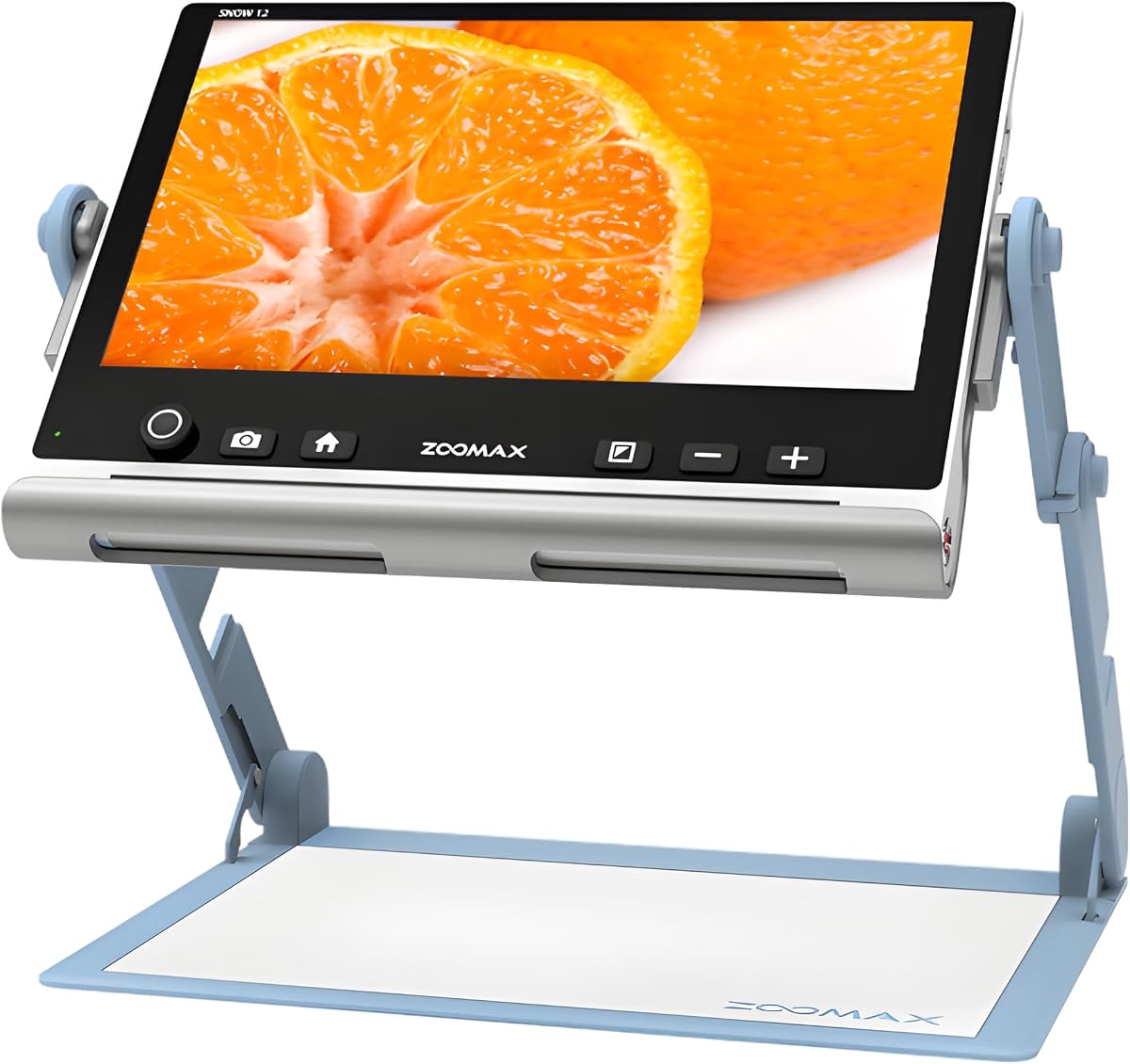
The Zoomax SNOW 12 is the most specialized product in this guide. It combines a large 12-inch HD display, 19-times magnification, optical character recognition, text-to-speech, and support for more than 20 languages. Its 4.0 rating is solid, and the OCR function gives it a distinctly different role from basic magnifiers that only enlarge an image on screen.
We may earn a commission when you buy through this link, at no additional cost to you.
The large display reduces the need to move the camera repeatedly across a page and can make longer passages easier to follow. Its folding stand supports stable positioning at different viewing angles, while the advanced HD camera is intended to provide clear images for reading, writing, and more. Most importantly, OCR can convert recognized text into spoken words, offering access to documents without requiring the user to follow every enlarged word visually.
Multilingual text-to-speech is a major advantage for people who need to read foreign-language material or want assistance with documents in more than 20 languages. The trade-off is that 19-times magnification is below the 32X and 48X maximums offered by several 5-inch products, so the Snow 12 is less oriented toward inspecting the smallest isolated details. Its larger, more advanced format may also be less convenient for very compact travel use.
This is the best choice for readers who want spoken-content support rather than magnification alone. It is particularly relevant for document-heavy use, multilingual reading, and users who benefit from a broad viewing area. Those wanting a smaller device for restaurant menus or shopping labels may find one of the five-inch models easier to manage, but for OCR, text-to-speech, and a large screen, the Snow 12 leads this roundup.
OCR converts visible text into machine-readable content, while text-to-speech reads that content aloud. This can reduce the strain of following a line of small print and provides a new way to interact with documents.
The 12-inch HD panel offers a generous viewing area for extended reading, and support for more than 20 languages makes the device relevant to multilingual households, travelers, and people working with varied documents.
We may earn a commission when you buy through this link, at no additional cost to you.
The Eyoyo 5-inch Portable Digital Video Magnifier offers 4X-32X zoom, 17 color modes, five brightness levels, and a 4.0 customer rating. It provides a larger screen and more magnification than the brand's compact 3.5-inch model, making it a logical step up for readers who want more text visible while retaining a portable format.
We may earn a commission when you buy through this link, at no additional cost to you.
The device remembers preferred viewing settings, supports photo capture and playback, and accepts TF cards up to 32GB. A 4500mAh battery is listed as providing more than four hours of continuous operation, which is a useful feature for travel or sessions away from an outlet. AV output gives users the option of moving the image to a television or other large display, while the foldable handle provides a comfortable grip.
Compared with the more extensively featured 5-inch competitors, this model has 17 color modes rather than 26 and begins at 4X rather than 2X. Its minimum magnification may offer less flexibility for normal-sized print, though the 32X maximum is sufficient for fine details. The TF card is not included, and the product's average 4.0 rating places it behind the strongest alternatives but still reflects a broadly positive reception.
This magnifier is a solid choice for people who want the Eyoyo brand's folding handle and battery life with a more useful five-inch screen. It suits books, newspapers, household paperwork, and image viewing, especially when a television is available for occasional large-display use. Buyers prioritizing the broadest color palette or lowest starting magnification should compare the 26-mode models, while those needing spoken text should look to the Snow 12.
The listed 4500mAh battery and more than four hours of continuous operation support longer sessions away from home. That makes the magnifier more practical for appointments, travel, and reading in different rooms.
Automatic setting memory reduces repeated adjustments, while photo capture and playback let users save and revisit important pages or labels. A compatible TF card is required for storage but is not supplied.
We may earn a commission when you buy through this link, at no additional cost to you.
The Portable Digital Video Magnifier with Foldable Handle combines a 5-inch display, 2X-32X magnification, 26 color modes, and switching between near and far cameras. Its 4.0 rating reflects a positive but not exceptional reception. The dual-camera capability is particularly useful because it allows the device to function as both a close reading aid and a viewer for more distant material.
We may earn a commission when you buy through this link, at no additional cost to you.
Large, prominent buttons are designed to make the interface intuitive for elderly users and anyone who may have difficulty navigating small controls. The device can remember preferred settings, while the 800×480 HD LCD and image-processing DSP are intended to maintain color and reduce distortion during enlargement. A television connection adds flexibility, allowing the image to be transferred to a larger screen when detailed work requires it.
The foldable bracket can position the magnifier at an angle above a page, and the reversible handle accommodates left- or right-handed use. As a trade-off, the 26-mode selection can feel extensive during initial setup, and the listing does not mention OCR or text-to-speech. The 4.0 rating also trails the 4.6-rated compact option and the 4.3-rated general-purpose 5-inch model. Its stated specification set does not include a clearly specified battery capacity.
This model is a good match for people who want one device to handle both page-level reading and distant viewing. It can be useful around the home, in stores, at appointments, and for everyday labels. Those who only need close reading may prefer a simpler model, while users who require spoken output should investigate the Zoomax SNOW 12 rather than expecting OCR from this magnifier.
The near camera handles close text and documents, while the far camera provides a view of signs, boards, and other distant details. Having both functions in one device broadens its usefulness without changing the overall viewing approach.
Twenty-six color modes provide many options for improving text contrast, including situations where standard full-color viewing does not separate letters from the page. Memorized preferences help users avoid repeating the setup.
We may earn a commission when you buy through this link, at no additional cost to you.
The Eschenbach SmartLux is a recognizable handheld option with a 4.4 rating, five magnification levels at 5X, 7X, 9X, and 12X, and five viewing modes. The supplied information is concise, describing it as a lightweight, portable, handheld digital and electronic magnifier with image capture. That simplicity may appeal to people who prefer an established visual-aid design over a large menu of specialized controls.
We may earn a commission when you buy through this link, at no additional cost to you.
The image-capture function lets users retain and review material, which is useful for labels, forms, packaging, and pages they want to inspect again. Five viewing modes offer a practical way to adjust the displayed image without requiring dozens of options. The handheld format is convenient for scanning a document or looking at an object without setting up a larger workstation.
Its maximum magnification is only 12X, compared with 25X, 32X, or 48X on several five-inch products in this guide. That may limit its usefulness for extremely small print, especially when compared with the Snow 12's large display and OCR functions. The product information also does not list external-display support, a specific battery capacity, or a numeric screen resolution, so those capabilities should be verified before purchase.
The SmartLux is best for someone who wants a straightforward handheld magnifier with image capture and a well-regarded rating, particularly for everyday labels and moderate detail. It may also suit buyers who want a familiar branded desktop visual aid. For very fine text, maximum zoom, television output, or OCR, one of the more explicitly specified alternatives will offer a clearer fit.
Four named magnification levels and five viewing modes create a manageable set of choices for a user who may not want to navigate dozens of settings. The handheld format makes it easy to move directly between nearby objects and pages.
Integrated image capture provides a way to save and revisit content instead of repeatedly positioning the magnifier. That is helpful for forms, packaging, labels, and other details encountered briefly.
We may earn a commission when you buy through this link, at no additional cost to you.
The 5-inch 3X-48X digital magnifier offers a broad zoom range, eight color modes, simplified buttons, photo playback, and AV output. Its 4.0 rating indicates generally favorable feedback. The device is explicitly positioned for short tasks such as reading prescriptions, instructions, maps, recipes, menus, and price tags, although its listing says it is not recommended for long books or novels.
We may earn a commission when you buy through this link, at no additional cost to you.
The external battery is stated to last for more than four hours, while the foldable handle keeps the unit lightweight and comfortable during extended handling. A memory function retains user habits, and the photograph-and-playback capability can preserve important information for later review. Compatible TF cards up to 32GB are supported, although no card is included. The television connection allows a larger display when more visual area is needed.
The most important limitation is the explicit recommendation against long-form reading. A handheld device that must be moved repeatedly across a page can become tiring or lose alignment, even when it offers enough magnification. The 3X starting point is also higher than the 2X minimum found on some competitors, although the 48X maximum is among the highest listed. Eight color modes provide fewer contrast choices than the 26-mode models.
This magnifier is best for quick inspections away from home, including restaurants, stores, pharmacies, and trips. It is also a sensible option for caregivers helping someone read a short label or document. For continuous book reading, choose a model with a larger display or a more stable stand, and for spoken document access, the OCR-equipped Snow 12 is the more specialized option.
The magnifier is particularly suited to short printed items such as prescriptions, recipes, price tags, instructions, and maps. Its portable body and foldable handle make it easy to deploy in a store, restaurant, or pharmacy.
The external battery is listed as providing more than four hours of use, helping avoid interruptions during a shopping trip or a session of short reading tasks. The TV output and photo playback add optional ways to view and retain content.
We may earn a commission when you buy through this link, at no additional cost to you.
The most suitable digital magnifier depends on where it will be used, the size of the text, preferred viewing adjustments, and whether spoken output or a larger screen is needed. Reviewing these factors before buying can prevent an oversized device, excessive controls, or insufficient magnification from limiting everyday usefulness.
Magnification determines how closely the device can enlarge small print, labels, photographs, or distant signs. Products in this guide range from the Eschenbach SmartLux at 5X-12X to the VEVOR and 5-inch 3X-48X models, with several 2X-32X options in between. A broad stated maximum is useful for very small details, but a useful lower magnification can make ordinary print easier to view without excessive enlargement.
Choose a range that covers your typical reading needs rather than selecting the largest number alone. Consider both close pages and distant signs, then verify how the controls move between levels.
A larger display shows more text at once and can reduce the need to sweep the magnifier across a page. The 12-inch Zoomax SNOW 12 is designed for extended viewing, while 5-inch models provide a balance between screen area and portability, and the 3.5-inch Eyoyo prioritizes a small, lightweight form.
Choose the smallest screen that still allows comfortable reading, or select a larger model when extended document viewing is the priority.
Color modes can improve visibility by changing how text and its background appear. High-contrast combinations may help users with reduced contrast sensitivity, color vision differences, or conditions that make faint lettering difficult to separate. The strongest selections here provide 26 modes, while other models offer 17, eight, or five viewing modes.
Prioritize a variety of high-contrast modes and automatic setting memory if you want to avoid repeated adjustments.
Automatic focus can be especially helpful when pages are positioned at slightly different distances. Near and far cameras, such as those listed for the VEVOR and the 5-inch 26-mode reading aid, broaden a magnifier's use beyond printed pages to signs, boards, and other distant objects.
Check whether automatic focus, separate near and far lenses, or only a close-reading camera best matches the environments where you will use the device.
A handheld body is convenient for shopping, dining, travel, and medication labels, while a folding bracket or stand improves stability over a book or document. Reversible handles can accommodate left- or right-handed use. The 3.5-inch Eyoyo is especially compact, whereas the Snow 12 prioritizes a large display and a foldable stand.
Balance screen size against device bulk, and confirm that the handle or stand can hold the camera at a comfortable angle without forcing you to hunch.
Optical character recognition recognizes printed text and can convert it into editable or spoken content. Among the products listed, the Zoomax SNOW 12 is distinguished by OCR, text-to-speech, and support for more than 20 languages. The other magnifiers primarily enlarge images and are not listed with equivalent spoken-document functions.
Choose an OCR-equipped model when reading aloud is essential, and verify language support and recognition behavior before committing to a device for regular document use.
Battery life determines how easily a magnifier can be used away from an outlet. Listed examples include a 2500mAh rechargeable battery, a 4500mAh battery with more than four hours of operation, and an external battery with a similar stated duration. Image capture and playback can depend on a TF card, which is generally not included. AV or HDMI output can move the image to a television, monitor, or computer.
Consider battery duration, charging convenience, storage needs, and large-screen connections together. Any required card or cable should be confirmed before ordering.
Begin by charging the device according to its instructions and learning the magnification, focus, brightness, and color controls before handling important material. Place the camera over the page at a comfortable distance, use the bracket or stand to stabilize it, and adjust the angle so the text appears upright and evenly lit. If the image is blurred, refocus before changing color settings.
Choose a viewing mode that provides the strongest contrast for the specific task. Full color works well for photographs and packaging, while black-on-white, white-on-black, and other high-contrast modes may make small print easier to distinguish. Save preferred settings when the device supports memory, and use screen lock or freeze functions to hold an image steady while inspecting a detail.
Clean the lens and screen gently with a suitable soft cloth, and keep the camera lens away from moisture and abrasive materials. Store the magnifier with the handle or stand folded, protect it from impact and extreme heat, and insert a compatible TF card before using storage features. For continued use with television or computer output, connect the cable carefully and confirm that the external display is set to the correct source.
A range extending to 32X or 48X is useful when text is extremely small or you need to inspect fine details. Lower starting magnifications can be more comfortable for ordinary print, while a large screen may matter more than maximum zoom for continuous reading. The best setting is the lowest level that still makes words comfortable and sharp to see.
No. A larger screen can show more content at once, which is helpful for books and extended documents, but it may be less convenient to carry. Compact models can be better for restaurant menus, labels, shopping, and travel. Consider screen size together with weight, handle design, battery life, and the places where you expect to use the device.
The best choice depends on the degree of visual difficulty and the tasks involved. High-contrast color modes, adjustable magnification, stable positioning, and a comfortable viewing angle are broadly useful. Models with OCR and text-to-speech, such as the Zoomax SNOW 12, may add value when reading aloud is preferred to visually following every word.
Digital magnification enlarges the camera image so text appears larger on a screen. OCR goes further by recognizing characters and converting them into text that can potentially be read aloud, edited, or otherwise handled. A magnifier can provide excellent visual enlargement without offering any spoken-content features, so check the two functions separately.
They may help by offering alternative color and contrast combinations that make text or objects easier to distinguish. High-contrast and inverted modes can be particularly useful when standard colors do not provide enough separation. The amount of benefit varies by the user's specific vision needs, so trying several viewing modes is recommended.
Many models in this guide include AV output, while the VEVOR includes both AV and HDMI, and some five-inch products support television or computer connections. The included cable and compatibility can vary, so verify the connector type before purchase. A larger external screen can provide a more comfortable view, especially for writing, detailed work, or shared viewing.
They can be useful when the device is stable and positioned to reduce bending and eye strain. A foldable bracket or stand is important for longer sessions, while a larger display reduces page movement. The 5-inch 3X-48X model is specifically described as unsuitable for long books or novels, so intended reading duration should be considered.
Several models support photo capture and playback through a TF card, but the required card is generally listed as not included. Confirm the maximum supported capacity before purchasing a card and format it according to the manufacturer's instructions. Users who do not need saved images can still use the core magnification and viewing functions without extra storage.
The Eyoyo 3.5-inch model is the leading compact and budget-oriented choice, combining a 4.6 rating with a pocketable body, useful color modes, image capture, and television output. The Portable 5-Inch 32X Magnifier offers the strongest overall balance for general reading, while the Zoomax SNOW 12 is the premium option for users who specifically need a large display, OCR, and multilingual text-to-speech.
Prioritize the task that matters most: choose a small device for travel and quick labels, a five-inch model for everyday documents and customization, or a large OCR-equipped system for spoken reading. Within that format, compare the starting and maximum magnification, color controls, focusing method, positioning hardware, battery life, and external-display connections rather than focusing on one specification alone.
Ratings and listed features provide a useful starting point, but current prices, promotions, availability, warranty terms, and included accessories can change. Confirm the latest product listing and accessory information before buying, especially when planning to use photo storage, connect an external display, or rely on a particular language for OCR.