
NZXT Kraken Elite 420 RGB
4.4Editor score
Large 2.72-inch IPS LCD
Custom high-flow turbine pump
Single breakout cable
A 420mm AIO liquid cooler combines a large radiator with a compact pump assembly, making it a practical choice for powerful CPUs, spacious mid-towers, and showcase builds. The best options balance heat-transfer capacity, quiet operation, attractive lighting, straightforward mounting, and enough room for the processor and graphics card.
We compared the supplied specifications, compatibility details, cooling features, pump designs, fan configurations, lighting, displays, and customer ratings. The list covers value-focused ARCTIC models, acoustically refined be quiet! and ENERMAX designs, plus premium LCD-equipped coolers from NZXT, Thermaltake, and MAGFloe.
Each review identifies the feature that makes the cooler most suitable for a particular build, while also noting compromises and installation considerations. Ratings reflect the supplied customer feedback and can change over time. Prices also fluctuate, so check the current listing before purchasing.
4.4Editor score

4.6Editor score

4.4Editor score
As an Amazon Associate we earn from qualifying purchases.
The comparison below highlights each cooler's defining features, including radiator size, pump display, lighting, fan configuration, noise-oriented design, and CPU compatibility.


The ARCTIC Liquid Freezer III Pro 420 A-RGB combines a 420mm radiator, three 140mm fans, offset mounting, and an integrated VRM fan in a particularly coherent design. Its supplied customer rating is 4.6, placing it among the strongest-reviewed products here, while the A-RGB treatment gives it the visual finish expected from a modern enthusiast cooler.
We may earn a commission when you buy through this link, at no additional cost to you.
The most distinctive feature is the PWM-controlled VRM fan mounted near the socket area. This additional cooling attention can help maintain steadier performance when the processor and power-delivery components are working hard. ARCTIC's P14 PRO fans are designed to provide strong airflow while remaining quiet, and their higher maximum speed gives the radiator additional headroom under sustained CPU loads.
Native offset mounting shifts the cold plate toward the CPU hotspot, which can improve the practical transfer of heat from modern processors. The included contact frame for Intel LGA1851 and LGA1700 distributes mounting pressure more evenly, while the integrated cable-management system runs the radiator fan wiring within the hose sheathing. Those details reduce clutter without sacrificing adjustability.
This is the most versatile recommendation for a high-performance PC because it combines strong thermal engineering, useful socket support, tidy wiring, and programmable lighting without relying on a large display. Buyers should confirm radiator clearance, CPU socket support, and case dimensions, but for a balanced 420mm build it offers the strongest combination of features.
The integrated VRM fan is a meaningful distinction in a compact air-cooled area. By directing controlled airflow toward the socket and voltage converters, it adds cooling beyond what the radiator's main airflow would otherwise provide.
Routing fan PWM cables through the hose sheathing leaves only one visible motherboard connection. That arrangement is especially useful behind a glass side panel, where loose parallel wires can otherwise dominate the presentation.
We may earn a commission when you buy through this link, at no additional cost to you.
The non-RGB ARCTIC Liquid Freezer III Pro 420 is a strong value choice for builders who care about cooling and cable management more than decorative lighting. It uses the same broad feature philosophy as the A-RGB version, including three P14 PRO fans, a PWM-controlled VRM fan, native offset mounting, and a contact frame for Intel LGA1851 and LGA1700.
We may earn a commission when you buy through this link, at no additional cost to you.
Its 4.4 customer rating reflects a generally favorable reception, and the cooling package is unusually comprehensive. The offset cold plate is designed to place the contact area closer to the processor hotspot, improving efficiency without requiring users to experiment with mounting positions. The three 140mm radiator fans offer a useful balance of airflow and controlled noise.
Because it omits lighting and a display, this cooler also avoids the visual and software complexity found in many premium competitors. That makes it a sensible choice for a restrained work system, a compact-looking enthusiast build, or anyone who prefers the radiator and fans to remain the main visual elements.
Choose this model when you want the ARCTIC Liquid Freezer III Pro's core engineering without spending on RGB. Verify socket compatibility and radiator space, then confirm that the current listing includes the mounting hardware required for your platform.
Removing decorative lighting does not reduce the listed cooling hardware. Users still receive the 420mm radiator, three P14 PRO fans, integrated VRM fan, and native offset mounting system.
A large radiator and 140mm fan array provide a sensible foundation for sustained processor workloads. The key requirement is a case with sufficient top or front clearance for a 420mm radiator.
We may earn a commission when you buy through this link, at no additional cost to you.
The NZXT Kraken Elite 420 RGB is the standout premium choice in this roundup, pairing a 420mm radiator with a large 2.72-inch circular IPS LCD. Its supplied rating is 4.4, and its defining attraction is not merely an illuminated pump block but a high-resolution display built for images, GIFs, monitoring information, and synchronized lighting.
We may earn a commission when you buy through this link, at no additional cost to you.
The panel offers 640-by-640 resolution, a smooth 60 Hz refresh rate, a bright 690 cd/m² backlight, 24-bit color, and wide viewing angles. NZXT also supports Google Photos, Spotify, and YouTube integration, allowing the display to act as a practical monitoring and entertainment surface rather than a static status indicator.
Under the display, a custom NZXT Turbine pump is designed to move coolant efficiently through the radiator. Installation is comparatively approachable thanks to pre-applied thermal paste, a single breakout cable, and tool-free mounting brackets for the latest listed AMD AM5 and AM4 as well as Intel LGA1851, LGA1700, LGA1200, and LGA115X platforms.
This cooler is best for showcase builders who want the screen to be a central part of the build. Its premium positioning comes with a display-focused feature set rather than additional radiator size, so buyers should consider whether they will regularly customize the panel and whether software-based control fits their preferences.
The circular IPS panel is large enough to make system information, animations, and personal images genuinely useful. Its high refresh rate also supports motion that looks more fluid than a basic static LCD.
Image support, performance monitoring, RGB synchronization, and integrations such as Spotify and YouTube give the display broad appeal. A single breakout cable keeps the physical installation comparatively tidy.
We may earn a commission when you buy through this link, at no additional cost to you.
This ARCTIC Liquid Freezer III Pro 420 A-RGB listing shares the core strengths of the first-ranked model: a 420mm radiator, three P14 PRO fans, native offset mounting, an integrated VRM fan, and hose-integrated fan wiring. Its customer rating is 4.4, and it remains a compelling all-around option for builders who want both effective cooling and coordinated lighting.
We may earn a commission when you buy through this link, at no additional cost to you.
The contact frame is specified for Intel LGA1851 and LGA1700, helping distribute mounting pressure evenly. Offset mounting shifts the cold plate toward the CPU hotspot, while the P14 PRO fans are engineered for strong airflow and quiet operation, including at lower speeds.
Its main distinction from the top-ranked listing is not dramatic on the supplied specifications. The listing includes A-RGB, the VRM fan, and the same integrated cable-management approach, so buyers should compare the current listing details carefully before assuming one ARCTIC variant offers a different hardware package.
This model makes sense for an RGB enthusiast who values a full-size radiator, modern socket provisions, and organized wiring. Its case fit and final socket compatibility remain essential checks, particularly if the motherboard uses an unusual mounting arrangement.
The dedicated VRM fan adds local airflow where processor power components can generate substantial heat. It complements rather than replaces the main radiator and three-fan array.
A-RGB illumination makes the pump block suitable for coordinated builds, while the integrated PWM wiring keeps the radiator area visually restrained. The result balances aesthetics and cable management.
We may earn a commission when you buy through this link, at no additional cost to you.
The be quiet! Silent Loop 3 420mm is built specifically around low-noise operation and carries a supplied customer rating of 4.7, the highest among the ten products. Its three-chamber pump design is intended to reduce turbulence and noise, while a dampened, adjustable six-pole motor gives users control over the pump's operating characteristics.
We may earn a commission when you buy through this link, at no additional cost to you.
Three Silent Wings 4 140mm PWM high-speed fans provide radiator airflow, with specially engineered radiator corners designed to support quiet operation. The wide CPU plate offers broad processor coverage, and the listed Threadripper support makes this model relevant to high-end workstation platforms as well as conventional gaming systems.
Its engineered cooling block is intended to provide high cooling performance, while ARGB lighting adds visual customization for builders who do not want to sacrifice a quiet design. The absence of a large display also means it can feel less visually busy than many premium alternatives.
This is the choice for a quiet workstation or refined enthusiast build where acoustic behavior matters. Confirm that the case supports a 420mm radiator and that the required Threadripper or standard socket mounting hardware is included for the intended CPU.
The three-chamber pump architecture is designed to reduce internal turbulence, while damping and adjustable motor control provide further ways to manage operating sound. This focus extends beyond the three radiator fans.
Wide CPU plate coverage and Threadripper support distinguish this model from coolers marketed only around mainstream sockets. It is a useful option for users assembling a quieter high-end system.
We may earn a commission when you buy through this link, at no additional cost to you.
The Geometric Future Eskimo Pro pairs a 420mm radiator with three preinstalled 140mm Squama 2503 ARGB PWM fans, giving it a complete cooling and lighting package. Its supplied rating is 4.6, and the product's most concrete cooling specifications center on an advanced K6 pump with a stated 1.5 L/min flow rate.
We may earn a commission when you buy through this link, at no additional cost to you.
The pump works with a large 55.8-by-55.8mm copper base, a substantial contact area intended to aid heat transfer. Diffused ARGB lighting in the CPU block adds a diffused glow rather than relying on a plain illuminated surface, while the preinstalled fans reduce the amount of radiator assembly required during installation.
Compatibility is listed for Intel LGA1700 and AMD AM5, with the model also described as fitting the latest Intel and AMD sockets. The exact bracket package should still be checked against the processor and motherboard, particularly when purchasing from a marketplace listing.
This cooler is a good match for a colorful high-airflow build where a large pump, copper cold plate, and integrated lighting matter more than an LCD. It also offers an appealing alternative to the more familiar ARCTIC options, although buyers should confirm motherboard lighting-control support and socket hardware.
The listed 1.5 L/min flow rate indicates an emphasis on moving coolant efficiently. Paired with a 55.8mm copper base, it gives the pump block a clear specification-led identity.
Having all three 140mm radiator fans supplied and mounted reduces initial setup work. The diffuser-covered ARGB block adds coordinated lighting without requiring a separate pump cover.
We may earn a commission when you buy through this link, at no additional cost to you.
The ASUS ProArt LC 420mm combines a 420mm radiator with Noctua NF-A14 industrialPPC-2000 PWM 140mm fans, making fan quality and controlled airflow central to its proposition. Its supplied rating is 4.4, and the minimalist ProArt styling fits workstations and restrained builds that do not need a large screen.
We may earn a commission when you buy through this link, at no additional cost to you.
The performance three-phase motor is described as offering strong cooling capability with quieter operation. An illuminated meter on the pump block displays live system load, temperatures, and fan speeds, giving useful operational information without turning the cooler into a multimedia display.
Durability and chassis flexibility are addressed through 450mm of reinforced sleeved tubing. The radiator is also described as thicker, with larger coolant storage intended to enhance overall cooling performance. These details support users who prioritize a robust installation and a long, flexible route around the motherboard.
This cooler is especially suitable for a professional or creator workstation with a clean visual theme. It may not suit buyers whose main goal is displaying images or animations, but for status monitoring, strong fan hardware, and understated styling it offers a focused alternative.
The illuminated meter reports system load, temperatures, and fan speeds in a compact format. It is a restrained alternative to the large LCDs offered by several other premium contenders.
Reinforced 450mm sleeved tubing provides ample room to route the cooler around components. Longer tubing can be particularly helpful in cases where the pump and radiator cannot sit directly above one another.
We may earn a commission when you buy through this link, at no additional cost to you.
The Thermaltake TH420 V2 Ultra ARGB offers a square 2.1-inch LCD on the pump block, three 140mm PWM fans, and a 420mm radiator. Its supplied customer rating is 4.0, which is lower than most products in the list, but the specification set is extensive for builders interested in coordinated RGB and on-pump media.
We may earn a commission when you buy through this link, at no additional cost to you.
The 480-by-480 display can present photos, videos, and content using 16.8 million colors. Its industrial-style enclosure gives it a technical appearance, while the three fans operate within a listed 500-to-1800 RPM range. A high-performance copper base plate supports heat conductivity, and the pump is designed to maintain circulation around it.
Lighting synchronization is listed for ASUS Aura Sync, GIGABYTE RGB Fusion, MSI Mystic Light Sync, and ASRock Polychrome. However, the Ultra Series products are supported by TT RGB Plus 2.0 software, so buyers should make sure they are comfortable using that control environment for the complete package.
Socket support includes numerous Intel and AMD platforms, from modern LGA1700 and AM5 through older connections. This broad list adds flexibility, but the exact mounting kit still needs to match the processor. This model is most convincing for a colorful system where the LCD and synchronized lighting are central priorities.
The 2.1-inch 480-by-480 panel can display photos and videos rather than only operating data. Its square shape also provides a distinctive visual difference from circular pump displays.
Compatibility with four major motherboard lighting ecosystems is useful for existing builds. Thermaltake's own TT RGB Plus 2.0 software remains the controlling application for Ultra Series products.
We may earn a commission when you buy through this link, at no additional cost to you.
The MAGFloe 420 Ultra is visually defined by its 3.95-inch square LCD, the largest pump display listed in this roundup. It also includes three 140mm SWAFAN EX fans and a 420mm radiator, creating a large-format package for showcase builders. Its supplied rating of 3.3 is the lowest here, warranting careful consideration.
We may earn a commission when you buy through this link, at no additional cost to you.
The fans operate from 500 to 2000 RPM and are rated at 81.6 CFM with 3.17mm of static pressure in standard orientation. Reverse blades are included, allowing airflow direction to be changed while keeping the illuminated side visible. MAGForce 2.0 retains magnetic fan-to-fan connections and magnetic daisy-chain cables while using larger pin-to-pad contact surfaces to reduce signal problems.
The LCD can display pictures, videos, and system data, making it one of the most visually ambitious options. Its broad Intel and AMD socket list includes current platforms such as LGA1851 and AM5 along with numerous older sockets, which is useful for upgrades.
Despite the feature set, the lower rating suggests potential compromises in overall consistency or satisfaction. Consider this cooler when a large display and reversible fans are priorities, but compare its fit, software experience, and customer feedback with higher-rated alternatives.
Swappable reverse blades allow the fan's lit face to remain visible when the preferred airflow direction changes. The alternative orientation still delivers substantial listed airflow and static pressure.
MAGForce 2.0 enlarges the pin-to-pad contact area to improve reliability and reduce signal drop from misalignment. Magnetic daisy-chain cables simplify connecting several fans in sequence.
We may earn a commission when you buy through this link, at no additional cost to you.
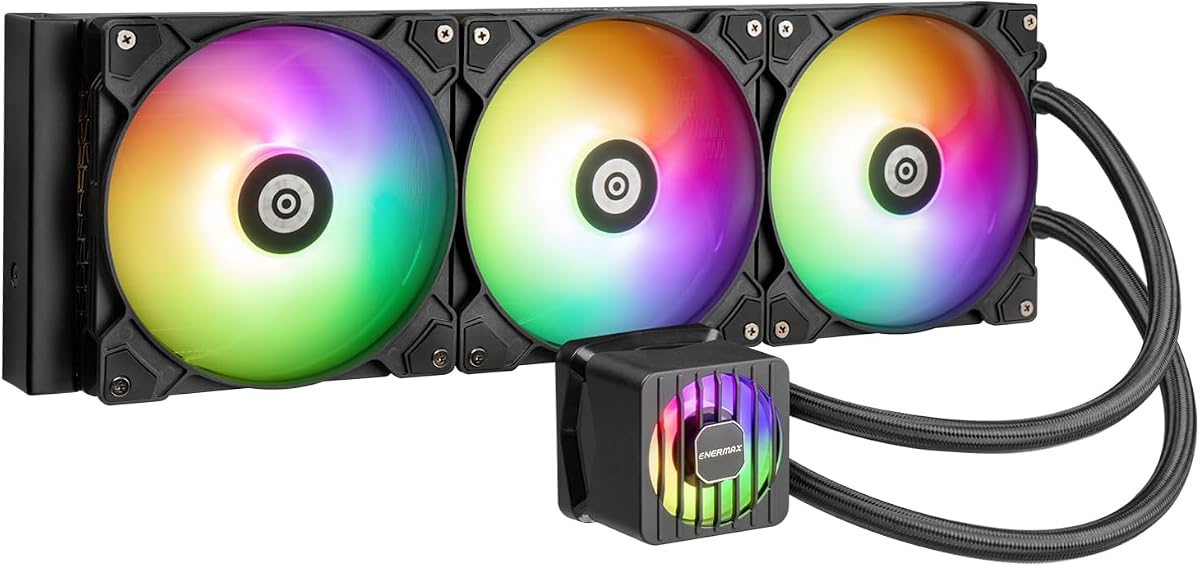
The ENERMAX LIQMAXFLO 420mm combines a 38mm-thick radiator, a pressure-optimized 140mm FDB PWM fan, a 60mm VRM fan, and a pump capable of reaching 3000 RPM. Its supplied rating is 4.1, and its most distinctive feature is the combination of socket-area cooling with a relatively high-speed pump.
We may earn a commission when you buy through this link, at no additional cost to you.
All three major cooling elements—the radiator fan, VRM fan, and pump—use PWM control, allowing compatible motherboard software to balance cooling and noise. The magnetic pump cover can rotate by 90 degrees for visual customization, while three tube clips hold the tubes and wires together and the daisy-chain cable design simplifies installation.
Thermal paste is pre-applied using Dow Corning TC-5888, and an extra tube is included for a later reinstallation. RGB effects can be coordinated through supported software and motherboard synchronization. The listed processor support includes Intel LGA1700, LGA1200, LGA115X, AMD AM5, and AM4.
This is a solid choice for a builder who values active VRM cooling, flexible pump aesthetics, and straightforward thermal-paste installation. Socket support should be checked carefully for newer boards, and the current customer feedback is worth reviewing before choosing it over higher-rated models.
The 60mm PWM fan adds localized airflow around the socket's power components. This can be especially useful in compact layouts where the main radiator does not directly influence the entire motherboard area.
Preapplied paste removes one common installation step, while an extra tube supports future servicing. Tube clips and daisy-chain wiring help reduce clutter around the pump.
We may earn a commission when you buy through this link, at no additional cost to you.
A 420mm AIO should be selected by considering case clearance, CPU support, thermal headroom, acoustic priorities, lighting control, and the installation features that suit your particular case.
A 420mm radiator is physically large, so the case matters more than with a smaller unit. Confirm that the chassis supports a 420mm radiator at the top, front, or another intended position, and account for the combined thickness of the radiator and fans. Long or sharply bent tubing can also determine whether the pump and radiator fit comfortably around motherboard components.
Choose a case designed for a 420mm radiator, and measure the complete assembly before ordering.
Every AIO needs a mounting kit compatible with the processor socket and sometimes with the motherboard's rear clearance. The products here reference platforms including LGA1851, LGA1700, AM5, AM4, LGA1200, older LGA115X sockets, and numerous legacy platforms. Threadripper support is explicitly mentioned for the be quiet! model. Confirm both the socket and any raised CPU cooler clearance before making a purchase.
Check the listing's mounting details against your exact CPU and board.
Cooling performance depends on more than radiator size. Pump design, cold-plate material and placement, coolant flow, radiator thickness, and fan static pressure all contribute to the system's ability to move heat away from the CPU. Offset mounting can improve contact with a processor hotspot, while a copper base plate provides a large conductive surface. Integrated VRM fans extend attention to the socket area rather than the processor alone.
Prioritize the complete pump, plate, radiator, and fan system.
Quiet cooling requires attention to pumps, fans, and airflow paths. The be quiet! Silent Loop 3 emphasizes a three-chamber pump, dampened adjustable motor, and Silent Wings fans, while the ARCTIC P14 PRO fans are designed for quieter operation, particularly at lower speeds. PWM control is valuable because it lets the motherboard reduce fan and pump speed when processor temperatures are lower.
Look for PWM control and consider a model designed around low noise.
ARGB is appropriate when the cooler should match a coordinated lighting ecosystem, while a display can add useful monitoring or personal media. The NZXT Kraken Elite uses a 2.72-inch circular IPS panel, the Thermaltake model a 2.1-inch square LCD, and MAGFloe a 3.95-inch square display. Displays add visual impact but also make software support and pump-block clearance important.
Choose lighting for aesthetics or a display for added information.
Features such as pre-applied thermal paste, tool-free brackets, single breakout cables, integrated pump leads, and magnetic daisy chains can simplify assembly and reduce clutter. ARCTIC routes radiator fan PWM cables through the hose sheathing, ENERMAX uses tube clips and daisy-chained wiring, and NZXT uses a single breakout cable. These differences matter in glass-sided cases where wire management is visible.
Favor fewer exposed cables when appearance and accessibility are priorities.
Most products use three 140mm fans, but radiator thickness and fan direction can affect compatibility. Standard-orientation fans push air through the radiator in one direction, while reversible blades allow the visible illuminated face to remain in view. A thick radiator improves coolant capacity but consumes more case space, and a three-fan array also requires three fan mounting positions.
Confirm radiator thickness, fan direction, and mounting positions together.
RGB lighting, pump control, LCD content, and performance monitoring may rely on a manufacturer's application or motherboard software. Thermaltake Ultra Series products are supported by TT RGB Plus 2.0, while NZXT supports media integrations and system monitoring. Before choosing a display or advanced lighting model, confirm that its software works with your operating system and that you are comfortable using the required control platform.
Verify software support before finalizing a feature-heavy choice.
Install the radiator in a location where incoming air is not blocked by dust filters, drive cages, or tightly packed tubing. Follow the mounting instructions for the specific socket, attach the supplied pump bracket, and confirm that the CPU contact surface is clean. If thermal paste is not pre-applied, apply the recommended amount evenly before tightening the bracket in a cross pattern to maintain even contact pressure.
Connect the pump and radiator fans to the appropriate PWM and lighting headers, then configure the pump and fan curves in motherboard or cooler software. Begin with conservative pump settings, monitor CPU and VRM temperatures, and listen for unusual noise or vibration. A radiator should be mounted firmly, and tubing should not be kinked, sharply bent, or compressed against a component.
During routine care, power down and disconnect the system before removing components. Keep the radiator and fans free of dust, and inspect tubing for swelling, leakage, or discoloration. Do not operate the cooler with the pump disconnected from power. If the CPU is removed, replace the thermal compound rather than reusing a disturbed paste layer, and reconnect all cables before testing.
A 420mm radiator generally offers more physical surface area than a 360mm unit, which can provide additional thermal headroom when paired with suitable fans and unobstructed airflow. The real-world difference depends on CPU workload, case design, fan characteristics, and pump performance. It also requires more chassis clearance, so a 360mm model may fit a smaller or more restrictive case more conveniently.
It will fit only if the case supports a 420mm radiator in a specific location. Measure the available length and the space required by the radiator plus fans, rather than checking only the radiator label. Pump, tubing, motherboard, graphics card, and memory clearance can also affect the installation.
It can, especially when it replaces a noisy air cooler operating at high fan speeds. Actual noise depends on the pump, fan model, fan curve, radiator placement, and nearby vibration. PWM-controlled pumps and fans are valuable because they can slow down when the CPU is not under heavy load. A pump or fan running near maximum speed can still produce substantial sound.
No. An LCD is useful for showing temperatures, images, animations, or other information, but it is not required for effective cooling. The ARCTIC, be quiet!, Geometric Future, ASUS ProArt, and ENERMAX options demonstrate that a 420mm cooler can focus entirely on thermal performance, acoustics, status information, or RGB without a large media screen.
Most modern AIO coolers use PWM-controlled fans and pumps that can be assigned in motherboard or manufacturer software. The exact headers and controls vary, so consult the product instructions and BIOS documentation. The ARCTIC, ENERMAX, Thermaltake, NZXT, and MAGFloe products all describe PWM or software-control features in the supplied data.
The list includes support for modern platforms such as Intel LGA1851 and LGA1700 and AMD AM5, alongside various older sockets. The be quiet! Silent Loop 3 also lists ThreadRipper support. Compatibility should still be verified for the exact CPU, motherboard, and mounting hardware before ordering.
Top mounting is common because it moves heat directly out of the case and keeps the area above the motherboard unobstructed. Front mounting can also work well if the case has space and the intake path is clear. The best position depends on chassis layout, graphics-card clearance, tubing routing, and whether the selected radiator includes fans in the listed thickness.
Inspect the radiator and fans whenever you clean the case or notice unusual noise, rising temperatures, or unstable performance. Dust can obstruct airflow, while aging or damaged fittings may cause leakage. The pump and radiator should remain securely mounted, and tubing should stay free of kinks and physical stress.
The ARCTIC Liquid Freezer III Pro 420 A-RGB stands out as the strongest all-around choice because it combines a 420mm radiator, three strong 140mm fans, offset mounting, VRM cooling, integrated cable management, and lighting without a large display. The non-RGB Liquid Freezer III Pro 420 is the better value-oriented version, while the NZXT Kraken Elite 420 RGB wins for premium screen-based customization.
Prioritize case fit and CPU socket compatibility before any other feature. From there, choose a quiet design for a workstation, a display model for a showcase, a broad socket list for an upgrade path, or a straightforward A-RGB package for a colorful gaming system. The be quiet! Silent Loop 3 420mm is especially relevant to builders prioritizing acoustics, while the ENERMAX LIQMAXFLO includes a dedicated VRM fan and practical preinstalled paste.
Customer ratings and prices change over time, and marketplace listings can also vary in included hardware or bundle contents. Review the current product page, compatibility list, mounting kit, software requirements, and case dimensions before purchasing. With those checks completed, one of these ten 420mm AIO liquid coolers should align well with your performance, appearance, and workspace priorities.