
Numark Party Mix III
4.4Editor score
Beat-synchronized LED light show
Real-time stems control
Bluetooth MIDI connectivity
Serato DJ Lite included
This Bluetooth Dj Mixer guide compares ten wireless controllers and audio mixers for portable DJing, streaming, karaoke, home use, and key features.
A Bluetooth DJ mixer can turn a phone, tablet, computer, or traditional audio source into the center of a lively performance. The best options combine wireless control, practical mixer functions, portable construction, and dependable connectivity for DJing, karaoke, streaming, podcasts, live music, and parties.
This guide compares ten controllers and audio mixers based on their supplied specifications, including channel counts, input options, Bluetooth support, pads, EQ controls, phantom power, USB functionality, portability, and included software. It covers both software-based DJ controllers and conventional mixers designed for microphones, instruments, computers, and stored music.
The recommendations show which products stand out for different needs, from app-driven smartphone mixing to compact portable setups and larger multi-channel boards. Specifications and retailer availability can change, so readers should confirm current compatibility, included accessories, and device requirements before making a purchase.
4.4Editor score

4.7Editor score
4.4Editor score
The table below compares all ten selections by format, connectivity, performance controls, and intended use, helping readers distinguish software DJ controllers from conventional live-sound mixers.




The Numark Party Mix III is a two-deck DJ controller designed to make software mixing approachable without reducing the experience to a handful of basic buttons. Its supplied rating is 4.4, and the strongest differentiator is the integrated light show, which projects beat-synchronized patterns for parties, social events, and practice sessions. It also supports wireless MIDI operation through the Algoriddim djay app on compatible iOS and Android devices.
We may earn a commission when you buy through this link, at no additional cost to you.
The control layout is notably complete for a party-oriented system. Each deck has eight backlit performance pads, touch-capacitive jog wheels, a filter knob, and three-band EQ. Dedicated controls allow performers to trigger Hot Cues, automatic loops, samples, and dynamic effects. Real-time stems controls can isolate or remove vocals, drums, and instruments, while automatic Fade FX help create smoother transitions between tracks. Visual Beat Align indicators provide an additional learning aid for manual timing.
There are some practical limitations to consider. Bluetooth MIDI is a connection method rather than a complete wireless audio system, and the controller still needs suitable software, a compatible device, and a way to route the final output to speakers. The included USB-C cable and power-bank compatibility help with portability, but the unit itself does not provide a built-in battery or speaker output. Users preparing complex performances will still need to learn the app and practice basic mixing techniques.
This is a strong recommendation for beginners who want a controller that produces an immediate party atmosphere and offers room to develop their skills. It is also a good fit for mobile DJs using a laptop, tablet, or phone, particularly when the light show and stems tools can simplify the first stages of a performance. Experienced users who require multiple microphone inputs or standalone analog mixing should instead consider one of the conventional mixer boards in this guide.
The built-in LEDs move in time with the music and eliminate the need for a separate lighting controller. This makes the Party Mix III especially engaging for casual events where visual effects are as important as the audio mix.
Dedicated stems buttons and pads can separate or mute vocals, drums, and instruments. Even inexperienced users can create combinations that would normally require more complex preparation in a DJ application.
We may earn a commission when you buy through this link, at no additional cost to you.
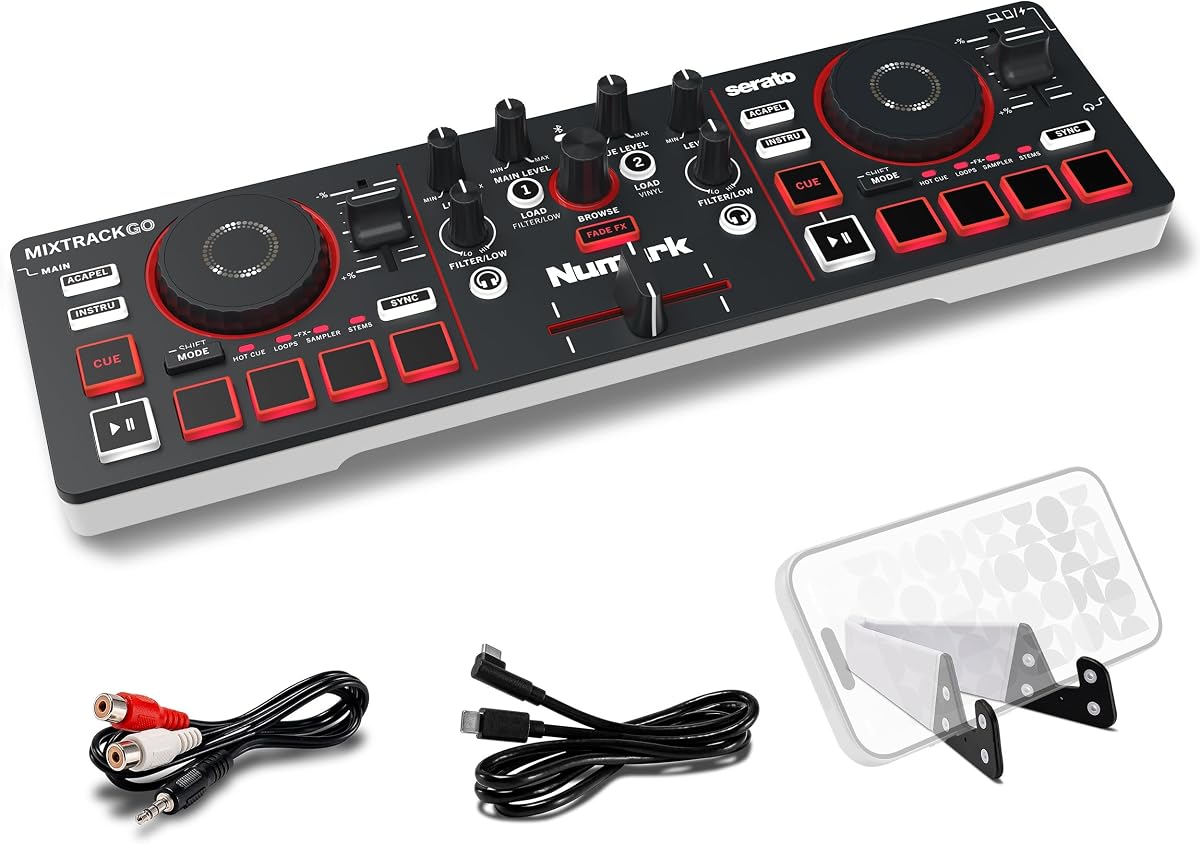
The Numark MixTrack Go is built for DJs who want a capable, compact controller that is easy to carry. It has a supplied rating of 4.4 and follows a familiar two-deck layout, but the emphasis is on portability rather than maximum input flexibility. Bluetooth MIDI connectivity allows compatible iOS and Android devices to work with the Algoriddim djay app, while USB-C power supports laptops, tablets, smartphones, and standard power banks.
We may earn a commission when you buy through this link, at no additional cost to you.
Despite its small footprint, the controller includes two capacitive touch jog wheels, eight backlit pads per deck, dedicated filter knobs, channel gain, master volume, and a smooth crossfader. The pads support Hot Cues, Loops, Samples, and Stems. Automatic Fade FX add a layer of transition polish, while the stems controls can isolate or remove vocals, drums, and instruments from compatible tracks.
The main trade-off is that this is a focused two-deck controller rather than a multi-input live console. It does not offer the range of XLR and line inputs available on the Pyle, FULUODE, and Hercules-style mixer products in the list. Its 1/8-inch main and headphone outputs may also require careful cable planning, although an adapter to stereo RCA is included. Software installation and device pairing add a little setup work.
Choose the MixTrack Go for a small bag, beginner practice, house parties, or mobile DJ sessions where portability and app control matter most. It is particularly attractive for users who want pads, jog wheels, and stems tools without carrying a larger desktop controller. Those needing microphone mixing, direct analog inputs, or a more conventional live-performance workflow should choose a higher-channel mixer.
The lightweight chassis and USB-C power design make the MixTrack Go straightforward to pack for coffee shops, outdoor gatherings, and small events. A compatible power bank can extend setup options when a wall outlet is not nearby.
Jog wheels, performance pads, filters, and crossfader-based Fade FX provide a more tactile experience than simple touch-screen mixing. These controls also make the controller useful for developing standard DJ habits.
We may earn a commission when you buy through this link, at no additional cost to you.
The Pioneer DJ DDJ-FLX4 stands out as the most versatile software-based controller in this roundup. It carries a supplied rating of 4.7, the highest among the selected products, and combines a familiar Pioneer DJ layout with useful assistance for newer users. Its Smart Fader can automatically adjust volume, bass, and BPM while the crossfader is moved, reducing the manual burden of blending tracks with different tempos.
We may earn a commission when you buy through this link, at no additional cost to you.
The controller provides two-channel, two-deck control and 16 Performance Pads for Hot Cues, Pad FX, Beat Jump, and Sampler. It connects to computers and mobile devices through USB or Bluetooth and includes a built-in sound card for speaker connection. Its streaming-oriented features support mixing from services including Apple Music, Tidal, and Beatport, as well as live streaming or MC use from a single device.
As with any compact two-channel controller, live input versatility is limited. It is not designed to replace a conventional board for several microphones, passive instruments, and multiple analog sources. Smart Fader also changes how a user learns manual mixing, so performers who want precise traditional beatmatching may eventually prefer to disable assistance. Compatibility should always be confirmed with the chosen software and device.
The DDJ-FLX4 is the strongest all-around recommendation for someone beginning a DJ practice while also wanting access to streaming services and mobile connectivity. It suits learners who value guided blending, live streamers, and users who want an established controller layout. For a traditional multi-channel live mixer, choose a Pyle, FULUODE, or similar analog board instead.
Moving the crossfader can trigger automatic adjustments to volume, bass, and BPM. This gives beginners a useful bridge between simple track transitions and more deliberate manual mixing.
USB and Bluetooth connections, streaming-service support, and live-streaming capabilities make the DDJ-FLX4 relevant to rehearsal, recorded mixes, and connected performance setups.
We may earn a commission when you buy through this link, at no additional cost to you.
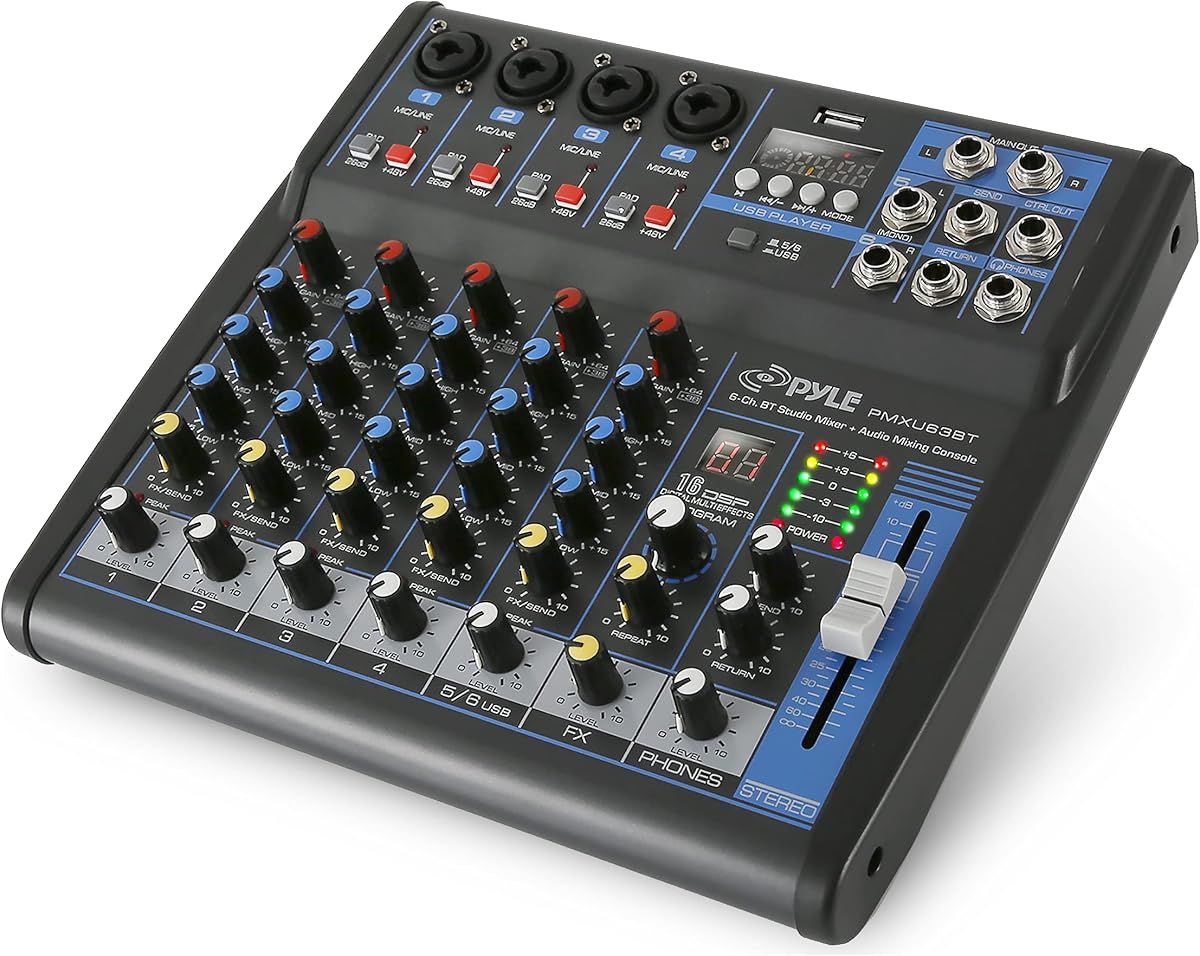
The Pyle PMXU63BT is a conventional six-channel audio mixer rather than a software DJ controller. Its supplied rating is 4.3, and its appeal lies in the number of practical connections available for stage work, karaoke, rehearsals, and live events. It supports Bluetooth wireless streaming, USB computer input, flash-drive playback, and a built-in MP3 player, allowing several kinds of source material to share the same board.
We may earn a commission when you buy through this link, at no additional cost to you.
Each channel can accept XLR and unbalanced quarter-inch connections, with a 48V phantom-power option for compatible condenser microphones. Three-band EQ, gain controls, LED peak indicators, and built-in DSP effects provide the essential tools for shaping vocals and instruments. The sealed-control steel chassis is designed to withstand repeated handling, while the multi-voltage power supply makes the mixer more flexible for international travel.
The product does not provide the jog wheels, performance pads, stems, or track-level software integration found in the Numark and Pioneer controllers. Its Bluetooth function is for bringing audio into the mixer rather than controlling DJ software. Users will also need compatible microphones, instruments, cables, and powered speakers or an amplifier to create a complete sound system.
This mixer is a good recommendation for musicians, karaoke hosts, teachers, and small-venue performers who need several analog inputs in one unit. It is less appropriate for someone whose goal is to mix tracks from a phone using tactile DJ controls. For that type of use, the Hercules DJControl Mix, Numark MixTrack Go, or Pioneer DDJ-FLX4 is a closer fit.
XLR and quarter-inch connections allow microphones, instruments, and line-level devices to be combined. This makes the PMXU63BT practical for rehearsals and small live events where several sources must share one control surface.
Bluetooth streaming from a phone or tablet complements the USB, flash-media, and MP3 functions. It is a straightforward way to add background tracks or prepared music to a conventional live mix.
We may earn a commission when you buy through this link, at no additional cost to you.
The FULUODE CT-80S combines eight input channels with a notably slim 1.57-inch profile. It has a supplied rating of 4.4 and targets situations ranging from family karaoke and campus events to band rehearsals, conferences, and other live activities. A large LED display, Bluetooth support, MP3 and USB playback, and 48V phantom power give it several functions usually associated with larger-format boards.
We may earn a commission when you buy through this link, at no additional cost to you.
The mixer supports cable, wireless, and capacitive microphone or instrument connections. Its three-segment EQ is provided per channel, while the display can present song information and the board includes a large-size LED area for operating information. Wireless audio uses a Bluetooth 5.0 connection, and the product also includes an LED display with a protective film that can be removed after delivery.
One important consideration is the listed power specification. The supplied information identifies the unit as operating on 110V with an American plug, so buyers outside that electrical environment should verify compatibility and power requirements. The eight-channel description does not mean every channel offers an identical combination of XLR, quarter-inch, or stereo connections, making it important to match the required source types to the available inputs.
The CT-80S is a strong option for a compact, multi-source live setup where Bluetooth media playback and microphone control are more important than DJ-specific pads or jog wheels. It can serve a small band, mobile karaoke host, or presenter who needs several channels in a relatively thin console. Software-focused DJs should look to the Numark and Pioneer controllers instead.
The slim enclosure helps conserve room on a rehearsal table, stage, or mobile equipment case. It offers more channels than a basic four-channel board without taking up the footprint of a full rack-style console.
The LED display and visible song-name information make Bluetooth media operations easier to monitor. This is helpful for hosts who need to identify tracks while managing microphones or instruments.
We may earn a commission when you buy through this link, at no additional cost to you.
The Hercules DJControl Mix is designed specifically for smartphone and tablet DJing through the Bluetooth connection. Its supplied rating is 4.3, and its list of essentials mirrors the familiar controls of a larger controller: jog wheels, faders, knobs, and pads. The Algoriddim djay app is included, reducing friction for users who want to begin mixing with a mobile device rather than a laptop.
We may earn a commission when you buy through this link, at no additional cost to you.
Its two-deck format supports the basic workflow of loading, cueing, and blending music. Physical jog wheels provide tactile control for track navigation and pitch adjustments, while the faders, knobs, and pads provide more control than a phone screen alone. A foldable smartphone stand is included, helping keep the display visible and accessible while the controller handles the physical mixing functions.
The major limitation is dependence on a compatible mobile device and app. It is not a conventional analog mixer with XLR microphone channels, and it is not designed to operate as a complete standalone sound board. Bluetooth performance, battery life, and app behavior also depend on the selected phone or tablet, making device compatibility and software support important parts of the purchase decision.
The Hercules DJControl Mix is a practical pick for beginners, travelers, and casual users who want a compact controller for parties or practice. It can also serve as a lightweight alternative for anyone who already works with djay and does not need streaming-service integration or a larger software ecosystem. Users preparing club-style sets may prefer the fuller control layouts of the Numark or Pioneer options.
By pairing the controller with a compatible phone or tablet, DJs can perform without carrying a laptop. The included stand keeps the device positioned for easier viewing during a set.
Jog wheels, faders, knobs, and pads reduce dependence on small touchscreen controls. The layout provides a more recognizable DJ workflow while preserving the portability of a mobile setup.
We may earn a commission when you buy through this link, at no additional cost to you.
The Four-Channel Bluetooth Mixer is a compact board oriented toward mobile podcasting, live streaming, karaoke, and small events. It has a supplied rating of 4.0 and measures 7.87 inches deep by 6.7 inches wide and 1.57 inches high, making it straightforward to place in a backpack. Its four-channel layout includes a USB audio interface, XLR input, 6.35-millimeter jack, and 48V phantom power.
We may earn a commission when you buy through this link, at no additional cost to you.
The USB interface is designed for straightforward computer recording and live streaming without a separate driver. It also supports flash-drive MP3 playback and audio recording, with controls for play, pause, skip, and mode changes. Bluetooth can receive streaming audio from smartphones, tablets, and laptops, while the physical inputs allow condenser microphones, dynamic microphones, guitars, basses, and electronic keyboards to be added.
An important distinction is that Bluetooth is input-only. The product does not send audio over Bluetooth to a speaker, so the final mix still needs wired outputs to active speakers, a power amplifier, or headphones. The supplied information also advises pressing MP3 ROUTE for Bluetooth and MP3 functions. As the product has the lowest supplied rating in the list, buyers should pay particular attention to device and application compatibility.
This mixer makes the most sense for a mobile creator who wants to combine computer audio, a microphone, and an instrument in a compact setup. It is also useful for small ceremonies, church gatherings, presentations, and home karaoke. It is not a track-focused DJ controller, so anyone seeking jog wheels, performance pads, or stems should choose one of the software controller options.
The built-in USB audio interface is intended for plug-and-play recording and streaming. This can simplify the process of combining computer audio with microphone and instrument sources.
Phones and computers can stream audio into the mixer through Bluetooth, but the mixer cannot transmit its final output to speakers that way. Wired speaker connections remain necessary for sound playback.
We may earn a commission when you buy through this link, at no additional cost to you.
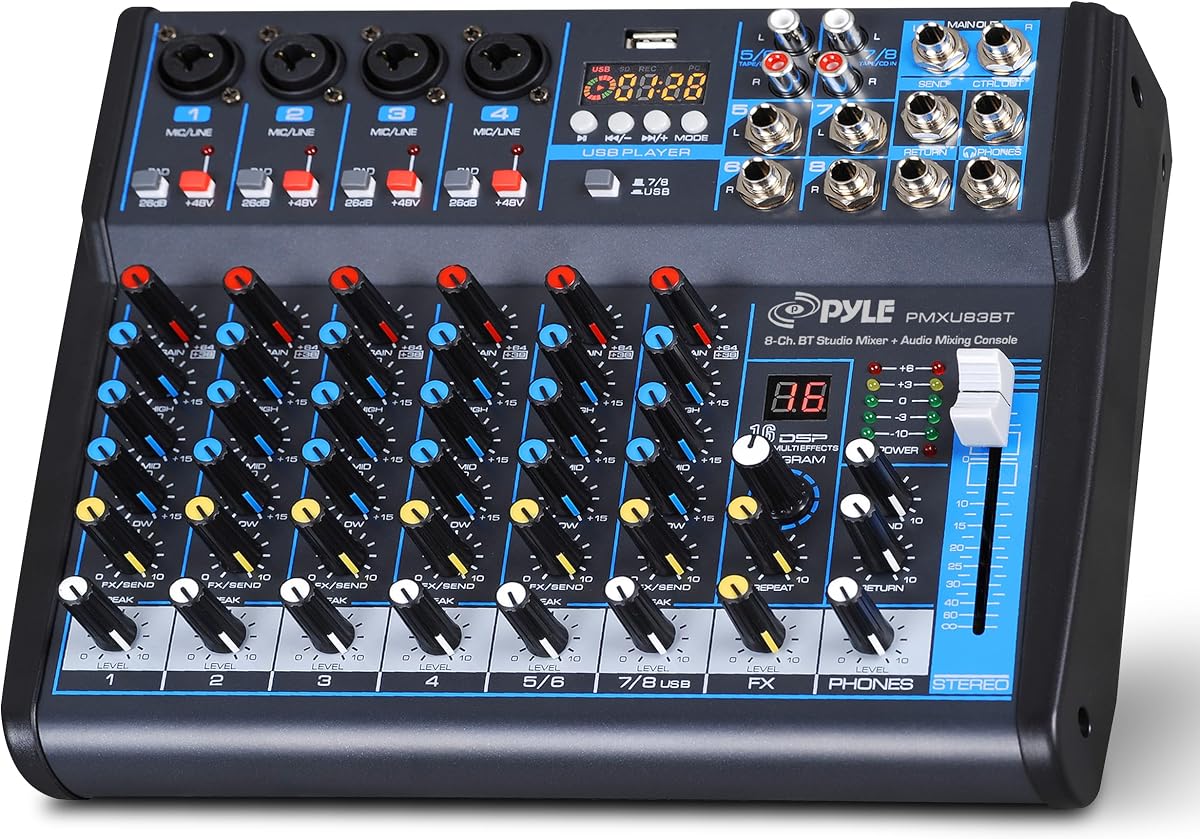
The Pyle Eight-Channel Mixer is built for live sound, karaoke, and multi-source control rather than software-based track mixing. It carries a supplied rating of 4.4 and includes Bluetooth wireless streaming, XLR and unbalanced quarter-inch inputs, 48V phantom power, LED peak indicators, and three-band EQ on all channels. The result is a versatile board for events where microphones, instruments, and stored music may all need to share a mixer.
We may earn a commission when you buy through this link, at no additional cost to you.
Its rugged steel chassis is designed for repeated transport and use, and sealed rotary controls help resist dust and grime. The multi-voltage power supply supports a broad range of operating environments according to the supplied information. Bluetooth adds a convenient way to stream music from a phone, while the eight-channel structure provides room to build a more elaborate live mix than a small four-channel console.
The product does not offer software DJ workflows such as track decks, performance pads, jog wheels, stems, or streaming-service integration. Bluetooth is intended for bringing audio into the console, while the final output still depends on the user's amplifier or powered speakers. The number of channels alone also does not guarantee that every channel supports the same connector and signal type, so the required microphone and instrument arrangement should be checked carefully.
This mixer is a solid recommendation for bands, karaoke hosts, and small-event technicians who need a durable analog console. It is also useful for rehearsals where a phone is the easiest source of additional tracks. Choose a software controller instead when the objective is to mix recorded music with a familiar deck layout, jog wheels, and live performance pads.
The steel enclosure and sealed controls are practical for rehearsal rooms, stages, and event transport. The construction is oriented toward dependable handling rather than a decorative desktop design.
Per-channel gain, three-band EQ, LED peak indication, and phantom power provide the basic controls needed to balance vocals and instruments. These functions are especially useful in live situations where quick level correction is necessary.
We may earn a commission when you buy through this link, at no additional cost to you.
The Six-Channel Audio Mixer is a traditional analog console aimed at karaoke, studio work, streaming, recording, and live music. Its supplied rating is 4.3, and the specification includes four XLR inputs, quarter-inch connections, switchable 48V phantom power, three-band EQ, a USB interface, Bluetooth streaming, and 16 built-in DSP effects. It offers a broad collection of traditional mixer functions in one compact board.
We may earn a commission when you buy through this link, at no additional cost to you.
The four XLR channels can accept condenser microphones, dynamic microphones, vocals, and other instruments. The unbalanced quarter-inch inputs are described as compatible with wireless microphones, electric guitars, direct boxes, and other musical instruments, while the final two channels provide stereo quarter-inch connections. A 16-effect processor includes options such as delay and reverb, and independent channel faders allow detailed level control.
The supplied information emphasizes that this is a traditional analog product and that incorrect operation can result in no sound. That warning is worth taking seriously: users should identify each input type, apply phantom power only to compatible microphones, and check output routing before a live session. The mixer also lacks DJ-specific jog wheels, pads, stems, and streaming-service software tools, so it should not be confused with a dedicated performance controller.
This board is a good fit for a singer, instrumentalist, streamer, or karaoke host who wants several microphone and instrument inputs plus digital effects. It can also support a compact studio or rehearsal environment. For mixing pre-existing tracks with familiar DJ controls, the Numark, Pioneer, or Hercules options are more direct choices.
The XLR section provides dedicated space for vocals and instruments that use balanced connections. Switchable phantom power supports compatible condenser microphones when that feature is required.
The onboard 16-effect processor includes delay and reverb-style processing. These effects can add atmosphere to karaoke, performances, and recorded output without requiring a separate effects unit.
We may earn a commission when you buy through this link, at no additional cost to you.
The Pyle PMX466 is a six-channel DJ and sound mixer with a supplied rating of 4.1. It combines four XLR microphone or line inputs with Bluetooth, USB, MP3 playback, an auxiliary connection, a headphone jack, and a subwoofer output. Sixteen preset digital effects can be selected in categories including Normal, Rock, Pop, Classical, Jazz, and Country.
We may earn a commission when you buy through this link, at no additional cost to you.
Its hardware is designed for a traditional mixer workflow. A separate sub output provides a dedicated path for low-frequency reinforcement, while the AUX connection broadens the options for external equipment. The MP3 player, USB interface, and Bluetooth connectivity make it possible to combine prepared media, computer audio, wireless playback, microphones, and line-level sources in one system.
The trade-off is that the PMX466 does not provide the tactile software-controller features associated with DJ-style decks. There are no jog wheels, performance pads, stem controls, or curated integrations with streaming services. Its supplied rating is also lower than those of most alternatives, so buyers should consider the complete specification and their own application rather than expecting a specialized beginner DJ experience.
The PMX466 is best suited to mobile DJs, karaoke setups, rehearsal rooms, and live performers who want a wide selection of analog connections and built-in effects. The sub output and flexible device connectivity are especially useful for portable sound systems. Users focused on learning software-based mixing should instead begin with the Pioneer DDJ-FLX4 or one of the Numark controllers.
A dedicated sub output lets a portable sound system handle low-frequency reinforcement separately. This can be valuable for parties, rehearsals, and events where a full-range speaker pair alone does not provide enough bass.
The mixer includes 16 preset digital effects organized into familiar categories. This gives performers quick access to processing suited to different genres without requiring a separate external effects processor.
We may earn a commission when you buy through this link, at no additional cost to you.
The right Bluetooth DJ mixer depends on whether you are performing prepared tracks, managing live microphones, producing content, or combining several analog sources. Use the following factors to narrow the category and identify the features that matter most.
A software DJ controller is designed around decks, jog wheels, performance pads, crossfaders, and an application running on a phone, tablet, or computer. It suits users who want to blend recorded tracks, perform with software, and use features such as cues, loops, samples, or stems. A conventional audio mixer is better for microphones, instruments, karaoke, live bands, podcasts, and events where each channel represents a physical audio source. The products in this guide deliberately cover both formats.
Choose a controller for DJ-style track mixing and a conventional mixer for live sound. Do not assume that Bluetooth alone makes an analog sound board a full DJ system.
Bluetooth can mean several different things. Software controllers may use Bluetooth MIDI to control an app, while conventional mixers generally receive streamed audio from a phone as another input. Some compact products explicitly support Bluetooth input only, meaning they cannot transmit the final mix to a speaker. These functions are not interchangeable, so confirm whether the device controls software, receives audio, or does both.
Match the wireless function to the intended workflow. Use Bluetooth MIDI for app control, and use Bluetooth audio input when bringing a phone's tracks into a live mixer.
Channel count is only the starting point. The connector on every channel matters. XLR inputs suit microphones and balanced line sources, while quarter-inch inputs can accept instruments, direct boxes, and stereo connections. Software controllers usually have fewer analog inputs because their source is a single connected device. Larger live mixers may support several XLR microphones plus stereo line inputs, making them more appropriate for bands and event work.
List every microphone, instrument, computer, and media source before choosing a board. Verify the exact XLR, quarter-inch, and stereo connections on each required channel.
Software controllers depend on compatible operating systems, DJ applications, and sometimes specific Bluetooth or USB requirements. The Numark products support Serato DJ Lite and Algoriddim djay, with additional application support noted for the MixTrack Go. The Pioneer DDJ-FLX4 supports major streaming services and a wide range of connected devices. App-based controllers such as the Hercules model depend on the included djay app and the capabilities of the paired phone.
Check the current software requirements before purchase. A controller's buttons may have different functions when paired with different applications, and mobile app availability can change.
Jog wheels, pitch controls, pads, filters, EQ, and crossfaders shape the feel of a DJ controller. Pads can trigger cues, loops, samples, and effects, while visual beat-alignment indicators help newcomers judge timing. Smart Fader assistance on the DDJ-FLX4 can automatically adjust volume, bass, and BPM, which lowers the initial barrier to blending. By contrast, analog mixers emphasize gain, EQ, routing, and effects rather than track-specific performance controls.
Beginners may prefer guided tools and visible timing aids. Experienced DJs may prioritize familiar jog-wheel response, filter placement, and pad layout.
A usable mixer needs a clear path from the final mix to headphones and sound system. Some controllers include separate main and headphone outputs, while conventional mixers use main, AUX, sub, and headphone connections for different purposes. RCA, 1/8-inch, and quarter-inch outputs are not universal, so included adapters and existing cables should be checked. Bluetooth output to a speaker is also uncommon among the compact mixers in this roundup.
Plan the full signal path before buying. Confirm the output connectors, required adapter, powered-speaker needs, and headphone monitoring arrangement.
Portable controllers should fit easily into a bag and run from a common power source. The Numark MixTrack Go and Party Mix III use USB-C power, allowing compatible laptops, tablets, phones, or power banks to serve as power sources. Analog mixers generally require an included AC adapter and offer more inputs but take up more space. One of the Pyle models also has a wide multi-voltage power range for international travel.
Consider the size, weight, power source, and carrying case together. Portability is only useful if the required device, cables, and adapter can travel with the mixer.
USB audio interfaces, MP3 players, flash-drive playback, DSP effects, phantom power, and streaming support serve different needs. Creators may prioritize plug-and-play recording and live streaming, while karaoke users need microphone inputs and playback from a phone. Live performers often value phantom power, subwoofer output, and multiple effects. A conventional mixer can also serve as the central audio hub for a small event or rehearsal.
Prioritize the features required for your exact session rather than choosing the largest feature count. A simpler board with the right inputs can be more dependable than a larger model with unnecessary functions.
Begin by identifying the intended signal path. For a software controller, install the compatible DJ application, connect the device by USB or Bluetooth MIDI, and confirm that the controller's audio output is assigned to the correct sound device. For a conventional mixer, connect microphones and instruments to matching inputs, attach powered speakers or an amplifier to the main outputs, and check that no source is assigned to an unintended channel before raising the master level.
Set levels conservatively. Bring channel gain, EQ, and master volume to a safe starting position, then raise the output gradually while monitoring for clipping through the LED indicators. For Bluetooth audio, pair the phone before a performance, use the required routing or mode control, and maintain a stable Bluetooth connection. On controllers, use Beat Align or Smart Fader features while learning, but practice manual tempo matching and cueing to develop reliable fundamental skills.
After each session, disconnect the power before moving the unit, coil cables without sharp bends, and remove the controller or mixer from moisture, direct heat, and crowded surfaces. Keep protective films or covers on when the equipment is stored, clean control surfaces with a dry soft cloth, and avoid pushing liquids into jacks. Software controllers should also be updated when needed, while live mixers benefit from periodic checks of connectors, power adapters, and input levels.
It depends on the type of mixer. A conventional analog mixer can usually receive Bluetooth audio and mix it with microphones or other analog sources without DJ software. A software DJ controller generally needs a compatible application running on a computer, tablet, or phone, although the application may be included or offered through the manufacturer. Confirm the controller type and listed software support before buying.
Bluetooth MIDI sends control instructions between a controller and a DJ application, such as triggering pads or moving a virtual fader. Bluetooth audio sends sound from one device to another. Some mixer products support only one of these functions, and the compact four-channel model in this guide explicitly uses Bluetooth for input rather than speaker output.
Most do not contain power amplifiers for passive speakers. Software controllers generally send line-level audio to powered speakers, an amplifier, or another sound system. Conventional mixers also commonly require powered speakers or an external amplifier. Check the output section and the supplied system requirements so you know what additional equipment is needed.
No. A controller must support compatible mobile operating systems and the required connection method, and the corresponding DJ app must support that controller. The Hercules DJControl Mix is explicitly centered on iOS and Android use, while the Numark products also describe Bluetooth MIDI operation with compatible mobile devices. Always verify current app and device requirements.
A DJ controller is optimized for mixing recorded tracks in software, usually with decks, jog wheels, pads, a crossfader, and performance controls. An audio mixer is optimized for live inputs such as microphones, instruments, computers, and media players, using channel gain, EQ, auxiliary routing, and effects. The correct choice depends on whether your priority is track performance or live sound control.
The conventional multi-channel models are better suited to karaoke and live music because they offer XLR microphone inputs, quarter-inch instrument connections, EQ, and phantom power. Software controllers focus more on track mixing and generally do not provide several microphone channels. Confirm the number and type of inputs needed for each performer before selecting a model.
Some conventional models include a USB audio interface that can send the mix to a computer for recording or streaming. The six-channel and four-channel options describe USB recording functions, while the Pyle PMX466 lists a USB interface and flexible external-device connectivity. Verify the connection type and software requirements because a USB playback port does not automatically mean the mixer can record.
The DDJ-FLX4 offers Smart Fader assistance and clear beginner-oriented controls, while the Party Mix III provides visual beat alignment and automatic fade effects. If the goal is to learn software-based track mixing, one of these controllers is more relevant than an analog live mixer. A conventional mixer is easier to understand when the priority is simply balancing microphones and instruments.
The Pioneer DJ DDJ-FLX4 is the strongest all-around option because it combines the highest supplied rating, Smart Fader assistance, 16 performance pads, streaming-service support, and both USB and Bluetooth connectivity. The Numark Party Mix III stands out for its integrated lighting, beginner aids, stems controls, and app support, while the compact MixTrack Go offers a more travel-friendly version of that controller experience.
Prioritize the type of performance you intend to deliver. Choose a software controller for track mixing, tactile deck controls, and application-based workflows. Choose a conventional multi-channel mixer for microphones, instruments, karaoke, live bands, streaming, or podcast production. Then match the wireless function, connectors, outputs, power method, and software requirements to your existing equipment instead of focusing on feature count alone.
Before placing an order, check the current retailer listing for compatibility details, included accessories, and availability. Software support and device requirements can evolve, and the correct current information will help you avoid buying a mixer that cannot connect to the devices, speakers, applications, or sources in your setup.