
AI Auto-Tracking Sports Filming System
4.4Editor score
Ball-following digital tracking
True 180-degree field view
Smartphone tripod workflow
20 hours cloud storage
This guide compares the best motion tracking camera for pickleball, covering AI subject tracking, 4K video, streaming, and setup options.
A motion tracking camera for pickleball can keep a player centered while you coach, compete, or watch from the sideline. The best models combine intelligent subject recognition, smooth video, flexible mounting, and dependable streaming, but the right choice depends on your court size, editing habits, and need for a completely hands-free experience.
We compared ten products using the supplied specifications, focusing on tracking capabilities, resolution, frame rate, field of view, audio, battery life, storage, compatibility, and live-streaming functions. The list includes dedicated AI sports cameras, smartphone-based tracking systems, a wireless dual-lens camera, and wearable or 360-degree action cameras that can complement a larger filming setup.
Each review explains where a product stands out, where its limitations may matter, and who it is best suited for. Ratings and product details reflect the supplied listings, while availability and pricing can change over time, so readers should confirm the current configuration and accessory package before purchasing.
4.4Editor score
5.0Editor score

3.9Editor score
The comparison below covers the major differences in tracking, image capture, connectivity, and intended workflow, from an iPhone-based system to dedicated AI sports cameras and action cameras that record a player’s point of view.


The XbotGo Falcon is a dedicated sports camera for people who want the camera to recognize the active portion of a game and keep the important action centered. Its 3.9 listing rating is not the highest in this guide, but the stated hardware is more ambitious than that number alone suggests. The combination of 6 TOPS AI performance, an 8-core processor, a dedicated recording lens, and an AI-assisted lens makes it a purpose-built option rather than a general action camera with tracking added later.
We may earn a commission when you buy through this link, at no additional cost to you.
The strongest feature is its automatic tracking system. Falcon is designed to recognize players and key moments during team sports, allowing a parent or coach to watch a pickleball game without constantly correcting the framing. Its 4K dual-lens configuration separates high-quality recording from AI-assisted tracking, which should help preserve image quality while the camera manages subject detection. The stated abilities also make it useful for game reviews, skill development, recruitment-style video, and family highlights.
There are trade-offs. The supplied information does not provide a pickleball-specific supported-sport list, so buyers should confirm that the camera’s recognition behavior suits individual players, doubles partners, or a rotating group. Its higher-specification design and more elaborate processing also make it less simple than a basic phone workflow. Finally, a 3.9 rating suggests some room for improvement in overall user satisfaction, and the listing should be checked for details such as included accessories, regional app availability, and storage requirements before ordering.
This is the premium recommendation for a buyer who values autonomous tracking and a complete sports-camera system more than minimalism. Position it on a standard 1/4-inch tripod mount with a clear view of the court, then let the AI maintain the shot while you focus on the match. Choose the Falcon if you want dedicated 4K hardware, live streaming, and local or cloud storage without managing a phone during play.
Falcon uses AI recognition to keep the main action centered, reducing the need to return to the device whenever a rally moves. This is particularly useful for parents, coaches, and league organizers who want to record continuously while remaining engaged with the game.
The dual-lens design combines a dedicated recording lens with an AI-assisted lens, while built-in Wi-Fi supports live sharing. Its microSD and cloud options also provide flexibility for local backups or remote access to completed games.
We may earn a commission when you buy through this link, at no additional cost to you.
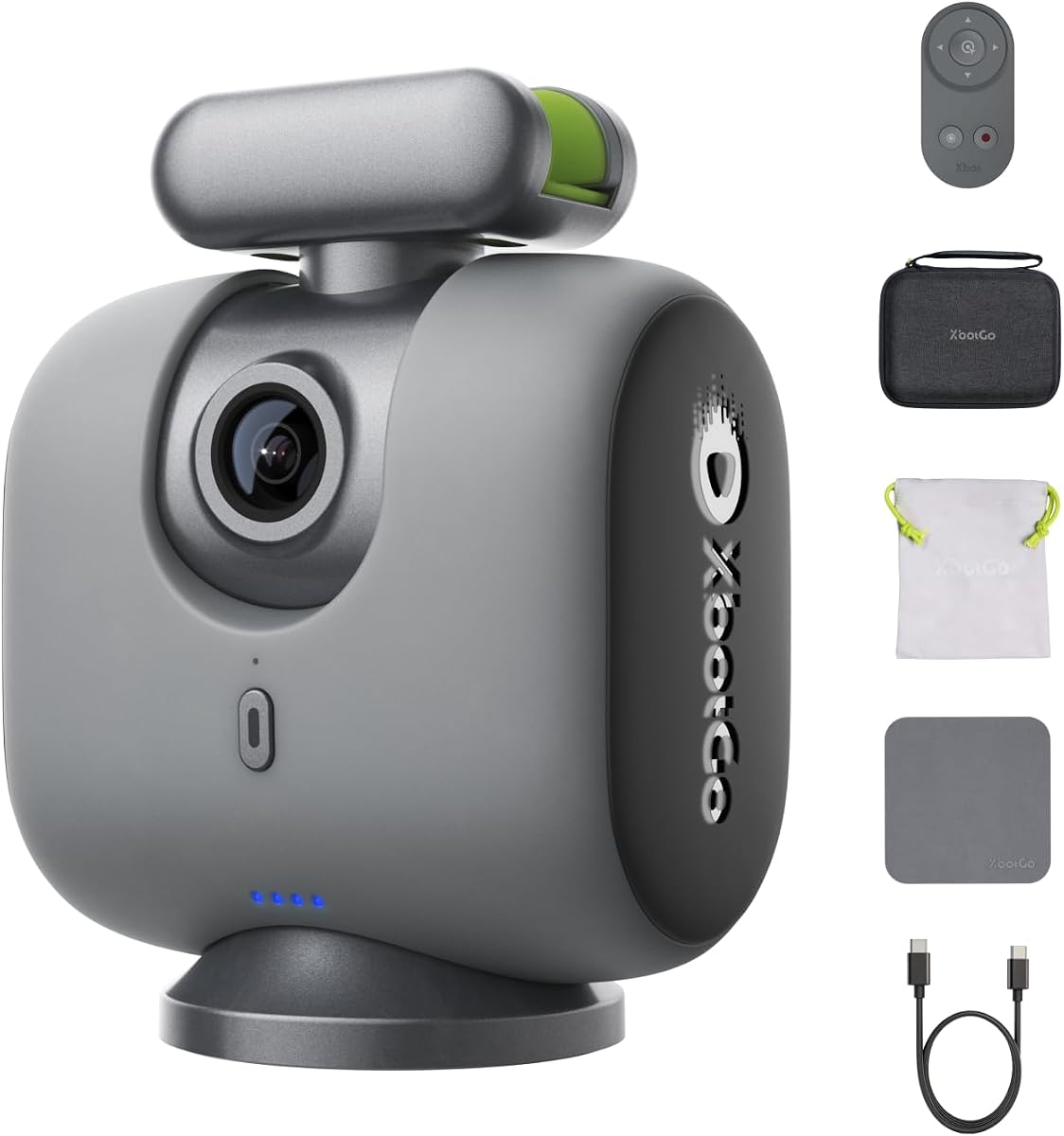
The XbotGo Chameleon in Lava Graphite is a broad sports-filming system designed to follow games while the operator coaches, cheers, or plays. Its 3.8 listing rating is among the lower scores in this roundup, yet the supplied feature set is unusually extensive. It offers 4K 60FPS recording, 360-degree panoramic tracking, a 120-degree ultra-wide AI lens, AI-assisted editing, and live streaming without a subscription requirement.
We may earn a commission when you buy through this link, at no additional cost to you.
According to the listing, the xbotVision AI 2.0 algorithm can track more than 20 sports, including team sports, gymnastics, and martial arts. That breadth is appealing for an athlete who also films soccer, basketball, or individual training. The 4K 60FPS mode should also serve fast rallies well by preserving motion detail, while panoramic tracking gives the operator more freedom to reposition or choose a more dramatic camera angle without losing the complete context of play.
The main uncertainty is whether the advertised multi-sport behavior includes pickleball. Its listed examples are not exhaustive, but direct confirmation remains important because recognition patterns for a small ball, a divided court, and four-player doubles can differ from larger field sports. The 3.8 rating is another reason to read recent owner feedback carefully. Bluetooth remote control, Apple Watch integration, and the option to pair with the XbotGo T4 tripod improve usability, but a tripod is not explicitly included in the supplied package information.
Choose this Chameleon when you film more than one sport and value 4K 60FPS, broad AI recognition, and live sharing. It is less compelling for a buyer who wants a turnkey pickleball camera and a well-documented supported-sport list. Before setup, verify pickleball behavior in the current app, choose a high and unobstructed mounting position, and test a full game before relying on it for important highlights.
Support for more than 20 sports makes Chameleon more versatile than a single-purpose court camera. It can follow action during practices and games without requiring a different tracking system for each activity, although pickleball should be confirmed directly.
Recording at 4K 60FPS provides a useful foundation for fast movement, while AI-assisted editing and montage creation can shorten the postgame workflow. Bluetooth remote and Apple Watch support offer more practical controls than repeatedly reaching for a phone.
We may earn a commission when you buy through this link, at no additional cost to you.
The green XbotGo Falcon offers the same advanced all-in-one approach as the grey version while giving buyers a different color choice. Its 3.9 listing rating places it near the middle of the overall field, but the underlying specification is aimed at serious recreational filming. It combines 4K video, a dual-lens architecture, AI-based action recognition, Wi-Fi live streaming, and flexible storage in a single unit.
We may earn a commission when you buy through this link, at no additional cost to you.
For pickleball, the most useful element is the camera’s ability to recognize players and keep the main action centered without manual operation. A parent can remain focused on a child’s match, while a coach can move between instruction and analysis. The dedicated recording lens is intended to preserve the 4K image, and the AI-assisted lens handles smarter tracking. Flexible 1/4-inch mounting makes it possible to position Falcon above a sideline or on a standard tripod.
As with other AI sports cameras in this list, pickleball behavior should be verified. The supplied description names soccer, basketball, football, and team sports rather than naming pickleball directly. Users should also consider storage management, network conditions for live streaming, and how much setup time they want to devote to AI behavior. The 3.9 rating is not strong enough to dismiss the camera, but it is a reminder to examine recent customer comments for firmware stability, tracking consistency, and app experience.
This version makes the most sense for a buyer who specifically likes the green finish or finds this listing preferable to the grey Falcon. It is a strong option for hands-free 4K capture, coaching clips, and family highlights, provided current app and sports support meet your expectations. Treat the mounting position and tracking calibration as essential parts of the purchase, not an afterthought.
Separating the recording and AI-assisted lenses gives the Falcon a clearer technical foundation than a conventional single-lens action camera. That arrangement is intended to preserve 4K detail while the tracking system follows the main action.
Automatic centering reduces the need for a dedicated camera operator during lessons, matches, and family events. The recorded result can support game review, player development, and family sharing through local storage or cloud access.
We may earn a commission when you buy through this link, at no additional cost to you.
The grey XbotGo Chameleon is the strongest balanced recommendation in this guide, carrying a perfect 5.0 listing rating. It is designed for hands-free AI sports tracking, smooth 4K 60FPS recording, and automatic following of a player’s movements. The supplied information positions it for parents, coaches, and athletes who want to capture a game without operating a phone throughout the match.
We may earn a commission when you buy through this link, at no additional cost to you.
The product’s appeal lies in its combination of accessible setup and serious recording specifications. A 60FPS image has clear advantages for quick lateral movements, overhead shots, and rapid changes of direction. At the same time, AI tracking is supposed to keep the moving subject framed as play shifts across the court. Compatibility with supported iPhone and Android devices broadens its potential audience, while the included official carry case adds useful protection and makes transport to practices or tournaments easier.
The main issue is specificity. The supplied data does not explicitly list pickleball among supported activities, so a buyer should confirm it in the current app or with the manufacturer. “Compatible with supported” phones also means the camera still relies on an appropriate mobile device for part of the experience. The perfect listing rating is encouraging, but it is a snapshot rather than a substitute for checking recent reviews, app requirements, and actual tracking behavior on a representative court.
This is the pick for a buyer who wants a balance of strong user satisfaction, hands-free operation, smooth recording, and convenient storage. Set it up on a stable tripod or compatible mount, establish the players’ normal positions, and test both singles and doubles framing. If the current software recognizes pickleball and performs consistently, this is likely the most complete package in the guide for families and coaches.
The 4K 60FPS mode is well suited to pickleball because it can preserve detail during rapid strokes, overhead reactions, and lateral transitions. That frame rate is also more forgiving when reviewing action or editing short highlights.
Automatic following reduces the need to touch the device during play. The included carry case makes the system easier to transport, while intuitive controls and mobile compatibility simplify the first recording session.
We may earn a commission when you buy through this link, at no additional cost to you.
The EMEET PIXY is a wireless 4K camera with AI tracking, gesture controls, HDR support, and a dual-lens design. Its 4.5 rating makes it one of the strongest general-purpose options here, and its flexible connectivity may appeal to pickleball players who want more than a fixed courtside viewpoint. One lens records video while a dedicated AI lens improves subject recognition in fast-moving scenes.
We may earn a commission when you buy through this link, at no additional cost to you.
The camera’s hands-free gesture system is especially useful during a match. A player or parent can start or stop tracking without searching for a remote, allowing the camera to follow a movement and keep the subject in frame. PIXY also connects wirelessly to a phone or computer, and the EMEET STUDIO interface can control multiple cameras, switch angles, monitor feeds, and stream to major platforms and RTMP destinations. Its broad software compatibility extends beyond phones to Windows and macOS.
The 97-degree field of view is broad enough for movement but narrower than the 180-degree sports system listed later. That narrower view may produce a more natural-looking image with less distortion, yet it could also require more careful placement or cropping. PIXY is not presented as a dedicated pickleball system, so its tracking model may not be optimized for a small ball and doubles formation. The built-in 48kHz microphone and 3.5mm input are useful for practice commentary, although they are not substitutes for a carefully positioned external microphone in noisy conditions.
Choose PIXY when wireless placement, live streaming, or a multi-camera setup matters more than sports-specific guarantees. It is particularly useful for coaching content, remote viewing, and social sessions where the camera must be moved between locations. For formal tournament recording, confirm pickleball tracking behavior in a trial and position the camera before the action begins rather than assuming general AI tracking will handle every court configuration.
Starting or stopping tracking with a hand gesture keeps the operator from approaching the camera during a point. Wireless phone or computer connectivity removes cable clutter and makes repositioning much easier between sessions.
PIXY supports a unified multi-camera workflow for monitoring, switching angles, and streaming. That makes it valuable for a coaching setup where one view follows the athlete and another captures the full court.
We may earn a commission when you buy through this link, at no additional cost to you.
The lemon green XbotGo Chameleon is a team-sports-oriented tracking camera whose FollowMe mode is designed to spotlight an individual athlete. Its 3.7 rating is the lowest among the products with numerical feedback, so it requires the most careful assessment. Nevertheless, the supplied feature set is well matched to parents who want one child’s pickleball moments rather than an evenly divided view of every player.
We may earn a commission when you buy through this link, at no additional cost to you.
FollowMe mode automatically focuses on a key player, which can produce a more personal recording during family games. The app’s live scoreboard, one-tap highlight creation, Bluetooth remote, and Apple Watch support reduce postgame work. The listing also states that streaming works with YouTube, Facebook, TikTok, and other RTMP-compatible platforms, while 20GB of cloud storage comes without additional fees. Those are meaningful advantages for users who want a ready-made sharing workflow.
The 3.7 rating is the clearest caution in this review. It may reflect software, setup, or general usability issues that are not visible in the specification summary, so recent customer feedback should be reviewed before purchase. The stated record time of up to eight hours and 4K 60FPS capture are both strong claims, but actual duration can depend on settings, network use, temperature, and storage conditions. The 120-degree lens offers a wide view, which may include substantial background or neighboring courts.
This Chameleon version is most appropriate for parents and coaches who want athlete-specific tracking and quick highlights. Its 20GB cloud allowance and no-fee model are particularly attractive for regular family use. Confirm the current pickleball support, evaluate the app with your phone, and set the FollowMe target before recording. It is a specialized option rather than the most broadly proven choice in the guide.
The camera can concentrate on a selected athlete instead of treating everyone on the court equally. That focus is useful for family memories, individual performance clips, and coach-created player reviews.
Live streaming, a scoreboard, one-tap highlights, and 20GB of included cloud storage shorten the path from match to shareable clip. The stated no-subscription approach also avoids a recurring fee for the covered features.
We may earn a commission when you buy through this link, at no additional cost to you.
The green XbotGo Chameleon is a dedicated AI sports camera built around automatic tracking and hands-free recording. Unlike the other Chameleon listings in this guide, its supplied description is brief and provides no numerical customer rating. That makes it the least documented option here, so the product is best viewed as a color-focused alternative whose detailed capabilities should be confirmed on the live listing.
We may earn a commission when you buy through this link, at no additional cost to you.
The core proposition is straightforward: recognize the action and record it while the operator remains focused on coaching, cheering, or playing. That is a meaningful advantage over a fixed phone camera because pickleball rallies can move quickly, and manually correcting the framing can cause missed moments. The design’s emphasis on team sports also suggests that the system is intended to keep a broader sequence of play in view rather than merely function as a wearable camera.
The lack of a rating and abbreviated specification list are substantial limitations for this roundup. We cannot independently determine the resolution, frame rate, lens angle, supported sport list, battery duration, included accessories, or streaming behavior from the supplied data. Those omissions make direct comparison difficult and mean a buyer should not assume this listing includes every feature found in the more extensively described Chameleon variants.
Choose this version if you prefer the green finish and have confirmed that the current listing contains the specifications and accessories you need. Before buying, check the product page for 4K recording details, supported phone compatibility, storage, and current user feedback. It is potentially convenient for team-sports use, but the limited information makes it a less confident recommendation than the better-documented Chameleon models.
AI tracking is intended to keep the principal action in frame, reducing the need to touch the camera between points. That hands-free approach is the product’s clearest advantage for active parents and coaches.
Because this listing provides limited detail, buyers should compare the current package carefully with the more fully specified Chameleon versions. Resolution, battery life, accessories, and app requirements may differ.
We may earn a commission when you buy through this link, at no additional cost to you.
The AI Auto-Tracking Sports Filming System, also described as BallerCam, is a budget-oriented way to add digital tracking to a phone already in hand. Its 4.4 rating is strong, and the system recognizes the court or field, follows the ball and key action, and keeps play centered without physically panning. It is especially appealing to families and recreational leagues that want a wide game view without operating a separate camera.
We may earn a commission when you buy through this link, at no additional cost to you.
Its 180-degree ultra-wide lens captures the complete court or field, providing spatial context that many conventional phone cameras cannot match. Because the camera remains stationary and tracking happens digitally, there is no mechanical pan to miss a rapid transition. The system supports basketball, soccer, futsal, flag football, and volleyball according to the supplied details. For pickleball, the ball-following concept is promising, although pickleball is not explicitly named and should be tested.
The principal constraint is dependence on an iPhone, with the title specifically noting compatibility with iPhone 14 Pro Max. Digital cropping and reframing may also reduce the apparent detail of the final clip compared with a dedicated 4K camera. The listing mentions 20 hours of cloud storage and optional upgrades, so buyers should understand what is included in the package and which phone, app, or account requirements apply. A tripod and the user’s own iPhone are central parts of the system rather than optional extras.
This is the best budget pick for a buyer who already owns a compatible iPhone and wants a broad, automated view of court play. Mount the phone securely, keep the full playing area in the lens, and test whether the tracker recognizes a pickleball serve and repeated exchanges near the net. It offers a practical introduction to automated sports filming without requiring a dedicated AI camera.
The 180-degree lens captures broad spatial context, while software cropping and tracking keep the ball and key action near the center. This design avoids the lag and missed swings associated with a physically rotating camera.
The app can generate a watch link for live viewing and create downloadable highlight clips from any moment. That makes it easy to send a live link to family or create a short recap without a full editing session.
We may earn a commission when you buy through this link, at no additional cost to you.
The DJI Osmo Nano is not a dedicated tracking camera, but it offers a lightweight, wearable way to capture pickleball from a player’s point of view. Its 4.4 rating reflects a broadly favorable reception, and the 1/1.3-inch sensor is designed to gather more light for crisp footage in low light or fast-action scenes. With 4K 60FPS recording and a 143-degree ultra-wide view, it can document movement, footwork, and court position from an unusually immersive perspective.
We may earn a commission when you buy through this link, at no additional cost to you.
The magnetic form factor is one of its most important benefits. A player can wear or mount the camera without carrying a larger smartphone, and the 128GB built-in storage allows recording to begin without an immediate memory-card setup. The camera supports 10-bit recording and D-Log M color performance, giving editors useful latitude for color work. A 200-minute stated battery life and fast charging make it practical for practices and matches, while the waterproofing adds confidence around outdoor play.
This product does not automatically follow a subject, so it should not be confused with an AI tracking camera. Its value comes from being attached to a player or a stable object, not from digital recognition of a rally. It may also be useful as a secondary view within a larger system rather than the main source for a full-court record. The listing notes that the DJI Mimo app was removed from Google Play because of platform compatibility issues and advises obtaining the latest version through the official DJI website.
Choose Osmo Nano for immersive player footage, training analysis, vlogs, and secondary angles. Its sensor, frame rate, field of view, built-in storage, and portability make it compelling for content creators who want the athlete’s experience rather than an automatically tracked external shot. Check the current app process before purchasing, and monitor the camera during extended high-resolution recording because the supplied information states that compact-camera heating is normal.
The 143-degree field of view captures a broad area around the player, which is useful for footwork drills, paddle positioning, and demonstrating movement. Wearable operation also keeps the camera close to the action without a tripod obstructing play.
A magnetic camera, 128GB of internal storage, and a stated 200-minute battery simplify spontaneous recording. Built-in 10-bit capture and D-Log M support also provide useful color flexibility for editing.
We may earn a commission when you buy through this link, at no additional cost to you.
The GoPro MAX2 delivers a different kind of motion coverage through spherical 8K 360 video. Rather than tracking a player automatically, it records everything around the camera and lets the user reframe the footage afterward in the GoPro Quik app. Its 4.4 rating is solid, and the ability to turn 360 recordings into traditional 4K views makes it a creative option for pickleball highlights, immersive practice videos, and unusual point-of-view sequences.
We may earn a commission when you buy through this link, at no additional cost to you.
The 360-degree design means a camera can be placed near the court without the operator needing to aim it at the correct player. The Quik app can then select a direction, create a conventional 4K composition, or experiment with multiple perspectives from the same recording. HyperSmooth stabilization and Horizon Lock can improve the appearance of motion, while the six microphones provide more audio options than a basic phone-based setup. Invisible pole mounting and 1/4-20 threads add creative flexibility for elevated or moving shots.
The weaknesses are substantial if your priority is automated editing. MAX2 does not identify and follow a subject, and a 360 file generally consumes more storage and demands more deliberate editing than standard fixed-frame footage. The supplied title does not specify recording duration, and high-resolution 360 capture can increase heat and battery demands. Replaceable glass lenses are useful for long-term ownership, but they also add another component to maintain and protect.
Choose MAX2 when creative flexibility matters more than one-click tracking. It can provide a striking wide-angle view of a rally, a player’s-eye perspective, or a dramatic court-level sequence that a conventional camera might miss. For routine game review or automatically produced player highlights, one of the dedicated AI sports cameras is more efficient. For occasional pickleball content with a creative angle, MAX2 offers a distinctive and durable recording system.
A 360 camera removes the need to predict where the action will develop. After the session, the Quik app can convert the spherical recording into a standard 4K view or reveal multiple perspectives from a single event.
Waterproof construction, replaceable optical-glass lenses, and a touch screen suit demanding outdoor use. The included Enduro battery, mounting buckle, adhesive mount, lens caps, and cleaning cloth cover the basic mounting and maintenance needs.
We may earn a commission when you buy through this link, at no additional cost to you.
The most useful camera is the one whose tracking method, field of view, mounting system, and output format fit the way you film. These factors determine whether a device can follow a fast rally, stay accessible during a match, and produce footage you will actually edit and share.
Automatic AI tracking and physical camera movement are not the same thing. AI systems digitally identify a player, ball, or key action and adjust the framing, while a wearable or 360 camera records from one position and may require manual reframing later. Dedicated sports cameras are best when your priority is a player-centered highlight, whereas 360 cameras are better when the appeal is an immersive scene or the freedom to choose a view after recording.
Prioritize a system explicitly designed to track the action you care about. Confirm whether it follows the ball, an individual athlete, or both, and check that pickleball is supported.
A wide angle can preserve the full geometry of a pickleball court, reduce the need to reposition the camera, and keep both doubles partners visible. Ultra-wide views may introduce edge distortion, while narrower lenses can look more natural but may lose players who move toward the sidelines. A 97-degree camera may work well with careful placement, while a 180-degree system offers maximum coverage, and a 143-degree wearable view captures much of the player’s surroundings.
Choose the widest view that still provides a clean, usable image. Test the actual court dimensions rather than relying on a generic field-of-view number.
4K recording preserves useful detail for close review, while 60FPS captures movement with greater temporal clarity than 30FPS. That matters for a paddle swing, a quick change of direction, or an overhead reaction near the net. Some systems also support 8K 360 recording, but that format serves a different purpose and generally demands more storage, processing, and editing.
For practical game review and highlights, 4K 60FPS is a strong target. Choose resolution based on the device you will actually edit with rather than selecting the largest available number automatically.
A long pickleball match can consume a great deal of camera power, especially when using 4K, live streaming, or wireless communication. Published battery claims can differ from real-world performance because they may assume lower resolution, reduced connectivity, or a particular recording mode. A stated 200-minute wearable runtime, an eight-hour streaming claim, and an eight-hour team-sports recording claim should therefore be treated as comparative indicators rather than guaranteed match durations.
Carry a charged spare battery or keep a power bank available when possible. For tournament days, verify whether the camera can record continuously while streaming or charging.
Live streaming turns a camera into a tool for families, teammates, and league spectators who cannot attend. Look for direct support for the platforms you use, or for RTMP-compatible output, and determine whether the app handles a watch link or requires account configuration. Automatic highlights, scoreboards, and cloud storage can save considerable editing time, but they may depend on the manufacturer’s software ecosystem and an active internet connection.
Prioritize a workflow you can operate between points. A simple start button, remote control, and reliable clip export are often more valuable than a long list of rarely used features.
Some tracking systems use a phone as the camera and therefore depend on a compatible model, current operating system, and app installation. Dedicated cameras may still require a mobile device for setup, monitoring, editing, or live sharing. App availability matters too: one product listing specifically notes that its app was removed from Google Play and recommends obtaining the current version from the manufacturer’s official website.
Verify compatibility before ordering and check whether advanced features require a particular phone, Wi-Fi configuration, or software version. This prevents a capable camera from becoming frustrating on the court.
Tracking cannot fully compensate for a poorly placed camera. A high sideline or baseline view often provides the best combination of player visibility, ball context, and minimal obstruction, but the optimal position depends on the venue and whether you want one player or the full doubles team. A standard 1/4-inch mount offers flexibility, while phone-based systems require a stable tripod and a clear view of the entire playing surface.
Mount the camera before the match and watch a full warm-up rally. Check for poles, fences, spectators, and adjacent courts that may enter the frame.
Local microSD support, built-in memory, and manufacturer cloud storage offer different conveniences. Local storage is useful for long sessions and direct editing, built-in memory makes a wearable camera easy to start, and cloud storage can simplify sharing. Audio also affects the usefulness of coaching clips: built-in microphones may capture court noise and distant voices, while a 3.5mm microphone input provides an upgrade path.
Choose enough storage for your longest session and export important files regularly. Use an external microphone when commentary quality matters more than wireless convenience.
Begin by choosing the right location rather than setting up the camera first. Place it on a stable tripod at a high sideline or baseline, keep the entire intended playing area in view, and check that fencing, poles, spectators, and adjacent courts do not obstruct the shot. Charge the camera, update its app, connect the storage or cloud account, and test the tracking target during a warm-up before recording an important match.
For a full game, use the highest practical tracking and recording settings, but confirm that the device remains stable and does not overheat during long sessions. Select the intended player when using FollowMe mode, or let the sports system identify the principal action. If the camera supports remote control, use it between points rather than interrupting play. For a phone-based system, leave the phone connected to power and verify that the app remains connected to the broadcast.
After the session, protect the equipment before reviewing footage. Remove dirt from lenses, keep ports dry, and use a protective case during transport. Download or back up important clips before clearing storage, and check that each exported highlight has the correct player, direction, and framing. For 360 footage, reframe it promptly while the action is fresh; for dedicated AI footage, review the key rallies and correct any tracking errors before sharing.
A dedicated AI sports camera or a phone-based ball-following system can provide the most automated experience. Mount it on a stable tripod with a full view of the court, then test its recognition during a warm-up. Tracking works best when the players remain within the camera’s established field of action and the court is not heavily obstructed.
Yes, particularly when you want to review quick strokes, lateral movement, and overhead reactions. The 60FPS option preserves more frames per second than a 30FPS recording, while 4K retains more spatial detail. You also need a display and editing workflow capable of handling the resulting file size, and actual results depend on the camera, lighting, storage, and motion stabilization.
Some systems can spotlight an individual athlete, while others follow the ball or the main cluster of players. FollowMe-style modes are designed for individual attention, whereas ball-following systems may prioritize wherever the active play occurs. In doubles, test both target modes because the desired subject can change quickly.
A 360-degree camera is better when you want immersive footage and the freedom to choose a viewpoint after recording. An AI tracking camera is usually more efficient for player-centered highlights because it frames the action automatically. A 360 camera still requires software-based reframing, while a tracker may occasionally make its own framing mistake.
A high sideline or baseline position generally provides the best balance of court context, player visibility, and ball tracking. Check the entire proposed frame from the player’s perspective and look for blocked sight lines. A second angle from the opposite end can be valuable when a single view does not show every exchange clearly.
They can, but the number of moving subjects and the width of the court may affect framing. Ball-following or general action tracking often works better for a complete rally, while individual-player modes may miss the other partner. Test a full doubles game and use the widest practical field of view when both players must remain visible.
Storage needs vary substantially with resolution, frame rate, codec, and whether the camera records 360 footage. A 4K 60FPS system can create considerably more data than a standard fixed-frame recording. Check the camera’s supported card format and maximum capacity, carry a spare card or high-capacity phone storage, and back up highlights promptly.
No, live streaming is most useful for relatives and teammates who cannot attend. A parent who mainly wants polished practice clips or player reviews may prioritize tracking, image quality, and reliable local storage instead. If streaming is important, verify platform support, app stability, network requirements, and whether cloud features require an ongoing subscription.
The best budget route is the AI Auto-Tracking Sports Filming System when a compatible iPhone is already available, while the grey XbotGo Chameleon offers the most balanced dedicated package with its 5.0 listing rating and 4K 60FPS tracking. The XbotGo Falcon is the premium selection for buyers who want dedicated 4K dual-lens hardware, strong AI processing, and autonomous sports tracking.
Prioritize the feature your filming situation actually requires. Ball-following is useful for complete rallies, individual-player focus is valuable for family highlights, and a wide field of view is essential on courts where athletes move far from the camera. A wearable or 360 camera can add an immersive angle, but it should complement rather than automatically replace a court-side tracking system.
Before placing an order, confirm the current app requirements, pickleball support, included accessories, storage options, and live-streaming workflow. Product availability, configuration, and pricing can change, so checking the latest listing will help ensure that the camera you select is the right one for your court, your players, and your editing habits.