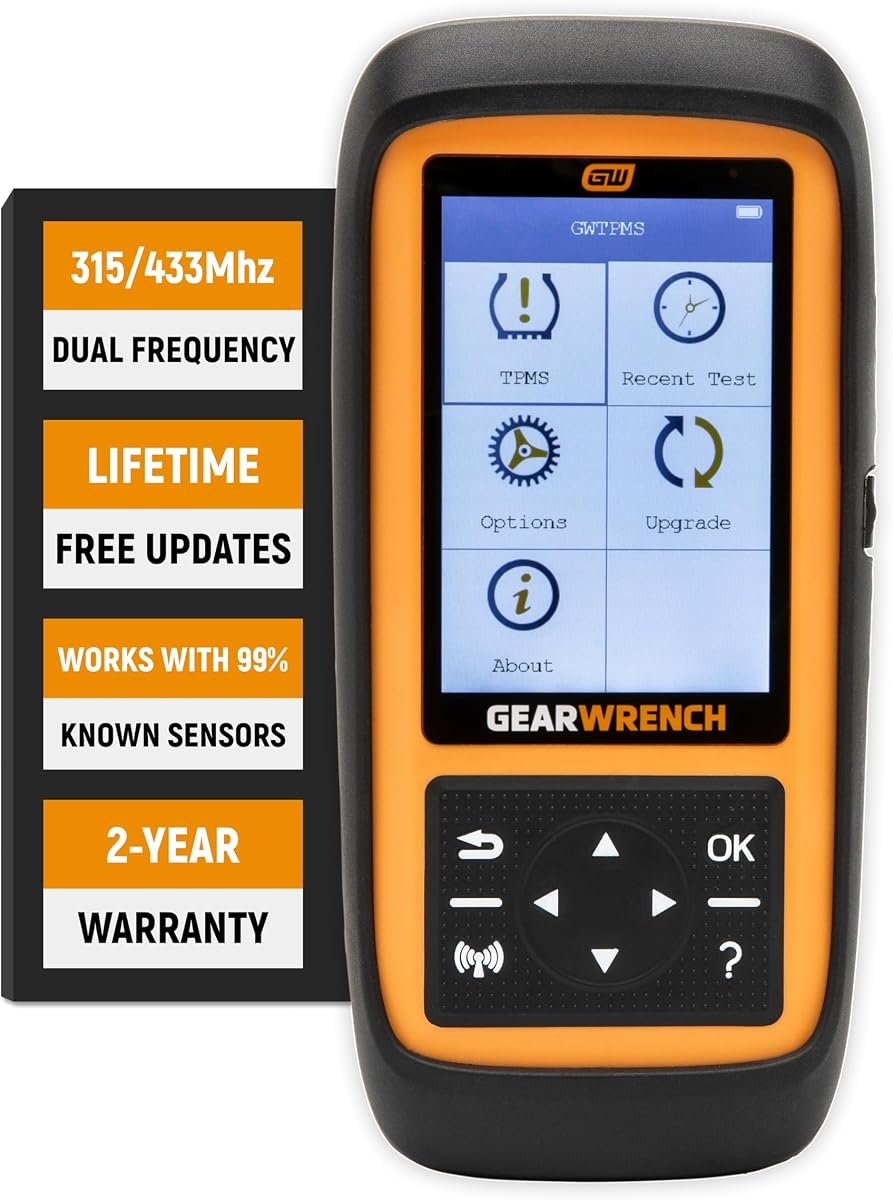
GEARWRENCH Universal TPMS Tool
4.0Editor score
Dual-frequency sensor support
Eight-sensor simultaneous programming
GEARWRENCH sensor programming
Explore our top Tpms Programming Scanner picks, comparing ten tools for sensor activation, programming, relearning, diagnostics, vehicle coverage, and ease of
A Tpms Programming Scanner helps technicians diagnose tire-pressure monitoring faults, activate sensors, relearn IDs after tire service, and reset warning lights. Because supported functions vary considerably by vehicle and sensor, choosing a capable tool requires comparing programming methods, relearn procedures, diagnostics, update support, and compatibility rather than looking at a broad feature list alone.
The ten products in this guide range from focused TPMS units to multifunction OBD2 scanners. We compared their stated sensor support, activation and relearn methods, programming restrictions, diagnostic capabilities, display or connectivity features, and update policies. This roundup also highlights important limitations, especially where a tool can activate or relearn sensors but cannot program them.
Each review highlights the strongest use case, practical advantages, and trade-offs of its featured scanner. The top three recommendations span budget-conscious, well-rounded, and premium options, while the remaining reviews cover alternatives for mobile technicians, tire shops, and owners seeking more focused TPMS service. Product availability and pricing can change, so confirm current details before purchasing.
4.0Editor score

4.4Editor score

4.7Editor score
The comparison below covers all ten scanners, emphasizing their stated TPMS functions, programmable sensor families, diagnostic breadth, connectivity, and important restrictions. Because vehicle coverage and supported procedures can vary by model and year, buyers should still verify VIN-specific compatibility before buying.


The XTOOL TP150 earns a place as a focused and approachable TPMS service tool, with a 4.4 customer rating and a feature set aimed squarely at technicians who do not need a general-purpose OBD2 tablet. Its strengths include diagnostics, activation, relearning, reset, and programming in one relatively simple handheld unit. The physical button interface is especially useful in a busy tire bay or during roadside work because it remains easy to operate when the user is wearing gloves.
We may earn a commission when you buy through this link, at no additional cost to you.
This listing supports both 315MHz and 433MHz sensors and provides four stated programming approaches: automatic ID generation, manual ID entry, copying an ID through activation, and copying an ID through OBD. It also offers automatic, OBD, stationary, and copy-sensor relearn methods, giving technicians several paths depending on the vehicle and installed sensors. Real-time information can include the sensor ID, pressure, temperature, battery status, and operating frequency, while the diagnostic side can read and clear TPMS-related trouble codes and reset the warning light.
The crucial limitation is that programming is restricted to pre-programmed sensors and XTOOL TS100 sensors. The listing explicitly says the XTOOL TS100 package is not included, so a user who expects to program a new sensor from scratch may still need a compatible sensor. It also cannot program other manufacturers' sensors. In addition, a damaged sensor can prevent a successful reset, and some vehicles may require a driving period or a particular stationary relearn sequence after service.
Despite those restrictions, the TP150 is a sensible pick for a DIY owner or independent tire technician who mainly needs reliable activation, relearning, diagnostics, and warning-light reset functions. It provides more TPMS depth than a basic code reader without carrying the complexity of a full diagnostic tablet. Buyers should check the vehicle and sensor compatibility list first, and anyone needing to create sensor IDs for non-XTOOL hardware should choose a more specialized or premium scanner instead.
The TP150 concentrates on sensor activation, diagnostics, relearning, and reset rather than spreading its interface across unrelated vehicle systems. That focus makes it a practical fit for routine tire rotations, seasonal tire changes, and replacement-sensor service.
Its tactile interface is a meaningful advantage over touchscreen-only tools in greasy workshops and outdoor service environments. A user can move through vehicle selection and service steps without relying entirely on small on-screen targets.
We may earn a commission when you buy through this link, at no additional cost to you.
The XTOOL TP300 is the most complete general recommendation in this guide because it combines a capable TPMS workflow with Engine, ABS, SRS, and Transmission diagnostics. Its 4.4 customer rating reflects a solid overall package, and the 5.45-inch touchscreen, wireless vehicle connection, and four-core processor make it well suited to modern shop workflows. It is more ambitious than the TP150 because it is designed not only for tire service but also for broader vehicle inspection.
We may earn a commission when you buy through this link, at no additional cost to you.
TPMS users get activation, programming, and relearn support for OEM and compatible universal sensors. Four programming methods—automatic ID generation, manual entry, copy by activation, and copy by OBD—cover common replacement scenarios. The four relearn methods likewise include automatic, OBD, stationary, and copy-sensor approaches. Beyond TPMS, the tool offers 10 OBD2 functions, live-data graphing, fault-code handling, and eight stated service functions, including electronic parking brake reset and throttle body relearn.
The trade-offs come from both sensor restrictions and device complexity. Programming is limited to XTOOL TS100 or pre-programmed sensors, which means it is not a universal sensor-creation platform. The touchscreen workflow and extensive menu system may also feel more elaborate than a physical-button TPMS tool. Although connectivity is described as reaching up to 33 feet, real-world range can be affected by the vehicle, surroundings, and communication protocol, so it should not be treated as a guaranteed operating distance.
This scanner is best for a technician who wants one device for TPMS work and preliminary system diagnostics. It is especially attractive for repair shops that would otherwise carry separate TPMS and general diagnostic equipment. Confirm VIN compatibility and the availability of the required programmable sensors before ordering, but for a broad mobile or shop toolkit, the TP300 offers the strongest balance in this roundup.
The major advantage over dedicated TPMS units is the ability to diagnose Engine, ABS, SRS, and Transmission systems without changing devices. That makes the TP300 useful for preliminary road-test diagnosis and broader workshop work.
The detachable wireless connection lets the display move around the vehicle while remaining linked to the diagnostic interface. This is useful when access to the OBD port is awkward or when a technician needs to view live data near a wheel.
We may earn a commission when you buy through this link, at no additional cost to you.
The Autel TS508WF is a compelling dedicated TPMS scanner with a 4.7 customer rating, the highest rating among the focused tools in this roundup. It combines TPMS programming, activation, relearning, diagnostics, and reset functions with a non-tablet design. Its defining practical advantages are direct Wi-Fi updates, two service modes, four ways to program Autel MX sensors, and support for stationary, automatic, and OBD relearning.
We may earn a commission when you buy through this link, at no additional cost to you.
Quick Mode is intended for basic sensor checks and retrieval of data such as sensor ID, battery condition, position, frequency, pressure, and temperature. Advanced Mode expands the workflow to diagnostics and position relearning, which gives technicians a clear way to match the interface to the job. The programming choices include copy by OBD, automatic creation of one through 16 sensors, copy through activation, and manual input. These capabilities are particularly useful after a sensor failure or when matching a new MX sensor to an existing system.
Autel MX sensors are the only programmable family, and that limitation is decisive for some buyers. The tool can activate and relearn a wide range of compatible OEM and aftermarket sensors, but it cannot create IDs for an arbitrary sensor brand. It must also be registered before use, and the listing advises checking vehicle compatibility with a VIN because functions differ among makes, models, and years. The stated ability to solve nearly all TPMS issues should therefore be read as a general capability claim, not a guarantee for every fault.
This is an excellent choice for a tire shop that already uses Autel MX sensors or wants an approachable dedicated unit with wireless updates. It offers a stronger customer rating and smoother service organization than many budget alternatives. For users who need broader all-system diagnostics, a multifunction scanner would be more appropriate, but buyers focused on TPMS programming, activation, and relearn workflows will find this model especially practical.
Quick and Advanced modes help users avoid unnecessary steps. Routine sensor checks can begin in the streamlined workflow, while diagnostics and position relearning remain available when a tire service becomes more involved.
Direct Wi-Fi updating removes the recurring need to connect the scanner to a Windows computer for routine software maintenance. Lifetime update support also helps keep the unit aligned with newer vehicle coverage as software is released.
We may earn a commission when you buy through this link, at no additional cost to you.
The Autel MaxiTPMS TS508WF offering shares the core architecture of the TS508WF family but is presented as a dedicated TPMS relearn, activation, programming, and diagnostic tool. Its 4.5 customer rating suggests a generally positive reception, while the feature set is designed for technicians who want clear TPMS workflows without carrying a full OBD2 diagnostic tablet.
We may earn a commission when you buy through this link, at no additional cost to you.
The scanner supports activation and relearning of compatible OE and aftermarket sensors, retrieving information such as ID, pressure, temperature, battery condition, and position. Its three stated relearn procedures are stationary, automatic, and OBD. For Autel MX sensors, programming choices include copy by OBD, copy through activation, copy by input, and automatic creation of one through 16 sensors. The Wi-Fi update path and lifetime update policy make this listing more convenient to maintain than older PC-dependent versions.
Its most important limitation is identical to that of the other TS508WF products: only Autel MX sensors can be programmed. The scanner may work with many other sensor brands for activation and relearning, but it cannot write their IDs. Support also depends on the vehicle's year, make, model, and specific TPMS arrangement. The listing provides broad examples of coverage, including US vehicles from 1996, European vehicles from 2006, and Asian vehicles from 2009, but these date ranges do not guarantee every listed procedure on every model.
Choose this model when your shop standardizes on Autel MX sensors and values report review, printing, and a focused menu. It is particularly appealing for a technician who performs frequent rotations, seasonal tire service, and sensor replacement. If non-Autel sensor creation is essential, a tool that explicitly supports a wider programmable sensor family would be a better fit.
The four programming paths make the scanner useful for common replacement scenarios, from copying a known ID to generating IDs for a group of new sensors. The supported workflow is especially helpful for technicians who keep Autel MX sensors in stock.
Data review and printing let a technician preserve a record of sensor readings and diagnostic activity. That can support clearer customer communication and provide a useful reference when investigating an intermittent warning light.
We may earn a commission when you buy through this link, at no additional cost to you.
This XTOOL TP150 2026 listing is another compact, TPMS-focused alternative with a 4.2 customer rating. It combines diagnostics, activation, relearning, reset, and XTOOL sensor programming in a portable physical-button device. The presentation is particularly detailed about supported American, Asian, and European examples, making it useful for buyers who want more transparency before purchasing.
We may earn a commission when you buy through this link, at no additional cost to you.
The scanner lists automatic, OBD, stationary, manual, and copy relearn methods, depending on the vehicle, and provides four programming methods for XTOOL TS100 or TS100 Pro sensors. It can activate compatible pre-programmed 315MHz and 433MHz sensors and display ID, pressure, temperature, battery status, and frequency. Its service menu also covers OE part-number checks, TPMS health diagnostics, and reading or clearing TPMS-related trouble codes.
The main constraints are predictable. It does not program unprogrammed sensors from other brands, and the listing notes that some update problems require installing TP200 software on a Windows computer. It also works only with 12-volt OBD2 vehicles. Detailed model examples do not guarantee that every procedure is available for every listed vehicle, so checking the specific make, model, year, and sensor number remains important.
This option is attractive for owners of multiple American, Asian, or European vehicles who value straightforward controls and 13-language availability. It also gives technicians a defined way to replace failed XTOOL sensors without using a dealership. It is less attractive than a multifunction OBD2 scanner for broad vehicle diagnosis, but for dedicated TPMS work with XTOOL hardware, the feature set is practical and well explained.
The listing provides extensive model examples across Ford, Toyota, GM, and many other marques. While users should still verify exact procedures, that level of detail makes it easier to begin a compatibility check before ordering.
Large physical controls keep routine operation straightforward in a garage or during mobile tire work. The design avoids requiring a user to navigate every task through a small touchscreen.
We may earn a commission when you buy through this link, at no additional cost to you.
The Autel MaxiTPMS ITS600 (E) is a premium-focused TPMS platform with a 4.6 customer rating and a substantial 5.5-inch Android-based interface. It goes beyond basic activation and reset by supporting TPMS building, retrofit, and toolkit functions. It also provides four included maintenance services and can be expanded to all-system diagnostics and more than 28 additional services through an in-app Pro Upgrade.
We may earn a commission when you buy through this link, at no additional cost to you.
For TPMS work, the ITS600 supports stationary, automatic, and OBD relearning along with four Autel MX sensor programming methods: copy by OBD, copy by activation, copy by input, and automatic creation of one through 20 sensors. It can build TPMS modules into the ECU and connect sensor information for dashboard display. The stated coverage is broad, and the product description identifies especially strong OE-level functions for selected Benz, BMW, Nissan, Hyundai, and Ford applications.
The upgrade model is the main decision point. Basic TPMS functions and four named services—oil reset, electronic parking brake service, battery registration, and steering-angle reset—are stated to be free for the device's life, while all-system code access and the wider service library require an in-app purchase. Programming is still limited to Autel MX sensors, so buyers needing creation across several sensor brands should not mistake its extensive diagnostic capabilities for unrestricted sensor programming.
The ITS600 is a compelling premium choice for a professional who wants a dedicated TPMS platform with room to grow. Its optional compatibility with Autel TBE200 (E) expands the proposition into tire health analysis, including DOT information, expiration notices, recall lookup, tread-depth measurement, and brake-disc wear. It is best for a shop willing to add advanced features over time, while a buyer seeking a simpler, already comprehensive scanner may prefer the MX808S-TS.
The ITS600 can begin as a dedicated TPMS device and later gain all-system diagnostics and additional maintenance functions through Pro Upgrade. That flexibility lets a technician add capability without replacing the entire hardware platform.
Compatibility with the Autel TBE200 (E) connects TPMS information with tire identification, tread-depth, and brake-disc wear data. This is valuable for shops that want a more complete tire-condition report rather than a sensor-only readout.
We may earn a commission when you buy through this link, at no additional cost to you.
The GEARWRENCH GWTPMS offers a deliberately focused approach to TPMS service, with a 4.0 customer rating and a concise feature set. It can clear warning lights, work with both common 315MHz and 433MHz sensor frequencies, program GEARWRENCH-branded sensors, and read or clear TPMS codes. The lack of extensive specifications makes it harder to assess in detail than many competing listings, but the supported fundamentals are easy to understand.
We may earn a commission when you buy through this link, at no additional cost to you.
A notable productivity feature is the ability to program up to eight sensors at once. That can reduce repetitive work when replacing a complete set or servicing several newly installed sensors. The scanner also reports sensor ID, position, pressure, temperature, and battery status, which provides enough information for basic diagnosis and verification after a tire rotation or sensor replacement.
The key limitation is brand-specific programming. Although the tool works with sensors across both major frequencies for activation and related service, it programs GEARWRENCH-branded sensors rather than every universal sensor family. The listing also does not describe the same breadth of relearn methods, general vehicle diagnostics, screen specifications, or update policy found in the more detailed products. Buyers who need deeper menu visibility may find the compact information set less persuasive.
This scanner makes the most sense for a user who values a straightforward universal TPMS workflow, particularly one already using GEARWRENCH sensors. It may also appeal to a technician who wants simultaneous multi-sensor programming without carrying a full diagnostic tablet. Confirm that the vehicle's relearn procedure is supported and that the required replacement sensors are available in the correct family before considering it for a mixed sensor inventory.
Programming as many as eight sensors simultaneously can streamline full-set replacement work. This is especially useful when a technician is preparing multiple new sensors for installation on a vehicle.
The scanner covers the information needed for a basic post-service check: ID, position, pressure, temperature, and battery status. This keeps the tool focused on practical TPMS confirmation rather than unrelated vehicle functions.
We may earn a commission when you buy through this link, at no additional cost to you.
The Autel MaxiCheck MX808S-TS is a premium multifunction scanner with a 4.7 customer rating and one of the broadest diagnostic feature sets in the roundup. Its TPMS functions are substantial, but the defining strength is bidirectional control: the listing states that it supports more than 3,000 active tests, including cylinder, fuel pump, injector, ABS pump, air-conditioning clutch, and door tests.
We may earn a commission when you buy through this link, at no additional cost to you.
It also delivers OE-level all-system diagnostics, live data in text, graph, and analog formats, freeze-frame data, 32 or more maintenance services, and cloud report management. TPMS work includes sensor programming, OEM sensor relearning, warning-light reset, and related functions. The hardware specification includes an RK3566 quad-core processor, Android 11, 4GB of RAM, 64GB of storage, dual-band Wi-Fi, and a 5000mAh battery, making it suitable for mobile service as well as a fixed workshop.
This is not a dedicated TPMS appliance, so the interface and feature set may feel excessive for a driver who only wants to clear a warning light. The update language in this listing also differs from products offering lifetime free updates, stating one year of free software updates. Programming restrictions should be checked carefully because full diagnostic capability does not imply that every sensor brand can be programmed. Service availability remains vehicle-specific.
This is the premium recommendation for a professional who wants TPMS service and comprehensive diagnostics in one unit. It is well suited to repair shops that perform active tests, work across multiple vehicle systems, and share reports with customers. Choose the MX808S-TS when those broader capabilities justify the added size and complexity; opt for a dedicated TS508WF or TP150-style unit when TPMS simplicity is the priority.
Bidirectional commands allow a technician to command components and observe their response instead of relying only on stored fault codes. This can shorten fault isolation when a warning light points toward a broader electrical or control-system problem.
Diagnostic reports can be uploaded and shared through a QR code, email, or text message. That creates a more accessible customer handoff while also helping keep working storage available on the scanner.
We may earn a commission when you buy through this link, at no additional cost to you.
The THINKCAR VENU90 combines a 4.6 customer rating with a compact six-in-one design that mixes TPMS functions and general OBD2 diagnostics. It is positioned as an approachable option for DIY users who want to check sensor information before a trip or perform routine maintenance in a home garage. The tool supports 315MHz and 433MHz sensors and includes activation, relearn, and programming functions within the same housing.
We may earn a commission when you buy through this link, at no additional cost to you.
Its programming capability is restricted to pre-programmed sensors or THINKCAR and MUCAR sensors. That is a meaningful limitation for a user who wants a broad universal programming platform, although the tool can still serve vehicles using compatible pre-programmed sensors. The listing describes relearn procedures for compatible vehicles but does not provide the same level of detail about specific stationary, automatic, or OBD methods as the more extensively documented Autel and XTOOL products.
As an OBD2 scanner, the VENU90 can display live data, read and clear diagnostic codes, and access vehicle information. Its 2.4GHz Wi-Fi update support helps keep software current without a more involved update process. The combined format is convenient, but buyers should not assume that the general OBD2 functions provide the deep bidirectional testing, all-system coverage, or large service libraries found in premium multifunction scanners.
The VENU90 is a sensible choice for a user who wants a portable all-in-one device for TPMS checks and basic code reading, particularly if compatible THINKCAR or MUCAR sensors are already in the plan. Its compact form also suits a vehicle-emergency kit. Confirm the exact relearn procedures and vehicle coverage before buying, and consider a more fully documented specialist scanner if detailed TPMS workflows are the main priority.
Combining TPMS service and basic OBD2 functions in a compact device reduces the number of tools needed for routine checks. It is a practical format for a garage shelf, mobile kit, or vehicle emergency collection.
Compatibility with both 315MHz and 433MHz sensors broadens the range of vehicles the tool can address. The remaining limitation is that programming applies only to specific supported sensor families rather than all universal sensors.
We may earn a commission when you buy through this link, at no additional cost to you.
The Autel MaxiTPMS TS508WF Upgrade listing presents a streamlined TS508-style tool with a 4.4 customer rating. It builds on the familiar Autel TPMS platform by offering Quick Mode for basic sensor checks and Advanced Mode for a broader workflow involving diagnosis and sensor-position relearning. It also adds an OBD2 code reader, making it more versatile than a strictly TPMS-only model.
We may earn a commission when you buy through this link, at no additional cost to you.
The tool can activate and relearn compatible OE and aftermarket sensors, retrieve ID, pressure, temperature, battery, position, and frequency data, and reset the TPMS warning light. Its three relearn approaches are stationary, automatic, and OBD. The product listing highlights two programming routes—automatic creation of one through 16 sensors and copy by OBD—although it also mentions four programming options in its description, so buyers should review the exact software interface and current feature set before purchase.
Autel MX sensors remain the only programmable family. That restriction is significant for technicians replacing sensors from several manufacturers. The lifetime free update statement is another positive, but vehicle-specific functions still require verification using the VIN, make, model, and year. A failed or defective sensor can also remain a problem after the TPMS light is cleared, because the scanner identifies and resets the system rather than repairing the physical component.
This listing is a good choice for a user who prefers Autel's dedicated TPMS interface and wants a quick path for routine checks without navigating a large multifunction diagnostic platform. It also makes sense for owners of Autel MX sensors who need programming and multiple relearn options. For broader active testing, all-system diagnostics, or programming across more sensor brands, a premium multifunction model will serve better.
Quick Mode prioritizes the sensor information most often needed after a tire service. Advanced Mode adds diagnostic and position-relearn procedures for jobs that require a more complete sequence.
Lifetime free software updates help the scanner continue covering newer vehicles and evolving TPMS procedures. Buyers should still install the latest release and check compatibility for each vehicle they service.
We may earn a commission when you buy through this link, at no additional cost to you.
The right TPMS scanner depends on the sensors you service, the vehicles your customers own, and whether you need one focused tool or a broader diagnostic platform. Use the following factors to narrow the field before comparing menus, displays, and update policies.
Programming is more restrictive than activation or relearning. Several scanners in this roundup can work with a wide range of OEM and aftermarket sensors yet can create IDs only for their own programmable families, such as Autel MX, XTOOL TS100, or GEARWRENCH sensors. If your work regularly involves mixed sensor brands, make sensor creation—not simply activation—the central requirement and verify every brand you intend to program.
TPMS relearn procedures are not standardized. One vehicle may use an automatic sequence, another may require stationary mode, and some can write IDs through OBD. Look for all relevant methods, but also confirm that the particular procedure exists for the make, model, year, and TPMS layout. VIN-based compatibility checks are more reliable than a general statement that a scanner covers a particular brand.
A dedicated TPMS scanner is convenient for tire work, while a multifunction OBD2 tool can also read codes, analyze live data, and test components in other systems. Professional repair shops may prefer one combined device to reduce equipment duplication. A DIY owner focused on rotations, seasonal tires, and sensor replacement can usually get better utility from a simpler dedicated unit.
A large, responsive screen helps when a technician must read sensor IDs, navigate menus, or follow multi-step relearn instructions. Physical buttons are also valuable in dirty workshops and for users wearing gloves. Touchscreens provide a more modern interface and can display reports more clearly, but menu complexity may make dedicated buttons quicker for repetitive TPMS tasks.
Wireless diagnostic communication gives a technician more freedom to move around the vehicle, while wireless software updates reduce dependence on a nearby computer. Both are convenient, although range and stability can vary with the vehicle and surroundings. A wired or PC-based update process is less mobile but may still be suitable for a fixed shop with a dedicated workstation.
TPMS systems and service procedures change, making software maintenance essential. Some products offer lifetime updates, while others provide a defined update period. Check whether updates happen over Wi-Fi or require a computer, and consider how often your shop encounters newer models. A tool that initially supports a vehicle is more valuable if its software can continue tracking that vehicle's changing service needs.
Data review, printable reports, and cloud sharing can make customer handoffs clearer and create a record of sensor readings or diagnostic results. These features matter most for professional shops handling multiple customer vehicles. A dedicated owner doing occasional tire service may value them less, but they add useful documentation without being the primary reason to choose a scanner.
Mobile technicians should consider battery capacity, screen size, device weight, and cable management together. A large scanner may be easier to read but less convenient to carry between vehicles. A compact tool can fit easily in a kit, yet a larger display and stronger battery may be more practical for all-day professional use. Choose based on the balance between readability and mobility.
Begin by identifying the vehicle, installed sensor type, OE part number, and the service required. Install the latest available software, register the scanner if required, and confirm that the selected vehicle procedure is supported. Before touching a sensor, inspect the tire for damage, verify the valve and seating, and make sure the replacement sensor is properly configured for the correct frequency and position.
For a warning-light reset, activate each sensor first and confirm that the tool can read its ID and live readings. Follow the vehicle-specific automatic, stationary, or OBD relearn sequence exactly, paying attention to on-screen instructions. After the relearn, confirm that all four sensor positions display correct pressure and temperature values. Clear relevant codes only after the underlying fault or service condition has been addressed, and road-test the vehicle when the manufacturer requires it.
Treat the scanner as diagnostic equipment rather than a substitute for safe tire service. Keep the connector and display away from moisture, impact, and excessive heat, and use a protective case during mobile work. Update the software regularly, retain diagnostic reports for reference, and never interrupt a programming sequence without following the manufacturer's guidance. A scanner can identify and configure a sensor, but it cannot repair a leaking tire, a damaged valve, or a physically defective sensor.
Activation wakes a compatible sensor and retrieves its data. Relearning teaches the vehicle control module to recognize the sensors and their positions after replacement or rotation. Programming creates or copies a sensor ID so a new compatible sensor can be recognized by the vehicle. These are different operations, and a scanner may support all three, only some of them, or programming for a restricted family of sensors.
No. Even scanners that describe broad US, European, and Asian coverage can have different supported functions by make, model, year, and TPMS configuration. Check compatibility with the VIN and the exact relearn procedure before purchasing. A tool may also support activation on a sensor brand while being unable to program that same brand.
A reset command does not repair a physical sensor, low battery, damaged valve, tire-pressure problem, or incompatible installation. The vehicle may also require a drive cycle, stationary relearn, or another specific initialization procedure. Use the scanner to read codes and verify sensor data, then correct the mechanical or electrical issue before trying to clear the warning light again.
A dedicated TPMS scanner is often enough for sensor activation, relearning, programming, and warning-light reset. A full OBD2 scanner becomes more useful when the TPMS warning involves broader vehicle faults or when the technician also needs engine, ABS, SRS, transmission, or service-function support. The right choice depends on the range of vehicles and repair work handled.
No. A universal sensor may require the tool to create a new ID or copy an ID from an original sensor, and not every tool can perform those tasks for every universal brand. Some products program only their own sensor family, while others offer a broader set. Match the scanner to the exact replacement sensor rather than relying on the word universal.
Yes. Vehicle coverage, menu terminology, and TPMS service procedures can change with software releases. Install the current version, especially before servicing a recent model or a vehicle you have not handled before. Also verify the VIN, the sensor part number, and the required relearn method after updating.
It depends on the environment. Touchscreens provide room for instructions, sensor data, and reports, while physical buttons can be faster and easier to use with gloves in a dirty workshop. Professional users should consider readability, menu depth, battery life, and whether the interface suits repeated daily workflows rather than choosing based on screen type alone.
Some tools can copy an ID from an activated or OBD-connected sensor, but programming requirements vary. Autel MX sensors are generally programmed before installation according to the listed product guidance. If an XTOOL or GEARWRENCH tool specifies a different sequence, follow its instructions. A damaged or unreadable sensor may not provide the information needed for a copy operation.
The strongest overall choice is the XTOOL TP300 because it combines four TPMS programming methods, several relearn procedures, wireless operation, and five-system diagnostics in one practical workshop tool. The Autel MaxiCheck MX808S-TS is the premium all-systems alternative for technicians who need bidirectional testing and extensive diagnostic functions, while the GEARWRENCH GWTPMS provides a more focused and budget-oriented path to core TPMS service.
Before choosing, prioritize the sensors you regularly replace, the exact relearn procedures required by your customer vehicles, and whether programming or general diagnostics matter more. A dedicated scanner can be quicker for tire work, whereas a multifunction model offers greater value if it replaces other shop equipment. Always verify VIN-specific compatibility, registration requirements, update terms, and programmable sensor brands.
TPMS tools are specialized investments, and their usefulness depends on using the correct procedure and a compatible sensor. Product details, software coverage, availability, and pricing can change, so review the current listing and seller information before ordering. With compatibility confirmed, the right scanner can make tire rotations, seasonal replacements, sensor service, and warning-light resets considerably more efficient.