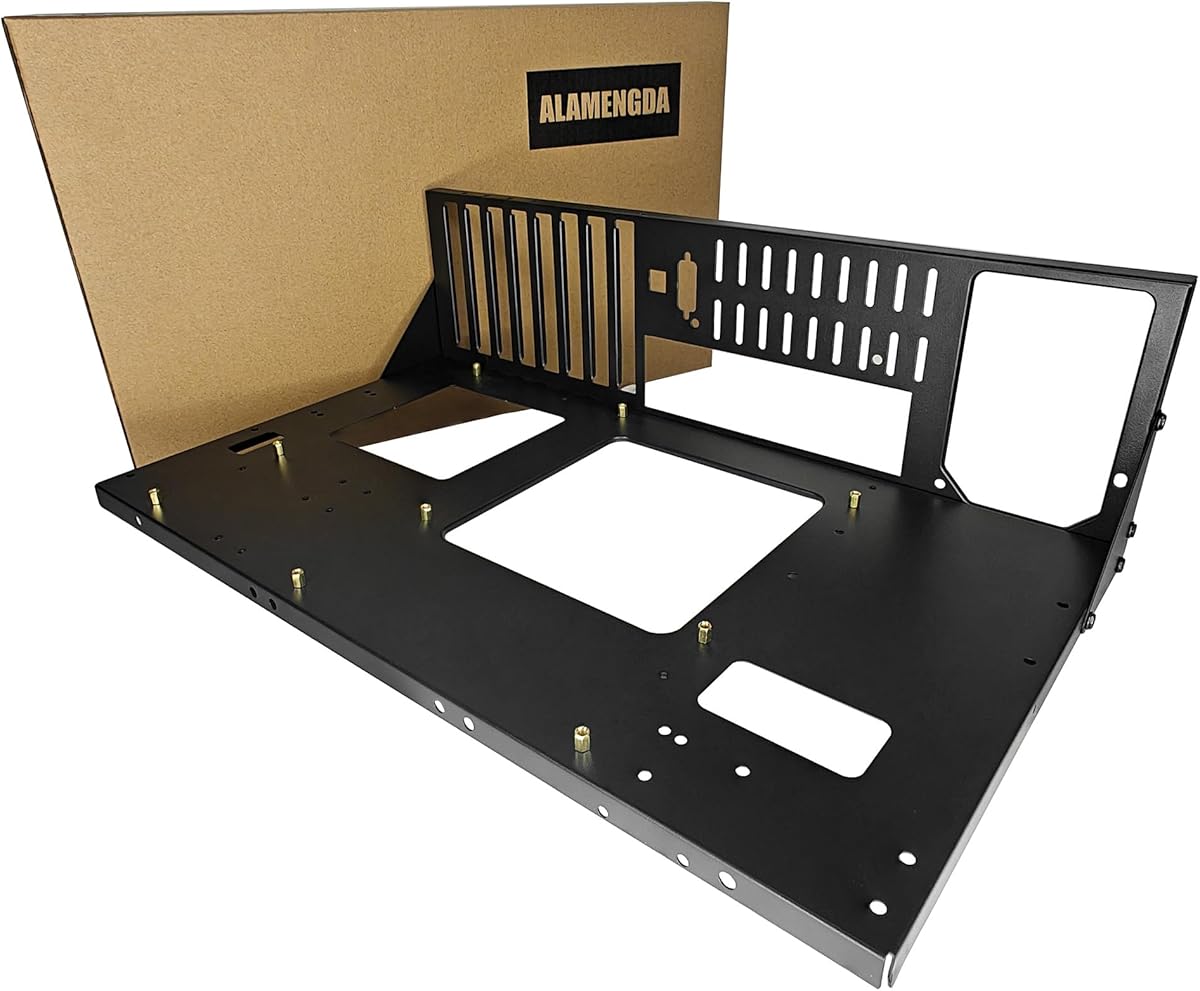
AL01 Open Frame Computer case DIY PC Test Bench for ATX M-Board,1Pc
4.4Editor score
Reinforced folded-edge steel construction
Supports ATX, MATX, and ITX
Unrestricted graphics card dimensions
Rear cable routing holes
Our Open Frame PC Case guide compares 10 models for motherboard support, cooling, expansion, airflow, portability, build flexibility, and everyday use.
An open frame PC case exposes the motherboard, graphics card, power supply, and cooling hardware, making it especially useful for test benches, diagnostic work, compact experimental builds, and visually distinctive gaming systems. The best model balances sturdy construction with airflow, broad component compatibility, manageable cable routing, and enough expansion flexibility for future upgrades.
We compared all 10 products using their stated motherboard support, case materials, graphics card clearance, power supply options, cooling provisions, storage support, dimensions, and front connectivity. The list includes bare aluminum and steel test benches, compact open chassis designs, and frame-based mid towers, so it covers both functional work platforms and display-oriented gaming builds.
Each review explains where a particular open frame case is strongest, where its stated specifications may require careful checking, and which builders it best suits. Ratings reflect the supplied customer feedback, while product details remain subject to seller revisions and manufacturer updates. As with all hardware, current prices and availability can change at any time.
4.4Editor score

4.6Editor score
4.5Editor score
The comparison below highlights the major differences among the 10 cases, including motherboard format, power supply support, cooling approach, graphics card clearance, structural material, and display-oriented features.


The AL01 is a straightforward steel test bench that gives a builder a rigid platform for a working PC rather than a decorative shell. Its 4.4 rating reflects generally favorable customer feedback, and its strongest qualities are the reinforced frame, broad motherboard coverage, and freedom from stated graphics card length and width restrictions. It is particularly practical for hardware testing, system maintenance, and builds where immediate component access matters.
We may earn a commission when you buy through this link, at no additional cost to you.
Construction uses upgraded 0.8mm SPCC steel with folded edges, triangular reinforcement plates, and a scratch-resistant black sand-grain finish. The motherboard area supports ATX, Micro-ATX, and ITX boards within the stated dimensional range, while the wider base is intended to accommodate server cabinet installation. Regular ATX power supplies are supported, and reserved rear cable holes help keep otherwise exposed wiring more orderly.
The open construction is both its main appeal and its main compromise. It encourages airflow and makes installation or troubleshooting straightforward, but it also leaves the graphics card, motherboard, and power connections visible. The product information does not emphasize drive mounting, front-panel controls, or decorative lighting, so buyers seeking a polished everyday gaming enclosure should look elsewhere. An extended base option is noted for suitable E-ATX dual-server motherboards.
Choose the AL01 when you want an affordable, no-nonsense test bench that can accommodate mainstream boards and unusually large graphics cards. It is a strong match for system builders, technicians, and enthusiasts who value stability and compatibility over cosmetic enclosure features. For a more decorative open case with cooling fans and synchronized lighting, the KEDIERS C570 is the stronger alternative; for a lightweight aluminium DIY chassis, consider the 3.ATX model.
Its versatility makes it easy to move between temporary validation and a permanent open-air installation. With the board installed, the large open surface makes ports, headers, and expansion cards easier to reach than they would be behind a conventional side panel.
The 0.8mm steel plate, folded reinforcement, and triangular braces give the AL01 a more substantial feel than a loose plate-and-bracket frame. That makes it a sensible choice when the bench may support a full-size graphics card, multiple power connections, and repeated hardware changes.
ATX, Micro-ATX, and ITX support covers most mainstream DIY systems, while the lack of a stated graphics card length or width restriction reduces a common source of fitment problems. Buyers should still verify connector reach, cooler clearance, and the physical dimensions of unusually large components.
We may earn a commission when you buy through this link, at no additional cost to you.
This 3.ATX aluminium chassis combines a 4.6 rating with unusually broad compatibility, making it the most balanced selection in the roundup. It is designed for builders who want a test-bench format without giving up flexibility around motherboards, power supplies, cooling, or graphics cards. The open design is especially suitable for experimental configurations, server-oriented layouts, and systems that are frequently serviced.
We may earn a commission when you buy through this link, at no additional cost to you.
The stated motherboard support is universal, and the title also highlights ITX, MATX, ATX, and E-ATX configurations. It accepts regular ATX, SFX, and 1U power supplies, giving it broader applicability than benches limited to a single power supply standard. Both air and water cooling are supported, while unlimited graphics card length is stated, which is valuable for workstations and specialist cards.
The main caveat is that this is explicitly a DIY chassis rather than a turnkey case. Buyers need to be comfortable assembling the structure and confirming that their chosen cooling hardware, board, power supply, and wiring arrangement work together. The supplied information does not list detailed storage mounting, front I/O, or included fans, so the case should not be assumed to provide every part needed for a complete build.
This is our top general recommendation because it offers the broadest documented power and cooling flexibility in a highly rated open chassis. It suits advanced hobbyists, system integrators, and anyone constructing a server-style or frequently serviced PC. If a polished display build is the goal, choose the KEDIERS C570; if rugged steel is more important than weight, examine the AL01.
Its broad power supply support is particularly useful for flexible prototyping. Rather than forcing a single supply format, the chassis can accept ATX, SFX, or 1U units, which allows the builder to adapt the enclosure to the components already on hand or to the intended workload.
Universal motherboard support, multiple power supply formats, and unlimited graphics card length make this chassis adaptable to many layouts. Those broad claims are especially useful for builders who routinely change processors, boards, power supplies, or accelerators.
Support for both air and water cooling lets builders select the processor cooling solution that suits the system rather than accepting a narrow preset. The open frame also provides direct access to tubing, radiator areas, and fan connections during installation.
We may earn a commission when you buy through this link, at no additional cost to you.
This DIY aluminium open chassis earns a 4.5 rating and distinguishes itself with modern Type-C connectivity alongside broad component support. It is positioned for custom builders who want a visible, flexible PC platform without being restricted to a single motherboard size or power supply standard. The open structure suits enthusiast builds, cooling demonstrations, and systems that need frequent access.
We may earn a commission when you buy through this link, at no additional cost to you.
The motherboard specifications cover ITX, MATX, ATX, and E-ATX, effectively spanning compact boards through extended dual-CPU formats. ATX, SFX, and 1U power supplies are supported, and both air and water cooling can be used. Graphics card length is unrestricted, making the chassis a better match for long accelerators than a compact case with a fixed clearance figure.
Type-C is the notable practical detail, although the supplied information does not identify the exact connector generation or list the rest of the front I/O panel. Storage support and included accessories are also not specified. As a result, buyers should treat the listing as a chassis-focused feature summary and confirm the final bill of materials against the seller's current product page before ordering.
It is a good fit for builders who prioritize modern peripheral connections and broad platform choices. Choose it over the 3.ATX aluminium chassis when Type-C support is a priority; choose the latter if you want a model whose universal motherboard and power supply claims are more prominently stated. This chassis is less suitable for a polished, ready-made gaming system because the emphasis is on customization and access.
The combination of Type-C and unrestricted graphics card length makes it useful for contemporary workstations and compact enthusiast projects. It also gives a builder a practical way to use a modern case while preserving the visibility of an open-frame layout.
Type-C support adds a practical contemporary feature to a chassis category that often focuses only on component clearance. The listing does not specify the exact Type-C standard, so buyers should confirm the port specification and whether an internal header or adapter is required.
ITX, MATX, ATX, and E-ATX support lets the same chassis serve compact, mainstream, and extended builds. Multiple accepted power supply formats further reduces the chance of an expensive mismatch late in the assembly process.
We may earn a commission when you buy through this link, at no additional cost to you.
This open-air test bench is built around quick access and straightforward maintenance, and its 4.1 rating places it among the more moderately rated picks. The tool-free design is the distinguishing feature: it is intended to let builders install, remove, and modify components without reaching for tools during every adjustment. That makes it appealing for troubleshooting and iterative PC assembly.
We may earn a commission when you buy through this link, at no additional cost to you.
The stated motherboard support covers ATX, MATX, and ITX formats, with particular attention to X79 and X99 builds. Dedicated brackets for the motherboard, power supply, and storage devices create a more organized platform than loose supports. The open layout improves airflow and makes ports, expansion slots, cables, and power connections reachable from several directions.
The trade-off is that the product information provides fewer detailed specifications than the leading picks. It does not state graphics card length limits, CPU cooler height, supported power supply formats, or the number of storage devices, so compatibility beyond the named board sizes requires careful checking. Its 4.1 rating also suggests that prospective buyers should read recent customer feedback closely.
This bench is best for technicians, system builders, and owners of older high-end platforms who repeatedly need access to the system. It can also work as a permanent open-air display case. If explicit power supply, cooling, and graphics card specifications are important to your decision, the AL01 or TGDGAMER E-ATX chassis provides more published detail.
Its strongest benefit is workflow speed. When diagnosing a boot issue, swapping a card, or checking a connection, the open frame reduces the need to dismantle a conventional enclosure. That convenience can matter more than decorative refinement in a working laboratory.
A tool-free design and direct access make it possible to change or inspect components without repeatedly removing a side panel. This is especially useful during initial assembly, when connectors and memory placement may need several adjustments.
Although aimed at hardware testing, the open-air structure can remain on display as a permanent case. The dedicated mounting areas help it look more deliberate than a board supported by improvised brackets.
We may earn a commission when you buy through this link, at no additional cost to you.
The upgraded portable chassis uses zinc-coated steel and a black baked finish, giving it a more rugged character than many exposed aluminium benches. Its 4.1 rating suggests a functional design with a mixed or relatively limited customer response, while the title emphasizes portability and support for ITX, MATX, and ATX motherboards.
We may earn a commission when you buy through this link, at no additional cost to you.
Zinc-coated steel provides a firm shell for the structure, and the baking-paint process helps the black exterior coordinate with a wide range of component colors. The portable chassis bracket is especially relevant to users who need to move a completed system between locations, service a cluster of test platforms, or carry a display build to an event.
The listing gives less compatibility information than several lower-ranked alternatives. It does not specify graphics card clearance, CPU cooler height, power supply format, storage capacity, cooling support, or front I/O. Those omissions do not necessarily indicate limited capability, but they make direct comparison harder. Anyone with a specialist card or water-cooling loop should request the current dimensions and mounting details before purchase.
Buy this bench if durable construction and portability matter more than a decorative lighting system or a fully documented accessory list. The AL01 is a better choice when reinforcement details, cable routing, and graphics card flexibility are priorities. The TGDGAMER E-ATX model is more attractive for a builder seeking clearly stated drive, cooler, and power supply support.
Its black finish and enclosed steel elements give it a more traditional appearance than a bare acrylic or aluminium frame. That balance can suit a workshop, office, or showroom where the system needs to look respectable without being hidden behind a full tower enclosure.
The zinc-coated steel shell and portable bracket are intended for setups that may be transported. Buyers should still protect the installed components from impact and use appropriate handling procedures around exposed hardware.
The black baked finish can blend with dark motherboards, graphics cards, and power supplies. That makes the chassis less conspicuous than a bright metal frame while preserving the visible, open-frame presentation.
We may earn a commission when you buy through this link, at no additional cost to you.
The TGDGAMER E-ATX open chassis is the stronger of the two similarly named TGDGAMER benches in this list. It supports E-ATX as well as ATX, M-ATX, and ITX motherboards, includes mounting for two SSDs and two hard drives, and carries a 4.4 rating. The wide-body open layout is aimed at builders who need more room than a conventional compact test bench provides.
We may earn a commission when you buy through this link, at no additional cost to you.
There is no stated limit on graphics card length or CPU cooler height, reducing the risk that a large accelerator or tower cooler will conflict with the frame. A standard ATX power supply is supported, and the drive options are more generous than those of the smaller TGDGAMER model. Its open construction is designed for heat dissipation and leaves every major component accessible during installation.
The trade-off is that the power supply format is more limited than the 3.ATX aluminium chassis, which also accepts SFX and 1U units. Water-cooling support is not stated, and the description does not mention front I/O, fans, lighting, or a particular material. Prospective buyers using a custom loop should verify mounting space and support rather than assuming it is included.
This is a compelling choice for E-ATX workstation owners, render farms, server-derived systems, and builders who want drive support alongside broad component clearance. The smaller TGDGAMER ATX bench may suit a simpler system, while the KEDIERS C570 is the stronger option when bundled fans, tempered glass, and synchronized RGB are priorities.
Its expansion support makes the chassis feel more like a reusable system platform than a one-purpose diagnostic board. The two SSD and two HDD mounting points are especially useful for builds that need a mix of fast scratch space and larger data storage.
E-ATX support distinguishes this model from smaller open test benches and allows more of the chassis to be used as a full workstation platform. The open sides make it easier to route cables around a large board.
Two SSD and two HDD positions provide room for both fast operating-system storage and higher-capacity data drives. This is more useful than a bare board-and-bracket approach when the system will operate outside a short diagnostic session.
We may earn a commission when you buy through this link, at no additional cost to you.
This TGDGAMER open chassis focuses on a compact set of core benefits: support for ATX, M-ATX, and ITX boards, unrestricted graphics card length, and no stated CPU cooler height limit. Its 4.4 rating indicates solid customer reception, while the wide open design emphasizes cooling and visibility for a DIY gaming PC.
We may earn a commission when you buy through this link, at no additional cost to you.
Removing the usual length and height restrictions gives builders considerable freedom with large graphics cards and tall air coolers. One SSD and one HDD position cover a basic local-storage configuration, and a standard ATX power supply is supported. The open frame keeps internal components exposed, allowing air to move around the system without the restrictions imposed by solid panels.
The simpler storage layout is the clearest limitation. Builders needing several drives should select the E-ATX TGDGAMER model, while the 3.ATX aluminium chassis offers more varied power supply support. The product information does not state cooling hardware, front-panel features, material, or included accessories, so it is best viewed as a flexible structural platform rather than a fully equipped case.
Choose this model for a straightforward gaming or validation build with one or two drives and a large GPU. It is a practical alternative to a full tower when visibility and quick access are priorities. For a richer visual build with lighting and glass, move up to the KEDIERS C570; for a workstation with more storage, use the E-ATX TGDGAMER bench.
The lack of a stated cooler height limit can be particularly valuable in open layouts because a tall tower cooler may sit where a closed side panel would normally be. Users should still confirm that the cooler, board, and graphics card do not physically overlap.
No stated CPU cooler height limit gives air-cooling enthusiasts room to use a large heatsink. Because the frame is open, the cooler has more opportunity to draw in ambient air than it would inside a tightly enclosed case.
One SSD and one HDD position is adequate for a straightforward system that boots from a solid-state drive and stores data on a secondary drive. Additional storage is better handled by the wider E-ATX alternative.
We may earn a commission when you buy through this link, at no additional cost to you.
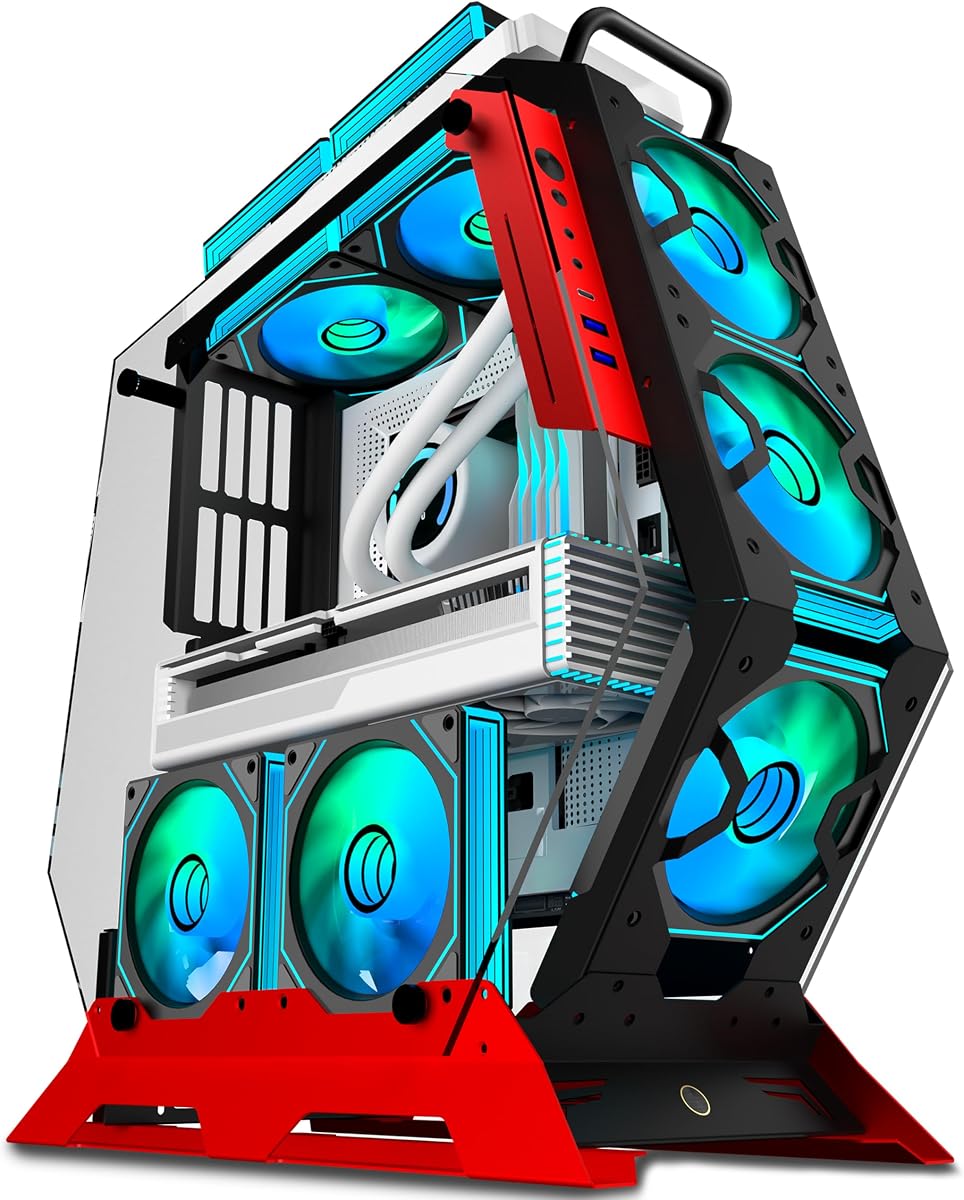
The KEDIERS C570 is the most presentation-focused product in the roundup. Its 4.5 rating, irregular open shape, thick metal frame, seven preinstalled PWM ARGB fans, and two tempered glass panels turn it into a display piece rather than a plain diagnostic bench. It is the top choice for a gaming build where appearance and integrated lighting are priorities.
We may earn a commission when you buy through this link, at no additional cost to you.
Seven PWM ARGB fans provide a substantial cooling foundation, while the open design allows air to move freely around the graphics card and other components. The fan lighting can be synchronized through a simple +5V ARGB motherboard header without requiring a separate controller. Two four-millimeter tempered glass panels provide clear views of the RGB lighting and internal hardware without fully enclosing the system.
Motherboard support covers ATX, Micro-ATX, and Mini-ITX formats. The front I/O panel includes one Type-C port, two USB 3.0 ports, and one HD audio connection, making this more practical for daily use than many bare test benches. The trade-off is that the supplied information does not state graphics card length, CPU cooler height, power supply format, drive support, or included radiator support, so those dimensions should be verified before purchase.
The C570 is ideal for a showpiece gaming PC with synchronized lighting and a preference for a red accent. It is less compelling for a technician who needs a lightweight portable bench or a specialist workstation with numerous drive bays. The TGDGAMER E-ATX model provides clearer drive and motherboard specifications, while the KEDIERS wins decisively on visual presentation and bundled cooling.
The irregular frame gives the system a more deliberate silhouette than a conventional rectangular test bench. Tempered glass adds a physical visual layer without returning to the fully enclosed tower format, preserving the see-through quality that many open-frame buyers seek.
Seven PWM ARGB fans are preinstalled and can use a standard +5V ARGB motherboard header, reducing the need for extra lighting hardware. Software control makes it easier to coordinate the illuminated look with the rest of a gaming system.
The irregular thick metal frame and two tempered glass panels provide a finished appearance that most test benches do not. The panels protect and frame the view of the components while preserving the open concept.
We may earn a commission when you buy through this link, at no additional cost to you.
The CORSAIR 4000D RS ARGB has the highest listed rating in the comparison at 4.7 and is built around a modular frame system. Although it is a mid-tower rather than a bare test bench, the frame concept and visible component layout place it within the broader open-frame category. It is a strong all-around choice for builders who value organization, flexibility, and established case features.
We may earn a commission when you buy through this link, at no additional cost to you.
The FRAME system is designed to let users replace or expand elements such as the motherboard tray and front I/O panel. Three CORSAIR RS ARGB PWM fans are included at the front, using daisy-chainable four-pin power connections and a +5V ARGB header. Zero RPM support helps the fans remain quiet at suitable low loads, while the steel InfiniRail mounting system permits fan placement up to the stated size limits.
This enclosure is less minimalist than the test benches in the list because it includes a front panel, fan system, and structured frame. It is also not described as a fully exposed chassis. The benefit is that it offers a more conventional, polished daily-computer experience while retaining a strong sense of visible hardware and a deliberately engineered frame identity.
Choose the 4000D RS ARGB for a finished gaming system rather than a temporary test platform. It is well suited to users who want bundled ARGB cooling, flexible mounting points, and cable management without moving to a fully enclosed case. If the requirement is literally an uncovered bench, the AL01 or TGDGAMER models are more direct answers.
Its airflow panel uses a three-dimensional Y-pattern perforation to reduce obstruction while moving air through the front. The removable internal side panel can alternatively act as a cable cover or be taken away to increase side cooling, giving builders a useful choice between tidiness and airflow.
The FRAME system allows the motherboard tray and front I/O panel to be changed as needs evolve. That makes the enclosure attractive to builders who expect their layout, connectivity, or materials to change over time.
The Y-pattern front panel and three included PWM fans provide a conventional high-airflow arrangement. Zero RPM mode can reduce fan noise under low loads, while the removable side panel gives users another cooling option.
We may earn a commission when you buy through this link, at no additional cost to you.
The Cooler Master MasterFrame 360 Stage Mirror is the most specialized open-frame concept in the group, using a mirrored platform to display components and collectibles from multiple angles. Its 4.0 rating is the lowest listed here, but the design targets creators and collectors rather than conventional test-bench users. It is a showpiece enclosure for builds where presentation is central.
We may earn a commission when you buy through this link, at no additional cost to you.
Cooling is the major technical strength. The case supports fan sizes from 120mm to 200mm, accommodates as many as twelve 120mm fans, and supports a radiator up to 360mm. Six fan positions are stated for the top and six for the bottom, allowing a dramatic symmetrical configuration. The open layout also gives builders freedom to position figures, accessories, and hardware around the mirrored stage.
Component support is clearly stated for Mini-ITX, Micro-ATX, and ATX motherboards, including ATX back-connect layouts. Graphics cards up to 430mm and power supplies up to 210mm fit within the stated limits. The front connectivity includes USB 4.0 Gen 2×2 Type-C with up to 20Gbps throughput and two USB 3.2 Gen 1 Type-A ports, making it unusually modern for a display-oriented case.
The main drawback is its specialized purpose. It may be excessive for routine troubleshooting, and its 4.0 rating indicates that buyers should review customer feedback for fitment, assembly, or presentation issues. Those seeking a basic open bench will find the AL01 more straightforward, while those prioritizing bundled fans and RGB may prefer the KEDIERS C570.
The mirrored stage gives the system a showroom or gallery quality that traditional open frames cannot match. It is particularly suited to themed builds, display-oriented creator systems, and anyone who wants components or collectibles to become part of the visual presentation.
The front-facing mirrored platform is designed to reflect hardware and collectibles from multiple directions. That turns the case into a display environment and makes it suitable for a desk, studio, or showroom installation.
Support for up to twelve 120mm fans and a 360mm radiator gives this frame extensive cooling potential. The symmetrical top-and-bottom layout can also create a striking visual centerpiece for a heavily illuminated build.
USB 4.0 Gen 2×2 Type-C and two USB 3.2 Gen 1 Type-A ports are useful for modern peripherals. The Type-C port is positioned on the front I/O, keeping high-speed connections accessible in a finished desk setup.
We may earn a commission when you buy through this link, at no additional cost to you.
An open frame case is only a good fit when its structure, expansion options, and intended use match your build. Compare motherboard formats, graphics card clearance, power supply support, cooling, storage, connectivity, and construction before making a final choice.
Begin with the exact board size you already own or intend to buy. Most test benches support ATX, Micro-ATX, and ITX, while the TGDGAMER E-ATX model adds extended-board support and the 3.ATX aluminium chassis states universal motherboard compatibility. A board that fits mechanically may still create cable-routing or cooler-clearance problems, so compare mounting positions and the space left around the CPU socket, memory, and expansion slots.
Long graphics cards are among the hardest components to fit in compact cases, which is why six products in this guide advertise unrestricted or unlimited length. That statement is useful, but it does not replace checking the actual position of the graphics card, power connectors, CPU cooler, and side-mounted hardware. Measure the card including its power connector and compare it with the space visible in the product photographs.
Open frames vary significantly in the power supplies they accept. The AL01 and TGDGAMER benches specify standard ATX units, while the 3.ATX and Type-C aluminium chassis also list SFX and 1U support. The MasterFrame provides a maximum PSU length of 210mm. Match both the mounting pattern and physical dimensions, and remember that open layouts can still require careful planning for modular cables and strain relief.
Open construction generally encourages airflow, but it is not a substitute for a complete cooling plan. The two aluminium chassis models support both air and water cooling, the KEDIERS includes seven PWM ARGB fans, and the MasterFrame supports a 360mm radiator and numerous fan positions. Compare the supplied fan and radiator support with the CPU cooler, case fan sizes, radiator dimensions, and tubing route.
A useful permanent build needs more than a motherboard mount. The TGDGAMER E-ATX bench offers two SSD and two HDD positions, while the smaller TGDGAMER model lists one of each, and the remaining products do not provide comparable storage details in the supplied information. Look for dedicated drive brackets, expansion slots, and enough open space to route cables without obstructing airflow.
The AL01 uses 0.8mm SPCC steel with folded edges and triangular reinforcing braces, the portable bench uses a zinc-coated steel shell, and several others use aluminium. Steel can provide a rigid feel and useful weight for transport, while aluminium offers a different balance. Consider the finish, edge treatment, fasteners, and whether the open parts of the frame will be moved while components remain installed.
A test bench may only need power and a display, but a permanent gaming system needs convenient peripheral connections. The KEDIERS includes Type-C, two USB 3.0 ports, and HD audio, while the MasterFrame offers USB 4.0 Gen 2×2 Type-C and two USB 3.0 ports. Confirm that a front Type-C connection matches the header available on your motherboard and that required audio or USB ports are present.
Bare steel and aluminium benches are best for repair, testing, iterative builds, and maximum component access. A display case such as the KEDIERS C570 or Cooler Master MasterFrame adds fans, glass, lighting, and a more deliberate visual design. Decide whether the system is primarily a work platform, a regular gaming computer, or a collectible-style centerpiece before choosing the enclosure.
Begin by assembling the frame on a clean, level surface and confirming that every motherboard, power supply, storage, and graphics card mounting point is properly supported. Install the power supply with its fan oriented to draw clean air, route cables through the available openings, and check that no wire blocks a fan or prevents the graphics card from seating fully. Tighten fasteners evenly and consult the seller's current instructions whenever the product details differ from the general guide.
For stable operation, treat the open frame as an exposed system. Keep dust away from heatsinks and filters, avoid placing the assembly where cables can be snagged, and use proper surge protection and grounded power. When adding a fan, radiator, or water-cooling component, confirm dimensions and mounting points first, then leave adequate space for tubing and avoid sharp bends that could stress a block or fitting.
During maintenance, power down and disconnect the system before touching any component. Hold the board by its edges, keep the frame stable, and avoid hanging heavy cables from headers or the open frame. Clean dust with appropriate tools, inspect tightened screws periodically, and keep liquids away from the exposed electronics. For a display build, periodic cleaning and careful cable management will preserve both airflow and presentation.
An open frame leaves most components visible and directly accessible rather than surrounding them with solid panels. This can improve airflow and make installation or troubleshooting faster, but it offers less physical protection from dust, impact, and accidental contact. It is therefore especially common for test benches, experimental systems, and display-oriented builds.
Open frames often have fewer airflow restrictions than fully enclosed cases, but the design alone does not guarantee lower temperatures. Fan placement, CPU cooler quality, radiator size, cable obstruction, and ambient airflow all influence results. Models with explicit fan or radiator support, such as the KEDIERS C570 and Cooler Master MasterFrame 360, make cooling planning more straightforward.
Yes, if the selected model explicitly supports ATX. The AL01, both TGDGAMER benches, the 3.ATX and Type-C aluminium chassis, the KEDIERS C570, and the CORSAIR all indicate ATX support. Even when the board size fits, check graphics card length, CPU cooler height, power supply dimensions, and cable space.
They can be, particularly models that include front I/O, fans, tempered glass, and a finished exterior. The KEDIERS C570 is designed more like a display-oriented gaming case, while the CORSAIR 4000D RS ARGB provides a more conventional mid-tower experience. A bare test bench is more commonly chosen for temporary builds and technical work.
That depends on the model. The KEDIERS C570 includes seven PWM ARGB fans, and the CORSAIR includes three front fans, while the product information for the other test benches does not clearly state that cooling fans are included. Power supplies are generally separate components, so confirm the case dimensions and mounting standard before purchasing one.
The most flexible models in this guide state that graphics card length is unlimited, which is useful for large workstation cards. The MasterFrame gives a maximum of 430mm. Even with generous clearance, measure the card including its power connector and check for conflicts with the CPU cooler, frame, or side-mounted accessories.
Verify motherboard format, power supply standard and dimensions, graphics card clearance, CPU cooler height, radiator size, drive locations, and front-panel header support. Lay out the parts and cables before fastening everything, and check the seller's current manual for any model-specific details. This preparation can prevent costly fitment problems later.
Durability depends on the reinforcement, fasteners, and handling method. Steel designs such as the AL01 and portable zinc-coated bench may feel more robust, while aluminium models can still work well when supported correctly. Always remove or protect fragile components before moving an assembled system, particularly a large graphics card or a water-cooling installation.
The AL01 stands out as a practical, well-supported steel test bench for builders seeking motherboard flexibility, unrestricted graphics card dimensions, and cable-routing provision. The 3.ATX aluminium chassis earns the Editor's Choice for its 4.6 rating and broad motherboard, power supply, and cooling compatibility, while the KEDIERS C570 takes the premium display slot with seven ARGB fans, tempered glass, and modern front connectivity.
Prioritize the components you already own and the role the system will play. Mainstream builders should check motherboard format, graphics card length, power supply dimensions, and cooler clearance first. A technician may prioritize tool-free access, a workstation builder may need several drive mounts, and a display builder may focus more on fans, glass, lighting, and front I/O than on bare structural simplicity.
Finally, review the seller's current listing, diagrams, and customer feedback before ordering because open frame specifications can vary between revisions. Product ratings and market conditions also change over time, and current prices may shift. Comparing the documented dimensions against your exact hardware is the most reliable way to avoid an expensive mismatch.