
ASUS Pro WS WRX90E-SAGE SE EEB
3.7Editor score
Up to 96-core processors
Seven PCIe 5.0 slots
Dual 10Gb LAN
Server-grade IPMI
Up to 2TB ECC memory
Our ASUS Server Motherboard guide compares 10 models for socket, memory, expansion, networking, management, and workstation performance in 2026 for buyers.
An ASUS server motherboard is built for demanding systems that need more than ordinary desktop connectivity. The best models support server-class processors, ECC memory, high-speed expansion, remote management, and cooling designed for sustained professional workloads. They can serve demanding workstations, content-creation systems, AI development machines, and compact on-premises servers.
We compared these 10 ASUS boards by processor platform, memory capacity and configuration, PCIe and storage expansion, networking, remote-management features, power delivery, cooling, and form factor. The list covers EEB, CEB, ATX, microATX, and E-ATX models for AMD Threadripper, AMD Ryzen, Intel Xeon, and compatible Intel Core processors.
Each pick reveals a different kind of strength: the WRX90E-SAGE SE leads in high-end workstation expansion, the W890E-SAGE SE combines a broad feature set with a strong customer rating, and the B850M-ACE SE offers a more compact business platform. Availability and prices change, so confirm the current listing and full system requirements before buying.
3.7Editor score

5.0Editor score
4.3Editor score
The comparison below places all 10 boards by platform, core expansion capability, memory configuration, networking, and management features. It shows how the list spans compact business systems, conventional ATX workstations, CEB platforms, EEB boards for Threadripper, and E-ATX infrastructure for dual-socket servers.


The ASUS Pro WS WRX90E-SAGE SE EEB is the flagship choice in this guide for builders who need the most expansion and memory headroom from an ASUS workstation platform. It carries a 3.7 customer rating, but its specifications make it a compelling foundation for professional systems using AMD Ryzen Threadripper PRO 7000 WX-Series processors. Support for up to 96-core CPUs, as many as seven PCIe 5.0 x16 slots, and up to 2TB of ECC R-DIMM DDR5 memory gives it exceptional flexibility.
We may earn a commission when you buy through this link, at no additional cost to you.
Its connectivity is designed for demanding multi-device builds. The board includes dual 10Gb LAN, a 2.5Gb LAN connection, four M.2 slots, SlimSAS NVMe support, and two rear USB4 40Gbps Type-C ports. A 32-stage power system, large VRM cooling, active chipset and M.2 cooling, and an M.2 thermal pad help sustain performance when the platform is under sustained load. Multi-GPU support makes it relevant to visualization, simulation, rendering, and specialized compute configurations.
Management is another differentiator. A dedicated LAN link to the AST2600 BMC controller provides server-grade IPMI remote management, while ASUS Control Center Express supports real-time monitoring and management. The PCIe Q-release Slim mechanism is designed to simplify graphics-card removal. These features add complexity compared with a basic desktop board, and the EEB format requires careful chassis, cooler, power-supply, and processor planning. The modest rating may also reflect the cost and complexity of assembling such a specialized system.
The WRX90E-SAGE SE EEB is best for professionals who need maximum PCIe bandwidth, very high memory capacity, remote administration, and multi-GPU capability in one workstation platform. It is less appropriate for a general office PC or a small home server. Buyers should confirm case clearance, supported graphics-card dimensions, processor cooling requirements, and the complete ASUS QVL before ordering any components.
Seven PCIe 5.0 x16 slots and four M.2 connectors create an unusually flexible expansion foundation. That makes the board suitable for multi-GPU rendering, large accelerator configurations, high-speed NVMe storage, and add-in cards that demand substantial bandwidth.
The dedicated AST2600 BMC link enables hardware-level IPMI management and monitoring through ASUS Control Center Express. Combined with extensive compatibility validation and claimed 24/7 operation testing, it suits systems expected to run beyond a conventional desktop workload.
We may earn a commission when you buy through this link, at no additional cost to you.
The ASUS Pro WS W890E-SAGE SE is the strongest all-around selection in this roundup, combining a perfect 5.0 customer rating with a broad collection of workstation features. Built for Intel Xeon 600 processors on LGA 4710-2, it targets professional systems that need high-bandwidth expansion, ECC memory, multi-gigabit networking, and server-style administration. Its EEB size offers room for a powerful VRM, extensive rear connectivity, and seven full-length PCIe 5.0 x16 slots.
We may earn a commission when you buy through this link, at no additional cost to you.
The board supports ECC R-DIMM DDR5 memory in a one-DIMM-per-channel configuration and uses ASUS NitroPath DRAM technology to improve memory performance. Storage and expansion options include four M.2 connectors, MCIO, two SlimSAS connections, and USB4 plus USB Type-C connectivity. Dual Intel E610-XAT2 10Gb LAN ports support demanding network-transfer and storage environments, while a dedicated AST2600 BMC connection enables remote monitoring through ASUS Control Center Express.
Power delivery uses a 16+(2+2)+1+2-stage design with multiple CPU and PCIe power connectors and support for dual-PSU operation. Active cooling targets the VRM, chipset, M.2 devices, and memory, reflecting the board's emphasis on sustained professional workloads. The main disadvantages are physical and financial: EEB requires a suitably spacious chassis, and the platform is far less flexible for upgrades than a mainstream microATX board. Compatibility must also be checked carefully because this model targets Xeon 600-series hardware.
This motherboard is an excellent choice for engineers, studios, developers, and infrastructure teams assembling an Intel-based workstation with serious expansion needs. It works particularly well when remote management, dual 10Gb networking, ECC memory, and abundant PCIe bandwidth matter more than compactness. For buyers who can source the right chassis, memory, processor, cooling, and power supply, it offers the most balanced feature set among the highest-ranked choices.
The W890E-SAGE SE avoids concentrating on a single headline feature. Seven PCIe 5.0 slots, dual 10Gb LAN, four M.2 connectors, MCIO, and SlimSAS allow a workstation to combine accelerator cards, fast storage, and network-heavy equipment without immediately running out of interfaces.
A dedicated BMC connection and ASUS Control Center Express bring remote monitoring and management to a workstation platform. That is valuable for machines operating in a studio, laboratory, rack, or other location where frequent physical access would be inconvenient.
We may earn a commission when you buy through this link, at no additional cost to you.
The ASUS Pro WS W890-SAGE is a high-end Intel workstation board for builders who prioritize expansion and flexible memory population. It supports Intel Xeon 600 processors on the LGA 4710-2 socket and ECC R-DIMM DDR5 memory in a two-DIMMs-per-channel configuration. That layout can be useful when a workstation needs more total memory than a one-DIMM-per-channel design allows, although populating every channel remains important for balanced performance.
We may earn a commission when you buy through this link, at no additional cost to you.
Seven PCIe 5.0 x16 slots provide substantial room for graphics, accelerators, capture cards, and high-speed storage controllers. The board also has four M.2 positions, two SlimSAS connectors, and USB4 plus USB 20Gbps Type-C connectivity. Network support combines a Realtek 10Gb LAN port with an Intel 2.5Gb LAN port, making it easier to separate high-speed network traffic from routine administrative or workstation connections.
Remote management is arranged around support for an ASUS IPMI expansion card, and ASUS Control Center Express provides real-time monitoring and management software. The 12+(2+2)+1+2 power-stage configuration, multiple CPU and PCIe connectors, and dual-PSU support indicate a design focused on sustained operation. Compared with the W890E-SAGE SE, this model requires an expansion card for IPMI and uses a different cooling and power-delivery arrangement, so buyers should not treat the two models as interchangeable.
The W890-SAGE makes the most sense for a custom Intel workstation requiring a large number of PCIe devices, extensive memory, and flexible storage connections. It may appeal to engineers and virtualization specialists more than ordinary office users. Before purchasing, check chassis support for CEB, CPU cooler clearance, expansion-card dimensions, IPMI card availability, and the qualified memory list.
Two-DIMMs-per-channel operation gives the board more ways to fill a high-capacity memory system. It can be attractive for large datasets, scientific workloads, and virtualized environments, provided memory is installed in the channels and capacities recommended by ASUS.
Seven PCIe 5.0 x16 positions, four M.2 connectors, and two SlimSAS ports create a broad platform for graphics, accelerators, NVMe storage, and compatible enterprise drives. The mix makes this a versatile CEB workstation foundation.
We may earn a commission when you buy through this link, at no additional cost to you.
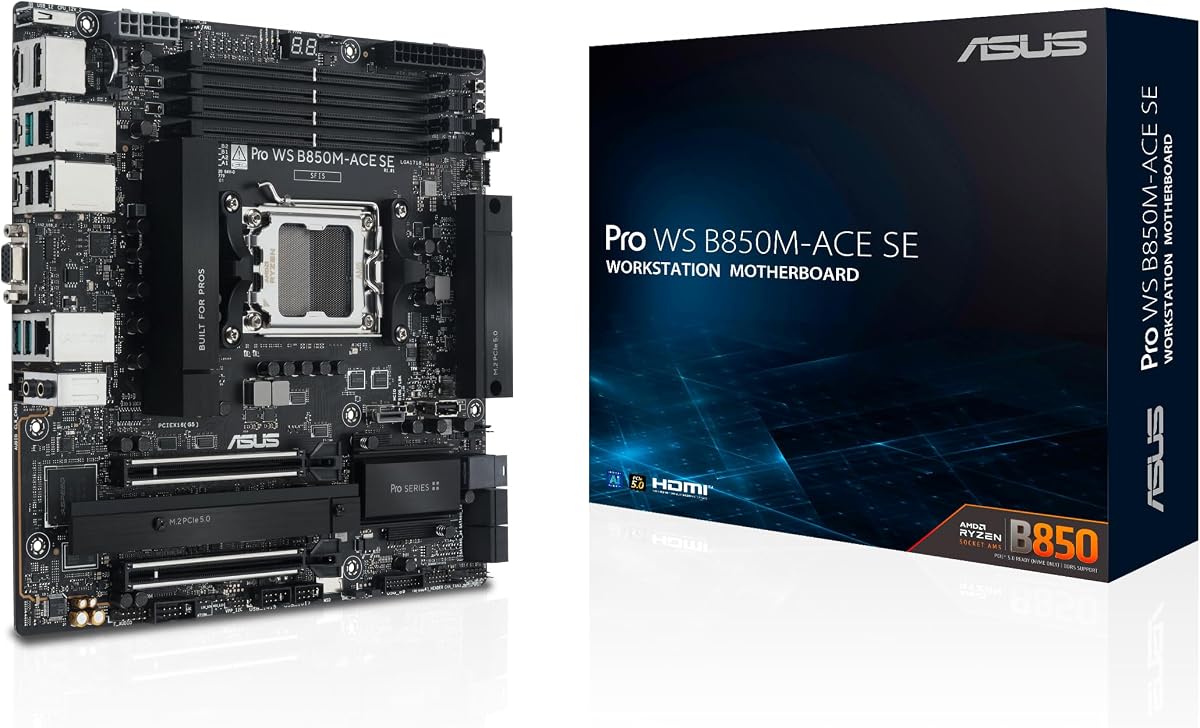
The ASUS Pro WS B850M-ACE SE stands apart as the most compact and accessible option in this guide. Its 4.3 rating reflects a well-received balance of business features, and the microATX format makes it easier to accommodate than the EEB, CEB, and E-ATX alternatives. It uses AMD AM5 and supports Ryzen 9000, 8000, and 7000 series processors, plus AMD EPYC 4005 series processors.
We may earn a commission when you buy through this link, at no additional cost to you.
Despite its smaller size, the board includes two PCIe 5.0 x16 slots, with one operating at x4, and two PCIe 5.0 x4 M.2 connectors. It also supports MCIO NVMe, U.2 storage, front USB 20Gbps Type-C, 10Gb LAN, and 2.5Gb LAN. The two network interfaces are especially notable for a business motherboard, enabling fast backbone traffic alongside a separate connection for administrative or ordinary network activity.
An onboard AST2600 BMC is a major advantage over many consumer-oriented microATX boards. ASUS Control Center Express IT management software provides real-time monitoring and management, giving this compact platform a genuine server-style feature set. Broad compatibility validation, a comprehensive QVL, and claimed 24/7 operation testing further support its professional positioning. The trade-off is expansion: only one full-length x16 slot is available, so it cannot match the multi-GPU capability of the EEB and CEB models.
This motherboard is best for compact business workstations, edge servers, specialized rendering systems, and developers who value remote management and fast networking more than abundant expansion slots. It is also a sensible foundation for an AI-development machine using an accelerator in the primary PCIe slot. Buyers should verify physical clearance, CPU support, and cooling requirements, particularly if a large accelerator or server-style processor cooler will be installed.
The microATX design makes the B850M-ACE SE easier to deploy in smaller business and technical workspaces. Despite its footprint, the onboard AST2600 BMC and Control Center Express support provide remote oversight that many similarly sized desktop boards omit.
Separate 10Gb and 2.5Gb Ethernet connections can support a high-throughput storage or backbone role alongside a standard administrative network. Two PCIe 5.0 M.2 slots, MCIO, and U.2 support offer several routes to fast local and compatible direct-attached storage.
We may earn a commission when you buy through this link, at no additional cost to you.
The ASUS Pro WS TRX50-SAGE WIFI is a high-capacity AMD workstation board for users who need a Threadripper platform without moving to the largest EEB model. It supports Ryzen Threadripper PRO 7000 WX-series and Ryzen Threadripper 7000 series processors, including CPUs with as many as 96 cores. ECC R-DIMM DDR5 support extends to 1TB in a one-DIMMs-per-channel configuration.
We may earn a commission when you buy through this link, at no additional cost to you.
Its 36-stage power system, two CPU power connectors, large VRM heatsink, chipset and M.2 heatsinks, and M.2 thermal pad make it well suited to high-power Threadripper configurations. Three PCIe 5.0 x16 slots support multi-GPU arrangements, while three M.2 connectors, SlimSAS, front and rear USB 20Gbps Type-C, and 10Gb plus 2.5Gb LAN cover storage and networking needs. WiFi 7 provides an additional wireless option, although wired Ethernet remains preferable for many professional workloads.
Management requires an ASUS IPMI expansion card, with ASUS Control Center Express supplying monitoring and management software. That arrangement is less integrated than the AST2600 approach in the WRX90E and W890E-SAGE SE, but it can still suit a planned professional build. The board's 3.6 rating is the lowest among the products that have a numeric score, so buyers should investigate recent customer feedback and verify the exact system configuration they intend to assemble.
This motherboard is a good fit for high-core-count rendering, simulation, compilation, and workstation compute systems where users value CPU capability and large ECC memory. It makes less sense for ordinary desktops or builds that need maximum PCIe slot count. Ensure the chosen CEB chassis supports the board, provides adequate airflow, and accommodates the physical dimensions and power requirements of high-end multi-GPU hardware.
The 36-stage power design and support for 1TB of ECC R-DIMM DDR5 align with the power and memory demands of high-core Threadripper systems. The one-DIMMs-per-channel layout also provides a direct path to balanced memory performance.
WiFi 7 offers convenient connectivity for office and development environments, while dual wired Ethernet provides much greater flexibility for bulk transfers, storage, and always-on systems. Professional infrastructure should generally favor the 10Gb connection where cabling allows.
We may earn a commission when you buy through this link, at no additional cost to you.
The ASUS Pro WS TRX50-SAGE WiFi A is a modern sTR5 workstation option for builders targeting current and forthcoming high-end Threadripper systems. Its specification list includes Ryzen Threadripper PRO 9000 and 7000 WX-series processors along with Ryzen Threadripper 9000 and 7000 series processors. The board has a 4.0 customer rating and is oriented toward AI computing, content creation, simulation, and other processor-intensive tasks.
We may earn a commission when you buy through this link, at no additional cost to you.
The board provides three PCIe 5.0 x16 slots, one PCIe 4.0 x16 slot, and four M.2 connectors. Two USB4 ports deliver 40Gbps, while front USB 20Gbps Type-C connections, SlimSAS NVMe support, 10Gb Ethernet, and 2.5Gb Ethernet create a versatile I/O selection. Its 20-stage power design uses two 8-pin CPU connectors and includes substantial VRM, chipset, and M.2 cooling, with an M.2 thermal pad for storage heat management.
Support for up to 1TB of ECC R-DIMM DDR5 in a one-DIMMs-per-channel layout is suitable for large professional workloads. As with the related TRX50-SAGE WIFI, remote management is provided through support for ASUS IPMI expansion cards and ASUS Control Center Express. The main practical limitation is platform dependence: all four M.2 positions, multiple PCIe slots, CPU power delivery, and multi-GPU support must be considered alongside case clearance and power-supply capacity.
This model is well suited to professionals building a modern Threadripper workstation with fast storage and multiple graphics or accelerator cards. It may be especially attractive to AI developers because the product is explicitly positioned for advanced AI PCs, although actual accelerator support depends on slot layout, physical fit, power delivery, and system software. Confirm the exact processor in ASUS compatibility lists before assembling the system.
USB4 40Gbps ports, four M.2 connectors, and a combination of PCIe 5.0 and PCIe 4.0 expansion provide modern bandwidth for fast storage, displays, and accelerator cards. This makes the board suitable for builds that are expected to evolve beyond their initial workload.
Three PCIe 5.0 x16 slots and a fourth PCIe 4.0 x16 slot create a strong graphics and accelerator foundation. Multi-GPU use will still require careful attention to card thickness, cooling, power connectors, and lane-sharing behavior.
We may earn a commission when you buy through this link, at no additional cost to you.
The ASUS Pro WS W680-ACE IPMI is a conventional ATX workstation board that combines mainstream processor compatibility with useful server-style features. Its 4.4 rating is among the strongest in this guide. It supports 13th and 12th Gen Intel Core processors as well as Pentium Gold and Celeron processors through LGA 1700, giving builders a wider choice of CPU types than the Xeon-focused models.
We may earn a commission when you buy through this link, at no additional cost to you.
Two PCIe 5.0 SafeSlots, dual PCIe 3.0 slots, and three PCIe 4.0 M.2 connectors provide solid expansion. SlimSAS, dual Intel 2.5Gb Ethernet, front USB 3.2 Gen 2×2 Type-C, and Thunderbolt 4 header support improve flexibility for storage, displays, and peripherals. DDR5 ECC memory support is valuable for systems where error correction matters, while DrMOS power delivery, alloy chokes, and durable capacitors support stable operation.
Cooling includes a large VRM heatsink, M.2 heatsinks, hybrid fan headers, and Fan Xpert 4. The package also includes an IPMI expansion card, making remote management more accessible than on boards where the expansion must be purchased separately. Advanced controls in ASUS Control Center Express include USB port management, software blacklisting, and Regedit on/off controls. These features make the board useful for controlled business or technical environments.
The W680-ACE IPMI is best for builders who want workstation features without moving to a Threadripper or Xeon platform. It is a natural fit for engineering, content creation, and compact professional workstation use. However, the LGA 1700 platform is not the newest choice in the roundup, so buyers should consider the expected service life of the system and confirm processor, memory, graphics-card, and IPMI accessory compatibility.
The included IPMI expansion card gives this model dedicated remote-management capability, while ASUS Control Center Express adds security and peripheral controls. That combination is useful for managed office, engineering, and technical workstation deployments.
A pair of PCIe 5.0 slots, additional PCIe 3.0 positions, three M.2 connectors, and SlimSAS offer enough flexibility for graphics, storage, and capture hardware. The ATX format is also easier to accommodate than the guide's EEB and E-ATX boards.
We may earn a commission when you buy through this link, at no additional cost to you.
The Asus P12R-M/10G-2T is a purpose-built microATX server board for entry-level, on-premises, and small-business systems using Intel Xeon E-2300 processors. It pairs the LGA 1200 socket with the Intel C252 chipset, distinguishing it from the more elaborate ASUS Pro WS workstation models. The supplied information is concise, but it identifies the board as a server platform rather than a general desktop motherboard.
We may earn a commission when you buy through this link, at no additional cost to you.
Its most visible feature is the 10G designation, indicating a high-speed network connection designed for server and storage-oriented environments. A compact microATX chassis can make it practical for installation in smaller offices, media rooms, edge-computing cabinets, and home labs where a full-size tower is unnecessary. Intel Xeon E-2300 processors also provide a platform with error-correcting memory support and server-oriented characteristics, depending on the exact memory configuration selected.
Because the product data does not enumerate expansion slots, storage connectors, memory slots, or management features, buyers should consult the technical documentation and current listing before committing. The lack of a customer rating means there is no useful marketplace feedback signal here, making manufacturer documentation and verified system compatibility especially important. Older component generations may also mean fewer readily available processor and board options.
This motherboard is best for a straightforward small server built around an E-2300-series Xeon and a compatible microATX chassis. It may appeal to users who prioritize a dedicated server board and 10Gb networking over workstation features such as multiple graphics outputs, high-end audio, or abundant PCI Express slots. Confirm the required processor, supported ECC memory, chassis airflow, storage controller, and expansion-card needs before buying.
The combination of the C252 chipset, Xeon E-2300 support, and microATX form factor targets compact server deployments. It provides a clearer server foundation than a repurposed desktop board for organizations that want dedicated infrastructure.
The 10Gb designation points to a platform optimized for faster network tasks, including file services, storage access, and business data movement. Cabling, switch support, and operating-system configuration still need to match the intended workload.
We may earn a commission when you buy through this link, at no additional cost to you.
The ASUS Z13PE-D16 is the roundup's high-capacity infrastructure option, built for dual Intel Xeon 5th Generation processors on LGA 4677. It supports processors with up to 350W TDP and provides 16 DDR5 RDIMM positions for as much as 4TB of system memory. This is a substantially different proposition from the compact business and workstation boards, offering capacity for virtualization, consolidation, and memory-intensive server workloads.
We may earn a commission when you buy through this link, at no additional cost to you.
A single CPU can operate up to three PCIe cards, while the board includes dual M.2 connectors using PCIe 5.0 x4 bandwidth for operating-system and boot storage. Two Intel 10Gbps Ethernet ports support high-throughput networking and teaming. ASUS Control Center and ASMB11-iKVM provide infrastructure management and remote-console functions, which are more central to this model than on a consumer-oriented motherboard.
The E-ATX board is large and inherently complex. A dual-socket system needs coordinated processor selection, extensive memory population, capable cooling, and a power-supply system designed for the combined load. Even when a single CPU is used, the board's size and infrastructure remain substantial compared with standard ATX and microATX options. There is also no customer rating in the supplied data, so technical documentation and exact platform compatibility should guide the decision.
The Z13PE-D16 is best for organizations building a dedicated dual-socket server with large memory, virtualization, storage, or high-speed networking requirements. It is less appropriate for an individual workstation or compact home server. Before ordering, verify processor support, memory population rules, chassis dimensions, cooling requirements, PCIe card layout, storage controller compatibility, and the specific management features required by the deployment.
Sixteen DDR5 RDIMM positions and support for up to 4TB of memory make the board suitable for large virtual-machine pools, memory-intensive databases, and consolidation tasks. Capacity should be balanced across channels and populated according to the manufacturer's supported configurations.
Dual Intel 10Gbps Ethernet ports support fast transfers and teaming, while ASMB11-iKVM provides remote-console capability. ASUS Control Center adds a broader management layer for organizations operating multiple server systems.
We may earn a commission when you buy through this link, at no additional cost to you.
The ASUS Pro WS W680-ACE IPMI is an ATX Intel workstation board with a broad selection of display, storage, network, and management connections. It supports 13th and 12th Gen Intel Core processors, along with Pentium Gold and Celeron processors, through the LGA 1700 socket. Its 2.6 customer rating is the lowest among the numerically rated models, but the specification remains useful for builders seeking a particular combination of legacy and modern interfaces.
We may earn a commission when you buy through this link, at no additional cost to you.
The expansion arrangement includes two PCIe 5.0 SafeSlot slots, two PCIe 3.0 slots, and three PCIe 4.0 M.2 connectors. SlimSAS and SATA 6Gbps support broadens storage options, while dual Intel 2.5Gb Ethernet offers redundant or segmented network connectivity. USB 3.2 Gen 2×2 Type-C, a Thunderbolt 4 header, a TPM header, and an LPT header provide useful connections for specialized peripherals and legacy industrial equipment.
Display outputs are a notable distinction. HDMI, DisplayPort, and VGA allow the board to serve more varied monitoring arrangements, including compatible legacy displays, while the bundled IPMI expansion card gives the BMC architecture a dedicated Ethernet controller. DrMOS power delivery, alloy inductances, durable capacitors, a large VRM heatsink, M.2 heatsinks, hybrid fan headers, and Fan Xpert 4 support stable operation and cooling control.
This model is best for a managed ATX workstation where storage variety, dual networking, display flexibility, and IPMI are more important than adopting the newest processor platform. It is less compelling for buyers seeking USB4 as a confirmed rear-panel feature, since the specification lists a Thunderbolt 4 header rather than a native USB4 port. Because its rating is comparatively low, examine recent customer feedback and confirm the exact configuration before buying.
Three M.2 positions, SlimSAS, SATA, HDMI, DisplayPort, and VGA make this board unusually accommodating for mixed legacy and modern equipment. It can be useful in workstations that still use older monitors, storage controllers, or specialized peripherals.
The included IPMI expansion card connects to the BMC through a dedicated Ethernet controller. That gives the workstation a path to remote monitoring and management while retaining the familiar ATX and LGA 1700 platform.
We may earn a commission when you buy through this link, at no additional cost to you.
Choosing an ASUS server motherboard requires matching the platform to the processor, memory, workload, chassis, and management strategy. The most capable board is not automatically the best choice; platform compatibility and physical design matter just as much as headline specifications.
Begin with the CPU family, because the socket and chipset determine which processors, memory, and firmware support are possible. The WRX90E-SAGE SE and both TRX50-SAGE models use AMD sTR5 for high-core Threadripper processors. The W890 boards use Intel LGA 4710-2 for Xeon 600-series processors, while the W680-ACE models use LGA 1700 for supported 12th and 13th Gen Core and related processors. The P12R-M/10G-2T targets Xeon E-2300 chips, and the Z13PE-D16 supports two fifth-generation Xeon processors on LGA 4677.
Choose the socket first, then confirm the exact processor model in the manufacturer's compatibility list. A board supporting a processor family does not guarantee support for every SKU, and high-power server processors may require cooling and power hardware not included with the motherboard.
Memory requirements can be more decisive than core count in many professional systems. ECC R-DIMM DDR5 support is valuable for workstations and servers where memory errors can disrupt a long-running workload. The WRX90E-SAGE SE supports up to 2TB of ECC R-DIMM DDR5 in a one-DIMMs-per-channel configuration, while the W890-SAGE offers a two-DIMMs-per-channel arrangement. The TRX50 models support up to 1TB, and the Z13PE-D16 supports up to 4TB across 16 RDIMM positions.
Check both maximum theoretical capacity and the qualified memory list. Populate all intended memory channels, use matched modules, and confirm whether the board supports registered, unregistered, or other memory types. Large memory capacities can also increase power, heat, and the importance of a motherboard's memory-management circuitry.
Count the full-length slots, not just the headline PCIe generation. The WRX90E-SAGE SE and W890 boards each offer seven PCIe 5.0 x16 slots, making them the strongest options for multiple graphics cards, AI accelerators, high-speed capture hardware, or storage controllers. The W890-SAGE, TRX50-SAGE WIFI, and TRX50-SAGE WiFi A provide three PCIe 5.0 x16 slots, while the more compact B850M-ACE SE has two listed x16 slots with one operating at x4.
Expansion-card count is only half the equation. Check physical dimensions, slot spacing, lane sharing, power delivery, cooling clearance, and supported card categories. A workstation carrying multiple accelerators may need more power and airflow than a standard desktop chassis can provide.
Modern ASUS server motherboards support a mix of M.2, SlimSAS, MCIO, U.2, and SATA connections. M.2 positions provide compact high-speed storage for operating systems and applications, while SlimSAS, MCIO, and U.2 can serve compatible enterprise or direct-attached storage. The P12R-M/10G-2T and the dual-socket Z13PE-D16 emphasize server deployment, whereas the Pro WS boards also provide extensive workstation storage flexibility.
Select enough storage connectors for both immediate and future needs, but do not assume every connector operates at its maximum speed in every configuration. Verify the ASUS manual for lane sharing, device support, boot behavior, and any required adapters or cabling.
Network requirements vary between ordinary workstations, storage servers, and managed business systems. The WRX90E-SAGE SE, W890E-SAGE SE, and Z13PE-D16 provide dual 10Gb-class connectivity, while the W680-ACE boards use dual Intel 2.5Gb Ethernet. The B850M-ACE SE combines 10Gb and 2.5Gb ports in a compact microATX design, and the TRX50-SAGE WIFI models add WiFi 7 alongside 10Gb and 2.5Gb wired connections.
Remote management is equally important. Boards with a dedicated AST2600 BMC connection, such as the WRX90E, W890E-SAGE SE, and B850M-ACE SE, offer the most integrated route. Other boards support ASUS IPMI expansion cards, while the Z13PE-D16 provides ASMB11-iKVM and ASUS Control Center. Confirm the required management functions, licensing situation, and networking method before purchasing.
Form factor can dictate whether a board fits your system before any performance feature is considered. The B850M-ACE SE and P12R-M/10G-2T are microATX options for compact builds. The W680-ACE models are standard ATX, the TRX50-SAGE and W890-SAGE boards use the larger CEB format, the WRX90E-SAGE SE is EEB, and the dual-socket Z13PE-D16 is E-ATX. These larger boards provide room for extensive power delivery, cooling, and expansion.
Measure the chassis, inspect mounting-hole positions, and account for rear-panel clearance, risers, and full-size power connectors. A high-end graphics card or accelerator may also require a larger chassis than the motherboard dimensions alone suggest. Case airflow is particularly important when using server-class CPUs and memory.
Server and workstation processors can draw substantial power, so the board's power-stage design and cooling system are critical. The WRX90E-SAGE SE uses 32 power stages, the TRX50-SAGE WIFI uses 36, and the W890E-SAGE SE uses a 16+(2+2)+1+2 configuration. Some boards also offer multiple CPU and PCIe connectors and dual-PSU support, which can simplify redundant power arrangements in infrastructure systems.
Compare the board's VRM, chipset, and M.2 cooling with the intended processor and workload. Active cooling is beneficial in dense systems, while large heatsinks require sufficient airflow around the socket. Processor coolers, memory heights, and case fan placement can all interfere if the motherboard is installed without adequate clearance.
Professional platforms are only useful when their major components work together. ASUS lists qualified memory, compatible processors, and validated technologies, and several boards in this guide are described as validated for 24/7 operation. The QVL is especially important for memory modules, storage devices, add-in cards, and remote-management accessories. A CPU appearing in a marketing headline does not guarantee that every board SKU supports it.
Check the current ASUS support resources, the motherboard manual, and the exact part number before purchasing. Confirm CPU support, memory type, M.2 and network-device compatibility, operating-system drivers, and the correct power supplies. This diligence is especially valuable for boards without a strong volume of customer feedback.
Install the board in a case that matches its exact form factor and provides adequate airflow around the VRM, chipset, memory, and M.2 drives. Assemble the processor, approved ECC memory, processor cooler, and storage according to the ASUS manual. Pay particular attention to CPU power connectors, fan headers, front-panel wiring, and any required IPMI or BMC connection, then verify that no chassis component obstructs large graphics cards, accelerators, or memory modules.
Before the first boot, update the motherboard firmware when doing so is practical and follow the model's documented procedure. Install the operating system, chipset, network, storage, and management drivers, then configure the BMC or IPMI interface with strong credentials and current firmware. If the system uses ECC memory, confirm that the platform recognizes error correction properly, and test the intended storage, network, and remote-management functions before moving critical work onto it.
Ongoing care means monitoring temperatures, fan speeds, storage health, memory status, and network activity through the appropriate system tools. Keep intake and exhaust filters clear, ensure that populated M.2 devices have adequate airflow, and schedule firmware and driver updates for controlled maintenance windows. For continuous operation, test alert notifications and remote recovery procedures so that management features are useful when the machine is unattended.
They share several server-oriented traits, including ECC memory support, multi-gigabit networking, workstation-grade power delivery, and remote-management options. Pro WS models are generally optimized for professional graphics, accelerators, and multi-GPU workstations, while traditional server boards emphasize infrastructure functions such as dual-socket operation, remote consoles, and enterprise memory support. The best choice depends on the workload and management requirements.
The ASUS Z13PE-D16 has the highest stated maximum, supporting up to 4TB of DDR5 RDIMM across 16 memory positions. The WRX90E-SAGE SE follows with support for up to 2TB of ECC R-DIMM DDR5. Actual usable capacity depends on the processor, memory configuration, module organization, firmware, and operating system.
Not always, but server and workstation motherboards from ASUS can provide dedicated IPMI or BMC functions that ordinary consumer boards usually lack. The WRX90E-SAGE SE, W890E-SAGE SE, and B850M-ACE SE feature onboard BMC connectivity, while several other models support an IPMI expansion card. Choose based on whether out-of-band monitoring and remote control are genuine requirements.
The featured boards primarily specify ECC R-DIMM or RDIMM DDR5 memory, and their qualified lists determine which modules are supported. Standard unbuffered consumer DDR5 should not be assumed to work, particularly on Threadripper, Xeon, and dual-socket server platforms. Use the ASUS QVL and check memory voltage, organization, capacity rules, and channel population before ordering.
The B850M-ACE SE is the most compact featured model, using the microATX form factor while retaining a 10Gb LAN connection, 2.5Gb LAN, onboard AST2600 BMC, and fast storage options. The P12R-M/10G-2T is another compact server-oriented choice, but it targets the older Xeon E-2300 platform. The best fit depends on whether you prioritize a current Ryzen workstation or a dedicated small-server design.
The WRX90E-SAGE SE and W890E-SAGE SE stand out with seven PCIe 5.0 x16 slots, while the W890-SAGE and TRX50-SAGE models offer three. Actual multi-card use depends on physical space, lane sharing, power delivery, cooling, and operating-system support. Verify card dimensions and supported configurations rather than relying on slot count alone.
Check the exact CPU model, memory type and capacity, form factor, chassis clearances, storage connectors, network requirements, and remote-management method. Also review the ASUS QVL for memory and add-in devices, confirm power-supply and cooler requirements, and verify operating-system and driver support. These checks are especially important for specialized server platforms.
It can be sufficient for modest workloads, office file services, management traffic, and systems with moderate storage or network demand. High-bandwidth storage, large backups, virtualization, and multi-user transfers may benefit from 10Gb Ethernet. The WRX90E, W890E-SAGE SE, W890-SAGE, B850M-ACE SE, TRX50-SAGE models, and Z13PE-D16 provide higher-speed wired options.
The ASUS Pro WS WRX90E-SAGE SE EEB is the strongest premium option for maximum memory and PCIe expansion, while the ASUS Pro WS W890E-SAGE SE stands out as the best overall choice thanks to its balanced workstation design and 5.0 customer rating. The ASUS Pro WS B850M-ACE SE provides the most compact route into an ASUS business platform, including onboard BMC management and dual high-speed networking.
Prioritize the CPU platform and memory support first, then choose the amount of expansion and management the workload genuinely requires. A large EEB or dual-socket E-ATX board is unnecessary for a modest system, while an ATX or microATX option may be too limited for multiple accelerators, extensive enterprise storage, or a large RDIMM population. Confirm physical fit, cooling, power, and qualified component lists before purchasing.
Finally, check current prices and availability at the time of purchase, because motherboard listings and component availability can change. Prices alone do not determine compatibility or value: the processor, memory, chassis, cooling, storage, and management requirements should drive the final decision. Use the product links in this guide to review the latest listing details and verify the exact configuration before ordering.

