
IDweel Blue and Gray Case
4.6Editor score
Two screen protectors included
Hybrid PC and TPU design
Precise port and button cutouts
Discover the best iPod Touch case options for generations 5, 6, and 7, comparing protection, kickstands, screen coverage, materials, fit, and everyday use.
An iPod Touch case should protect a compact music player without making it unnecessarily difficult to carry or use. The right choice depends on generation compatibility, drop protection, screen coverage, grip, button access, and whether a kickstand or magnetic mounting system would improve your routine.
This guide compares ten cases listed for the iPod Touch 5th, 6th, or 7th generation, focusing on the construction and features stated in their product information. It covers clear, rugged, hybrid, silicone, belt-clip, kickstand, screen-protector, and magnetic designs rather than assuming every owner needs the same level of protection.
The selections reveal how practical priorities change the ideal case: a minimal clear cover suits someone who wants the original finish visible, a rugged hybrid suits frequent handling, and a kickstand or magnetic model supports hands-free viewing. Product details and availability can change, so confirm the listed generation and features before purchasing.
4.6Editor score

4.7Editor score

4.6Editor score
The table below compares all ten cases by compatibility, principal materials, protection style, and standout functional features. Every option is designed for at least one recent iPod Touch generation, but the details differ in screen coverage, mounting options, grip, bulk, and color.



The ULAK Red Kickstand Case combines a flexible TPU edge with a built-in PC body and earns a 4.6 customer rating. Its most useful feature is the rotating metal kickstand, which adds hands-free positioning for videos, movies, typing, or other activities without requiring a separate accessory.
We may earn a commission when you buy through this link, at no additional cost to you.
Protection is built around the edges of the device. The TPU bumper is intended to absorb everyday bumps and drops, while the PC section adds structural coverage. The package also includes two HD screen protectors, reducing the need to source a separate installation for the front of the iPod Touch.
Precise openings are provided for the speakers, camera, charging connection, buttons, and other interfaces, allowing the case to remain on during normal use. The trade-off is that the rotating metal stand and reinforced edge make this more substantial than a simple wraparound silicone cover. The red finish also stands out more than a clear case.
This is a strong general recommendation for an iPod Touch owner who watches videos, wants a case and screen protectors together, and appreciates a stand that can be repositioned. It is particularly suitable for generations 5, 6, and 7, provided the buyer confirms that the installed iPod Touch has the expected physical layout.
The combination of TPU edge material and a PC back panel is intended to protect against the scratches, bumps, and accidental drops associated with portable use. The rotating metal kickstand adds functional value without requiring the case to be removed.
Two HD screen protectors are included in the package. That makes the set more convenient for buyers who want immediate front-screen coverage alongside the protective shell.
We may earn a commission when you buy through this link, at no additional cost to you.
The ULAK Clear Anti-Yellowing Case is a transparent, slim cover rated 4.7 by customers, the highest rating among these selections. It is designed for iPod Touch generations 5, 6, and 7, but it is explicitly not intended for generation 4 or unrelated devices.
We may earn a commission when you buy through this link, at no additional cost to you.
Its construction pairs a hard PC back panel with a flexible, durable TPU bumper. Four reinforced TPU corners and slightly raised front and back edges are intended to guard against shock and surface contact. A scratch-resistant clear coating helps preserve the transparent appearance while the device is stored or carried.
The profile is one of the strongest attractions for buyers who dislike bulky cases. Pronounced buttons improve access, while the large cutouts accommodate many charging cables. As with most transparent cases, the glossy surfaces may eventually collect fingerprints, and this option does not include a screen protector.
Choose this model when low-profile appearance, the original iPod Touch finish, and uncomplicated everyday controls matter most. It offers a particularly balanced combination of grip and visibility, but users who need a kickstand, magnetic attachment, or included screen films should consider one of the more specialized alternatives.
The clear PC panel allows the color and design of the iPod Touch to remain visible. Its thin construction also adds less bulk than models with a front cover, folding stand, or belt attachment.
Pronounced button areas and generously sized openings make common interactions less dependent on removing the case. Confirm cable fit before ordering, particularly if you use a less common connector.
We may earn a commission when you buy through this link, at no additional cost to you.
The ZoneFoker Rugged Black Case is a 4.5-rated hybrid cover for iPod Touch generations 5, 6, and 7. It emphasizes protection with a flexible TPU bumper and hard PC body, offering a more substantial appearance than a basic silicone sleeve.
We may earn a commission when you buy through this link, at no additional cost to you.
The product information describes the shell as guarding against scratches, accidental drops, bumps, and shock while remaining lightweight. Its functional kickstand slides out for gaming, typing, or video viewing, creating a convenient alternative to holding the small device throughout longer sessions.
Cutouts are designed around the buttons, ports, camera, sensors, and speakers, which helps preserve normal use despite the rugged shell. The black finish is practical for concealing incidental marks, although it sacrifices the visibility offered by a transparent case and adds more structure at the rear.
This is a good fit for users who routinely carry the iPod Touch in a bag, travel with it, or want a case that visibly communicates rugged protection. It may be less attractive to someone seeking the smallest possible profile or a case specifically built for magnetic car mounts.
The dual TPU and PC structure provides targeted edge and rear coverage while remaining lighter than many large protective cases. It is a practical middle ground for a compact portable device.
The built-in kickstand provides support when typing, gaming, or watching video. Because it is integrated into the shell, there is no separate stand to carry or accidentally leave behind.
We may earn a commission when you buy through this link, at no additional cost to you.
The Hensinple Magnetic Black Case combines front and rear protection with a magnetic attachment system, earning a 4.4 customer rating. It supports the iPod Touch 5th, 6th, and 7th generations and is particularly relevant to owners who use magnetic stands, wallets, desk mounts, or car mounts.
We may earn a commission when you buy through this link, at no additional cost to you.
A hard PC front cover pairs with a soft TPU back cover to create a two-layer structure. The front includes a touch-sensitive, anti-scratch PET film with small interior dots intended to reduce bubble formation. A raised lip and beveled edges help keep the screen and camera away from direct surface contact.
The built-in magnetic ring is the defining feature. According to the supplied information, it supports magnetic wireless charging and MagSafe-style accessories, including car mounts, wallets, stands, and bedside or desk charging setups. That versatility comes at the cost of a bulkier front and requires compatible accessories.
This case makes the most sense for someone who already wants to mount, charge, or organize the iPod Touch magnetically. If portability is the priority or magnetic accessories are not part of the intended setup, a slimmer clear or hybrid model would offer a more focused design.
The magnetic ring broadens the case beyond basic impact protection. It can support compatible charging, stands, wallets, and vehicle mounts for users who prefer an organized setup.
The transparent touch-sensitive PET layer provides front coverage without requiring a separate film. Its anti-scratch construction and dotted interior are intended to maintain usability while reducing trapped bubbles.
We may earn a commission when you buy through this link, at no additional cost to you.
The IDYStar Sky Blue Hybrid Case is a slim two-part shell designed for iPod Touch generations 5, 6, and 7. Its 4.4 rating reflects a balance between compact handling, basic shock resistance, and the inclusion of two HD screen protectors.
We may earn a commission when you buy through this link, at no additional cost to you.
A hard PC inner frame provides structure, while a TPU backplate is intended to protect the rear from scratches and dirt. The fit is engineered with precise openings for buttons, controls, and ports so the device can be operated without removing the case.
Its slim profile is the main benefit for owners who regularly move the iPod Touch between pockets, bags, and desk stands. The case does not provide the same full-body envelope as front-cover or belt-clip designs, so users prone to drops may want a more substantial option.
This model is a sensible all-around choice when screen films, portability, and hybrid construction matter. It is particularly useful for children, travelers, and everyday listeners who want basic protection without a kickstand or magnetic mounting system.
The rigid PC frame supports the shape of the case, while the flexible TPU backplate adds grip and helps shield the rear surface. This two-piece arrangement offers practical protection without the footprint of a large holster.
Two HD screen protectors accompany the shell. That combination gives buyers front and rear coverage while keeping the overall profile compact enough for frequent carrying.
We may earn a commission when you buy through this link, at no additional cost to you.
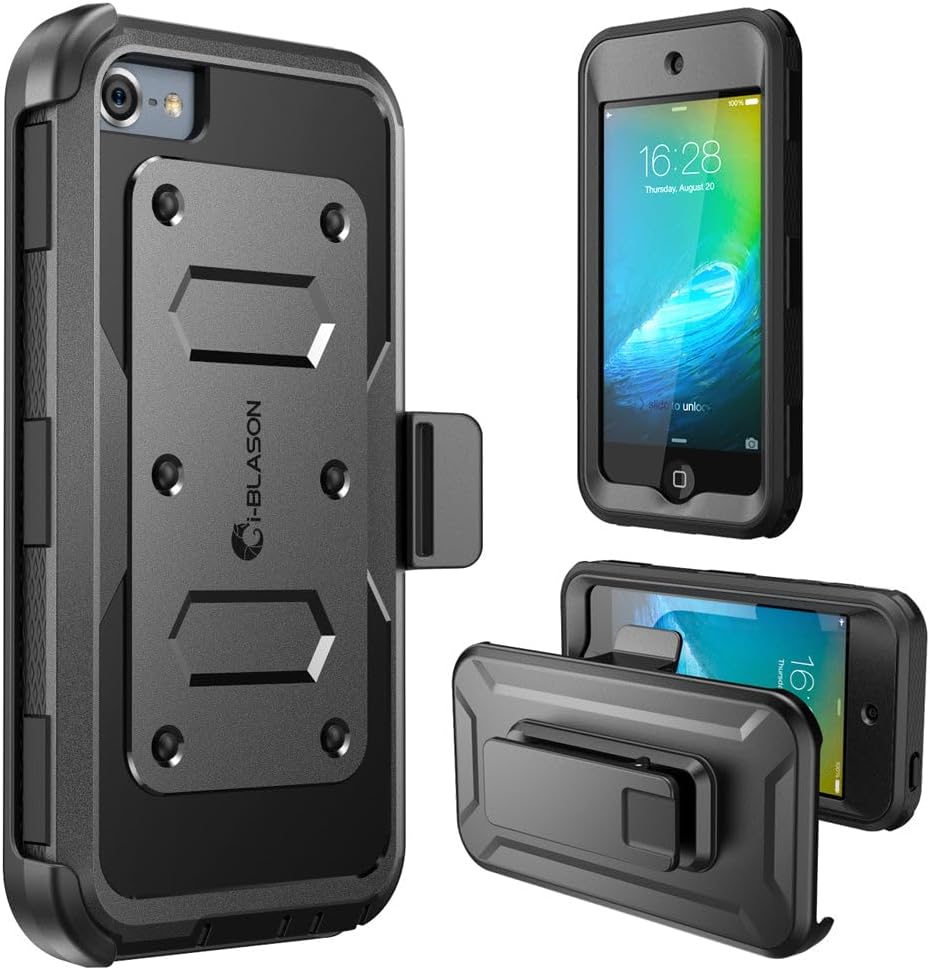
The i-Blason Belt Clip Case is built for iPod Touch generations 5, 6, and 7 and carries a 4.6 rating. Its defining feature is the belt attachment, which offers a convenient way to keep the device accessible without holding it in a pocket.
We may earn a commission when you buy through this link, at no additional cost to you.
Protection comes from a rigid polycarbonate shell and a flexible TPU inner core. The dotted pattern within the core is designed to improve shock absorption, while a front protective cover incorporates a screen protector for added front coverage.
Precise construction is intended to preserve access to ports and controls. The trade-off is additional bulk and weight from the holster-style arrangement. Owners who value a thin case for slipping into small pockets may find the belt-oriented design less convenient.
This is a strong recommendation for commuters, students, or anyone who prefers keeping an iPod Touch attached to a belt or bag strap. It offers more security than a loose sleeve and more front protection than a conventional back shell.
The belt clip keeps the iPod Touch visible and within easy reach during walks, commutes, or travel. That accessibility is especially useful when the device is used regularly for music or short-form video.
The flexible dotted TPU core sits beneath the hard polycarbonate exterior. Its structure is intended to cushion the device during impacts while the outer shell resists scratches and deformation.
We may earn a commission when you buy through this link, at no additional cost to you.
The ULAK Black Full-Body Case combines a transparent back, protective edges, and two included HD screen protectors. It has a 4.4 rating and supports the iPod Touch 5th, 6th, and 7th generations.
We may earn a commission when you buy through this link, at no additional cost to you.
The clear PC backing allows the device's natural finish to remain visible while the surrounding layers protect the sides and rear. Four bumper corners are designed to augment drop protection, and the two-part structure helps defend against scratches, bumps, fingerprints, and dirt.
The camera opening is positioned above the camera surface, which the manufacturer says helps reduce the chance of scratches when the iPod Touch is placed on a flat surface. Precise cutouts retain access to buttons, controls, and ports, although the screen films must be installed correctly.
This case works well for owners who want the original device finish visible but still want more front and edge coverage than a simple clear shell. It does not offer a kickstand or magnetic mounting system, so its appeal rests on balanced protection and a complete screen-protection package.
The transparent PC panel preserves the look of the iPod Touch while the bumper corners take on many of the direct impacts that occur during accidental drops. It offers visual restraint without sacrificing a protective structure.
Positioning the camera opening above the device surface helps keep the lens from touching a table or other flat surface. That detail can reduce abrasion on the camera area during storage.
We may earn a commission when you buy through this link, at no additional cost to you.
The OtterBox Defender Glacier Case is the most substantial protective option in this guide, with a 4.6 rating. Its three-layer design is intended to withstand scratches, drops, bumps, and shock while supporting iPod Touch generations 5, 6, and 7.
We may earn a commission when you buy through this link, at no additional cost to you.
A built-in screen protector supplies front coverage, and port covers help keep dust and debris away from openings. These features make the case appealing for users who place the iPod Touch in bags, storage compartments, or environments where small particles are likely to accumulate.
The principal compromise is size. A three-layer shell with front and port protection naturally creates more bulk than a slim silicone or clear hybrid case. The product information also warns that port covers may not work with certain 30-pin-to-Lightning adapters or non-Apple-branded USB-to-Lightning cables.
Choose the Defender when comprehensive protection is more important than a minimal profile. It is well suited to owners of older iPod Touch hardware who want a durable case-and-screen-protector combination and are willing to check their cable and accessory compatibility.
The Defender is built around a robust outer structure rather than a minimal bumper. It is intended for owners who want stronger coverage for the edges, back, front, and openings of the device.
Protective covers help reduce the entry of dust and debris. Buyers should confirm that their charging cables and adapters fit before relying on the case for regular charging or syncing.
We may earn a commission when you buy through this link, at no additional cost to you.
The kwmobile Light Pink Silicone Case is a simple TPU cover for the 6th and 7th generation iPod Touch. Its 4.6 rating reflects a straightforward design focused on shock absorption, a soft surface, and accessible controls.
We may earn a commission when you buy through this link, at no additional cost to you.
The flexible silicone material is described as absorbing shocks and resisting falls, scratches, bumps, and other everyday impacts. Its non-slip coating improves the chances of keeping the iPod Touch secure in a hand, pocket, or bag.
Precise cutouts provide access to buttons, ports, and the camera. Compared with full-body or belt-clip designs, the case is straightforward and visually unobtrusive. Its main limitation is that it is not listed for generation 5, so buyers must verify their exact model before ordering.
This is a good choice for owners of generations 6 or 7 who prefer a soft case over a rigid hybrid shell. It is especially suitable for light handling, listening, and everyday portability where a kickstand, magnetic attachment, or integrated screen film is not required.
The TPU silicone coating feels soft under the fingers and is designed to resist slipping. That makes the case a straightforward choice for prolonged handheld use.
A flexible wraparound construction guards against bumps and scratches without the larger footprint of a belt holster, front-cover case, or magnetic mounting system.
We may earn a commission when you buy through this link, at no additional cost to you.
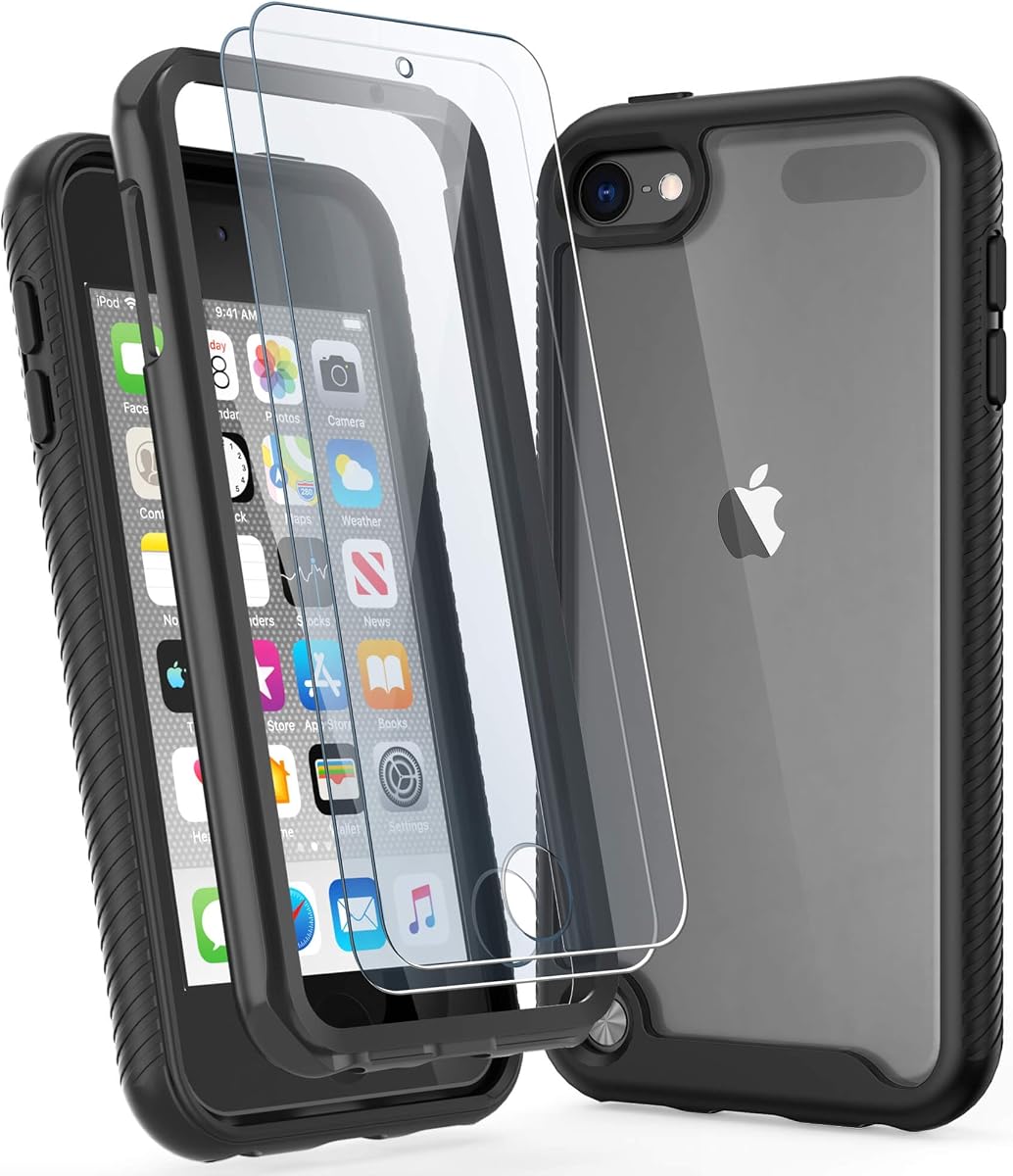
The IDweel Blue Gray Case is a hybrid shell for iPod Touch generations 5, 6, and 7 with a 4.6 customer rating. It combines a hard PC outer back with a flexible TPU bumper and includes two screen protectors as part of the package.
We may earn a commission when you buy through this link, at no additional cost to you.
The flexible bumper offers grip while the hard panel protects the rear from scratches. Slightly raised TPU at the front and back helps protect the device when it is resting on a surface, and the four reinforced corners provide additional coverage around likely impact points.
Cutouts are positioned to keep buttons and functional ports accessible, which is useful during normal listening or viewing. The hybrid structure is more substantial than a plain silicone sleeve, and buyers should follow the protector installation instructions carefully to avoid dust or bubbles.
The IDweel is a well-rounded recommendation for owners who want a case, rear protection, and two screen films in one purchase. It supports all three relevant generations, but those shopping for the smallest possible cover or a specific mounting feature should choose a more specialized option.
The hard outer shell preserves shape and protects the back, while the soft inner bumper adds grip and helps absorb impacts. Together they create a more versatile everyday cover than a single-material sleeve.
Two screen protectors complete the set, providing a convenient way to protect the display as well as the body. Correct alignment and careful installation help minimize bubbles and ensure reliable touch response.
We may earn a commission when you buy through this link, at no additional cost to you.
The best iPod Touch Case balances device compatibility, impact protection, grip, front-screen coverage, and the accessories a user actually needs. Because generations 5, 6, and 7 are frequently grouped together, it is important to verify that the physical controls, camera area, charging port, and overall shape match the model being protected.
Compatibility is the first consideration because a case shaped for the wrong generation can leave controls inaccessible or fit incorrectly. Most products in this guide support generations 5, 6, and 7, while the kwmobile option is listed specifically for generations 6 and 7. Check the model information printed on the device and compare it with the listing before ordering.
A broad compatibility claim is convenient, but it should not replace a physical fit check. Pay particular attention to the charging connection, front controls, camera opening, and speaker locations because these areas can differ across otherwise similar iPod Touch releases.
Protection can range from a soft wraparound cover to a three-layer shell with a front protector and covered ports. Flexible TPU and silicone cases are useful for basic scratch and bump resistance, while hybrid PC-and-TPU designs add structure. The OtterBox Defender is the most comprehensive option in this group, whereas the ULAK clear case is designed for a slimmer protective profile.
Think about where the iPod Touch spends most of its time and how likely it is to be dropped. Use a robust case for travel, children, frequent commuting, or storage in crowded bags. A slimmer shell may be more appropriate for careful everyday handling.
Cases with a front cover or included screen protectors reduce the need to handle a separate film. The ULAK red, IDYStar sky blue, ULAK black, IDweel, and OtterBox Defender options include or incorporate screen protection, while other back-shell designs leave that choice to the owner.
Integrated front protection can make installation more convenient, but it may add thickness and make the original display less visible. Check whether the film is touch-sensitive and whether the package includes two pieces before deciding which arrangement offers the best fit for your routine.
TPU provides flexible cushioning and useful grip, while PC is rigid and helps preserve a case's shape. Many products combine both: a soft TPU bumper surrounds the device while a harder PC back protects the rear. A silicone-only design feels simple and flexible but may provide less structural rigidity than a hybrid construction.
Material choice should reflect grip and durability priorities. TPU is helpful when the device is frequently handled, while a PC-backed design may look and feel more structured. Transparent panels preserve the original finish, whereas black, blue, gray, pink, or red options offer a different visual character.
A kickstand is valuable for video, movies, typing, or gaming because it supports the device at an angle and can reduce the need to hold it continuously. The ULAK red model uses a rotating metal stand, while the ZoneFoker cover uses a sliding built-in kickstand. Their stability, angle, and added thickness should be considered together.
Magnetic mounting serves a different purpose. The Hensinple case has a magnetic ring intended to work with magnetic charging, wallets, stands, desk chargers, and car mounts. This can streamline a fixed setup, but it requires compatible accessories and generally creates a bulkier profile than a simple sleeve.
Precise cutouts and responsive button areas allow a case to remain on during daily use. Look for access to the charging connection, speakers, camera, headphones connection, and front controls, particularly if you use a large cable or specialized adapter. The OtterBox Defender's covered ports require extra attention because some 30-pin-to-Lightning adapters and non-Apple cables may not fit.
A case should protect the device without creating a new obstacle. If you charge frequently, favor an open or generously sized charging opening over a fully covered port. If you use the device while walking or exercising, button and port access become even more important.
The case that works best should be comfortable to hold and appropriate for your storage situation. Soft silicone improves grip, clear PC preserves the original appearance, and hybrid shells balance both qualities. Belt-clip designs offer secure attachment but add a pronounced profile, while slim hybrid cases slide more easily into narrow pockets.
Choose based on where you carry the iPod Touch. A slim clear or silicone shell works well for a pocket and media player use. A rugged hybrid or magnetic cover suits bags, travel, and mounted use. A belt holster makes sense when quick access and security are more important than minimal size.
Before installing the case, confirm the iPod Touch generation and compare its camera, controls, and charging opening with the product listing. Clean the device with a soft, lint-free cloth, then remove dust or lint from the case and screen protectors. Follow the included installation directions so the shell, film, and any front cover seat correctly without trapping particles.
Put the iPod Touch into the case without forcing it. The flexible TPU edges should stretch slightly around the controls, while the rigid PC sections should remain aligned. If a protector is included, align one edge first and smooth it across the display using a clean card or the supplied tool. Avoid pressing hard around the home button or front opening.
Check buttons, speakers, camera access, and the charging connection after installation. Remove the case if a cable cannot seat fully or if any control feels obstructed. Periodically clean the exterior with a lightly dampened microfiber cloth, allow it to dry completely, and avoid leaving the device or case in direct heat. Remove the shell if moisture or residue enters the openings.
No. Most of the listed cases support the 5th, 6th, and 7th generations, while the kwmobile silicone case is specifically listed for the 6th and 7th generations. The OtterBox listing expressly excludes earlier generations. Always identify the exact model before purchasing and compare the physical openings with the device.
A well-fitted case should leave the charging connection accessible, but designs with covered ports can restrict certain cables. The OtterBox Defender may not accommodate every 30-pin-to-Lightning adapter or non-Apple USB-to-Lightning cable. Check the connector dimensions and make sure the cable can seat fully without excessive force.
No. Several options include two screen protectors or incorporate a protective front layer, while other cases protect only the body and leave the display uncovered. The ULAK red, IDYStar sky blue, ULAK black, and IDweel models include separate films, and the Hensinple and OtterBox Defender models feature integrated front protection.
The ULAK Red Kickstand Case and ZoneFoker Rugged Case both include built-in stands. The ULAK model uses a rotating metal kickstand, whereas the ZoneFoker has a sliding stand. Both can support hands-free viewing, although the ULAK offers more stand orientations and the ZoneFoker emphasizes a rugged exterior.
The Hensinple case includes a built-in magnetic ring intended for magnetic wireless charging and compatible MagSafe-style accessories. The product information specifically mentions car mounts, wallets, stands, desk chargers, and bedside chargers. You still need compatible accessories, and the added magnetic system should be considered when assessing bulk.
The ULAK Clear Anti-Yellowing Case and the ULAK Black Full-Body Case use transparent sections that allow the iPod Touch finish to remain visible. The clear model is especially slim, while the black model adds more full-body coverage and includes screen protectors. Neither disappears entirely, but both preserve more of the original appearance than an opaque design.
Neither material is universally better. Hard PC provides structure and scratch resistance, while soft TPU or silicone offers cushioning and grip. Hybrid cases combine both approaches and are often practical for daily use, while a pure silicone cover is simpler and lighter for careful handling.
Wipe the clear surfaces with a soft microfiber cloth and avoid harsh solvents or abrasive materials. Keep the case away from oily or sticky substances, and remove it before washing or vigorous activities. Transparent finishes may show fingerprints and superficial marks even when their structural protection remains intact.
The ULAK Clear Anti-Yellowing Case stands out for its slim transparent profile and strong customer rating, making it the most versatile option for everyday ownership. The IDweel Blue Gray Case offers a complete basic protection set with a hybrid shell and two screen protectors, while the OtterBox Defender Glacier Case is the strongest choice for comprehensive protection.
Prioritize exact generation compatibility first, then match the construction to your habits. Choose clear or slim materials for pocket use, rugged hybrid construction for frequent travel, a kickstand for extended viewing, or magnetic attachment for a dedicated mounting setup. Included screen protection adds convenience, while silicone offers a soft grip and full-body designs provide broader coverage.
Product specifications, compatibility details, colors, included accessories, and availability can change over time. Review the current listing before buying, particularly if you rely on a particular charging cable, magnetic accessory, belt clip, or screen protector. Confirm that every feature aligns with how you actually use your iPod Touch.