
pdobq Switch Dock
4.2Editor score
Broad multi-device compatibility
Compact travel-friendly design
HDMI and USB connectivity
Compare the best Nintendo Switch replacement dock options for compatibility, video output, charging, portability, ports, and included accessories today.
A Nintendo Switch replacement dock can restore television connectivity, provide a second charging base, or make travel gaming more convenient. The right model should match your console, deliver dependable video output, include the cables you need, and remain compact enough for your setup. Compatibility and included accessories matter as much as headline specifications.
We compared all ten products in the list by examining supported Nintendo systems, HDMI output, charging behavior, port selection, portability, safety features, and what arrived in the box. The roundup covers dedicated docks, compact adapters, the official dock set, and one repair-oriented charging-port component that serves a different purpose.
Each review explains the strongest reasons to consider the product, along with compatibility limits, missing accessories, and other practical trade-offs. The three highlighted picks represent the most balanced options for value, features, and official hardware, while prices and availability can change at any time.
4.2Editor score

4.3Editor score

4.2Editor score
This side-by-side comparison highlights the differences that matter most: console compatibility, maximum video mode, power requirements, port availability, portability, and whether essential cables or chargers are included.


This 3-in-1 TV Dock Station is a convenient replacement for original Nintendo Switch and Switch OLED owners who want a complete television setup without assembling one from separate accessories. Its 4.0 rating reflects a practical package centered on 1080p 60Hz output, console charging, and a generous selection of USB connections.
We may earn a commission when you buy through this link, at no additional cost to you.
The most useful feature is the combination of essentials. It includes an original IC module, an AC charger, and a high-speed HDMI cable, so a buyer can potentially connect a console to a television and begin using the dock without separately sourcing the basic video and power components. Its 39W power delivery system supports charging while the console remains connected for play.
Connectivity is more useful than that found on many minimal replacement docks. The unit provides one USB 3.0 port and two USB 2.0 ports, making it possible to attach accessories such as a controller, keyboard, mouse, or external storage. Its non-slip base and integrated cable channels also help keep the console stable and the television area organized.
The trade-off is that the dock is limited to the original Switch and Switch OLED and is explicitly not compatible with Switch 2. It also lacks a built-in Ethernet connection, so it cannot provide the wired network option found on some other docks. Even so, the included power and HDMI accessories, useful port selection, charging capability, and safety protections make it a strong all-in-one choice for compatible systems.
Including the AC charger and high-speed HDMI cable removes the most common cause of an incomplete dock purchase. The 39W charging system also allows the console to remain powered during longer television sessions.
One USB 3.0 port and two USB 2.0 ports expand peripheral options, while the non-slip base and cable channels help maintain a stable, organized setup. The lack of Ethernet is the principal feature limitation.
We may earn a commission when you buy through this link, at no additional cost to you.
The SIWIQU TV Dock Station is a small replacement dock for Nintendo Switch and Switch OLED consoles. It earns a 4.1 rating by combining a familiar dock layout with a one-touch control, charging support, and an unusually portable 109 g weight. It is especially relevant for buyers who value a simple television base more than a broad collection of ports.
We may earn a commission when you buy through this link, at no additional cost to you.
A button on the rear changes the console between Tabletop Mode and TV Output Mode, making it easy to move from television play to a closer screen view. The charging stand can power the console while it is in either mode. Its built-in chip is described as providing short-circuit, over-power, recovery, and overheating protection.
Physical design receives careful attention. A spring-buffered guide notch helps reduce the force applied to the console port, while an anti-skid pad helps keep the dock from sliding. The red-and-blue styling reflects the familiar Nintendo Switch color scheme, and the dimensions of approximately 7.5 by 2.3 by 1.3 inches make the unit substantially easier to pack than the official dock.
Buyers must account for several boundaries. Only the docking station is included, so an appropriate charger and HDMI cable must already be available. The console must be removed from a protective case, and the product does not work with Switch 2. For travelers who already own the necessary cables, it offers a neat balance of portability, simple operation, and charging convenience.
At 109 g and with a slim rectangular profile, the SIWIQU dock is easy to carry between home, a friend's television, or a hotel room. Its lightweight construction is a clear advantage over maintaining a larger permanent dock.
The rear TV/Tabletop Mode button offers quick changes without navigating console settings. The spring-buffered guide notch also helps care for the charging connection during repeated docking.
We may earn a commission when you buy through this link, at no additional cost to you.
The pdobq Switch Dock is a compact TV adapter that places the original Switch, Switch OLED, and Switch 2 among its supported systems, with additional compatibility for devices such as the Steam Deck. Its 4.2 rating and multi-device approach make it one of the most versatile entries in this roundup, even though it does not replace every function of a full-size Nintendo dock.
We may earn a commission when you buy through this link, at no additional cost to you.
The device offers HDMI 2.0 output, a USB 3.0 port, and USB-C power input. For the Switch family, the practical video mode is 1080p at 60Hz, while the product description also discusses 4K 60Hz output for compatible USB-C devices such as a suitably equipped Steam Deck and television.
Setup follows a defined sequence. The user connects a compatible PD wall charger, plugs an HDMI cable into the adapter, changes the television to the correct input, and then connects the USB-C output to the console. The manufacturer suggests allowing a short startup interval before the television picture appears.
This is a travel adapter rather than a self-contained dock package. It does not include the wall charger, HDMI cable, or official Nintendo power adapter, and the consumer still needs a suitable power source. Its advantages are compact dimensions, broad device reach, and useful port access. It is a compelling option for anyone who wants one small TV adapter for several compatible USB-C devices.
Support for multiple Switch models, Steam Deck, and other compatible USB-C equipment makes the adapter more useful than a model restricted to one console generation. Verify DisplayPort Alternate Mode before expecting another device to work.
Its small body is easy to place beside a television or pack in a bag. The 1080p 60Hz mode is appropriate for Nintendo Switch, while stronger 4K claims depend on the connected source device, television, and cable.
We may earn a commission when you buy through this link, at no additional cost to you.
This TV Dock Station is designed as a straightforward replacement for the dock supplied with the original Nintendo Switch system. It has a 4.0 rating and a focused proposition: supply another functioning television base without requiring the buyer to assemble a charger, HDMI cable, and dock from separate sources.
We may earn a commission when you buy through this link, at no additional cost to you.
The package includes the dock, a charger, and an HDMI cable. An upgraded IC module is incorporated into the unit, and the overall function is described as equivalent to the original dock. That makes the product most attractive to owners who want a second base in another room or who need a spare for the original console.
Its primary strength is the completeness of the set. Rather than being merely a plastic connector with a few ports, it arrives with the basic equipment needed to link an original Switch to a television and keep it powered during play. The straightforward design also makes it easier for a buyer to move the console between home and a secondary television.
Compatibility is the major limitation. The dock does not support the newer Switch 2, and the available information focuses on the original Nintendo Switch rather than the OLED version. Its feature listing is also less detailed than that of some competitors. Still, for an original Switch owner seeking a ready-to-use replacement set, the included charger and cable make this a convenient option.
Keeping another dock at a second television avoids moving one base and its connected cables each time. The included accessories also make the package easier to deploy in a new room.
The upgraded IC module provides the core television and charging functions expected from a replacement dock. Buyers with a Switch OLED or Switch 2 should not assume compatibility based on the broader product category.
We may earn a commission when you buy through this link, at no additional cost to you.
The Nintendo of America Nintendo Switch Dock Set is the official option for owners who prioritize known compatibility and a complete package over third-party alternatives. It carries a 4.2 rating and includes the dock, AC adapter, and HDMI cable, creating a straightforward setup for the Nintendo Switch system.
We may earn a commission when you buy through this link, at no additional cost to you.
Official hardware offers a clear advantage for buyers who want the original television docking experience without navigating the compatibility statements attached to many aftermarket products. The familiar design provides a place to rest and charge the console while connecting it to a television, and the supplied cables remove the need to assemble the basic connection kit separately.
The set is not a universal answer for every Nintendo device in the family. Its listed compatibility is with the Nintendo Switch system, and it does not extend the function of a Switch 2 dock or guarantee support for newer console hardware. Nor does the supplied information identify a built-in Ethernet connection.
Despite those limits, this is the safest recommendation for a compatible original Switch owner who values an official accessory and expects a recognized design rather than an evolving third-party product. It is also a logical choice when a second dock is needed for another television. The complete bundle and straightforward installation make it particularly useful for new owners building a first stationary setup.
Using an official accessory avoids uncertainty about signal conversion, port arrangement, and console fit. The familiar layout is designed to support the Nintendo Switch system directly.
The AC adapter and HDMI cable are included, giving buyers the essential components for a television setup. The result is a lower-friction alternative to sourcing each accessory independently.
We may earn a commission when you buy through this link, at no additional cost to you.
This Switch 2 TV Dock Station is intended exclusively for the newer Switch 2 console. It has a 4.2 rating, a three-port layout, and support for 4K 60Hz or 1080p 60Hz video, making it more relevant to a current-generation owner than docks built exclusively for the original Switch.
We may earn a commission when you buy through this link, at no additional cost to you.
Type-C handles power, HDMI 2.0 handles television or monitor output, and a USB 3.0 port expands peripheral connectivity. The dock supports charging while playing and can accommodate external controller connections. Its video claims are tailored to the Switch 2, including stable 4K 60Hz operation and 1080p output.
Safety features include over-voltage, over-current, and short-circuit protection, backed by upgraded chip technology. Those protections are useful in a stationary setup because the dock continuously handles power and video signals while the console is running.
The exclusive compatibility is both its strength and its weakness. This is not a universal dock for the original Switch, Switch OLED, or Switch Lite. Buyers who own only older hardware should examine those products directly, while a Switch 2 owner can benefit from a dock purpose-built around the new console's Type-C arrangement and output capabilities.
The combination of HDMI 2.0 and advertised 4K 60Hz support differentiates this dock from original Switch-focused replacements. A compatible television and suitable signal cable remain part of achieving the desired output.
Type-C power input supports charging during play, while USB 3.0 gives external controllers another connection option. Over-voltage, over-current, and short-circuit protections strengthen the package.
We may earn a commission when you buy through this link, at no additional cost to you.
The RuntoGOL TV Dock is a compact replacement for the official Nintendo Switch dock that is designed to work with the original Switch and Switch OLED. Its 4.2 rating is supported by a useful combination of a small footprint, charging support, three USB connections, and included video and power cables.
We may earn a commission when you buy through this link, at no additional cost to you.
The body measures approximately 6.8 by 2.5 by 1.5 inches, making it easy to carry in a bag or pocket. A one-touch control switches between television and handheld-oriented console modes, while the angled stand is designed to provide a comfortable tabletop view and reduce the chance of the screen being scratched.
Connectivity is unusually generous for a portable dock. It offers one HDMI output, one USB-C power port, one USB 3.0 port, and two USB 2.0 ports. The package includes an HDMI cable and a Type-C cable, reducing the need for separate accessory purchases. Ventilation openings are also incorporated to help address heat buildup.
Although the product uses 4K-oriented language in its naming, Nintendo Switch output is practically limited to 1080p. The instructions also call for the original Nintendo power adapter when charging during play. These limitations do not undermine its core value, but they are important for buyers whose priorities are maximum Nintendo resolution or a completely self-contained charging package.
The small enclosure fits more ports than a minimalist travel adapter, including USB 3.0 and two USB 2.0 connections. That balance makes it useful at home as well as on the road.
The tilted stand supports tabletop viewing, while cooling holes and the included Type-C cable complement charging during play. The original Nintendo power adapter is still needed for proper console charging.
We may earn a commission when you buy through this link, at no additional cost to you.
The AHGEIIY Switch 2 Dock combines a 4.3 rating with an unusually broad feature set and a body weighing only about 39 g. It is designed as a portable television adapter for Switch 2 and Switch 2 OLED while also supporting the original Switch and Switch OLED, provided the connected device supports the required USB-C functions.
We may earn a commission when you buy through this link, at no additional cost to you.
Its 4K 60Hz HDMI capability, 100W Power Delivery input, and USB 3.0 port make it function like more than a simple console-shaped adapter. It can also serve as a Type-C hub for compatible Mac, MacBook, iPad Pro, Steam Deck, and other devices that support DisplayPort Alternate Mode.
Power delivery reaches 100W, which is particularly useful when connecting a higher-power USB-C computer. The recommendation is to use the original Switch charger or another source rated above 39W for compatible Nintendo systems. The setup guidance advises connecting the power source before the HDMI cable to avoid a black screen during startup.
The package does not include a wall charger, HDMI cable, or USB-C charging cable. It also does not support Switch Lite. Importantly, 4K output applies only where the source device and connected hardware permit it; the original Switch is limited to 1080p by the console itself. Even with those caveats, the strong rating, broad compatibility, 100W charging, and exceptional portability make this a compelling all-purpose dock.
The USB 3.0 port and 100W Power Delivery input add value beyond television docking. For non-Nintendo devices, the dock can act as a compact Type-C hub when the source supports DisplayPort Alternate Mode.
A weight of approximately 39 g makes the adapter easy to carry in a pocket or computer bag. Its 4K 60Hz capability benefits newer supported devices, while original Switch systems remain limited to 1080p.
We may earn a commission when you buy through this link, at no additional cost to you.
The KEKUCULL TV Docking Station is a compact third-party alternative for the original Nintendo Switch and Switch OLED. Its 4.2 rating reflects a useful mix of television output, three USB interfaces, charging support, and a body that weighs 95 g and measures approximately 6.7 by 2.5 by 1.6 inches.
We may earn a commission when you buy through this link, at no additional cost to you.
Video output supports 1080p and 720p modes, while the rear button lets the user select TV mode after connecting the dock to a television and charger. The angled stand creates a more comfortable viewing position in handheld mode and is designed to reduce the risk of screen contact that can occur with some official docking arrangements.
The product description mentions 4K output in a broader context, but Nintendo Switch television output is normally 1080p. More importantly, the package does not include the power adapter or HDMI cable. The original Nintendo 15V 2.6A charger is specifically recommended, and the console's protective case must be removed before docking.
Those omissions make this less convenient for a first-time setup than the all-in-one products, but they do not reduce the value for someone who already owns the necessary cables. The dock supports charging in television or handheld mode and includes short-circuit, overcharge, recovery, and overheating protections. Its compact size and three-port layout make it a practical choice for original Switch and OLED owners.
The tilted design supports a closer, more comfortable tabletop view and is intended to reduce screen-scratching concerns. A non-slip base helps keep the console stable during use.
The dock can charge the console in television or handheld mode while offering three USB interfaces for controllers and other peripherals. A compatible original-style charger and HDMI cable must be supplied separately.
We may earn a commission when you buy through this link, at no additional cost to you.
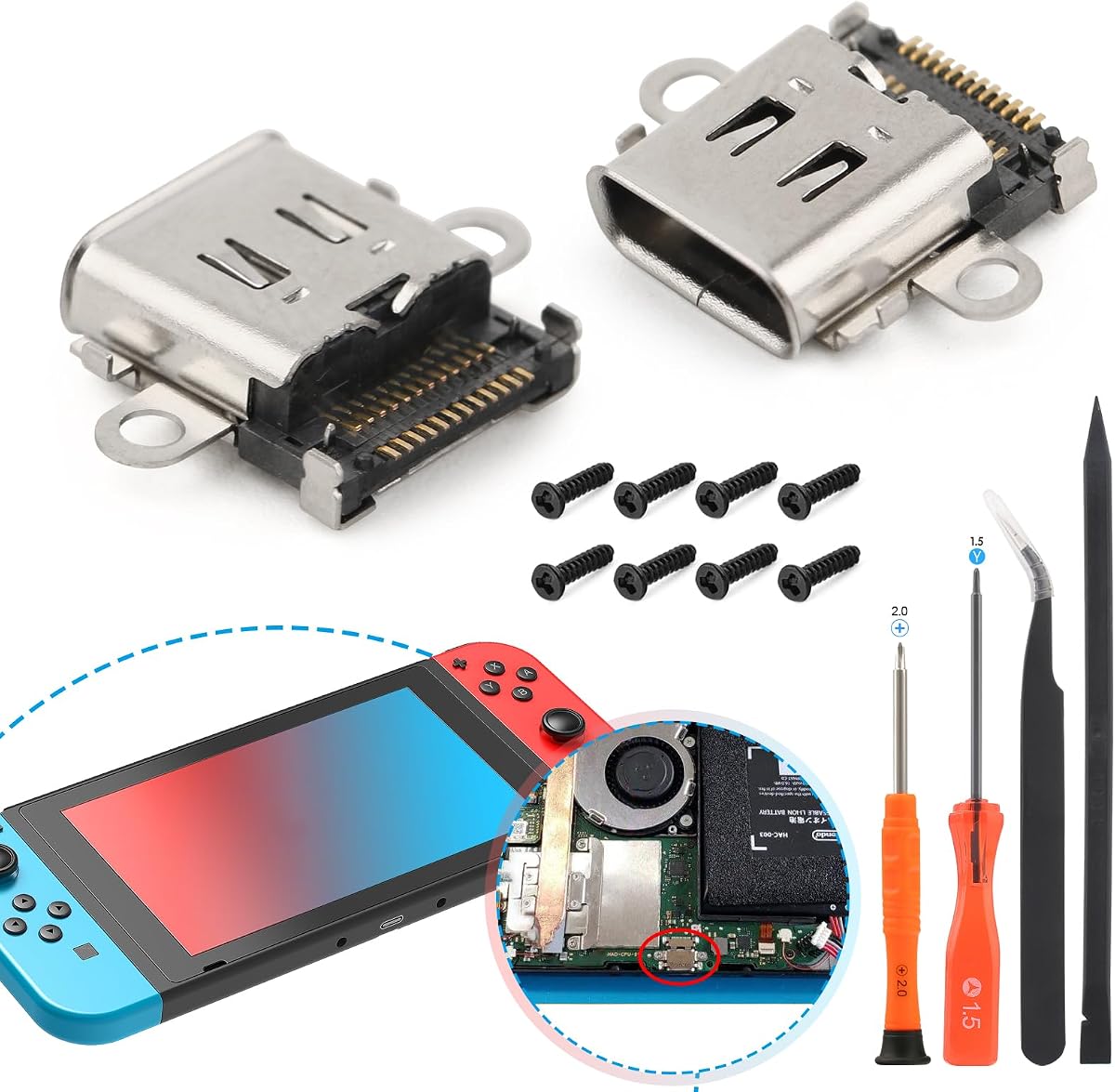
This two-pack charging-port replacement kit addresses a narrower problem than the other products in the roundup. Instead of supplying a television dock, it is intended to replace a damaged or unreliable USB-C charging port on the original Nintendo Switch console. It carries a 4.1 rating and includes two port boards, screws, and repair tools.
We may earn a commission when you buy through this link, at no additional cost to you.
The repair may be appropriate when the console charging port will not charge, feels insensitive, has become loose, or is physically damaged. The replacement boards are described as accurately produced to restore the dimensions and function of the original port, and the supplied information states that they passed double quality-control checks before shipment.
Installation is considerably more demanding than connecting a dock. The console must be disassembled, and the replacement process involves soldering. The kit includes eight back-cover screws across two sets and a set of tools intended to make the work more convenient, but the manufacturer advises buyers without installation experience to use a professional repair service.
Compatibility is narrow. The kit is for the original Nintendo Switch charging port and is not designed for Switch Lite or Switch OLED. It is also not a substitute for a working dock if the goal is television output. Its value lies in potentially restoring charging on a compatible console whose original port has failed.
The replacement boards target common charging-port problems such as failure to charge, poor sensitivity, looseness, and physical damage. A successful repair can restore the console's original charging connection.
Disassembly and soldering are required, so experience matters. The included screws and tools help, but professional installation is the sensible choice for anyone uncomfortable with console repair work.
We may earn a commission when you buy through this link, at no additional cost to you.
The best replacement dock depends first on console generation, then on power, video, portability, ports, and included accessories. Comparing those requirements before shopping prevents a convenient-looking adapter from becoming an incomplete or incompatible setup.
Console compatibility is the first filter because the docks in this category are not interchangeable. Some support only the original Switch, while others are designed for the Switch OLED, Switch 2, or Switch 2 OLED. The Switch Lite has different requirements and is explicitly excluded by at least one compact model in this roundup. Do not rely on a broad phrase such as Nintendo-compatible without checking the exact model list. A dock built for a proprietary or differently arranged connector may not physically fit, may not provide the expected video mode, or may not deliver sufficient power.
A television dock should ideally support charging while the console is connected for play, but power requirements differ between products. Some include a 39W charger or offer integrated 39W power delivery. Others require the original Nintendo 15V 2.6A adapter, recommend a source above 39W, or advertise USB-C Power Delivery up to 100W. The wattage figure alone does not guarantee full compatibility; the connector, voltage protocol, and console requirements all matter. A compact adapter that needs a separate charger is more flexible for travel, but it is less convenient at home.
Video specifications are easy to misread because a dock may support several output standards across different source devices. The original Switch and Switch OLED generally use 1080p television output, while some products advertise 4K 60Hz for a Switch 2 or another compatible USB-C device. The television, source device, and HDMI cable must all support the desired resolution and refresh rate. A dock can have HDMI 2.0 and still be limited to 1080p when paired with an original Switch. Look for clear language about which console receives which output mode.
Ports determine what accessories can be connected while the console is docked. One USB 3.0 port and two USB 2.0 ports cover common needs such as external controllers, a keyboard, a mouse, or storage, while a more compact adapter may offer only one USB port. Ethernet is particularly useful for online play, stable downloads, and local multiplayer, yet several docks in this roundup do not provide it. Decide which accessories matter before selecting a minimal adapter based solely on size.
A dock listed as a three-in-one set may include the charging adapter and HDMI cable, while compact adapters and bare docks often exclude them. The distinction affects both convenience and total ownership needs. If you already own a reliable Nintendo power adapter and a suitable HDMI cable, a lighter bundle can be entirely practical. If you are building a new television setup, an included charger and cable reduce the chance of incompatible accessories. Always verify whether the product list includes a wall charger, console power adapter, HDMI cable, and USB-C cable.
A compact replacement dock is valuable when the console travels or when the official dock occupies unnecessary space. The smallest adapters in this roundup weigh about 39 g, while other portable options weigh 95 g or 109 g. Smaller does not always mean better, because additional ports and stronger power delivery can add useful capability. Look for a stable base, a comfortable viewing angle, an anti-skid surface, and a connector that does not place excessive strain on the console.
Long television sessions create sustained heat and continuous power flow, so protection and ventilation deserve attention. Features advertised across the roundup include thermal monitoring, over-current, over-voltage, overcharge, short-circuit, recovery, and overheating protection. Cooling holes can also help reduce heat buildup around the console. These features are reassuring, but buyers should still use a stable surface, avoid covering the dock, and follow the product's power requirements.
A one-touch button between TV and handheld or tabletop modes can make daily use less cumbersome. The button position, connector fit, and spring-buffered guide notch affect how often and how easily the console can be moved. A dock that is too tight may stress the port, while one that is too loose may display poor contact. Screen angle, cable management, and the stability of the base also influence whether a setup remains comfortable after a long session.
Begin by identifying the console model and reading the dock's compatibility instructions. Confirm that the required charger and HDMI cable are available, remove any protective console case if the manufacturer says it is incompatible, and place the dock on a stable, ventilated surface. For a travel adapter, connect the external power source first, then attach the console's USB-C connector and the HDMI cable.
After making the connections, select the correct television input and use the dock's display or mode button if one is provided. Allow a few seconds for the television to recognize the signal. If the picture is absent, verify the input selection, cable seating, power connection, and console output setting. Reconnecting the power before the video cable is a useful step for the AHGEIIY model, and some products recommend waiting between five and eight seconds after insertion.
For care, keep the dock away from moisture and excessive heat, and avoid stacking items on top of it. Do not force a connector into the console or use a power source that does not meet the stated requirements. Clean the dock with a dry or lightly damp cloth, avoid liquid entering its ports, and inspect cables for damage. When traveling, pack the dock in a separate pocket or sleeve where it will not be crushed or pulled by connected cables.
The best choice depends on whether you prioritize a complete package, compact travel, or extra ports. The 3-in-1 TV Dock Station and official Nintendo Dock Set include key power and HDMI accessories, while the AHGEIIY and pdobq adapters are lighter and more flexible. Confirm original Switch compatibility and ensure the required charger and cables are available.
No. Several docks explicitly exclude Switch 2, while the AHGEIIY Switch 2 Dock and the Switch 2 TV Dock are designed for the newer system. The pdobq adapter also claims support for Switch 1, Switch 2, and Switch OLED. Always check the exact model list because a product naming a console generation may still exclude a related variant.
It depends on both the dock and the console. The AHGEIIY and Switch 2-focused docks advertise 4K 60Hz capability, but the original Switch and Switch OLED are generally limited to 1080p. For another USB-C source, the device must support DisplayPort Alternate Mode, and the television and HDMI cable must also support the chosen resolution and refresh rate.
Some docks include a suitable charger, while others require the original 15V 2.6A Nintendo adapter or a compatible source above 39W. The SIWIQU and KEKUCULL docks do not include cables or a charger, and the compact AHGEIIY dock excludes those items as well. Follow the stated power requirements because a higher-wattage USB-C port does not automatically guarantee proper console charging.
Not always. The SIWIQU dock specifically states that the console does not fit when enclosed in a protective case, while the KEKUCULL product instructs buyers to remove the case before use. Other docks may accommodate a slim case, but the connector clearance varies. Removing the case is the safest approach when fit or charging behavior is uncertain.
Check that the television is set to the HDMI input connected to the dock, confirm the console is awake, and inspect every cable for full seating. Verify that external power is connected to the dock and allow several seconds for recognition. If the screen remains blank, disconnect the HDMI cable, reconnect power first, and then reattach the video connection as recommended by the product instructions.
A compatible dock can be moved between televisions, which is one reason to own a portable model. It can also serve multiple compatible USB-C devices when the required video and power standards are supported. The dock itself does not eliminate the need for suitable cables, a television, and a power source at each location.
No. The two-pack charging-port kit is a repair component for a damaged original Switch console port, not a television dock. It requires disassembly and soldering and does not provide HDMI output or the physical support of a docking station. Choose it only when the goal is to restore charging on a compatible original Switch.
The AHGEIIY Switch 2 Dock stands out as the strongest feature-focused option, offering broad console support, 4K 60Hz capability, USB 3.0, 100W Power Delivery, and exceptional portability. The official Nintendo Switch Dock Set remains the premium choice for buyers who value manufacturer-designed hardware and a complete bundle, while the pdobq Switch Dock is a versatile budget-oriented adapter for multiple compatible devices.
Prioritize exact console compatibility first, followed by the power arrangement, required video mode, and whether you need Ethernet or several USB ports. Include accessories in the comparison only after deciding what you already own. A compact adapter can be ideal for travel, whereas a stationary dock with a charger, HDMI cable, multiple ports, and a stable base may be more convenient at home.
Finally, check the current product listing and price before purchasing because availability, bundles, and specifications can change. Review the compatibility notes, included components, power requirements, and console instructions one last time to ensure the replacement dock meets your television setup rather than merely matching the product category.