
Mount-It! POS Kiosk Floor Stand
2.0Editor score
Fifteen to twenty-two-inch displays
Thirty-degree customer-facing tilt
Integrated printer bay
Payment terminal mounting bracket
A Self Service Kiosk Pos Stand turns a compatible tablet or commercial display into an organized customer-service station for ordering, check-in, payments, registration, or information. The strongest options combine a stable base, protected device mounting, convenient touch positioning, and space for essential peripherals such as receipt printers and card readers.
We compared these ten stands based on the supplied specifications, customer ratings, supported devices, mounting patterns, adjustability, security features, storage areas, and ease of installation. The list covers floor stands, monitor-based kiosks, and compact iPad mounts for restaurants, retail stores, offices, healthcare locations, hotels, and other high-traffic environments.
Each pick highlights a different way to build a self-service station, from a full monitor stand with printer storage to a portable iPad mount. Ratings reflect the supplied product information, while current configurations, included accessories, device compatibility, and retailer listings should be verified before ordering.
2.0Editor score

5.0Editor score

4.4Editor score
As an Amazon Associate we earn from qualifying purchases.
The comparison below highlights each stand's device compatibility, mounting method, security, adjustability, and peripheral support to help buyers identify the most appropriate Self Service Kiosk Pos Stand for their installation.



The CTA Self Service Kiosk Stand White is a monitor-based station designed for digital signage, self-service applications, restaurant ordering, retail check-in, and business information displays. Its supplied rating is 2.5, but the specification sheet reveals a purposeful design with support for displays up to 33 pounds, VESA 75mm and 100mm mounting patterns, and separate areas for a compact computer and receipt printer.
We may earn a commission when you buy through this link, at no additional cost to you.
Its main advantage is integrated equipment organization. The mini-CPU holder accommodates a device no larger than 7.2 inches wide by 7 inches deep by 1.45 inches high, while the universal printer compartment accepts a receipt printer up to 6 inches high, 6 inches wide, and 7.6 inches deep. The heavy-duty metal base includes pre-drilled holes, making the stand suitable for installations where accidental movement would be disruptive.
The low rating is the main reason this product does not receive an award badge, and it should prompt buyers to examine recent customer feedback, assembly details, and the exact dimensions of their equipment. The stated 33-pound capacity applies to the display, while CPU and printer compatibility depends on separate size limits. The product is a bare stand, so the screen, computer, printer, and other peripherals must be supplied separately.
This white CTA model is most appropriate for businesses building a full monitor-based kiosk around a VESA-compatible screen and a compact CPU. It is particularly attractive where a clean white appearance fits a restaurant, retail, or hospitality environment and where permanent anchoring is preferred. Buyers should verify every accessory dimension and the intended monitor's mounting pattern before ordering.
Keeping the computer and receipt printer within the stand's footprint produces a cleaner customer-facing station. It also reduces the number of separate supports competing for counter space, making the unit more practical for permanent service points.
The pre-drilled base holes are valuable in busy locations because they allow the heavy-duty metal structure to be secured in place. Buyers should confirm that the installation surface and anchoring method are appropriate for their environment.
We may earn a commission when you buy through this link, at no additional cost to you.
The CTA Self Service Kiosk Stand Black shares the functional design of the white version while providing a darker finish suited to restaurants, retail environments, hospitality settings, and modern self-service installations. It has a supplied rating of 2.5 and is built for a VESA-compatible display weighing as much as 33 pounds.
We may earn a commission when you buy through this link, at no additional cost to you.
This stand offers a useful combination of screen support and peripheral management. Both 75mm and 100mm VESA patterns are supported, reducing the chance of an incompatibility when choosing a compatible commercial monitor. A dedicated mini-CPU bay and universal receipt-printer holder keep core components close to the display and preserve a more unified countertop or floor-station appearance.
Its limitations are substantial enough to require attention. The low customer rating may reflect installation, component-fit, or durability concerns that cannot be evaluated conclusively from the supplied specifications. The CPU and printer spaces have exact size limits, and the stand is not a complete POS system. Buyers also need compatible display hardware and should review current feedback about fit and assembly.
Choose the black CTA model when its appearance coordinates with a darker commercial interior and the basic station design meets your needs. It is best suited to buyers who want CPU and printer compartments, flexible VESA support, and optional permanent mounting. Confirm the equipment dimensions, mounting pattern, and anchoring plan before installation.
The black finish can blend more naturally with dark counters, display bezels, and POS equipment. That visual coordination is valuable in customer-facing spaces where the kiosk should look intentional rather than like a collection of unrelated supports.
The CPU and printer compartments distinguish this model from basic tablet cradles. They support a more complete service point without requiring separate shelving beside the display.
We may earn a commission when you buy through this link, at no additional cost to you.
The BSF-2205 VESA Kiosk Stand is the strongest overall choice for a permanent, monitor-based self-service station. It carries a supplied rating of 5.0 and combines all-metal construction, support for 21.5-inch and 27-inch displays, a 100 x 100mm VESA pattern, an integrated printer compartment, and a built-in card-reader bracket.
We may earn a commission when you buy through this link, at no additional cost to you.
Its substantial dimensions measure 21.3 by 14.6 by 53.7 inches, and the stated weight of 28.7 kilograms communicates the seriousness of the structure. The integrated printer space measures 5.9 by 5.9 by 7.87 inches, allowing a compatible receipt printer to remain within the stand rather than on a separate counter. The card-reader bracket simplifies the placement of a payment terminal near the screen.
The trade-off is size and weight. This is a fixed floor installation rather than a portable or compact stand, and the monitor and printer are not included. The VESA pattern is limited to 100 x 100mm, so a screen using another mount will not be compatible. Buyers should also measure their printer and plan the floor footprint before selecting the unit.
Overall, the BSF-2205 is ideal for restaurants, retail stores, corporate reception areas, and other locations seeking a stable, professional monitor kiosk with integrated POS accessories. The 5.0 supplied rating, heavy metal design, printer bay, and payment bracket make it the most complete conventional monitor stand in this guide.
The all-metal frame and high stated weight are particularly appropriate for a public-facing terminal that may be touched repeatedly. A permanent kiosk benefits from a substantial base because even a small amount of wobble can make touch interaction feel less precise.
Placing the card reader and receipt printer close to the display creates a coherent transaction path. This is especially useful for self-service ordering because customers can pay, receive confirmation, and collect printed output without moving between separate fixtures.
We may earn a commission when you buy through this link, at no additional cost to you.
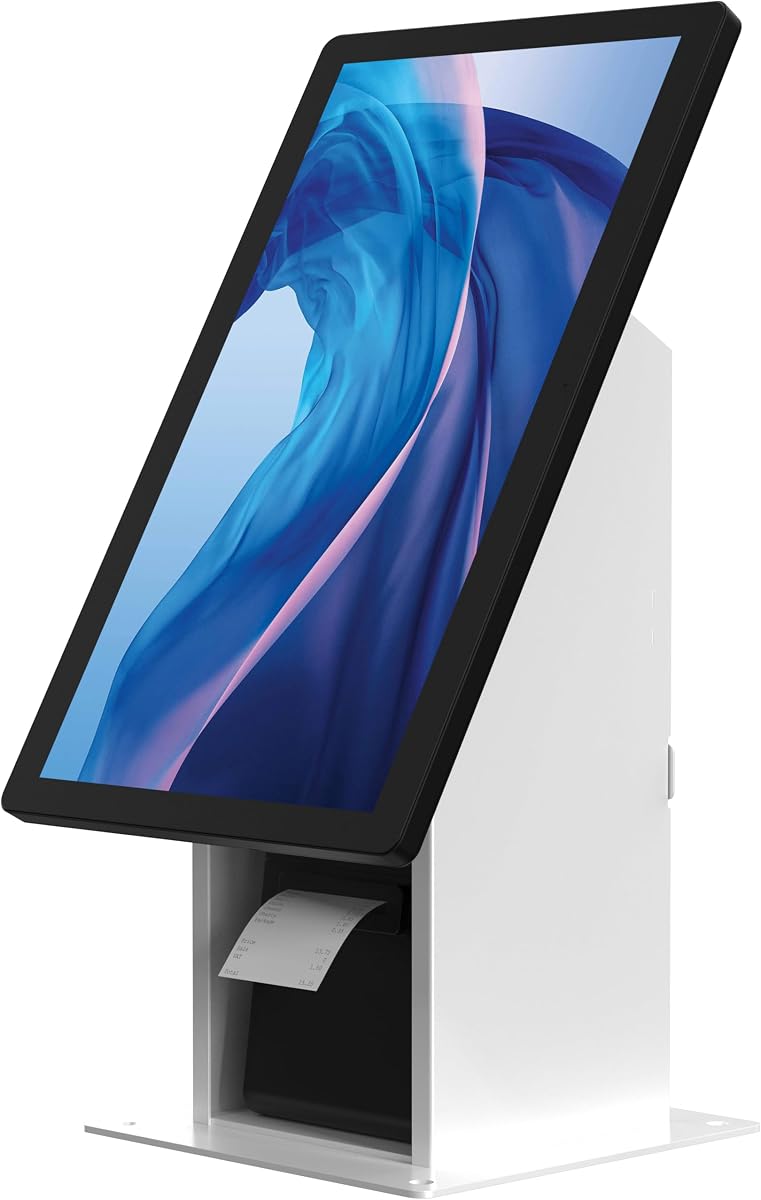
The Mount-It! Commercial POS Stand is designed for standard commercial monitors used in POS and check-in installations. Its supplied rating is 2.0, but the supplied feature list is unusually specific, identifying compatible printer models, supported screen sizes, mounting patterns, a fixed 30-degree tilt, and a payment-terminal bracket.
We may earn a commission when you buy through this link, at no additional cost to you.
The stand accommodates 15-inch to 22-inch screens weighing no more than 22 pounds and supports both 75 x 75mm and 100 x 100mm VESA patterns. Its integrated printer bay measures 5.5 inches wide by 5.5 inches deep by 8.6 inches high and is listed as compatible with Epson TM-M30II and T20III, Star mC-Print2 and TSP143IIIU, Bixolon SRP-350III, Citizen CT-S310II, and SNBC BTP-U80 models.
Even with those details, the 2.0 rating warrants caution. A fixed 30-degree angle is useful for touch interaction but does not offer the same positioning freedom as an adjustable or swivel mount. The screen-size limit excludes larger commercial displays, and the stand does not include a monitor, printer, or payment terminal. Current customer feedback should be reviewed carefully before committing to a permanent deployment.
The product remains a compelling option for a compact, customer-facing monitor kiosk where printer integration and a consistent touch angle matter. It may suit restaurants, hotel lobbies, corporate receptions, healthcare check-in desks, and retail shops. The recommended approach is to verify the exact display and printer model before purchase, then use the included installation guide and assembly video for setup.
The 30-degree angle places the screen within a comfortable viewing zone for standing customers. A fixed angle can also reduce the chance of accidental movement after deployment, which is useful in a controlled commercial location.
Listing several supported receipt-printer models gives buyers a more useful starting point than a vague universal claim. The terminal bracket also creates a defined location for supported Ingenico, Verifone, and PAX devices.
We may earn a commission when you buy through this link, at no additional cost to you.
The Square Stand for iPad is a compact alternative for businesses that want a focused self-service ordering and payment station rather than a full monitor kiosk. It has a supplied rating of 4.4 and is built around an iPad, Square Kiosk software, and a compatible payment-reader setup.
We may earn a commission when you buy through this link, at no additional cost to you.
Its strongest feature is a streamlined checkout experience. Guiding LED lights help direct customers through the process, while the payment-focused design can shorten interactions and reduce the need for staff assistance. Because the setup can be installed on a wall, countertop, or any 100 x 100mm VESA-compatible mount, it offers flexibility for restaurants and other compact ordering environments.
The main limitation is its specialized nature. The stand is intended to work with the Square Kiosk app and compatible Square payment hardware, so it is less appropriate for businesses committed to another point-of-sale platform. An iPad is also not included, and some payment configurations may require an additional reader. The stand should not be understood as a universal solution for every tablet-based POS system.
This is the best budget-oriented pick for a small restaurant, café, or counter where a straightforward ordering kiosk is the goal. It is particularly attractive when the business already uses or intends to use Square. Buyers should confirm iPad size, application requirements, payment hardware, and the desired mounting location before ordering.
The built-in guidance lights help customers understand where attention should go during checkout. That visual direction can be valuable in a busy restaurant, especially during periods when several guests attempt to order at the same time.
Wall, counter, and VESA-compatible mounting options make it easier to fit the station into an existing service flow. The included hardware and step-by-step instructions also reduce reliance on specialist installation support.
We may earn a commission when you buy through this link, at no additional cost to you.
The AboveTEK Adjustable iPad Stand is a flexible floor-mounted security stand for iPad, iPad Pro, and iPad Air deployments. Its supplied rating is 4.2, and it supports tablets from 9.7 inches to 13 inches with a maximum thickness of 0.4 inches.
We may earn a commission when you buy through this link, at no additional cost to you.
Height adjustment from 29.5 to 45.3 inches lets operators adapt the station for different users and locations. The holder also rotates through 360 degrees and tilts from negative 90 to positive 90 degrees, making it suitable for portrait ordering, landscape menus, presentations, or customer-facing information. A heavy-duty steel construction and 5.3-pound base are intended to provide stability in high-traffic spaces.
Security is handled through an anti-theft screw operated by a specialized wrench. This is a more discreet alternative to a keyed enclosure, although the need for the specific tool means staff must keep it accessible when maintenance is required. Hidden cable management helps maintain a tidy appearance, but the supplied information does not indicate that the base can be permanently anchored.
Choose this model for retailers, offices, public areas, and businesses that need a versatile tablet station with broad positioning control. It is a good fit when a locked enclosure is unnecessary but basic tamper resistance is important. Confirm the tablet's dimensions and assess the floor location before selecting it for a high-interaction environment.
The 15.8-inch height range allows a single station to serve multiple user types and business needs. Combined with broad rotation and tilt, it can change from an upright ordering interface to a landscape information display without replacing the base.
A security screw can deter casual removal while preserving a cleaner appearance than a fully enclosed keyed frame. The included specialty wrench should be stored responsibly so authorized staff can service the station.
We may earn a commission when you buy through this link, at no additional cost to you.
The AboveTEK Locking iPad Stand emphasizes device security with a robust aluminum and steel enclosure, a lock-and-key mechanism, and an attachable base with screw holes. It carries a supplied rating of 4.4 and is positioned for restaurants, retail businesses, trade shows, and other public environments where unauthorized tablet access is a concern.
We may earn a commission when you buy through this link, at no additional cost to you.
The stated compatibility list includes the 9.7-inch iPad, 10.2-inch iPad, 9.7-inch iPad Air, 9.7-inch iPad Air 2, 10.5-inch iPad Air, 9.7-inch iPad Pro, and 10.5-inch iPad Pro. Height adjusts from 27.6 to 45.3 inches, while the holder tilts from negative 90 to positive 90 degrees to improve viewing angles and interaction comfort.
Stability and installation options are also strong. The frame is described as 0.16 inches thick, weighing 3 kilograms, with an anti-slip pad and screw holes that can be used for added security. The locking mechanism is more tamper-resistant than a simple screw, but key control becomes a practical responsibility for the business. The listed model support should be checked carefully against the exact tablet being used.
This stand is a good recommendation for operators with a compatible legacy iPad who value theft deterrence and a polished fixed installation. It can be especially useful in unattended or semi-attended public areas. The buyer should verify the device model, available space, anchoring surface, and internal access before finalizing the purchase.
The keyed enclosure protects both the device and its on-screen checkout process. In a public location where a tablet could otherwise be removed or tampered with, this level of physical control is a meaningful advantage.
Screw holes in the attachable base allow the stand to be secured for longer-term use. An anti-slip pad supports stability, while the additional anchoring option helps reduce movement in busy spaces.
We may earn a commission when you buy through this link, at no additional cost to you.
The Mount-It! Universal Tablet Floor Stand is a keyed security kiosk designed for tablets from 7.9 inches to 11 inches, with the supplied dimensions supporting widths from 5.3 to 7.8 inches and heights from 7.7 to 10.6 inches. It has a supplied rating of 4.2 and is intended for retail, healthcare check-in, hospitality, offices, and trade-show environments.
We may earn a commission when you buy through this link, at no additional cost to you.
Its open clamp design distinguishes it from fully enclosed tablet kiosks. Because the tablet's audio jack remains accessible, the stand can support Square, PayPal Here, and other audio-jack card readers. The keyed locking clamp, adjustable pole, 360-degree rotation, and plus-or-minus 90-degree tilt create a flexible checkout or information station that can switch between portrait and landscape orientations.
The product has several important limitations. It requires a bare tablet and is not compatible with cases, which means buyers must assess their existing protective setup carefully. It also occupies more space than a compact mount, and its listed steel construction weighs 9.4 pounds with a 13.6 by 17.4-inch triangular base. While permanent floor bolting is possible, freestanding use is also possible.
This Mount-It! model is a versatile choice for businesses using several generations of iPad, iPad Air, iPad Pro, and Samsung Galaxy Tab devices. It is particularly valuable when audio-jack payment hardware must remain connected. Confirm the tablet's exact dimensions, remove or account for any case, and choose the installation method based on customer traffic before purchase.
Keeping the audio jack available lets a business retain compatible card-reader equipment without changing its payment workflow. This open-clamp approach offers more flexibility than many enclosed tablet kiosks.
The stand can be adjusted without removing the tablet, allowing staff to move between checkout, registration, menu, and presentation layouts. This makes one physical station useful for several operational roles.
We may earn a commission when you buy through this link, at no additional cost to you.
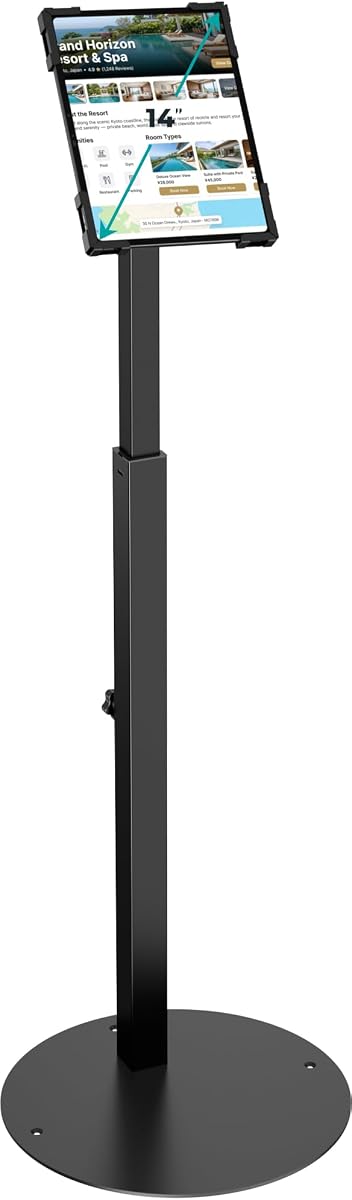
The Anti-Theft iPad Floor Stand is a large-tablet POS stand with a supplied rating of 4.4. It accommodates most 10-inch to 14-inch devices up to 0.39 inches thick, including examples such as the 12.9-inch and 11-inch iPad Pro, Galaxy Tab, and Surface Pro.
We may earn a commission when you buy through this link, at no additional cost to you.
Its 13.78-inch solid-steel base includes pre-drilled holes for optional floor mounting. This gives the business a choice between freestanding placement and a more permanent commercial installation. The pole height adjusts from 29.53 to 45.28 inches, while the mount rotates 360 degrees and tilts through 180 degrees for customer-facing checkout and other interactive uses.
The primary security mechanism uses specialized security screws and a custom wrench rather than a conventional key. That approach deters casual removal and keeps the device enclosed without a prominent lock, but authorized staff need the tool for maintenance. Cable routing through the hollow center pole and out the base creates a cleaner installation and reduces exposed cords around customer traffic areas.
This product is well suited to hotels, retail stores, public exhibitions, and corporate check-in points using a larger tablet. Its strongest combination of features is the heavy base, broad device support, generous articulation, and hidden cable path. Buyers should confirm the exact tablet dimensions, decide whether floor bolting is permitted, and keep the custom wrench accessible.
A larger display and heavier tablet can place greater demands on a stand than a compact iPad cradle. The broad solid-steel base and optional anchoring holes provide a stronger foundation for these high-interaction installations.
Routing power and data cables through the pole keeps connections less visible and away from the main walking area. This supports a tidier presentation and reduces the chance of a loose cable being disturbed.
We may earn a commission when you buy through this link, at no additional cost to you.
The CTA Anti-Theft POS Station combines a lock-and-key tablet enclosure with dedicated space for a credit-card reader and receipt printer. It carries a supplied rating of 5.0 and is designed for point-of-sale locations, retail stores, warehouses, and other environments where a complete transaction station is needed.
We may earn a commission when you buy through this link, at no additional cost to you.
The card-reader holder is width adjustable, allowing it to accommodate readers of different sizes. A dedicated front area provides space for a receipt printer, while a side-mounted metal bracket can be attached on either the left or right according to workflow preferences. The enclosure's keyed mechanism helps prevent unauthorized removal and protects the tablet during operation.
Compatibility is one of the most important checks. The listed devices include iPad A16, 11-inch iPad Air M3 and M2, 11-inch iPad Pro M4, 10th-generation iPad, 5th-generation iPad Air, several earlier iPad Pro, iPad, and iPad Air versions, numerous Galaxy Tab models, Surface Go, Surface Go 3, and Galaxy Tab S5E. Because the list is extensive, buyers should compare exact model dimensions and confirm the fit rather than relying on a family name alone.
This CTA station is a strong recommendation for a tablet-based checkout that needs both payment and printed-output support in one frame. It suits businesses using one of the listed modern tablets and willing to verify peripheral dimensions. Its 5.0 rating, security system, and all-in-one arrangement make it one of the most functionally complete tablet choices in the guide.
Housing the card reader and printer around the tablet creates a more logical customer journey. It also reduces the need to place payment and output devices on a separate counter beside the mount.
The ability to attach the metal bracket on either side gives the installer more control over the final layout. That is useful when the station must accommodate customer flow, staff access, or a particular printer orientation.
We may earn a commission when you buy through this link, at no additional cost to you.
The right kiosk stand depends on your device, interaction pattern, security requirements, available space, and the peripherals customers need. Review the following factors before choosing a permanent or portable installation.
Choose compatibility based on the actual equipment you already own or intend to buy, not merely the broad device family. Measure width, height, and thickness, then compare those dimensions with the manufacturer's limits.
Prioritize a locking or tamper-resistant mechanism for unattended kiosks, and make sure authorized staff can access the key or specialized tool when maintenance is required.
Use a broad, heavy base for freestanding installations and anchor high-interaction kiosks whenever the site allows. Check that the footprint does not obstruct customer or staff movement.
Choose a fixed angle for a simple standing transaction point, or an adjustable mount when one station must serve multiple screen layouts and user heights.
Treat printer storage and card-reader support as separate compatibility checks. Confirm both device dimensions and the attachment method before selecting a stand.
Permanent anchoring favors security and stability, while portable mounting favors flexibility. Match the installation method to the site's traffic, staffing, and relocation plans.
Favor concealed cable paths and coordinated finishes when appearance and customer safety are priorities. Confirm that ports remain accessible after all components are installed.
Unpack the stand, identify all included hardware, and read the product-specific assembly instructions before attaching a display or tablet. Assemble the base and vertical support on a level surface, then fit the mounting plate without applying excessive force. If the model supports permanent anchoring, mark the pre-drilled holes and use appropriate fasteners for the floor material. Do not mount a heavy station on a temporary counter unless the manufacturer has confirmed that the surface can support it.
Install the device, power supply, card reader, and receipt printer in the order recommended by the manufacturer. Maintain the specified clearance around vents, keep cables away from pinch points, and leave enough room to access charging ports without removing the screen. For adjustable stands, tighten locking mechanisms after setting the final height and angle. Test the reach of every customer-facing control and confirm that the device remains stable when touched at different points.
Perform routine cleaning with a soft, dry or lightly damp cloth and avoid spraying cleaner directly onto the stand or tablet. Check fasteners, base anchors, locking mechanisms, cable paths, and moving joints at regular intervals, particularly in high-traffic locations. Keep the security key or specialty wrench accessible to authorized personnel, and update the kiosk application and payment hardware independently. If the stand begins to wobble, creak, or lose electrical continuity, stop using it until the affected component has been inspected.
A tablet kiosk stand holds a specific tablet size, often with a security clamp or enclosure, while a monitor POS stand uses VESA mounting hardware to support a commercial display. Monitor stands are often larger, heavier, and better suited to built-in printer or CPU storage. Tablet stands are generally more compact and may be easier to relocate or mount on a counter.
It depends on the model and the dimensions of the peripherals. Several stands in this guide include a dedicated payment-terminal bracket, printer bay, or adjustable reader holder. Buyers should compare the stated compartment measurements with the exact printer and reader, and confirm that cables can reach their ports without preventing the display from closing or moving.
It is strongly advisable when the tablet is unattended or accessible to customers. A keyed clamp, locking enclosure, or security screw can deter casual removal and protect payment data. The appropriate level of security also depends on the device's value, the location's traffic, and whether staff can supervise the station.
Check the monitor's specification sheet or look for the VESA mounting dimensions on the rear of the display. Common patterns include 75 x 75mm and 100 x 100mm, but other sizes exist. The stand's supported pattern and maximum display weight must both match the monitor, and the display should be a suitable commercial or interactive model.
Yes, when the stand securely supports the intended tablet or display and the ordering software is configured for customer use. Pay attention to reach, viewing angle, device security, payment-reader access, and printer output. A stand with a fixed customer-facing angle or a 360-degree holder may suit an ordering flow better than a basic storage stand.
Permanent anchoring is useful in busy locations because it reduces movement and makes removal more difficult. It requires compatible hardware, permission from the property owner, and a floor suitable for the installation. A weighted base may be sufficient in a low-traffic or supervised setting, but both freestanding and anchored options should be evaluated for stability.
Not always. Some universal stands explicitly require a bare tablet and cannot accommodate a case, while others are designed to fit devices within specific width, height, and thickness limits. Measure the complete tablet and case together, and check the product description before purchasing.
Use the stand's built-in channel, hollow pole, clips, or internal compartment whenever possible. Secure excess cable away from customer traffic, the tilt mechanism, and any area where it could be pinched. Leave enough slack for adjustment but prevent loops from resting on the floor, where they can become trip hazards.
The BSF-2205 VESA Kiosk Stand is the leading choice for a substantial, permanent monitor installation with printer storage and a card-reader bracket. The Mount-It! Commercial POS Stand is the premium-oriented option for smaller commercial displays that benefit from a fixed touch angle and model-specific peripheral support, while the Square Stand for iPad offers the most approachable compact ordering setup.
For most buyers, the most important priorities are exact device compatibility, stable construction, usable touch geometry, and secure cable and peripheral management. Tablet users should check screen size, case compatibility, and payment-reader access, while monitor buyers should verify VESA pattern, weight capacity, printer dimensions, and the available floor space.
Before ordering, compare the current retailer listing with the product specifications, confirm included hardware and accessories, and review recent customer feedback for the exact model. Device generations, installation requirements, and retailer listings can change, so verifying the latest compatibility details helps prevent costly mismatches.