
Thermal Grizzly TG Scraper
4.8Editor score
Narrow precision scraping tip
Safe acrylic construction
Three scrapers included
Our Delidding Kits guide compares 10 precision repair tools, highlighting compatibility, blade design, material quality, precision, and safe use for technicians
Delidding kits help technicians remove integrated heatspreaders, adhesives, and stubborn thermal compounds without relying on improvised knives or heat. A useful kit should match the target processor or console, control the working edge, and reduce the chance of cutting silicon, package substrates, or nearby board components.
We compared ten delidding and precision-repair kits based on their stated compatibility, construction, blade design, handling, and intended applications. The list includes purpose-built CPU and console tools, a multi-blade electronics repair set, adhesive scrapers, and an iFixit separator for broader repair work.
Each selection reveals which jobs it is best suited to, from removing Intel heatspreaders and PlayStation 3 RSX lids to scraping residue from delicate packages. Product availability, ratings, and pricing can change, so confirm compatibility and current conditions before purchasing.
4.8Editor score

4.5Editor score

4.1Editor score
The table below compares all ten kits by target device, tool type, key construction, and best-fit application, making it easier to identify the right option before ordering.




The Delid Tool V3 is a purpose-built PlayStation 3 delidding instrument that combines a thin cutting blade with three replacement blades. Its 4.6 rating reflects a favorable user response, while its strongest appeal is specialization: the tool is designed around a specific console repair operation rather than being adapted from a general-purpose utility knife. For technicians who regularly service compatible PlayStation 3 systems, that distinction can be more useful than a larger collection of loosely related implements.
We may earn a commission when you buy through this link, at no additional cost to you.
The V3 designation is meaningful because the product information describes a sharper and more flexible blade than earlier versions. A thin, durable edge can help a technician enter the seam between the PlayStation 3 heatspreader and its underlying assembly with greater control. The replaceable blade system also protects long-term usability: if an edge dulls or is accidentally damaged, it can be changed without replacing the entire tool. Including three blades gives the kit a useful supply of replacements for routine maintenance work.
The important trade-off is that this is not a universal delidding kit. It is explicitly compatible with PlayStation 3 hardware and does not offer the interchangeable tips or broad chip-level applications associated with general precision-repair sets. It also does not address the separate problem of loosening sealed display adhesive, although that distinction keeps its purpose clear. For the right console, a purpose-built opener is often easier to position and control than a generic blade.
Choose this product if you repair PlayStation 3 consoles, routinely replace thermal interface material, or want a dedicated blade tool with replacement stock. Confirm the exact console revision and internal layout before use, and inspect the blade before every operation. For users working across many CPU and board types, one of the multi-purpose electronics sets may be the more practical investment.
A dedicated PlayStation 3 opener removes the need to improvise a blade position each time. Its stated compatibility also makes it easier for a repair shop to standardize a tool for a recurring service task.
The included replacement blades help maintain a clean working edge. A fresh edge is especially valuable on adhesive seams, where a dull blade can tear material rather than separate it predictably.
We may earn a commission when you buy through this link, at no additional cost to you.
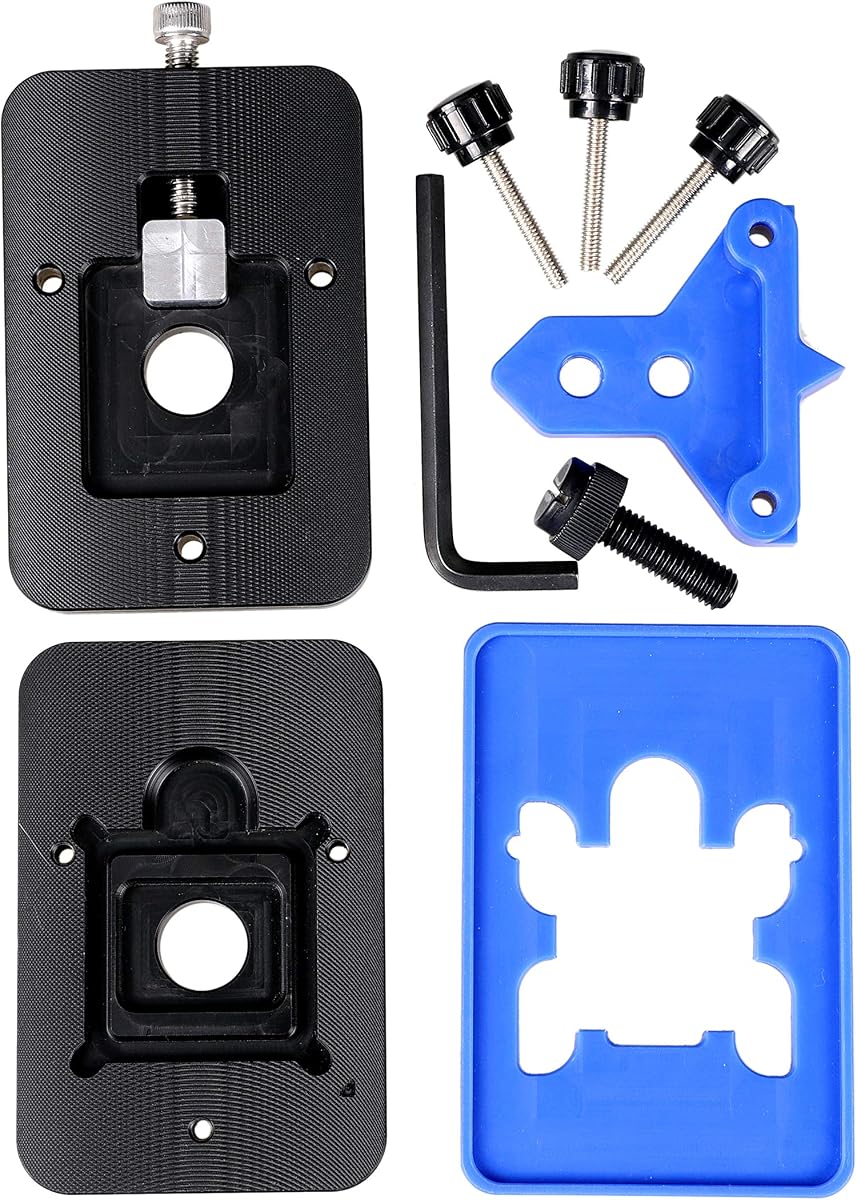
The der8auer Delid-Die-Mate X is a specialized CPU heatspreader removal tool for Intel Skylake-X and Kaby Lake-X processors on socket 2066. Its 4.1 rating places it behind the higher-rated products in the list, but rating alone does not determine suitability: a processor-specific tool with a well-defined mechanical action can be more appropriate for its supported platform than a general-purpose scraper. The product is positioned as an integrated solution rather than a simple hand tool.
We may earn a commission when you buy through this link, at no additional cost to you.
Its aluminum and stainless steel construction gives it a substantial feel, while the anodized black finish suits a professional bench environment. The integrated design is intended to make heatspreader removal more repeatable than improvised methods. For a technician comfortable with direct-die cooling work, the tool can provide a more focused approach than manually working a thin knife around a processor package. The key benefit is repeatable positioning on a compatible high-end Intel platform.
There are meaningful limitations. The product information warns that removing the heatspreader is performed at the user's risk and completely invalidates the manufacturer's guarantee. It also explains that removing an integrated heatspreader lowers the CPU cooler's mounting height, so a cooler with a fixed height may no longer be suitable. Compatibility checking therefore involves both the socket and the eventual cooling solution, not merely the processor label.
This is the premium choice for a technician who confidently works on socket 2066 systems and intends to use direct-die cooling. It is less appropriate for a first-time hobbyist because the procedure carries irreversible risk and requires careful preparation. For a broader collection of Intel platforms, an opener with wider socket support or a CPU-specific tool for a newer generation may be a better fit.
The Delid-Die-Mate X focuses on Skylake-X and Kaby Lake-X processors rather than trying to serve every CPU. That narrow scope lets its integrated mechanism be designed around a known package and mounting environment.
Removing the heatspreader reduces the available cooler mounting height. Before beginning, verify that the selected cooler can be lowered or that a compatible replacement solution will be used.
We may earn a commission when you buy through this link, at no additional cost to you.
The Knife Repair Kit is a general precision tool set for chip removal, adhesive scraping, glue cutting, and circuit-board maintenance. Its 3.6 rating is the lowest numeric score among the rated products, so buyers should evaluate the specifics carefully rather than assume it matches the finish of a dedicated CPU opener. In return, it offers a versatile 0.38-millimeter blade and a construction intended for delicate electronics work.
We may earn a commission when you buy through this link, at no additional cost to you.
SK5 steel is the standout specification because the blades are described as specially quenched and capable of withstanding elevated temperatures without readily losing their cutting performance. The ultra-thin profile can move between chips and baseplates where a standard knife cannot fit. The handle is designed to reduce slipping, an important consideration because even a small lateral movement near a BGA package or motherboard trace can cause expensive damage.
Its versatility is also its main drawback. Unlike a purpose-built delidding tool, this kit does not offer a guided opener or dedicated heatspreader-removal mechanism. The user must control the blade angle and force manually, making experience and a steady bench setup important. The lower rating may reflect the challenges of a general-purpose tool, although customer feedback should not be treated as a controlled test result.
This kit is best for a repair technician who also handles smartphone logic boards, BGA chips, power-supply assemblies, and adhesive residue. It can serve as a useful companion to a dedicated CPU opener rather than replacing that opener. If your work is exclusively console or CPU delidding, a platform-specific tool will usually provide better positioning and predictability.
The narrow profile is useful for separating chips from baseplates, cutting glued strips, and lifting adhesive. That versatility makes the kit useful beyond a single delidding workflow.
The stated heat tolerance of the SK5 blades is relevant in electronics repair environments. A blade that maintains its edge through repeated sessions can reduce interruptions for blade changes.
We may earn a commission when you buy through this link, at no additional cost to you.
The Thermal Grizzly Delid-Die-Mate is a CPU-specific heatspreader removal tool developed by Roman “der8auer” Hartung for 12th- and 13th-generation Intel Core processors. Its 4.5 rating places it among the strongest-rated options in the guide. More importantly, it combines current-platform compatibility with an integrated tool format, making it a focused choice for technicians interested in direct-die cooling on supported processors.
We may earn a commission when you buy through this link, at no additional cost to you.
The tool is made from black and red anodized aluminum, matching the visual identity associated with premium enthusiast hardware. Its mechanical purpose is to remove the heatspreader in a more controlled manner than an improvised knife. Once the lid is removed, the design can support a direct-die cooling approach, which the manufacturer says may reduce CPU temperatures by 10–20 degrees Celsius. That figure is a product claim, not a guarantee, and real results depend on the processor, cooling hardware, workload, and installation quality.
The main constraint is compatibility. The listed support is limited to 12th- and 13th-generation Intel Core chips rather than every processor on the market. Direct-die cooling also introduces complications involving the exposed die, interfacial material, cooler mounting, and insulating components. A user with a Ryzen processor, an older Intel platform, or no plan to install a suitable direct-die cooler will get less value from this specific tool.
For a technician whose work regularly involves supported Intel Core processors, this is one of the most compelling products in the list. It offers a more purposeful experience than a generic knife and a more current platform focus than the socket 2066 der8auer model. For a first delidding attempt, it is best paired with careful research, a stable work surface, and a clear plan for safe reassembly.
Rather than claiming universal processor support, the tool concentrates on 12th- and 13th-generation Intel Core chips. That specificity gives buyers a clear platform target.
An integrated opener can make heatspreader access more repeatable than manual blade work. The resulting direct-die setup must still be assembled with compatible thermal hardware and careful insulation.
We may earn a commission when you buy through this link, at no additional cost to you.
The Thermal Grizzly TG Scraper is a three-pack of acrylic precision tools designed to remove silicone adhesive and indium solder residue from delidded processors. It carries the highest numeric rating in the selection at 4.8, making it a particularly well-regarded option among customers. It is not a delidding opener, however; its job begins after a heatspreader has already been removed.
We may earn a commission when you buy through this link, at no additional cost to you.
The narrow tip is the defining feature. It allows a technician to work close to exposed CPU components while removing old adhesive or residue that could interfere with a clean thermal interface. Acrylic construction is intentionally gentler than metal on delicate surfaces, which can reduce the risk of scratching package edges or nearby components. An ergonomic grip supports control during a task where the blade or tip is held at a very shallow angle.
Its limitations follow directly from its purpose. The TG Scraper will not split an integrated heatspreader, open a console, or replace the mechanical advantage of a dedicated die-mate tool. It also requires light, controlled strokes. Even a material chosen to reduce surface damage can still catch an edge or be pushed against a component if used at an unsuitable angle, so the product should not be treated as indestructible.
The three-pack format makes this an accessible companion for anyone who already owns a delidding opener and wants a dedicated residue-removal implement. It is also a sensible choice for technicians who value minimal surface contact over aggressive residue removal. Buy it as part of a broader repair setup rather than as a standalone solution for removing an entire CPU lid.
Acrylic is suited to careful residue removal because it offers a softer contact surface than steel. It helps limit scratching when the tip is used with light pressure.
The scraper is most valuable after heatspreader removal. Use it to clean the package before applying a new thermal interface or preparing the die for direct-die cooling.
We may earn a commission when you buy through this link, at no additional cost to you.
The EG Starts CPU Delid & Relid Tool is a platform-specific opener for numerous Intel processors associated with LGA 775, LGA 1150, LGA 1151, and LGA 1155. Its 4.6 rating makes it one of the most positively reviewed products in this comparison. It is particularly appealing for technicians or enthusiasts who move among several common Intel platforms and want a tool that can assist with both opening and closing the integrated heatspreader.
We may earn a commission when you buy through this link, at no additional cost to you.
A key advantage over a manual blade is the guided cap-tool format. The tool is designed to lift and reseat the heatspreader using a defined mechanism, which can make the operation more repeatable when the tool is correctly aligned. The product description provides a vital positioning warning: the square aluminum block must remain below the plastic plane, or the CPU board could be damaged. That instruction illustrates why orientation must be checked before force is applied.
The main limitation is that a broad socket list still requires exact model confirmation. Even within a named socket generation, package and heatspreader shapes can vary, and the long list of supported processor names should not be treated as permission to use the tool on anything from that era. The opener also remains a specialized tool rather than a general circuit-board knife or adhesive-scraping set.
This is a strong choice for someone building a repair inventory around older and mainstream Intel platforms. It offers more platform coverage than the current-generation Thermal Grizzly model and a different operating format from the multi-purpose knife sets. Confirm the processor package, study the positioning requirement, and practice the relid action before working on a valuable chip.
Support across LGA 775, 1150, 1151, and 1155 gives the tool relevance to many systems. Exact processor compatibility should still be verified against the product's supported list.
The stated requirement to keep the square aluminum block below the plastic plane is critical. Correct orientation prevents the opener from contacting and potentially damaging the CPU board.
We may earn a commission when you buy through this link, at no additional cost to you.
The QianLi ToolPlus 009 is a 12-in-1 handle metal craft knife set aimed at professional electronics repair. It covers a broad range of tasks, including adhesive removal, chip lifting, pad cleaning, glue cutting, BGA work, PCB maintenance, and smartphone processor refurbishment. Because no customer rating is supplied for this product, its appeal should be judged primarily from its stated features rather than from a numerical rating.
We may earn a commission when you buy through this link, at no additional cost to you.
Interchangeable tips are the core advantage. Fine points support detailed scraping, while angled edges are better suited to cutting or prying. The metal handle is described as balanced, sturdy, and non-slip, providing a stable platform for the small movements required around densely populated boards. This broad utility may appeal to a technician whose work includes iPhone CPU refurbishment, motherboard soldering, and general microsoldering rather than delidding alone.
The trade-off is that a multi-tool is not a guided heatspreader opener. Selecting and positioning a tip by hand introduces more variables than a purpose-built die-mate design. A sharp point that works well for lifting a chip may not be the safest choice around a CPU lid, while an angled blade may be too aggressive for a visible package edge. The product's usefulness therefore depends on choosing the appropriate tip and controlling the angle.
This kit is a strong bench companion for broad microsoldering work. It can also assist with parts of a delidding workflow, such as adhesive cleanup, although it should not be expected to provide the same guided access as a CPU or console-specific tool. Keep the tips organized, inspect them for damage, and store the handle in a way that protects both the fine points and the user.
The interchangeable blade range lets a technician move from fine scraping to angled cutting without changing the entire handle. Matching the tip to the task helps limit unnecessary blade changes.
Applications extending from iPhone processors to motherboard work make this more than a single-purpose delidding accessory. It is best viewed as a precision toolkit for experienced repair work.
We may earn a commission when you buy through this link, at no additional cost to you.
The RSX GPU Delid Tool is designed specifically to remove the integrated heatspreader from the RSX graphics processor found in PlayStation 3 Fat and Slim consoles. No customer rating is listed, but the product's narrowly defined design makes its intended use clear. It is intended for repair procedures involving RSX thermal-paste replacement rather than general CPU delidding.
We may earn a commission when you buy through this link, at no additional cost to you.
Access to the thermal interface material is the tool's practical value. Over time, the original compound beneath the RSX lid can degrade, and replacing it requires separating the heatspreader from the assembly. The tool is shaped to assist with that separation while keeping the working edge away from the main board. That board-awareness distinguishes it from a general craft knife and is especially important in the tightly packed interior of a console.
Compatibility boundaries are significant. The PlayStation 3 Super Slim does not use the same RSX lid and is explicitly excluded. The tool also will not remove the CELL processor's heatspreader, so technicians should not interpret it as a complete console delidding solution. Delidding itself can still damage the chip or board, making careful handling and appropriate repair procedures essential.
Buy this tool if you specifically service the RSX-equipped PlayStation 3 Fat or Slim and routinely replace the GPU thermal interface. It is unnecessary for Super Slim work, unrelated desktop processors, or general board repair. The narrow target makes it less versatile than the multi-use kits, but potentially more reassuring than an improvised blade when the objective is one specific console component.
The tool focuses on the RSX heatspreader and its relationship to the console main board. That targeted geometry can improve control during thermal-paste access.
Super Slim consoles do not use the RSX lid covered by this tool. Purchasing for a Super Slim unit would result in an incompatible product despite the shared console name.
We may earn a commission when you buy through this link, at no additional cost to you.
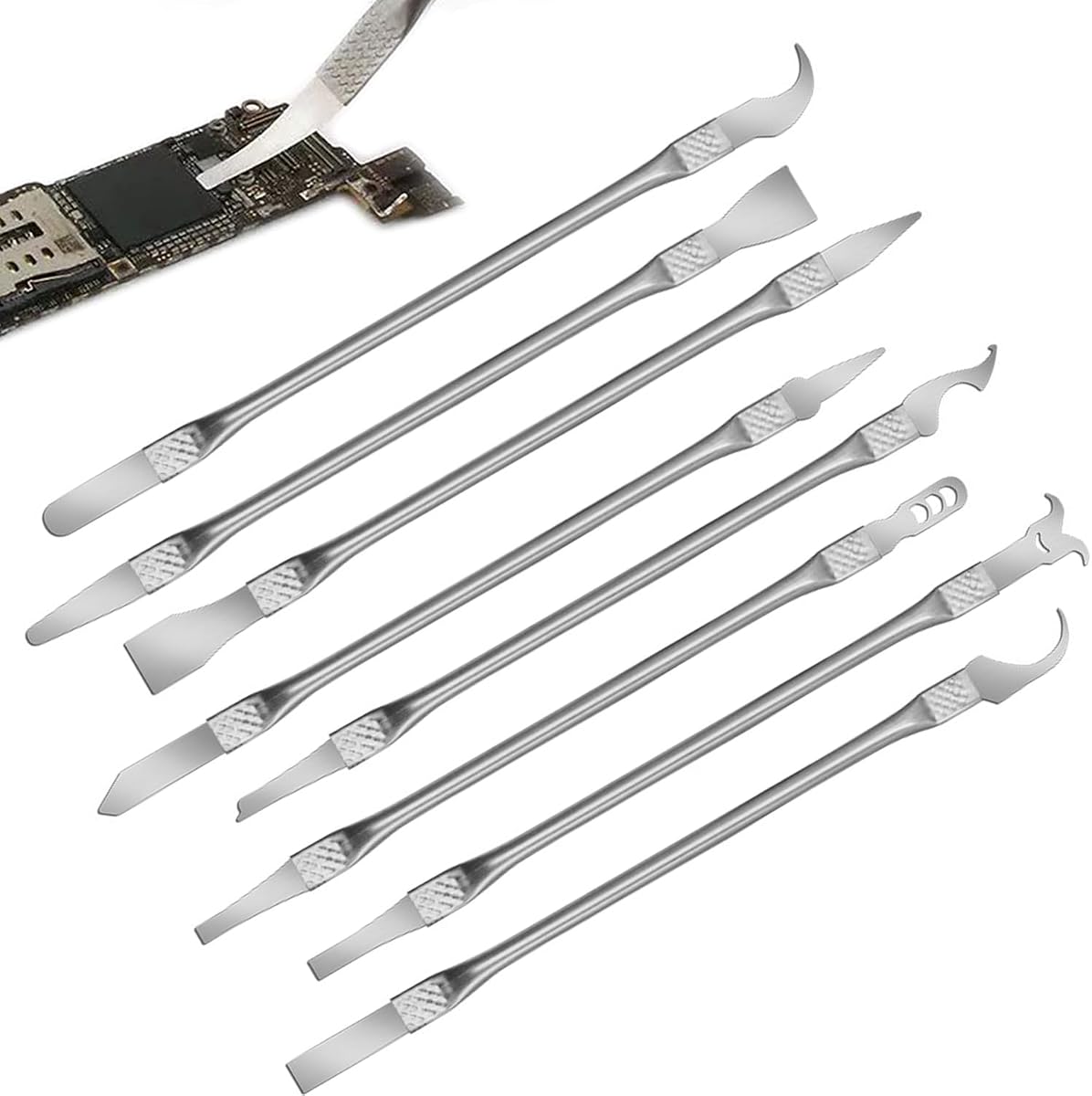
The 8 Piece Multi-Function CPU Removal Tool Set is a compact electronics kit for removing BGA chips, CPUs, and other small components from smartphones and motherboards. Its 4.0 rating reflects moderate customer feedback. The set's defining advantage is convenience: several useful implements are grouped in one package, making it appealing to beginners and technicians who want basic access without purchasing a full professional station.
We may earn a commission when you buy through this link, at no additional cost to you.
The ultra-thin tools are designed to maneuver between chips and board components, while the alloy construction is described as resistant to corrosion and bending. Integrated blade-and-handle designs reduce the need for assembly and can make the tools quicker to deploy. An ergonomic shape also helps during extended repair sessions, where a small, poorly balanced implement can increase fatigue and contribute to a slip.
As with other general repair sets, the main concern is specialization. A thin tool can enter a tight space, but it does not automatically provide the controlled lift or reseating action of a CPU-specific opener. The eight-piece format may also contain smaller components that are easy to lose on a busy bench, so an organizer is worthwhile. Any sharp implement should be stored with its tip fully protected.
This set works best for a new technician building a compact repair kit or for handling small electronics tasks outside a dedicated delidding bench. It can also serve as a backup for scraping and chip-removal jobs. For repeatable CPU heatspreader removal, pair it with a platform-specific opener and a dedicated residue scraper rather than relying on it as the sole solution.
Combining several implements in one set helps new users begin without assembling an extensive collection. It is especially practical for smartphone and motherboard work.
Ready-to-use blade and handle designs can reduce setup time. Keep each component secured during storage so nothing is lost or exposed accidentally.
We may earn a commission when you buy through this link, at no additional cost to you.
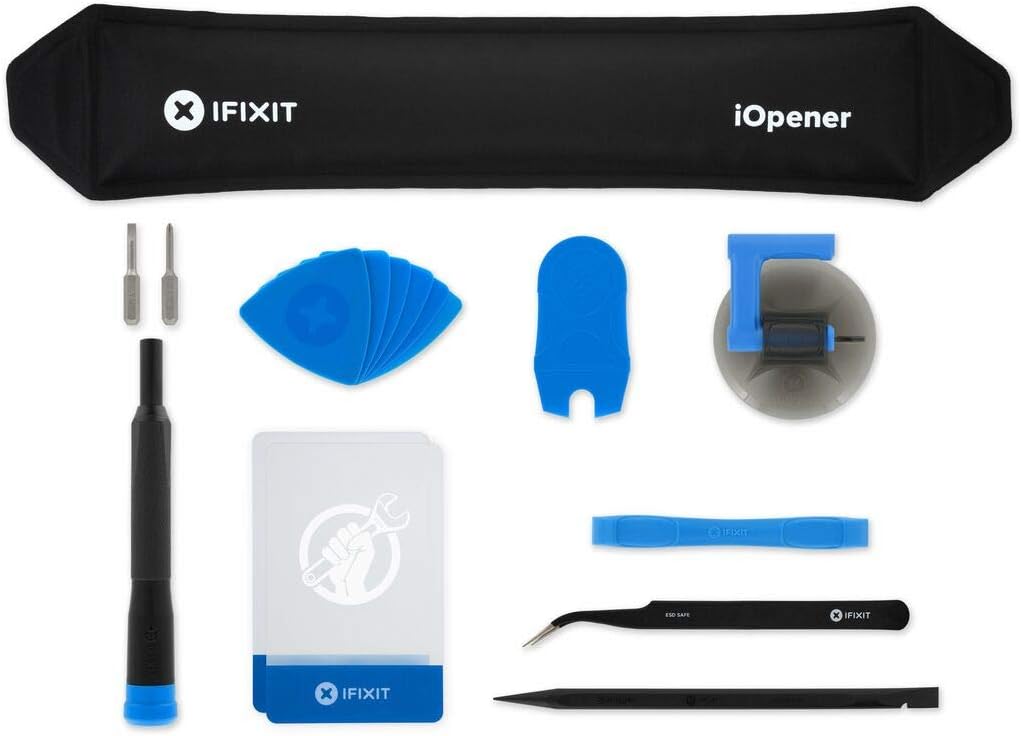
The iFixit iOpener is a heated separator designed to apply heat directly and evenly to electronics screens so adhesive can be loosened. Its 4.5 rating makes it one of the stronger-reviewed selections, although it serves a different purpose from most products in this guide. It is included because successful delidding and repair work often begins with gaining controlled access to a device.
We may earn a commission when you buy through this link, at no additional cost to you.
Even heating is the defining benefit. Rather than concentrating heat on one narrow point, the separator provides a broader warm surface intended to soften display adhesive more uniformly. It is made for iPad but also works with many tablets, iPhones, Android phones, PC laptops, and other electronics. The included fix kit contains tools commonly used alongside the heated opener during disassembly.
This is not a replacement for a CPU heatspreader opener or a precision adhesive scraper. It works on a different scale and is used before precision separation, while its heated surface requires careful handling. Users should follow device-specific instructions, avoid exposing sensitive components to excessive heat, and keep the opener away from moisture and combustible materials.
Choose the iOpener when a repair involves sealed screens or housings and broad adhesive-softening is needed. It is a useful addition to a general electronics kit rather than a dedicated delidding purchase. For CPU or console work, use it only as a preliminary access tool where appropriate, then switch to a platform-specific opener and controlled scraping technique.
Spreading warmth across a wider area can soften adhesive more evenly than a concentrated heat source. This makes the tool useful for larger display and housing seals.
The iOpener helps gain entry into electronics, but it does not remove a CPU lid. It works best before a precision opener or scraper takes over.
We may earn a commission when you buy through this link, at no additional cost to you.
The right delidding kit depends on the device, the material being separated, and the technician's experience. Compatibility, edge control, repeatability, and safe handling should take priority over the number of included pieces.
Begin with the exact processor, socket, chip package, or console model that enters your repair queue. Several products in this guide are deliberately narrow. The Delid Tool V3 is for compatible PlayStation 3 systems, the RSX tool excludes the Super Slim and targets the RSX processor only, the der8auer Delid-Die-Mate X supports specified socket 2066 processors, and the Thermal Grizzly Delid-Die-Mate focuses on 12th- and 13th-generation Intel Core chips. Broad platform language is not a substitute for checking the actual package and lid geometry.
Choose a purpose-built opener when your work repeatedly involves one known platform. It usually provides a more controlled action than a generic knife. For mixed repair work, a precision blade set may be more useful, but you remain responsible for selecting the correct tip and technique.
A thin, sharp edge can enter narrow seams and reduce the amount of force required, but it can also cut more easily once it is inside a package. Purpose-built CPU tools use mechanical positioning to control the cut, while ultra-thin repair blades rely on manual angle and pressure. For post-delid cleanup, the narrow tip of the Thermal Grizzly TG Scraper is better suited to adhesive residue than a thick mechanical blade.
Look for a tool that controls the working edge rather than one that merely provides sharp steel. A defined opener or narrow scraping tip is usually safer in confined areas than a wide utility blade, provided it is used with the correct technique.
Material affects rigidity, edge retention, heat tolerance, and the likelihood of damaging a delicate surface. SK5 steel, stainless steel, anodized aluminum, acrylic, and corrosion-resistant alloys all have different roles. Hard steel can maintain a precise cutting edge, while acrylic is a gentler choice for scraping residue. Aluminum gives a tool rigidity and a premium feel but may not be the only part of the working mechanism.
Match the material to the task rather than assuming one construction is universally superior. Use harder or sharper materials for controlled cutting, softer non-damaging surfaces for exposed packages, and robust frames for mechanical openers.
Delidding often involves low, lateral forces applied over a long period. A comfortable, non-slip handle can reduce fatigue and help keep the working edge steady. The QianLi set emphasizes a balanced metal handle, the knife repair kit uses a proof-drop handle, and the TG Scraper has an ergonomic grip. Purpose-built openers should also be checked for clear positioning and a predictable operation.
A comfortable handle is valuable only when the rest of the tool fits the device correctly. Choose the tool for compatibility first, then evaluate grip and handling for the specific bench task.
Delidding is often part of a larger disassembly process, and display adhesive or other seals may need to be softened first. The iFixit iOpener applies even heat across a broad surface and is useful for screens, tablets, phones, and laptops. It is not a substitute for a precision CPU blade, but it can make initial access less aggressive and more predictable.
Determine whether the device must be opened beyond the heatspreader. If it does, a heat-control tool may be a necessary companion, used according to the device-specific repair procedure and with careful attention to heat-sensitive parts.
Removing a lid is only one stage. Old silicone adhesive, thermal compound, or indium residue may remain on the package and can interfere with a clean thermal interface. The TG Scraper is purpose-built for that cleanup, while multi-tool sets may include suitable fine tips. Look for narrow, controllable implements that can work around a die or package without gouging the substrate.
Plan to buy a gentle dedicated scraper even when the opener is well made. Keeping residue removal separate from the initial cut makes the process more controlled and reduces the need to improvise with a general blade.
A delidding tool that can also help position or reseat the heatspreader may be more useful than a blade-only set. The EG Starts tool explicitly supports both delid and relid functions, while the der8auer product is designed around integrated heatspreader removal. Reassembly is a delicate step, and the correct tool can help a technician return the lid to a more consistent position.
Before buying, consider whether your planned cooling solution will even be mounted over the exposed processor. Removing an integrated heatspreader changes the mounting height and may require a compatible cooler or a different direct-die assembly.
Delidding is not a consequence-free operation. The der8auer description explicitly states that heatspreader removal invalidates the manufacturer's warranty, and every CPU-oriented product carries a risk of damaging silicon, package edges, or circuit boards. A purpose-built tool reduces uncertainty, but it does not remove the need for correct alignment, stable work surfaces, careful force application, and appropriate thermal materials.
Beginners should favor a platform-specific opener, read the full compatibility notes, and practice on an expendable processor before attempting a valuable machine. Experienced technicians can choose based on fit, repeatability, and the range of components they service.
Before opening any device, confirm the processor package, console revision, socket, and cooler arrangement against the tool's compatibility information. Remove power, disconnect the battery where applicable, remove shields, and work over a clean, stable, well-lit surface. Take reference photographs, identify the heatspreader and main board, and keep small screws organized before any cutting or lifting begins.
Use the tool exactly as its orientation instructions specify. For a mechanical opener, align the moving sections and apply controlled, even force rather than twisting or driving one corner downward. For a precision blade, begin at an approved edge, hold a shallow angle, and use light strokes. Remove the lid without contacting the die, and use a dedicated scraper to lift remaining adhesive away from the package.
After delidding, clean the package, inspect the die and substrate under magnification, and apply only compatible thermal interface materials. Reassemble with the correct hardware and mounting height, then test temperatures under a controlled load. Clean and store blades after use, protect fine tips, replace damaged blades immediately, and keep heated tools unplugged and completely cool before storage.
A delidding kit contains a purpose-built opener or scraper intended to remove an integrated heatspreader, its adhesive, or related residue. A general precision knife set offers interchangeable tips for chips, glue, solder pads, and other board-level work. Purpose-built tools provide more guided positioning, while general sets offer broader applications.
No. Compatibility depends on the package geometry, socket, console revision, and specific component being opened. The RSX tool, for example, excludes PlayStation 3 Super Slim models and does not remove the CELL CPU heatspreader. Always identify the exact target before ordering or applying a tool.
It is often helpful because a clean lid removal does not mean the package is free of adhesive or residue. A narrow, gentle scraper such as the TG Scraper can remove silicone or indium residue while reducing the chance of scratching the package. Use light pressure and inspect the tip before every job.
The der8auer Delid-Die-Mate X information explicitly states that removing the CPU heatspreader invalidates the manufacturer's guarantee and warranty. Even when a manufacturer does not explicitly address the procedure, physical modification can complicate warranty claims. Buyers should accept that risk and retain proof of purchase and original components.
No. Removing an integrated heatspreader lowers the processor's mounting height, and a cooler with a fixed mounting height may no longer fit. The der8auer product information specifically warns about this issue. Verify the cooler's adjustment range, the required insulation, and the appropriate thermal interface before removing a heatspreader.
Keep the tip protected when the blade is not in use, use a stable work surface, and avoid reaching across the board. Move slowly, maintain a shallow controlled angle, and never force the blade beneath a component without confirming the correct entry point. A platform-specific opener is preferable when available.
The iFixit iOpener is intended to soften display and housing adhesive across many electronics, not to act as a CPU heatspreader opener. It may help with initial device access when a repair procedure calls for it. CPU lids should be removed with a compatible opener or precision tool and appropriate care.
List the devices and processor packages you actually repair, then check every compatibility claim against the exact model. Choose a platform-specific opener for repeated CPU or console work, a fine-tip set for varied microsoldering, and a gentle scraper for residue cleanup. Also consider your experience level because delidding can irreversibly damage a processor or board.
The Thermal Grizzly TG Scraper is the budget-friendly choice for careful residue removal, while the Thermal Grizzly Delid-Die-Mate is the focused recommendation for supported 12th- and 13th-generation Intel Core processors. The der8auer Delid-Die-Mate X stands as the premium option for socket 2066 work. These picks serve different parts of the process and should be matched to the platform and task at hand.
Prioritize exact compatibility, controlled positioning, and the right material for the job. A purpose-built opener is generally preferable to a general blade for repeatable heatspreader removal, while a narrow scraper and a careful cleaning routine are valuable additions. Experienced technicians doing broader microsoldering may get more utility from a multi-tip set, but should still use platform-specific tools where possible.
Ratings, product details, availability, and pricing can change over time, so review the current listing before buying. Confirm the target processor or console, understand the mounting and warranty consequences, and use appropriate protective procedures. A compatible, well-maintained tool is only one part of safe delidding; careful technique and methodical reassembly are equally important.